


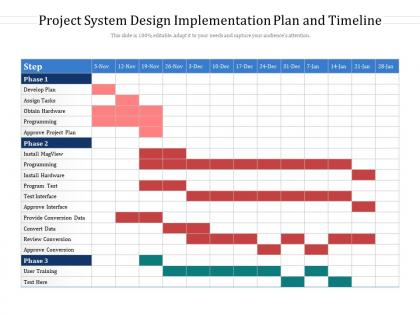
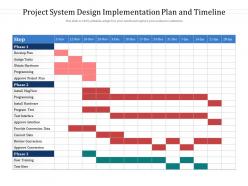
Project system design implementation plan and timeline




Try Before you Buy Download Free Sample Product
 Impress Your
 Audience
 100%
100% Editable
 Save Hours
 of Time


Our Project System Design Implementation Plan And Timeline are topically designed to provide an attractive backdrop to any subject. Use them to look like a presentation pro.
People who downloaded this PowerPoint presentation also viewed the following :
Project system design implementation plan and timeline with all 2 slides:
Use our Project System Design Implementation Plan And Timeline to effectively help you save your valuable time. They are readymade to fit into any presentation structure.
FAQs for Project system design implementation
So there are five main phases you'll go through: initiation where you define scope and get approvals, then planning to map out timelines, execution when the actual work happens, monitoring to track progress, and finally closure to wrap things up. Honestly? Most projects live or die in the monitoring phase. Build regular check-ins into your plan so you can spot problems early. Oh, and definitely pad your timelines - I learned this the hard way. Something random always pops up. Like, always. The key is being realistic upfront instead of overpromising to look good.
Honestly, don't try to estimate the whole project at once - you'll be way off. Break everything down into smaller tasks first, then estimate each piece. Way more accurate that way. If you've done similar stuff before, look at how long that actually took (not what you planned lol). Also talk to whoever's actually doing the work - they know what's realistic better than anyone. Dependencies between tasks will mess you up if you don't think about them upfront. And seriously, add like 20-30% buffer time because something weird always happens. I've started tracking my estimates vs reality and it's helped tons.
Gantt charts are honestly your best bet here - Microsoft Project, Asana, Monday.com all make them super visual. I've watched people overcomplicate this stuff with crazy software when basic Excel would've worked fine, but if you're juggling dependencies and multiple people, go with the real tools. Trello's solid for simpler projects too. My old boss used to swear by it, probably still does. Pick something your team will actually stick with - that's the real trick. Start simple and upgrade later if you need to.
Dude, stakeholders will absolutely wreck your timeline if you're not careful. Clear feedback? You're golden. But when they drag their feet or keep flip-flopping on what they want - ugh, kiss your deadlines goodbye. Those "quick suggestions" always turn into massive scope changes too. Build in extra time for all their review rounds because they will take forever to approve stuff. Oh, and definitely nail down requirements early and set response time expectations from day one. Otherwise you'll spend every standup explaining why you're behind schedule. Trust me on this one - learned it the hard way.
Honestly, the trick is catching problems before they completely wreck your timeline. Build in extra time for the big stuff and figure out your main risk factors early. Have backup plans ready because something will go wrong - trust me. Our vendor literally disappeared on my last project and I wasn't prepared at all! Check in with people regularly so you can fix issues while they're still small. Document everything too, even if it feels annoying right now. You'll be so glad you did when things get messy later. Maybe start by listing your top 3 risks and thinking through quick solutions?
Honestly, I'd say weekly during busy phases, but it really depends on what's happening. Stable periods? Maybe every two weeks is fine. Major milestones or when everything's falling apart though - check daily if you need to. I learned this the hard way after missing a huge delay once. Don't be like me waiting until you're already screwed to adjust things. Just set a calendar reminder and actually stick to it. Even 10 minutes makes a difference. Better to catch problems early than scramble later.
Ugh, the worst thing you can do is pack everything back-to-back with no breathing room. Something ALWAYS takes longer than you think - I've learned this the hard way lol. Dependencies will bite you too - like when Task B can't even start until Task A wraps up, but nobody made that clear upfront. Stakeholders love being unrealistic about timelines, and people forget basic stuff like holidays or when Sarah's taking that two-week vacation. Honestly, just tack on 20% extra time to everything. Get your team to actually look at the timeline before you lock it in - saves so much drama later.
So first thing - figure out which tasks can't start until others are done. Those are gonna be your critical path and honestly, they're the ones that'll screw you over if you mess up the timing. I always throw everything into a spreadsheet or whatever project tool we're using because trying to keep it all in your head is just asking for trouble. Build in some wiggle room between handoffs too, like even just a day buffer helps. Oh and definitely tell your team what everyone's waiting on - saves so much back and forth later.
Your team's capacity is literally what makes or breaks your timeline. Doesn't matter how perfect your schedule looks on paper - you've gotta be real about how many hours people can actually put in. I learned this the hard way when I assumed everyone was free full-time, but they were all working on like three other projects. People have meetings, random stuff comes up, plus nobody works at 100% all day (thank god, right?). Map out what bandwidth you actually have first. Then build your timeline around that instead of some fantasy version where everyone's available 24/7.
Dude, your brain just eats up visual stuff way faster than walls of text or boring spreadsheets. Gantt charts are clutch for seeing which tasks depend on others, and color coding helps you track different teams or work streams. I swear, half the project disasters I've witnessed happened because someone missed a dependency that was buried in some random document. When everything's visual, you'll catch bottlenecks and resource conflicts immediately. Milestone markers are great too for those big deadlines. Start simple - even sketching on a whiteboard works, or try Trello if you want something digital.
Honestly, flexible timelines are a lifesaver. When stuff goes sideways (and it always does), you can shift resources around instead of watching everything crash and burn. Your team won't hate you either - there's nothing worse than grinding toward some random deadline that makes zero sense. I always build in like 15-20% buffer time upfront. Stakeholders might push back initially, but they'll thank you later when you're not scrambling. You can actually focus on doing good work instead of just hitting dates. The trick is explaining why that wiggle room matters from day one.
Honestly, the biggest thing is finally knowing what's actually happening with your project instead of just guessing. You get instant updates when stuff changes, and you can catch problems before they blow up your timeline. Modern dashboards are actually pretty nice - way better than scrolling through a million emails trying to figure out where things stand. The real game changer though? When your tools sync up with each other. No more entering the same info everywhere like some kind of data entry robot. I'd start with one solid platform that plays nice with whatever you're already using.
Track your planned vs actual dates first - that's the big one. Milestone completion rates and critical path delays are clutch too. Resource usage and budget burn tell you if you're gonna hit your timeline. Task velocity is honestly my favorite metric because it shows problems before they get ugly. Oh, and don't skip the soft stuff like team capacity issues or blockers per sprint. Set up a simple weekly dashboard with these and tweak it once you see what patterns pop up for your project type. Start basic though - you can always add more later.
Ugh, vague timelines are the worst - they'll torpedo your project before you even start. Team members get confused, deadlines slip everywhere, and suddenly everyone's asking why nothing's getting done. Resources get wasted because nobody knows what to prioritize first. It's honestly like driving around without GPS... you might end up somewhere, just not where you planned. Scope creep becomes inevitable too. My take? Yeah, it's boring, but spend that extra time upfront getting specific dates and milestones nailed down. Trust me on this one.
Honestly, this is where most projects go sideways - you've gotta connect your milestones to whatever the company actually cares about. Figure out which big goals your project feeds into first. Then work backwards and set checkpoints that show real progress on those priorities. Yeah, the stakeholder meetings are boring as hell but they keep everyone aligned. I'd do quarterly reviews too since priorities change constantly (learned that the hard way). Don't just focus on hitting dates - make sure you're actually moving things forward on stuff leadership obsesses over.
-
Excellent design and quick turnaround.
-
Unique design & color.