

Project Schedule Powerpoint Presentation Slides





Try Before you Buy Download Free Sample Product
 Impress Your
 Audience
 100%
100% Editable
 Save Hours
 of Time


Introducing our project schedule PowerPoint presentation slides. Provide a detailed description of your new project with the help of this task assignment PowerPoint deck. This report assessment PPT theme has a slide that details the type and impacts of the risk over the project. Utilizing this assignment plan PPT layout will help you in displaying your project management team. This readymade task optimization PowerPoint design contains a slide that provides a detailed layout of the roles and responsibilities of the team for the project. Incorporating this particular task proposal PPT theme allows you to present your project progress summary. This project assessment PowerPoint creative set contains a slide that has a project management dashboard. Selection of this task boost PowerPoint template lets you showcase the project cost estimate. Choose our project escalation PowerPoint design to display organization and assurance. Download our project presentation ppt slide to avail the benefits of perfection.
People who downloaded this PowerPoint presentation also viewed the following :
Content of this Powerpoint Presentation
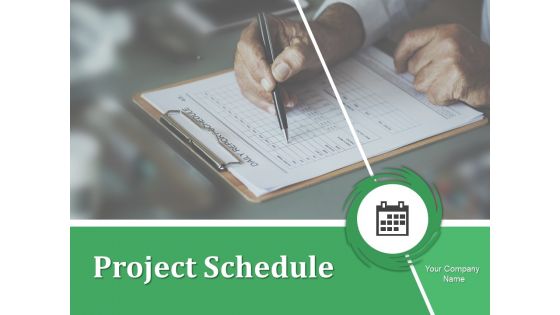
Slide 1: This slide introduces Project Schedule. State the name of your company to get started.
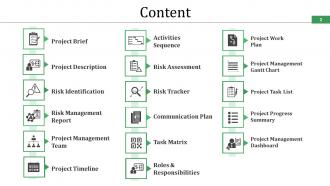
Slide 2: This is the Content slide. Few of its components have been mentioned by us which include- Project Brief, Project Description, Risk Identification, Risk Management Report, Project Management Team, Project Timeline, Activities Sequence, Risk Assessment, Risk Tracker, Communication Plan, Task Matrix, Roles & Responsibilities, Project Work Plan, Project Management Gantt Chart, Project Task List, Project Progress Summary, Project Management Dashboard.
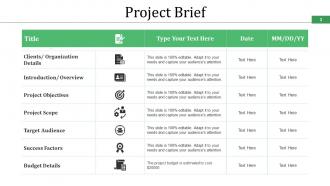
Slide 3: This is a Project Brief slide with text boxes to add in the relevant information.
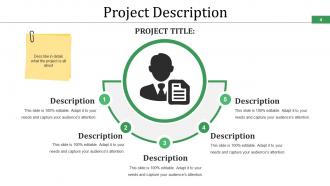
Slide 4: This slide presents Project Description which describes in detail what is the project all about. Add in your own description and make use of it.
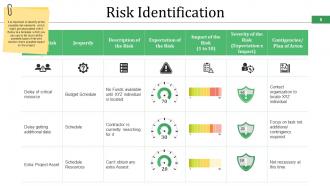
Slide 5: This is Risk Identification slide showing various types of risks faced by the organization. It also shows there possible impacts of these risks on the project. You can alter these as per your own business need.
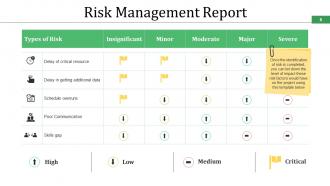
Slide 6: This slide shows Risk Management Report with High, Low, Medium, Critical parameters. Once the identification of risk is completed, you can list down the level of impact these risk factors would have on the project using this template.
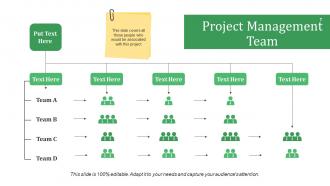
Slide 7: This slide shows Project Management Team hieracrchy. Cover all the people associated to your project with their names and designation in this slide.
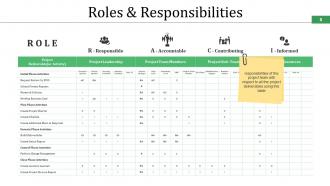
Slide 8: This slide shows Roles & Responsibilities. State the responsibilities as well as the role of the project team with respect to all the project deliverables using this table.
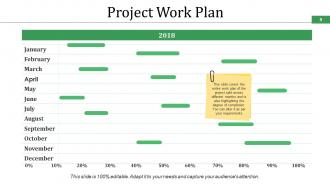
Slide 9: This slide shows the Project Work Plan in a gantt chart form which covers the entire work plan of the project split across different months and also highlights the degree of completion. Alter it as per your requirements.
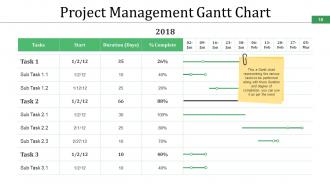
Slide 10: This slide presents Project Management Gantt Chart. This Gantt chart represents the various tasks to be performed along with their duration and degree of completion which you can use it as per your need.
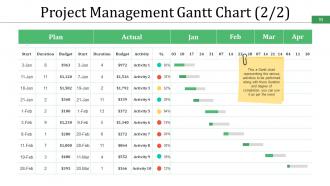
Slide 11: This slide also shows Project Management Gantt Chart to add in your stats.
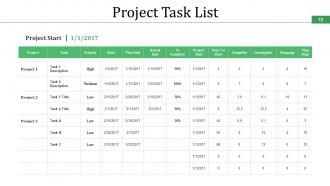
Slide 12: This slide presents the Project Task List which shows the starting deatils of the project.
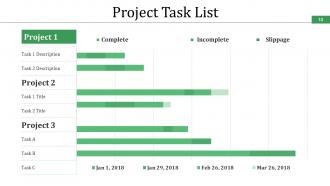
Slide 13: This slide also shows Project Task List dividing the project into the following three parameters- Complete, Incomplete, Slippage.
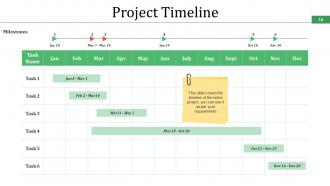
Slide 14: This slide shows Project Timeline. It covers the timeline of the entire project, you can use it as per your requirements.
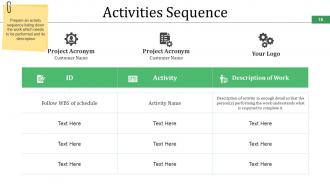
Slide 15: This slide shows Activities Sequence with- Project Acronym, Customer Name, Your Logo. Prepare an activity sequence listing down the work which needs to be performed and its description.
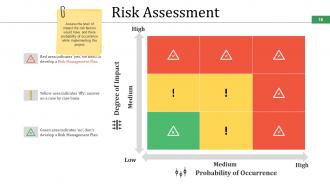
Slide 16: This slide shows Risk Assessment matrix showing- Degree of Impact, Probability of Occurrence with High, Low and medium parameters. Assess the level of impact the risk factors would have and their probability of occurrence while implementing the project with the help of this matrix.
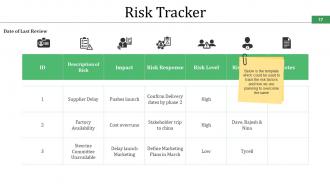
Slide 17: This slide presents a template which shows Risk Tracker. This template could be used to track the risk factors and how we are planning to overcome the same.
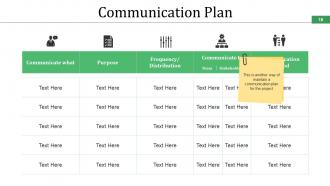
Slide 18: This slide shows the Communication Plan.
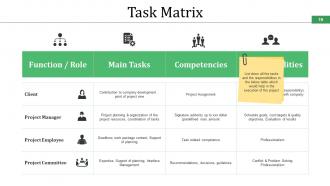
Slide 19: This slide presents Task Matrix. List down all the tasks and the responsibilities in this table which would help in the execution of the project.
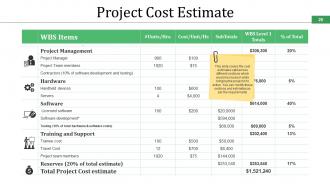
Slide 20: This slide shows Project Cost Estimate. This project cost estimate covers the cost estimates split across different sections involved while bringing the project into action. You can modify these sections and estimates as per the requirements.
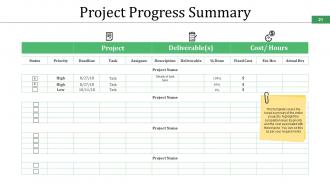
Slide 21: This slide shows Project Progress Summary. It covers the broad summary of the entire project to highlight the completion level, its priority and the cost associated with these tasks. Use it as per your requirement.
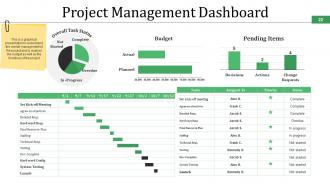
Slide 22: This slide displays Project Management Dashboard. This dashboard helps in understanding the overall management of the project and analysing the budget as well as the timelines of the project.
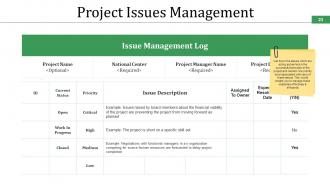
Slide 23: This slide shows Project Issues Management with Issue Management Log. List down the issues which are acting as barriers in the successful execution of the project and also mention the priority level associated with each of these issues.
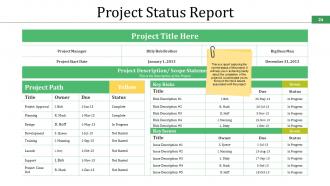
Slide 24: This slide shows Project Status Report. This report helps in capturing the current status of the project. It will also help you in achieving clarity about the completion of the project & enable you to focus on the risk & issues associated with the project.
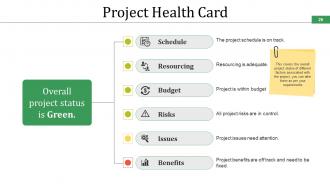
Slide 25: This slide shows Project Health Card which covers the overall project status of different factors associated with the project. You can alter them as per your requirement.
Slide 26: This is Project Schedule Icon Slide. Alter the icons on the basis of your requirement.
Slide 27: This is a Coffee Break slide to halt. Alter the slide content as per your requirement.
Slide 28: This slide is titled Charts & Graphs to move forward. You may change it as per requirement.
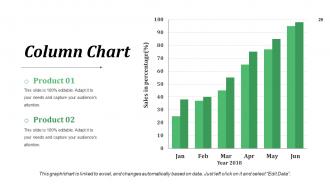
Slide 29: This is a Column Chart slide for product/ entity comparison.
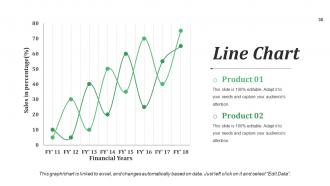
Slide 30: This is a Line Chart slide for product/ entity comparison.
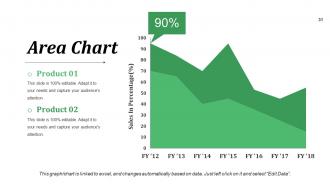
Slide 31: This is an Area Chart slide for product/ entity comparison.
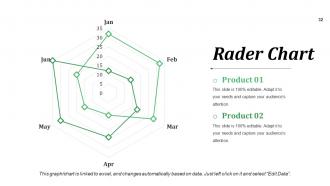
Slide 32: This slide presents a Radar Chart. Compare Product 01, Product 02 and use as per required.
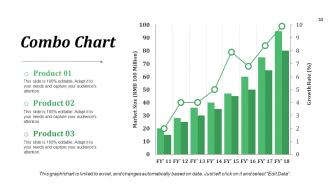
Slide 33: This is a Combo Chart slide to show information, comparison specifications etc.
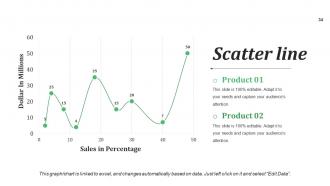
Slide 34: This is a Scatter Line chart slide to show product/ entity comparison, specifications etc.
Slide 35: This slide is titled Additional Slides to move forward. You can change the slide content as per need.
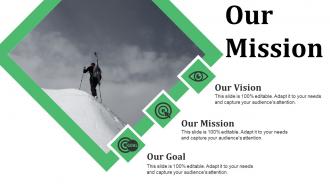
Slide 36: This is Our Mission slide which show the vision, mission and goals of your company. Add all of these three aspects here.
Slide 37: This is Our team slide with names and designation to fill.
Slide 38: This is an About Us slide showing Target Audiences, Values Client, and Preferred by Many as examples.
Slide 39: This is Our Goal slide. State them here.
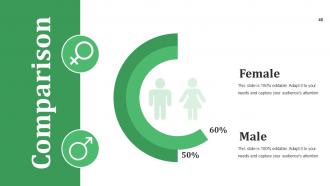
Slide 40: This slide showcases Comparison of two entities in male female chart imagery form.
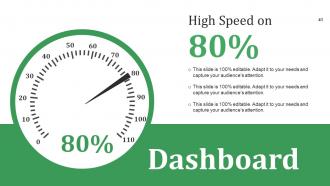
Slide 41: This is Dashboard slide to show information in percentages etc.
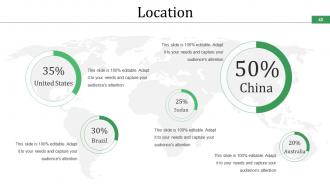
Slide 42: This is a Location slide to show global growth, presence etc. on a world map image.
Slide 43: This is a Quotes slide. Put a quote or anything you want to highlight here.
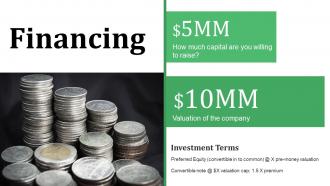
Slide 44: This slide shows aspects related to Financing. Add them here.
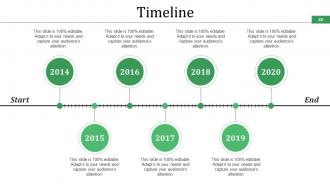
Slide 45: This slide presents a Timeline to show growth, milestones etc.
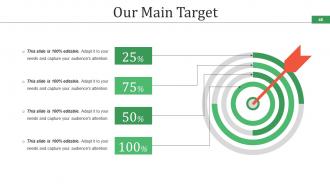
Slide 46: This slide shows Our Main Target with an arrow and target imagery. It also has empty text boxes wherein you can add your own targets.
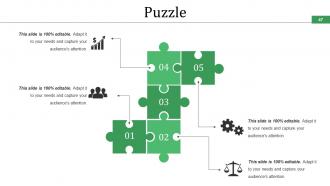
Slide 47: This is a Puzzle pieces slide to show information, specifications etc. with icon imagery.
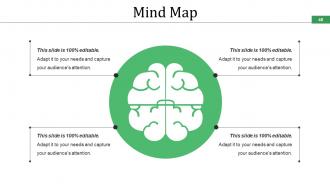
Slide 48: This slide shows a Mind Map image for representing entities.
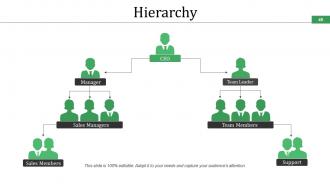
Slide 49: This is a Hierarchy slide to show information, organization structural specifications etc.
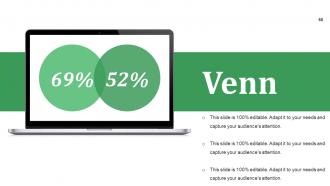
Slide 50: This is a Venn diagram image slide to show information, specifications etc.
Slide 51: This is a Silhouettes slide to show people related information, specifications etc.
Slide 52: This is a Post it slide to mark reminders, events etc.
Slide 53: This is a Magnifying Glass slide with imagery to show information, specification etc.
Slide 54: This is an Idea Bulb image slide to show information, ideas, innovative stuff etc.
Slide 55: This is a Thank You slide with Address# street number, city, state, Contact Numbers, Email Address.
Project Schedule Powerpoint Presentation Slides with all 55 slides:
The correct facts are bound to emerge with our Project Schedule Powerpoint Presentation Slides. It helps comb through the evidence.





FAQs for Project Schedule
So you'll want to start by mapping out your big deliverables, then chunk those down into smaller tasks. Get realistic about how long stuff actually takes - we're all terrible at this honestly. Figure out which tasks depend on others finishing first, assign who's doing what, and build in some buffer time because things always go sideways. Milestones are clutch for tracking progress and keeping everyone updated. Don't forget to identify your critical path - that tells you which delays will actually screw you versus the ones that won't matter much. Keep updating it regularly or it becomes totally useless.
Okay so Waterfall is super rigid - you map out everything upfront with set phases and deadlines. Agile? Totally different. Short sprints, usually 1-4 weeks, and you can actually adapt as things change. Here's the thing - once you commit to a Waterfall timeline, you're pretty much stuck with it. Requirements change? Too bad. Agile lets you switch priorities after each sprint based on what you learned. Waterfall does give you predictable delivery dates though, I'll give it that. But Agile gets working software in your hands faster and handles feedback way better. Choose Waterfall if your requirements won't budge, go Agile if you need room to pivot.
Honestly, Microsoft Project is the gold standard but it's way too much if you're not managing like a massive construction project or something. Asana's pretty solid for teams - clean interface, everyone can see what's happening. Monday.com works too, though I think their colorful boards are kinda gimmicky. For Gantt charts (which I'm weirdly into), Smartsheet does the job well. Don't sleep on simple solutions either - sometimes Excel or Google Sheets is all you need for basic deadline tracking. Just pick whatever your team won't hate using every day.
Honestly, start by breaking everything down into tiny pieces. You can't estimate "build website" but you totally can figure out "create wireframes" or "set up database." Look at similar stuff you've done before, or bug someone on your team who has. Always add extra time because something WILL break - I learned this the hard way lol. Try three-point estimation: best case, worst case, most likely, then average them out. The trick is being real about how complex things actually are instead of just hoping for the best. Dependencies will mess you up if you don't think them through.
Dude, you literally can't build a realistic schedule without knowing who's actually free. I made this mistake once - scheduled three devs during their vacation week like an idiot! Start by checking everyone's calendars first, then figure out your timeline. Map out who has what skills and how many hours they can actually give you. Some people are already drowning in other projects. Don't just think about the perfect task order - think about whether Sarah can actually code that feature while she's also fixing bugs for the other team.
Honestly, Gantt charts are a game changer for visualizing project timelines. Tasks show up as bars on a timeline, so you can see what's happening when at a glance. Dependencies become super obvious. So do overlaps and your critical path. I used to think they were overkill, but they actually help you catch scheduling conflicts that you'd totally miss in a regular task list. Even throwing something basic together in Excel will give you way better clarity than just writing stuff down. Trust me - once you see everything laid out visually, you'll wonder how you managed projects without them.
When delays happen (and they will), first figure out what's actually affected. Then you've got two moves: throw more people at the critical stuff or run tasks in parallel instead of one after another. Honestly, the communication part is where most people mess up - tell stakeholders the real timeline, not the one they're hoping for. Trust me on this one. Set up some kind of change control process so random requests don't completely wreck your schedule. Oh, and document everything as you go. Next time around, build in buffer time from the start. You'll thank yourself later.
So first thing - figure out if they want actual scope changes or just tweaks to what you're already doing. Scope changes? Yeah, that's gonna suck. You'll need to redo your work breakdown and re-estimate everything. Smaller stuff you can usually handle by just adjusting task timing or dependencies without everything falling apart. Document whatever changed and why (trust me on this one), then tell everyone about the new timeline. Be upfront about how it affects deadlines or resources. Don't update your baseline until you get approval on big changes though.
Try the MoSCoW thing first - Must have, Should have, Could have, Won't have. Cuts through all the BS when everyone thinks their stuff is urgent. Look at what's blocking other people's work too, since those tasks gotta go first. The Eisenhower Matrix is solid for urgent vs important stuff. Also figure out your critical path - which tasks actually mess with your deadline if they're late. Honestly though, sometimes I just pick the thing I'm dreading most and knock it out. Gets the ball rolling and everything else feels easier after that.
Dude, scheduling tools are honestly life-savers. I use Asana but Monday.com and Microsoft Project work great too. They'll automatically push back deadlines when something runs late, which happens way more than I'd like to admit. Plus they send reminders to your team so you don't have to be the annoying person constantly following up. The conflict alerts are clutch - catches issues before they blow up. You can make templates for projects you do repeatedly and sync everything with your calendar. Reports actually make sense too. Start with just one tool though and focus on whatever scheduling nightmare bugs you most.
Dude, everything takes way longer than you think - that's the
-
Editable templates with innovative design and color combination.
-
Wonderful templates design to use in business meetings.