

Project Assignments Powerpoint Presentation Slides






Try Before you Buy Download Free Sample Product
 Impress Your
Audience
 100%
Editable
 Save Hours
of Time


Introducing our project assignments PowerPoint presentation slides. Provide a detailed description of your new project with the help of this task assignment PowerPoint deck. This report assessment PPT theme has a slide that deciphers the type and impacts of the risk over the project. Utilizing this assignment plan PPT layout will help you in displaying your project management team. This ready-to-use task optimization PowerPoint design contains a slide that provides a detailed layout of the roles and responsibilities of the team for the project. Incorporating this particular mission proposal PPT theme allows you to present your project task list. This project assessment PowerPoint creative set contains a slide that has a project management Gantt chart. Selection of this task boost PowerPoint template lets you showcase the project cost estimate. Choose this project escalation PowerPoint design to display organization and assurance. Download this PPT slide to avail the benefits of perfection.
People who downloaded this PowerPoint presentation also viewed the following :
Content of this Powerpoint Presentation
Slide 1: This slide introduces Project Assignments. State your company name and proceed.
Slide 2: This is the Content slide presenting- Project Brief, Project Description, Risk Identification, Risk Management Report, Project Management Team, Project Timeline, Risk Assessment Task Matrix, Risk Tracker, Activities Sequence, Communication Plan, Roles & Responsibilities, Project Work Plan, Project Progress Summary, Project Management Gantt Chart, Project Task List, Project Management Dashboard.
Slide 3: This is a Project Brief slide to state Project aspects etc.
Slide 4: This slide states Project Description with imagery and text boxes to go with.
Slide 5: This slide presents Risk Identification table to state the following aspects- Type Of Risk, Jeopardy, Description of the Risk, Expectation of the Risk, Impact of the Risk (1 to 10), Severity of the Risk (Expectation x Impact), Contigencies/ Plan of Action.
Slide 6: This slide presents Risk Management Report with the following parameters- Almost certain, Likely, Possible, Unlikely, Rare, Insignificant, Minor, Moderate, Major, Severe, HIGH, LOW, MEDIUM, CRITICAL. Once the identification of risk is completed, you can list down the level of impact these risk factors would have on the project using this template.
Slide 7: This slide shows Project Management Team. All the people responsible for the Project can be listed with name and designation here.
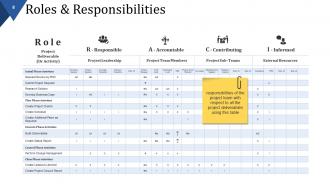
Slide 8: This slide presents Roles & Responsibilities table with the following sub headings- Project Leadership, Project Team Member, Project Sub- Teams, External Resources. List all the responsibilities of the project team with respect to all the project deliverables in this table.
Slide 9: This is a Project Work Plan slide which covers the entire work plan of the project split across different months and also highlights the degree of completion. You can alter it as per your requirements
Slide 10: This slide displays Project Management Gantt Chart. Use it as per your need.
Slide 11: Thi is another slide showing Project Management Gantt Chart(2/2). Use it to represent the various activities to be performed along with their duration and degree of completion. You can also alter it as per your requirement.
Slide 12: This slide presents Project Task List in a tabular form. State your various Project Tasks here.
Slide 13: This slide also shows Project Task List with the following aspects- Complete, Incomplete, Slippage.
Slide 14: This is a Project Timeline slide showing Milestones etc. You can use it as per your requirement.
Slide 15: This slide shows Activities Sequence.Prepare an activity sequence listing down the work which needs to be performed and its description here.
Slide 16: This slide displays Risk Assessment Matrix showing Red, Yellow and Green areas- Red area indicates ‘yes’, we need to develop a Risk Management Plan, Yellow area indicates ‘iffy’, answer on a case by case basis, Green area indicates ‘no’, don’t develop a Risk Management Plan. Assess the level of impact the risk factors would have and there probability of occurrence while implementing the project with this matrix.
Slide 17: This a Risk Tracker slide showing Date of Last Review in a tabular form.
Slide 18: This slide presents Communication Plan in a tabular form. You can alter it or use as such.
Slide 19: This slide showcases Task Matrix table. List down all the tasks and the responsibilities in the table which would help in the execution of the project.
Slide 20: This is a Project Cost Estimate slide. This slide covers the cost estimates split across different sections which would be involved while bringing the project in to action. You can modify these sections and estimates as per the requirements.
Slide 21: This slide showcases Project Progress Summary with the following aspects to show- Status, Project, Deliverable (s), Cost/ Hours.
Slide 22: This slide displays Project Management Dashboard in charts and graphs showing- Pending Items, Budget, Overall Task Status.
Slide 23: This slide shows Project Issues Management. List down the issues which are acting as barriers in the successful execution of the project and mention the priority level associated with each of these issues.
Slide 24: This slide shows Project Status Report. This report captures the current status of the project. Alter/ modify as per need.
Slide 25: This slide shows Project Health Card listing the following aspects- Schedule, Resourcing, Budget, Risks, Benefits, Issues.
Slide 26: This is Project Assignments Icon slide. Use/ add icons as per need.
Slide 27: This is a Coffee Break image slide to halt. Alter/ modify content as per need.
Slide 28: This slide forwards to Charts & Graphs. Alter/ modify content as per need.
Slide 29: This slide presents a Line Chart for showcasing product/ company growth, comparison etc.
Slide 30: This is Volume High Low Close Chart slide for showcasing product/ company growth, comparison etc.
Slide 31: This is a Combo chart slide to show product/ entity growth, comparison etc.
Slide 32: This slide showcases Column Chart with which you can compare the products.
Slide 33: This is an Area Chart slide for product/ entity comparison.
Slide 34: This is a Radar Chart slide for product/ entity comparison.
Slide 35: This slide is titled Additional Slides to move forward. You can change the slide content as per need.
Slide 36: This is Our Mission slide to state your goals, mission etc.
Slide 37: This is Our team slide with names and designation.
Slide 38: This is an About us slide to state company specifications etc.
Slide 39: This is Our Goal slide. State your important goals here.
Slide 40: This is a Comparison slide to show comparison of two entities.
Slide 41: This is a Dashboard slide to state Low, Medium and High aspects, kpis, metrics etc.
Slide 42: This is a Location slide to show growth, presence etc. on a US map image.
Slide 43: This is a Business Quotes slide to convey company's message, beliefs etc.
Slide 44: This is a Financial score slide to show financial aspects here.
Slide 45: This is a Timeline slide to present important dates, journey, evolution, milestones etc.
Slide 46: This is Our Target slide. State your targets here.
Slide 47: This is a Puzzle image slide to show information, specifications etc.
Slide 48: This is a Mind map image slide to show information, segregation, specifications etc.
Slide 49: This is a Hierarchy slide to show information, organization structural specifications etc.
Slide 50: This is a Venn diagram image slide to show information, specifications etc.
Slide 51: This is a Silhouettes slide to show people related information, specifications etc.
Slide 52: This is a Post it slide to mark reminders, events etc.
Slide 53: This is a Magnifying glass image slide to show information, specification etc.
Slide 54: This is an Idea or Bulb image slide to show information, ideas, innovation specific stuff etc.
Slide 55: This is a Thank You slide with Address# street number, city, state, Contact Numbers, Email Address.
Project Assignments Powerpoint Presentation Slides with all 55 slides:
Acquire a great fan following with our Project Assignments Powerpoint Presentation Slides. They will catapult you to fame.




FAQs for Project Assignments
Hit the main stuff: problem you're tackling, how you're approaching it, what you've found so far, and what's next. Honestly, I always run over time on these things, but shoot for 10-15 minutes. Definitely call out where you're stuck and ask for specific help. Charts or mockups are your friend - anything visual helps. Don't sugarcoat what's broken or not working yet. People respect the honesty. Wrap up by nailing down who's doing what and when, otherwise you'll have another meeting about the meeting. Trust me on that one.
Honestly, visual aids are a game changer for presentations. People zone out so fast when you're just talking - I swear nobody listens after like 5 minutes. Charts and slides actually help your audience remember stuff later, which is kind of the whole point, right? They're perfect for timelines or showing data that would be a nightmare to explain verbally. Visual learners will definitely appreciate it too. You don't need anything fancy though. Even basic slides with your main points can seriously boost how much people actually absorb and keep them from checking their phones.
Know your current workload before you walk in - this alone will save your sanity. Map out what you're already juggling and be honest about your bandwidth. Ask about scope and timeline right away instead of assuming (learned this one the hard way lol). Write down who's responsible for what and when check-ins happen. If something sounds impossible, say it! Way better than panicking later. I always end by repeating back my action items with deadlines. Sounds obvious but you'd be surprised how often people skip this step.
Put your objectives right at the beginning - don't make people wait until slide 12 to figure out what you're trying to accomplish. Make them specific and measurable too, none of that vague corporate nonsense. I swear, half the meetings I sit through, nobody actually knows what "success" looks like. Break everything down with clear deadlines and assign ownership. Don't just assume silence means everyone gets it - pause and ask for questions. Oh, and definitely follow up with an email afterward so people can reference the objectives later when they inevitably forget half of what was discussed.
First thing - figure out who actually gives a damn about this project and loop them in early. Don't just show up with your plan already decided. Ask them what they're worried about, what they expect. Honestly, people hate being blindsided in meetings about budgets and deadlines, so I always send draft stuff beforehand. Listen to what they say and write it down, even the crazy ideas. Sometimes those turn out to be less crazy than you think. Bottom line: make them feel like they had a say in how things turn out.
Definitely take notes while they're talking - shows you're actually paying attention. Ask questions right then if something's unclear, don't just sit there nodding like I used to do (learned that the hard way lol). After you're done, shoot everyone a quick email with what changes they want and when you'll have them ready. Keeps everything straight and nobody can say later "but I thought you were doing X..." Oh and honestly? Try not to take it personal. I know it's hard but they're just trying to make the project better, not tear you down.
Look, risk assessment is basically your reality check when presenting projects - shows everyone what could go wrong and how you'd deal with it. I'd identify potential roadblocks upfront: resource issues, timeline problems, budget overruns. People skip this step constantly then wonder why everything falls apart later (drives me crazy honestly). Be specific about both risks AND your solutions. Don't just say "communication might be tricky" - explain exactly how you'll prevent that. Include a risk matrix ranking everything by likelihood and impact. That way leadership knows what actually worries you most.
Dude, you gotta switch up your presentation style based on what you're actually presenting. Technical stuff? Go heavy on data and demos - those people want all the details. But creative projects are totally different - you need storytelling and visuals that hit people in the feels. Strategic presentations work best when you stick to big outcomes and business impact. Don't get lost in tiny details there. I made this mistake for years, using the same format for everything and wondering why some presentations fell flat. Read your audience first - are they wanting proof it works, creative vision, or just ROI numbers? Then build your slides around that.
Okay so don't cram everything onto your slides - huge mistake I see all the time. Practice out loud at least once because going over time is super awkward for everyone. Reading straight from slides will put people to sleep instantly. Oh and seriously, make your fonts big enough! I've sat through so many presentations where I'm squinting at tiny text. Clean backgrounds work way better than those busy templates. Focus on your main points instead of every little detail. One more thing - think about what questions they might ask beforehand. Trust me on this one, being caught off guard sucks.
Honestly, these tools are game-changers for keeping everyone aligned. No more digging through random email chains trying to find that one attachment from three weeks ago. Real-time updates mean you can see who's working on what without being that annoying person asking for status reports every five minutes. Everything stays in one spot - tasks, deadlines, files, conversations. I'd go with Trello or Asana to start since they're pretty intuitive. Fair warning though: getting everyone to actually stick with using it consistently? That's the real challenge. But once people get into the habit, projects run way smoother.
Honestly, track the obvious stuff first - timelines, budget, scope changes, quality of what you deliver. But here's the thing: soft metrics matter just as much. How's your team feeling? Are stakeholders actually happy? Did the project fix what it was supposed to? I'd throw in knowledge transfer too - like, did people actually learn new skills they can use later? Pick maybe 4-5 metrics that make sense for your specific goals. Oh, and track them consistently or you'll hate yourself later when someone asks how things went.
Dude, try turning your presentations into actual stories! Start with the problem you're solving - that grabs people right away. Then walk through how you'll fix it, like you're explaining the plot of a good movie or something. Don't just drone on about deliverables and dates (ugh, so boring). Show them the before and after - what's broken now vs. what awesome thing you'll create. Finish strong with what success looks like. I swear this approach works way better than the typical corporate presentation format. Your audience will actually stay awake!
Okay so bullet points are your best friend here - nobody wants to read giant paragraphs of project details. Start with a quick one-sentence summary because let's be real, half the team will stop reading after that anyway. Then break everything else down: who's doing what, when stuff's due, and what depends on what else. Templates are clutch for keeping things consistent across projects. Your team will thank you when they can actually find info without hunting around. Oh, and throw in some color coding for priorities if you can. Makes scanning so much faster. The goal is making it skimmable first - you can always add more detail underneath for people who actually need it.
Oh man, cultural differences are huge for presentations! Like, some audiences want you to get straight to the data and numbers. Others need the whole story and relationship stuff first. Your eye contact and gestures? They'll read those completely different ways depending on who's there. I bombed once in Tokyo because of this - learned my lesson real quick. Timing's weird too. What feels thorough to some feels like you're wasting time to others. Honestly, just do a bit of research on your audience beforehand and tweak your approach. Small changes make a massive difference in how your message hits.
You'll want to ditch the jargon and break everything into clear steps with actual deadlines. Flowcharts and diagrams are your friend - I can't tell you how many times I've watched projects crash because someone misread one tiny detail. Throw in contact info for whoever's in charge, and define any techy terms right up front. Headers and bullet points save everyone's sanity since nobody wants to read paragraph after paragraph. Oh, and get someone else to look it over first. You're way too close to your own work to spot the confusing bits.
-
Best way of representation of the topic.
-
Appreciate the research and its presentable format.