


Project Output Powerpoint Presentation Slides





Try Before you Buy Download Free Sample Product
 Impress Your
 Audience
 100%
100% Editable
 Save Hours
 of Time


Present the information related to project output using our presentation deck. In project management, output is the word used to describe the goals and objectives that are associated with it. Our 30 slide PowerPoint deck includes the details that are required to be a part of the presentation which is based on project management such as project timeline, team structure, budget, work breakdown structure, activities sequence, communication plan, project work plan, task matrix, project management dashboard etc. Creating a presentation to highlight all these points may require you to spend lot of time on research and then come up with individual slides. However, with our PPT deck you can access all this in just one download. You can communicate the information using this deck with your clients. Outputs help to describe business activities such as measurements, tracking processes and status report related to planning, managing and completing the project itself. Create the most innovative presentation using project output PowerPoint deck that can help you to engage your audience with it. Explain the intent behind each clause with our Project Output Powerpoint Presentation Slides. Be able to decipher the judgement.
People who downloaded this PowerPoint presentation also viewed the following :
Content of this Powerpoint Presentation
Slide 1: This slide introduces ProJect Output. State Your Company Name and begin.
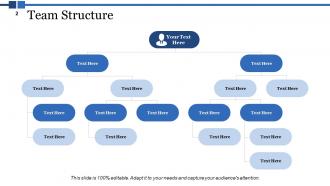
Slide 2: This slide showcases Team Structure.
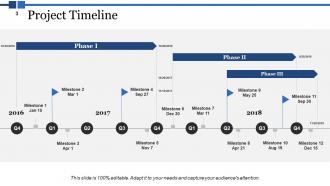
Slide 3: This slide presents Project Timeline. Add the three phases and use it.
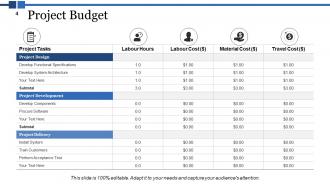
Slide 4: This slide shows Project Budget table and use it as per your requirement.
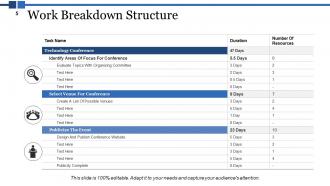
Slide 5: This slide presents Work Breakdown Structure.
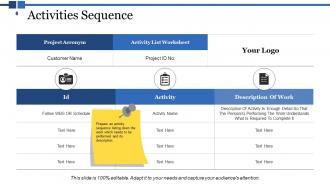
Slide 6: This slide showcases Activities Sequence. Prepare an activity sequence listing down the work which needs to be performed and its description.
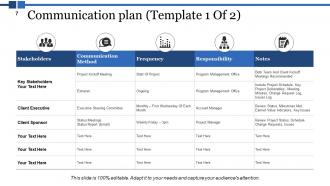
Slide 7: This slide presents Communication plan (Template 1 Of 2).
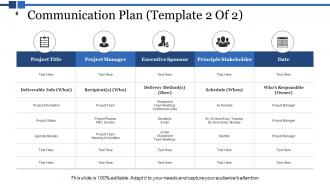
Slide 8: This slide showcases Communication Plan (Template 2 Of 2).
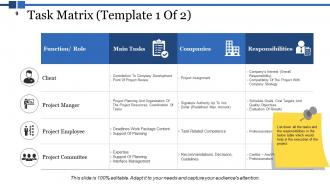
Slide 9: This slide presents Task Matrix (Template 1 Of 2). List down all the tasks and the responsibilities in the below table which would help in the execution of the project.
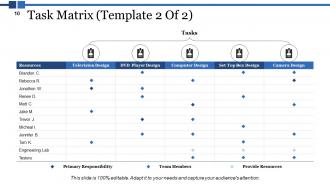
Slide 10: This slide showcases Task Matrix (Template 2 Of 2) with these four of the main parameters- Primary Responsibility, Team Members, Provide Resources, Tasks.
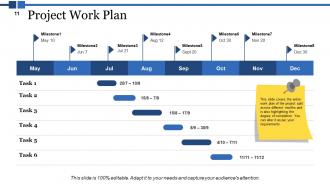
Slide 11: This slide presents Project Work Plan.
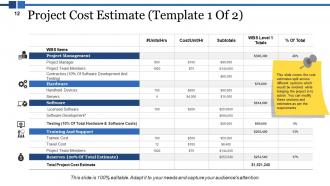
Slide 12: This slide showcases Project Cost Estimate (Template 1 Of 2). This slide covers the cost estimates split across different sections which would be involved while bringing the project in to action. You can modify these sections and estimates as per the requirements.
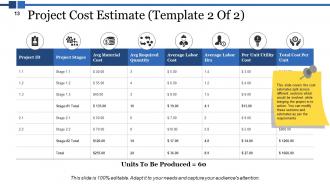
Slide 13: Project Cost Estimate (Template 2 Of 2). This slide covers the cost estimates split across different sections which would be involved while bringing the project in to action. You can modify these sections and estimates as per the requirements.
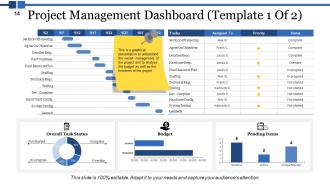
Slide 14: This slide shows Project Management Dashboard (Template 1 Of 2). This is a graphical presentation to understand the overall management of the project and to analyse the budget as well as the timelines of the project.
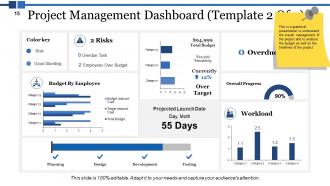
Slide 15: This slide presents Project Management Dashboard (Template 2 Of 2). This is a graphical presentation to understand the overall management of the project and to analyse the budget as well as the timelines of the project.
Slide 16: This slide is a Coffee Break image for a halt.
Slide 17: This slide showcases Project Output Icons Slide Continue…
Slide 18: This slide shows Project Output Icons Slide.
Slide 19: This slide is titled Additional slides to proceed forward.
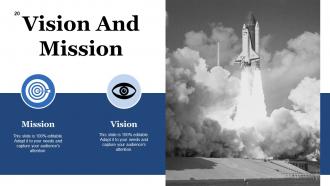
Slide 20: This is a Vision, Mission and Goals slide. State them here.
Slide 21: This slide presents Management Team with name and designation.
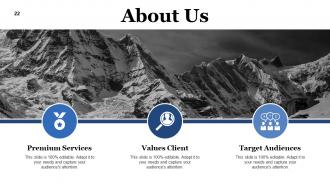
Slide 22: This slide helps show- About Our Company. The sub headings include- Creative Design, Customer Care, Expand Company
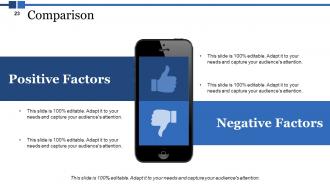
Slide 23: This slide shows Comparison of Positive Factors v/s Negative Factors with thumbs up and thumb down imagery.
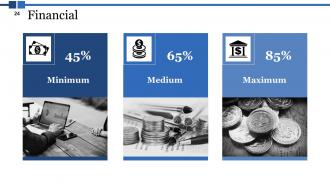
Slide 24: This is a Financial Score slide to show financial aspects here.
Slide 25: This slide shows Our Goals for your company.
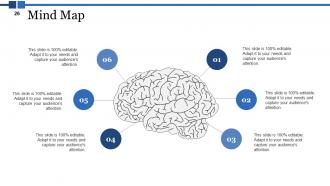
Slide 26: This slide shows a Mind map for representing entities.
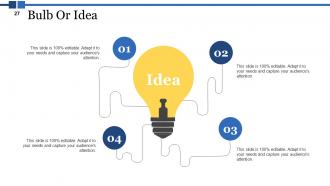
Slide 27: This slide displays a Bulb or idea image.
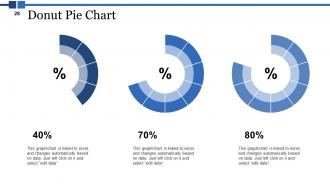
Slide 28: This slide presents Donut Pie Chart.
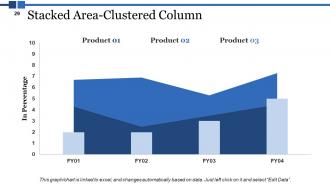
Slide 29: This slide showcases Stacked Area-Clustered Column.
Slide 30: This is a Thank You image slide with Address, Email and Contact number.
Project Output Powerpoint Presentation Slides with all 30 slides:
Eradicate blind belief with our Project Output Powerpoint Presentation Slides. Help them figure out the actual facts.




FAQs for Project Output
Honestly, I've learned this comes down to three main things. First, nail down exactly what you're delivering upfront - none of that "we'll figure it out as we go" nonsense. Documentation is huge too, otherwise whoever comes after you will hate your guts. But here's the thing that really matters: getting actual sign-off from stakeholders. Like, formal acceptance that you delivered what they wanted. I can't tell you how many projects I've seen drag on forever because nobody bothered with this step. Oh, and make yourself a little checklist with these three things - saves so much headache later.
So here's the thing - when you nail your project deliverables, stakeholders actually feel like you get them. They're way happier because you're solving their real problems, not just checking boxes. Clear documentation matters too (learned this the hard way). But honestly? The secret sauce is asking them upfront what success looks like to them. Don't assume you know! Half the battle is just delivering something polished that doesn't create ten more headaches. Shows you're professional and actually listened to what they needed from day one.
Honestly, it depends what kind of project you're running. Customer satisfaction and defect rates are solid basics that work for most stuff. I'd also track delivery times and budget - though stakeholder feedback is worth getting even if some of it ends up being kinda useless. For tech projects, look at things like code coverage or user adoption rates. Performance benchmarks work well too. My advice? Don't go crazy tracking everything. Pick maybe 3-4 metrics your stakeholders actually care about and focus on those instead.
Honestly, it depends completely on what field you're in. Tech projects usually spit out software, apps, maybe system integrations. Manufacturing? You're getting actual products, new production lines, that kind of thing. Healthcare projects might be new treatment protocols or facility upgrades - research stuff too. Construction's pretty obvious - buildings, roads, renovations. Financial services is where it gets weird though, they'll create investment products or compliance frameworks (riveting, I know). The real trick is figuring out what "finished" actually means for your project upfront, since that'll drive everything else you do.
Templates are lifesavers tbh - they force you to think through your points logically instead of just throwing stuff on slides. Your team will actually know where to find things when everything follows the same structure. Consistent fonts and colors keep people focused too (I once sat through a presentation with like 6 different fonts... nightmare). Most good templates have sections for objectives, findings, next steps - basically the stuff you'd forget otherwise. Oh, and stakeholders love when they can predict the flow. Just pick a simple format with your go-to sections and stick with it.
Think of stakeholder feedback as your safety net - it catches those "oh crap, this isn't what they wanted" disasters before it's too late. Fresh eyes spot things you miss, especially from people who'll actually use your stuff. I learned this the hard way on a project last year, honestly. Get feedback throughout the process, not just at the end when changes cost a fortune. Short bursts work better than marathon feedback sessions too. Just don't ask vague questions like "thoughts?" - you'll get useless responses. Be specific about what you need them to review.
When you're presenting to non-tech people, lead with "here's what this means for you" instead of diving into how you built it. They don't care about your code - honestly, technical details just make their eyes glaze over. Talk about the business stuff they actually worry about: money saved, time freed up, problems solved. Use visuals and real examples they can relate to. Think dashboards, not databases. I always start with the bottom line impact first, then if someone's curious about the technical side, you can go deeper. But seriously, most of the time they just want to know if it's working and what's in it for them.
So first thing - nail down what you're actually trying to achieve and make it measurable. Seriously, half the projects I've seen go sideways because people skipped this part. Set up check-ins at major milestones where you literally ask "does this thing we just made get us closer to the goal?" Sounds obvious but you'd be shocked how rarely it happens. Get your stakeholders involved in these reviews too - they'll spot stuff you're blind to. Oh and make this a regular thing, not just something you do once at the beginning. That's where most people mess up.
Honestly, visuals are a game-changer because people process images like 60,000 times faster than text. Pretty wild, right? So you're basically giving people's brains a huge shortcut. Charts and infographics prevent that dreaded wall-of-text thing that makes everyone's eyes glaze over. They turn confusing data into something you can actually wrap your head around. What's cool is visuals stick in people's memory way longer than bullet points do - there's some emotional connection happening there. Don't overthink it though. Even just throwing in some icons or color-coding sections will boost engagement big time.
Honestly, scope creep will drive you insane - stakeholders change their minds constantly. Budget cuts and impossible deadlines don't help either. Your team gets pulled in different directions for "emergency" stuff. Requirements are usually a mess from the start. Quality suffers when everyone's rushing around not talking to each other. Oh, and there's always that fun choice between doing it fast or doing it right. Get everything signed off early, in writing. I learned that one the hard way! Build extra time into your schedule and check in with people regularly before things get out of hand.
Oh man, this happens more than you'd think! Your stakeholders might see your "perfect" deliverable as totally wrong for their culture. Some want crazy detailed docs, others just want the highlights. Even colors can mess things up - like red means danger in some places but luck in others. I learned this the hard way on a project where our clean, minimal design looked "unfinished" to the client. Always check upfront how they want stuff presented. Different communication styles, different success metrics - it's wild how much this varies. Save yourself the headache and just ask early.
Look, you gotta set your standards early and actually stick to them - I learned this the hard way on my last project. Make templates and style guides so everyone's on the same page. Version control is huge too, plus those naming conventions that seem boring but save your butt later. Do regular check-ins to catch problems before they snowball. Oh, and having one person do final quality checks? Game changer. Seriously, document everything now even if it feels obvious. When someone new joins and asks "how do we usually do this," you'll be so glad you wrote it down.
Honestly, automating the boring stuff will save you so much time. Pick a good project management tool that auto-generates reports - game changer. Templates keep everything looking consistent without the hassle. I'd skip the endless email threads and use a collaboration platform instead (seriously, my inbox thanks me). AI tools are pretty solid for drafting content or crunching data quickly. Don't go crazy with apps though - I learned that the hard way. Find 2-3 that actually work together. Start by automating whatever's eating up most of your time first.
Look, documentation is basically your safety net when everything hits the fan. I learned this the hard way on a project where half the team quit unexpectedly. You need records of what got delivered, when stuff happened, and who was responsible. Trust me, stakeholders will absolutely question your work later. Without docs, you can't prove deliverables actually match what was originally asked for. Yeah, it feels like overkill at first - I used to skip it too. But start documenting from day one anyway. Future you will be seriously grateful when someone asks "wait, why did we decide this again?"
Honestly, start keeping notes after every project wraps up - what went smoothly, what was a disaster. I used to think this was busy work until I realized I kept making the same dumb mistakes over and over. When you're planning something new, pull up those old notes. Super helpful for timeline estimates and figuring out how to talk to stakeholders. Don't just write "communication was bad" though - dig into why it sucked. Have someone actually write this stuff down during your wrap-up meeting, otherwise it'll never happen. Future you will be grateful.
No Reviews