


Project Brief Powerpoint Presentation Slides






Try Before you Buy Download Free Sample Product
 Impress Your
 Audience
 100%
100% Editable
 Save Hours
 of Time


Presenting Project Brief PowerPoint Deck designed to deliver an impactful presentation. Project brief is a statement of what is required to define the possible requirements of your project. Our 55 slides presentation deck ensures to give each aspect of project brief that you would like to have it when you are looking to share information with your people. Some of the key aspects are included in this deck to such as project identification, risk identification, roles and responsibilities, project management, task list, timeline, risk assessment, communication plan etc. Every project holds an importance for the business development and requires professional approach when handling. Be it research, development, job assignment or anything. It should be planned in the systematic way. This presentation deck covers all the basics and gives you a layout as what needs to be done first and how you should move forward. From the first step till you deliver the project; all the information is available in this PowerPoint deck. Download it now to deliver your next project brief presentation in the professional way. Our project presentation ppt contain the best of bygone eras. They evoke the charm of days gone by.
People who downloaded this PowerPoint presentation also viewed the following :
Content of this Powerpoint Presentation
Slide 1: This slide introduces Project Brief with an imagery. State Your Company Name and begin.
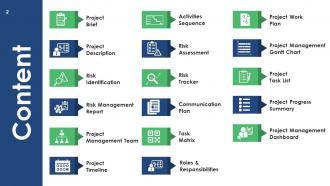
Slide 2: This is a Content slide showcasing- Project Brief, Project Description, Risk Identification, Risk Management Report, Project Management Team, Project Timeline, Risk Assessment, Task Matrix, Risk Tracker, Activities Sequence, Communication Plan, Roles & Responsibilities, Project Work Plan, Project Progress Summary, Project Management Gantt Chart, Project Task List, Project Management Dashboard.
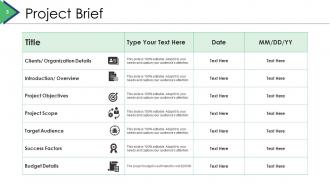
Slide 3: This slide states Project Brief in tabular form.
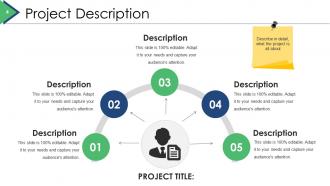
Slide 4: This slide showcases Project Description. Describe in detail, what the project is all about.
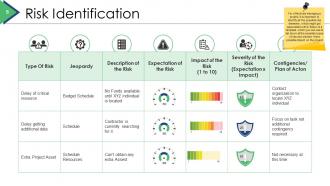
Slide 5: This slide shows Risk Identification in tabular form. For effectively managing a project, it is important to identify all the possible risk elements which might get associated with it. Below is a template which you can use to list down all the possible types of risk and mention there possible impact on the project.
Slide 6: This slide presents a Risk Management Report with the following parameters- High, Low, Medium, Critical. Once the identification of risk is completed, you can list down the level of impact these risk factors would have on the project using this template below.
Slide 7: This slide showcases Project Management Team. For effectively managing a project, it is important to identify all the possible risk elements which might get associated with it. Below is a template which you can use to list down all the possible types of risk and mention there possible impact on the project.
Slide 8: This is a Roles & Responsibilities slide. Mention the roles & responsibilities of the project team with respect to all the project deliverables using this table.
Slide 9: This slide shows Project Work Plan in gantt chart form. This slide covers the entire work plan of the project split across different months and is also highlighting the degree of completion. You can alter it as per your requirements.
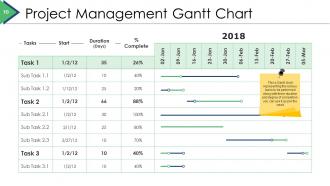
Slide 10: This slide presents Project Management Gantt Chart. This a Gantt chart representing the various tasks to be performed along with there duration and degree of completion, you can use it as per the need.
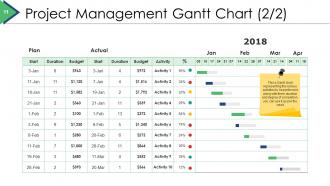
Slide 11: This slide also showcases Project Management Gantt Chart. This a Gantt chart representing the various activities to be performed along with there duration and degree of completion, you can use it as per the need
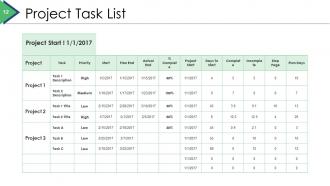
Slide 12: This slide presents Project Task List in tabular form.
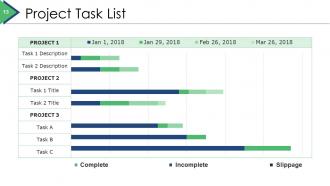
Slide 13: This slide displays Project Task List categorized into- Complete, Incomplete, Slippage.
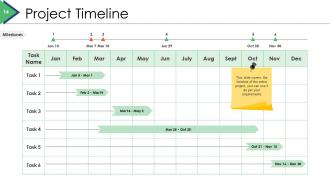
Slide 14: This is a Project Timeline slide. It covers the timeline of the entire project, you can use it as per your requirements.
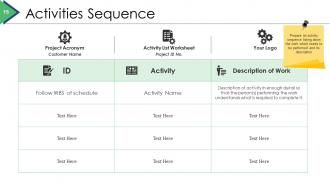
Slide 15: This slide shows Activities Sequence with- Project Acronym, Customer Name, Activity List Worksheet, Project ID No., Your Logo. Prepare an activity sequence listing down the work which needs to be performed and its description.
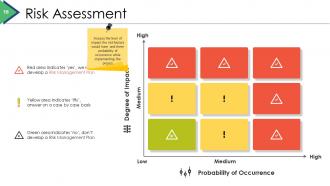
Slide 16: This slide shows Risk Assessment in 3 by 3 matrix form. Assess the level of impact the risk factors would have and there probability of occurrence while implementing the project.
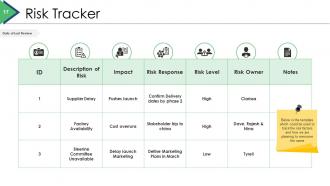
Slide 17: This slide presents Risk Tracker in table form. Below is the template which could be used to track the risk factors and how you are planning to overcome the same.
Slide 18: This is a Communication Plan slide for the Project.
Slide 19: This is a Task Matrix slide. List down all the tasks and the responsibilities in the below table which would help in the execution of the project.
Slide 20: This slide shows Project Cost Estimate. This slide covers the cost estimates split across different sections which would be involved while bringing the project in to action. You can modify these sections and estimates as per the requirements.
Slide 21: This is a Project Progress Summary slide. This template covers the broad summary of the entire project to highlight the completion level, its priority and the cost associated with these tasks. You can use this as per your requirements.
Slide 22: This is a Project Management Dashboard slide displaying- Overall Task Status, Complete, Overdue, In -Progress, Not Started, Pending Items, Budget. This is a graphical presentation to understand the overall management of the project and to analyse the budget as well as the timelines of the project.
Slide 23: This slide presents Project Issues Management. This is a graphical presentation to understand the overall management of the project and to analyse the budget as well as the timelines of the project.
Slide 24: This slide showcases Project Status Report. This is a report capturing the current status of the project. It will help you in achieving clarity about the completion of the project & would enable you to focus on the risk & issues associated with the project.
Slide 25: This slide displays a Project Health Card showing- Schedule, Resourcing, Budget, Risks, Issues, Benefits. This covers the overall project status of different factors associated with the project, you can alter them as per your requirements.
Slide 26: This is a Coffee Break image slide to halt. You can change the slide content as per need.
Slide 27: This is a Project Brief Icon Slide. Use the icons as desired.
Slide 28: This slide is titled Charts and Graphs to move forward. You can change the slide content as per need.
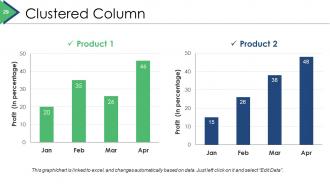
Slide 29: This slide presents a Clustered Column Graph for showcasing product/company growth, comparison etc.
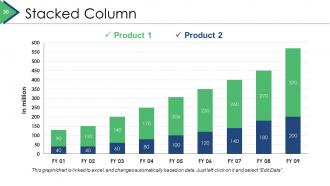
Slide 30: This slide showcases a Stacked Column Graph for showcasing product/company growth, comparison etc.
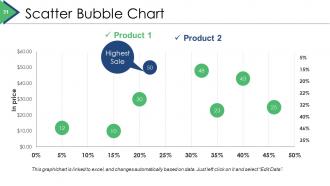
Slide 31: This is a Scatter Bubble chart slide to show product/entity comparison, specifications etc.
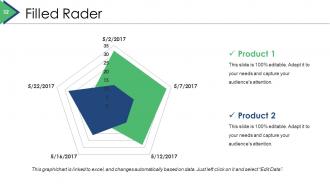
Slide 32: This is a Filled Radar chart slide to show product/entity comparison, specifications etc.
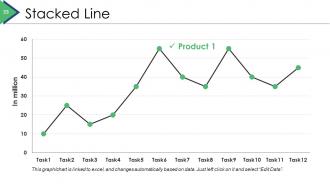
Slide 33: This slide showcases a Stacked Line Graph for showcasing product/company growth, comparison etc.
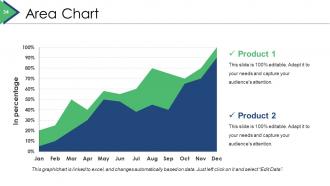
Slide 34: This slide presents an Area Chart for showcasing product/company growth, specifications etc.
Slide 35: This slide is titled Additional slides to proceed forward. You may the change the slide content as desired.
Slide 36: This is Our Mission slide with Vision and Goal. State mission, vision, goal here.
Slide 37: This is Our Team slide with image boxes to fill name, designation.
Slide 38: This is an About Us slide. State team/company specifications etc. here.
Slide 39: This is Our Main Goal slide. State goals etc. here.
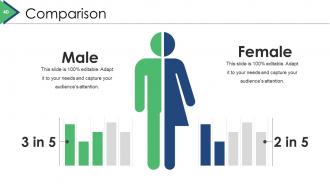
Slide 40: This is a Comparison slide to compare product/entities etc.
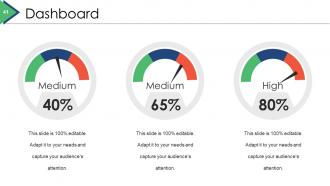
Slide 41: This is a Dashboard slide to state Low, medium and High aspects, kpis, metrics etc.
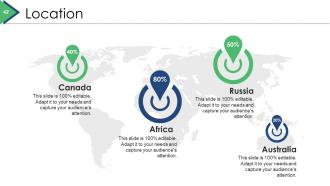
Slide 42: This slide showcases Location to show global presence, growth etc.
Slide 43: This is a Quotes slide to highlight, or state anything specific. You may change the slide content as per need.
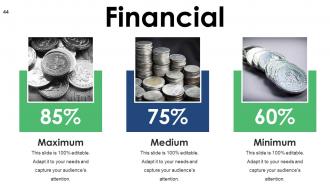
Slide 44: This slide presents Financial scores and stats to display.
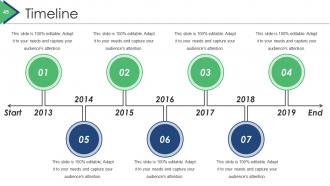
Slide 45: This slide showcases a Timeline to show milestones, evolution, growth etc.
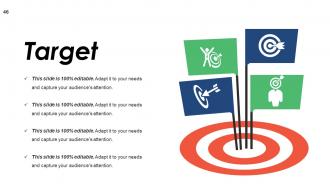
Slide 46: This slide shows a Target image with relative icons. State your targets here.
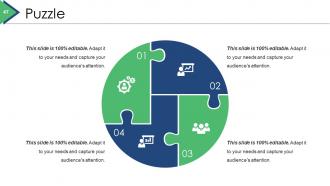
Slide 47: This slide showcases a Puzzle image to show information, specifications etc.
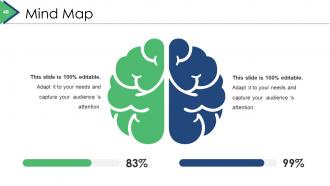
Slide 48: This is a Mind Map slide to show information, segregation, specifications etc.
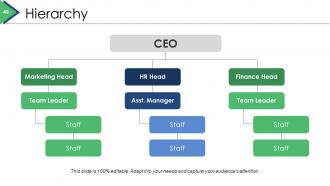
Slide 49: This is a Hierarchy slide to show information, specifications, staffing etc.
Slide 50: This slide shows a Venn diagram image with text boxes. State information etc. here.
Slide 51: This is a Silhouettes image slide. Use it the way you want to show solutions etc.
Slide 52: This slide displays Post It to show reminders, important notes etc.
Slide 53: This slide shows a Magnifying glass image with text boxes. State information, scope etc. here.
Slide 54: This slide shows an Idea or Bulb image with text boxes. State innovative information, highlighting idea etc. here.
Slide 55: This is a Thank You slide with Address# street number, city, state, Contact Numbers, Email Address.
Project Brief Powerpoint Presentation Slides with all 55 slides:
Our Project Brief Powerpoint Presentation Slides enable fruitful interaction. Get folks involved in the game.
-

Project Brief
-
Content
-
Project Brief
-
Project Description
-
Risk Identification
-
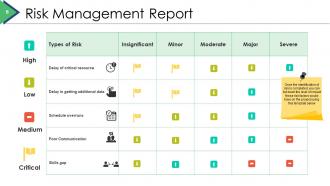
Risk Management Report
-
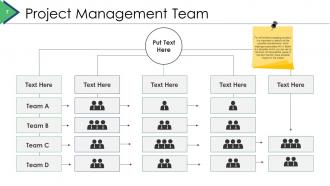
Project Management Team
-
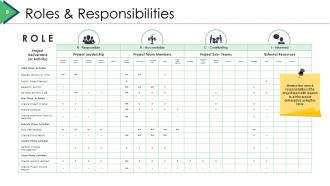
Roles Responsibilities
-
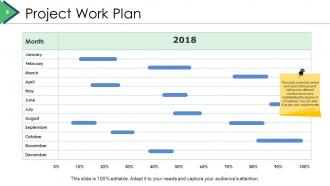
Project Work Plan
-
Project Management Gantt Chart
-
Project Management Gantt Chart 2 2
-
Project Task List
-
Project Task List
-
Project Timeline
-
Activities Sequence
-
Risk Assessment
-
Risk Tracker
-
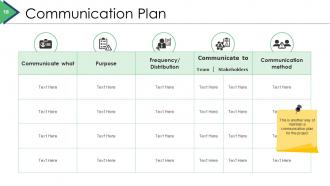
Communication Plan
-
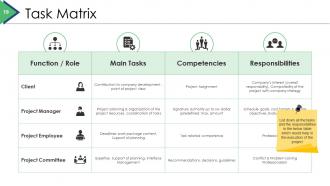
Task Matrix
-
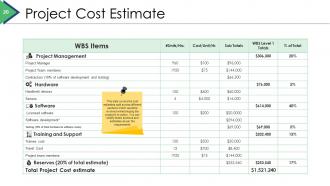
Project Cost Estimate
-
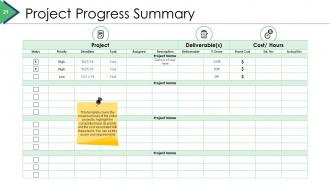
Project Progress Summary
-
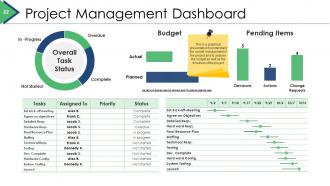
Project Management Dashboard
-
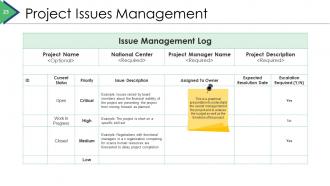
Project Issues Management
-
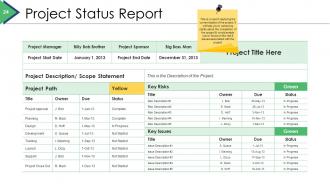
Project Status Report
-
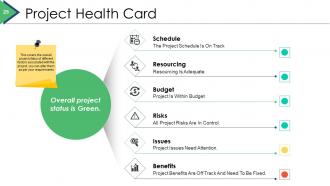
Project Health Card
-

Coffee Break
-
Project Brief Icon Slide
-
Chart Graphs
-
Clustered Column
-
Stacked Column
-
Scatter Bubble Chart
-
Filled Radar
-
Stacked Line
-
Area Chart
-
Additional Slides
-
Our Mission
-

Our Team
-

About Us
-
Our Main Goal
-
Comparison
-
Dashboard
-
Location
-

Quotes
-
Financial
-
Timeline
-
Target
-
Puzzle
-
Mind Map
-
Hierarchy
-
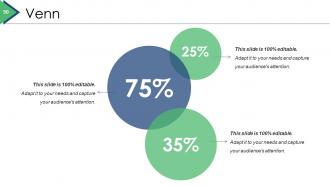
Venn
-
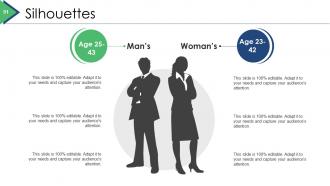
Silhouettes
-
Post It
-
Magnifying Glass
-
Idea or Bulb
-

Thank You
FAQs for Project Brief
Start with your main goals and who you're targeting. Budget and deadlines are obvious but people forget them anyway. List out what you're actually delivering and when - be realistic here because everyone always underestimates time. Oh, and definitely spell out who's responsible for what. I've seen so many projects crash because nobody knew who was supposed to do the thing. Background context helps too so people aren't confused about why this even exists. Technical requirements, brand stuff - get all that boring but necessary info down. Two pages tops or nobody reads it.
So the brief is like your "what and why" – project goals, scope, who's involved, that kind of stuff. Your plan gets way more detailed with actual timelines, tasks, budgets, all that nitty-gritty work. Think of it this way: you'd show the brief to your boss for approval, but your team lives in the plan daily. Honestly, I've seen too many projects jump straight to planning without a solid brief first. Big mistake – you'll deal with scope creep nightmares later. Start with the brief, then dive into the detailed roadmap once you've got that foundation locked down.
You absolutely need their input - otherwise you're just guessing at what people actually want. Talk to decision makers, end users, anyone who'll be impacted. Their perspectives show you constraints and expectations you'd never think of on your own. Getting buy-in upfront saves you from those brutal "we never agreed to this" meetings later (trust me on that one). Make sure you document what they tell you right in the brief. That way everyone sees their voice was heard. Oh, and don't just talk to the loudest people - sometimes the quiet ones have the best insights.
Honestly, a good project brief is like having a shared map for your team. Everyone knows where you're headed and what you're building. Write down the why, what, and when so people can make calls without bugging you constantly. Trust me, stakeholders will try to sneak in extra stuff later - having that original scope written down saves your butt. Yeah, it feels like extra work upfront, but you'll dodge so many "wait, wasn't this supposed to be..." conversations. Spend those 30 minutes now, thank yourself later when things actually run smooth.
Ugh, the worst thing you can do is be super vague about what you want. I've seen it happen so many times and it's painful for everyone involved. Be specific about deliverables and deadlines - don't just assume people will magically know what you're thinking. Oh, and actually write down how you'll measure success, otherwise you'll never know if it worked. Try to stay focused instead of throwing in every random feature you can think of. Before hitting send, ask yourself: could a total stranger run this project just from reading my brief? If not, you're not done yet.
So basically, bigger scope = way more detailed brief. Small projects? Just cover the basics - what you want, what you're delivering, when it's due. Done. Complex stuff though... that's where you need stakeholder maps, risk plans, resource breakdowns, the whole nine yards. Multiple approval stages too, which is honestly kind of a pain but whatever. I've watched people try to wing it on huge projects with bare-bones briefs and it never ends well. Trust me on this one. More scope means you've gotta document everything upfront or you'll deal with endless changes later.
Put your main goals right at the top, then use bullets for everything else - makes it way easier to scan. Active voice is your friend. Ditch fancy words that just confuse people (trust me, I've written briefs nobody could follow). Short sentences work better. Give actual dates instead of saying "soon." Number your processes and always start with a one-sentence summary of the whole project. Oh, and read it out loud before sending - if you trip over words, your team definitely will too.
Honestly, visuals are game-changers for project briefs. People hate reading walls of text—I know I do. Flowcharts make processes crystal clear, and mockups help everyone understand what you're actually building. Templates save your sanity because they make you think through everything upfront. When stakeholders see a visual timeline instead of paragraphs about deadlines, they actually get it. Start simple: objectives, deliverables, success metrics. Then throw in visuals wherever the text feels awkward or confusing. Trust me, your future self will thank you.
Honestly, you NEED measurable objectives or you'll be completely lost. I've sat through so many painful meetings where nobody could agree if we'd actually succeeded - super awkward. Concrete targets give you proof your project worked and help justify resources to your boss. When scope creep hits (and it always does), having specific metrics makes those tough priority calls way easier. Stakeholders stay aligned too. Look, even if your initial metrics feel kinda random, just pick something. You can tweak them later once you figure out what actually matters.
So basically you want to keep the same structure - objectives, scope, timeline, deliverables - but tweak what you emphasize. Creative projects? Go heavy on brand stuff, audience insights, the vibe you're going for. Technical ones need way more specifics on requirements and metrics (learned this the hard way lol). I always think creative briefs are more fun to write tbh. But yeah, just beef up the sections that matter most for each type and keep the rest streamlined. Your team will know what they need from the brief anyway.
Honestly, just start with Google Docs or Word - your whole team already knows them and they're great for collaboration. Notion's pretty cool if you want to get fancy with embedded charts and stuff. I've actually seen some surprisingly slick briefs made in Canva, though that's more for when you need it to look really polished for clients. PowerPoint works too, weirdly enough. The tool really doesn't matter as much as having a decent template and getting everyone's input early. Don't overthink it - use whatever your team's already comfortable with, then switch later if you need more bells and whistles.
Honestly, get your team to look at your project brief before you finalize it. Different people will catch stuff you totally missed - like unrealistic deadlines or technical issues that'll bite you later. Your teammates know the actual day-to-day chaos better than whoever's writing from their office upstairs (trust me on this one). They'll ask questions that force you to be clearer about the fuzzy parts. Short sentences work. Longer ones help you explain the nuances without sounding robotic. Don't wait until you've already decided your draft is perfect though - get their input early when you're still willing to change things.
Honestly, just make sure your brief spells out everything - scope, deliverables, deadlines, who does what. Get stakeholders to actually sign off on it in writing (this part is crucial). When clients inevitably try to add random stuff later, you'll have that signed document to wave around. Budget limits, quality standards, what "finished" actually means - put it all in there. Oh and define success metrics upfront so you're not arguing about whether the project worked or not. It's basically your insurance policy against scope creep and mismatched expectations.
Check your project brief every 2-4 weeks, or whenever big changes happen. I always do it at kickoff, midway through, and right before delivery. Trust me - I've watched so many projects completely derail because people forgot what they actually signed up for in the first place. Update it immediately when scope shifts or stakeholders change their minds (which they will). Don't let it become some forgotten document gathering digital dust. The brief needs to reflect what's happening NOW, not what you thought would happen three months ago. Set those calendar reminders or you'll definitely forget.
Get that project brief out to everyone who's gonna touch this thing - stakeholders, your team, vendors, whoever. I'd skip the email blast honestly and just throw it in a shared drive or your project tool so people can grab the latest version. Don't just fire-and-forget though. Set up a quick walkthrough meeting to hit the big points and field questions early. Trust me, it's way better than dealing with "oh wait, I thought we were doing something completely different" drama halfway through. And yeah, make sure there's someone they can bug with questions later.
-
Attractive design and informative presentation.
-
Editable templates with innovative design and color combination.