


Project Description Powerpoint Presentation Slides





Try Before you Buy Download Free Sample Product
 Impress Your
 Audience
 100%
100% Editable
 Save Hours
 of Time


Deliver an informative presentation with our project description PowerPoint presentation slides. This blueprint explanation PPT deck holds a plethora of information like- project brief, task matrix, roles and responsibilities, risk tracker, and more. Providing a description of what the plan is all about in depth, this design illustration PowerPoint layout is everything you need in a business to grow. For effectively managing a project, it is important to identify all the risk elements which might get associated with it, therefore, this ground plan explanation PPT design enables you to list down all those factors while working. This roadmap chronicle PowerPoint bundle also assists you in jotting down the level of impact these risk factors would have on the information. Making it easy to understand and implement the plan, Our strategy representation creative PPT set covers all those people who would be a part of this planning. Assimilate our project presentation ppt instantly in your business and be assured of getting fruitful results in the longer run.
People who downloaded this PowerPoint presentation also viewed the following :
Content of this Powerpoint Presentation
Slide 1: This slide introduces Project Description. State Your Company Name and begin.
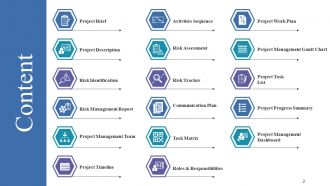
Slide 2: This slide shows Content of the presentation.
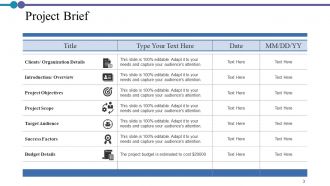
Slide 3: This slide presents Project Brief in a tabular form.
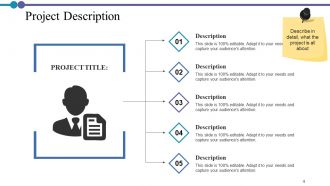
Slide 4: This slide displays Project Description with related imagery and text boxes.
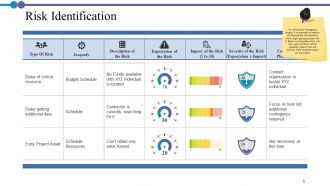
Slide 5: This slide represents Risk Identification in a tabular form.
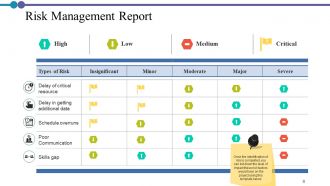
Slide 6: This slide showcases Risk Management Report with parameters as- High, Low, Medium, Critical.
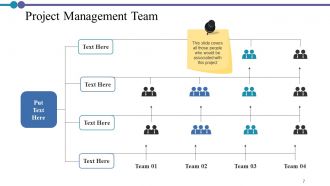
Slide 7: This slide shows Project Management Team with names and designation.
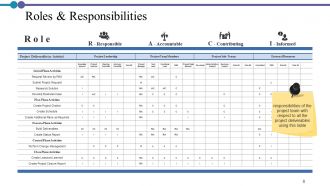
Slide 8: This slide presents Roles & Responsibilities in a tabular form.
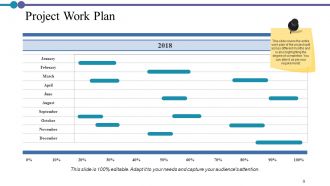
Slide 9: This slide displays Project Work Plan splitted across different months and is also highlighting the degree of completion.
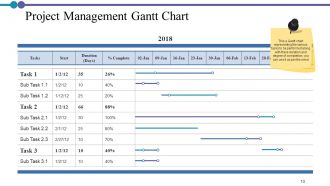
Slide 10: This slide represents Project Management Gantt Chart.
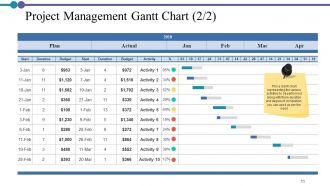
Slide 11: This is another slide representing Project Management Gantt Chart.
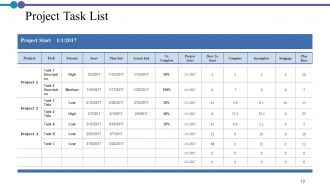
Slide 12: This slide showcases Project Task List in a tabular form.
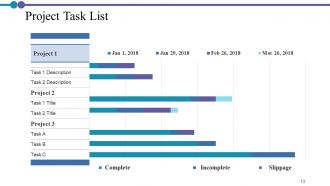
Slide 13: This slide shows Project Task List with parameters as- Complete, Incomplete, Slippage.
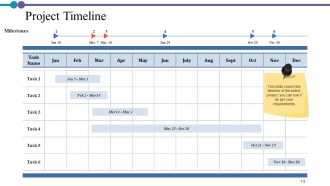
Slide 14: This slide presents Project Timeline for the entire project.
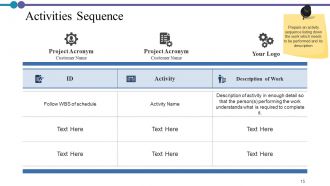
Slide 15: This slide displays Activities Sequence with- Project Acronym, Customer Name etc.
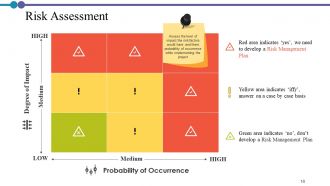
Slide 16: This slide represents Risk Assessment to Assess the level of impact the risk factors would have and there probability of occurrence while implementing the project.
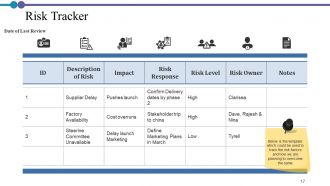
Slide 17: This slide showcases Risk Tracker in a tabular form.
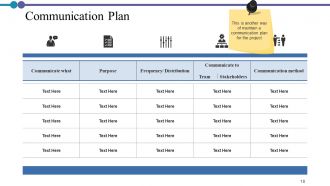
Slide 18: This slide shows Communication Plan to maintain communication for the project.
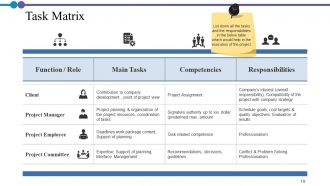
Slide 19: This slide presents Task Matrix describing function/role, main tasks, responsibilities etc.
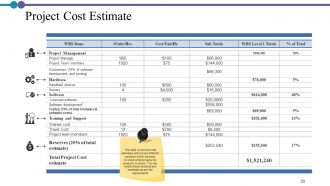
Slide 20: This slide displays Project Cost Estimate with costs split across different sections which would be involved while bringing the project in to action.
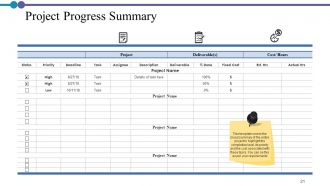
Slide 21: This slide represents Project Progress Summary in a tabular form.
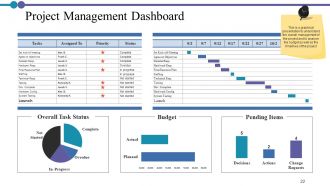
Slide 22: This slide showcases Project Management Dashboard describing- Pending Items, Budget, Overall Task Status etc.
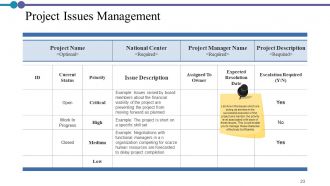
Slide 23: This slide shows Project Issues Management listing down the issues which are acting as barriers in the successful execution of the project and mention the priority level associated with each of these issues. This would enable you to manage these obstacles effectively & efficiently.
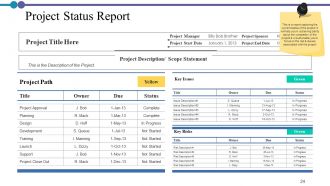
Slide 24: This slide presents Project Status Report.
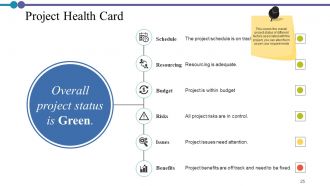
Slide 25: This slide displays Project Health Card with- Schedule, Resourcing, Budget, Risks, Issues, Benefits.
Slide 26: This slide shows Project Description Icons.
Slide 27: This slide reminds about a 30 minutes Coffee Break.
Slide 28: This slide is titled as Charts & Graphs for moving forward.
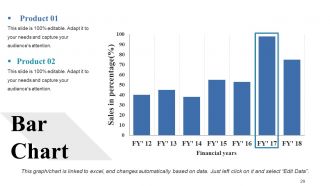
Slide 29: This slide shows Bar Chart with two products comparison.
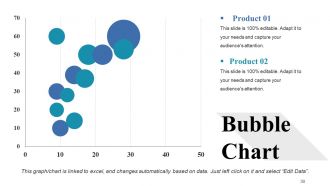
Slide 30: This slide presents Bubble Chart with two products comparison.
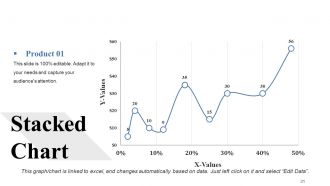
Slide 31: This slide displays Stacked Chart.
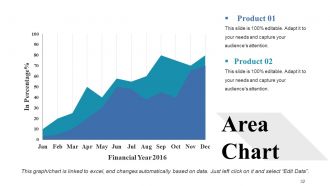
Slide 32: This slide represents Area Chart with two products comparison.
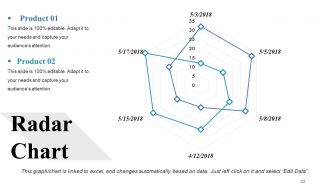
Slide 33: This slide showcases Radar Chart for product comparison.
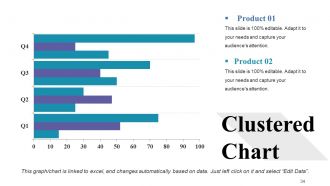
Slide 34: This slide shows Clustered Chart with two products comparison.
Slide 35: This slide is titled as Additional Slides for moving forward.
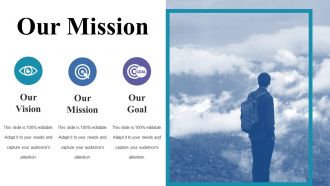
Slide 36: This is Our Mission slide with imagery and text boxes.
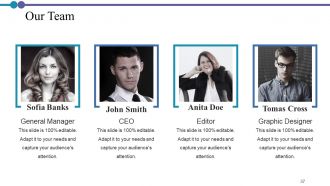
Slide 37: This is Our Team slide with names and designation.
Slide 38: This is About Us slide to show company specifications etc.
Slide 39: This is Our Main Goal slide. Show your goals here.
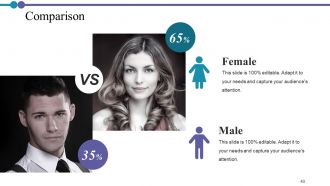
Slide 40: This is a Comparison slide to state comparison between commodities, entities etc.
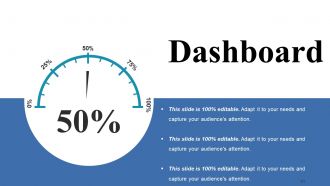
Slide 41: This is a Dashboard slide with text boxes to show information.
Slide 42: This is a Location slide with maps to show data related with different locations.
Slide 43: This is a Quotes slide to highlight or state anything specific.
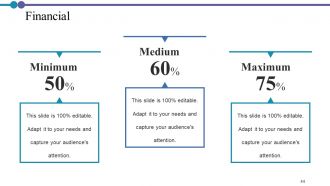
Slide 44: This is a Financial slide. Show your finance related stuff here.
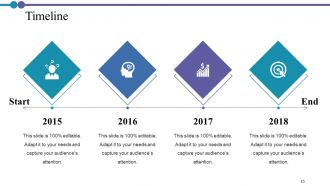
Slide 45: This is a Timeline slide. Show information related with time period here.
Slide 46: This is Our Main Target slide. Show your targets here.
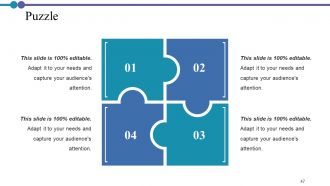
Slide 47: This is a Puzzle slide with text boxes to show information.
Slide 48: This slide displays Mind Map for representing entities.
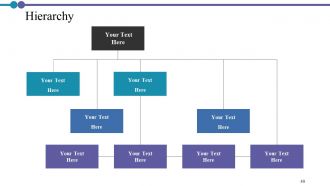
Slide 49: This is a Hierarchy slide. Show relevant data accordingly.
Slide 50: This is a Venn slide with text boxes.
Slide 51: This is a Silhouettes slide to show people specific information etc.
Slide 52: This is Post It slide. Post your important notes here.
Slide 53: This slide displays Magnifying Glass with text boxes.
Slide 54: This is a Idea Bulb slide to state a new idea.
Slide 55: This is a Thank You slide with address, contact numbers and email address.
Project Description Powerpoint Presentation Slides with all 55 slides:
Elevate your chances with our Project Description Powerpoint Presentation Slides. Be competitive all along.


FAQs for Project Description
So you definitely need the basics: objectives, scope, deliverables, timeline with milestones, budget, and who's doing what. I always add background context upfront - makes everything click faster. Success criteria and assumptions are huge but people skip them constantly. Also map out dependencies and risks that could mess things up. Oh, and make your template adaptable but not so loose that you forget critical stuff. Honestly, I'd start simple and tweak it as you go based on what actually matters in practice.
Honestly, visuals are a game changer for presentations. Charts and diagrams help people actually *get* your complex stuff instead of zoning out during explanations. Plus, let's be real - nobody wants to stare at text-heavy slides. You'll keep people way more engaged with mockups or even simple flowcharts. Before/after images work great too. Visuals also make you look like you've got your act together, which doesn't hurt. I always think of it like this - if I can show it instead of saying it, why wouldn't I? Even basic diagrams beat boring descriptions every time.
Dude, you HAVE to figure out who's gonna read this first. Like, are you writing for executives who just want the big picture? Technical people who need all the nitty-gritty details? Or regular users who only care how it'll help them? Each group speaks totally different languages. Your CEO summary can't sound like developer documentation - that's just asking for confusion. I learned this the hard way on my last project, honestly. Figure out your main audience, then write in their style. Match their depth level. Short sentences work great for busy execs. Developers might want longer explanations though. Just don't write for yourself!
Honestly, just think about what each person actually cares about. Executives want the business stuff - ROI, strategic impact, the big picture wins. Technical people need all the detailed methodology and implementation specifics (they'll call you out if you're vague). End users just want to know how this changes their day-to-day work. It's basically like switching how you talk depending on who you're with. Same info, totally different angle. I always figure out their main priorities first, then write around those pain points. Works way better than trying to make one description fit everyone.
Don't be vague - that's the killer. Those generic descriptions that could fit literally any project? Skip them. Same goes for buzzwords like "revolutionary." People see that and immediately tune out. Here's what works better: nail down the exact problem you're fixing and who needs it fixed. Real examples help tons. I always think - could my mom read this and actually get what I'm building? Oh, and don't dump every feature into one messy paragraph. Pick the stuff that matters most. Your description should make someone go "oh, I see why this exists" instead of "...what?"
Definitely stick to 2-3 minutes max - that's like 300-450 words if you're reading notes. Hit the problem, your solution, what you expect to happen. Done. I've watched so many people drone on for 10 minutes about background stuff while everyone's eyes glazed over. Not pretty. Practice out loud beforehand (seriously, do this) and have a backup 1-minute version ready. Oh, and figure out what your audience actually needs to decide on - that's your north star. Don't make them sit through info they don't need.
Think of your project like you're telling a story. What's broken right now? That's your "before" scene. Then walk them through how things will change and what the end result looks like. Seriously, most project pitches are boring as hell - people zone out immediately. But add some characters (your actual users), drama (the messy problem), and a satisfying ending (your solution working), and suddenly people give a damn. Skip the jargon and use real examples instead. Like, don't just say "improved efficiency" - show them what Sarah from accounting will actually experience on Tuesday morning. Makes it stick way better.
Grammarly's pretty solid for catching weird phrasing, and Hemingway Editor helps tighten things up. Canva has some decent project brief templates if you need visuals. I usually just use Google Docs though - way easier when people need to leave comments and collaborate. Actually, here's something that sounds dumb but works: read your description out loud. You'll instantly hear the confusing parts. Oh, and Notion's good too if you're into that whole organized workspace thing. Honestly? Don't stress about fancy tools. Pick whatever you already know and focus on being clear. Most project descriptions fail because they're confusing, not because of the software.
You gotta match your audience's level, honestly. Technical people? Go ahead and use some jargon - it shows you know your stuff. But I've watched so many good projects die because nobody understood the proposal in the first place. Mixed crowds or executives need clearer language with just a sprinkle of tech terms for credibility. Define your acronyms the first time. Understanding beats showing off every time. Here's my quick test: could someone smart but outside your field follow along? If not, dial it back a bit.
Dude, focus on three things: what problem you're fixing, why your solution is actually different (not just "better"), and how big the opportunity is. Make the problem feel real and urgent - something people instantly get. Most descriptions I read are either way too techy or super vague, which kills momentum. Keep it conversational and explain why this matters right now. The market size should excite them but don't go crazy broad or you'll sound delusional. End with specific next steps. What exactly do you need from them?
So figure out your end goal first - like what you actually want to accomplish, not the steps to get there. Write 2-3 super clear outcomes with words like "reduce" or "increase." One sentence each, max. Honestly, your stakeholders will be way happier if you skip the jargon completely. Focus on business results, not technical stuff. Each goal needs a specific number or deliverable so everyone knows when you're done. Think of it like explaining your project in an elevator - what does success look like? And make sure it fits your timeline and budget, obviously.
Honestly, just lead with the problem you're solving differently than everyone else. That's your real hook. Then get super specific about your approach - skip the "innovative" and "cutting-edge" BS because literally everyone says that. What's your actual methodology? Who are you targeting that others missed? I'd throw in a solid statistic if you've got one. The thing is, people want concrete examples, not vague promises. End it by spelling out exactly what benefit someone gets from YOUR project that they can't get anywhere else. Make it clear why you exist.
Dude, infographics are a game changer for project descriptions. People scan visuals 60,000x faster than reading text - wild stat but it's true. I used to write these massive paragraphs that nobody read. Now I throw in timelines, charts, process diagrams. Way better engagement. Your stakeholders won't have to dig through walls of text to find what matters. Icons work great for highlighting features, and diagrams show how different pieces connect. Honestly, even replacing one chunky paragraph with a simple visual makes a huge difference. Your audience will actually pay attention instead of glossing over everything.
Dude, seriously - write a solid project description from the start. It stops people from guessing what they're supposed to do, which saves you SO much headache later. When goals and deliverables are crystal clear, your team isn't constantly asking "wait, what are we doing again?" Trust me, spending 30 minutes upfront beats explaining the same stuff over and over to different people. Plus you'll have something to point to when scope creep inevitably happens (and it always does). Short sentences work. Your future self will definitely thank you for not skipping this step.
Honestly, you're way too close to your own writing to catch the obvious stuff. Get 2-3 people to read your draft - they'll spot confusing jargon and missing context that seems crystal clear to you but makes zero sense to everyone else. Fresh eyes are honestly magic for this. They might completely restructure something or point out your best ideas that you buried halfway through. I always ask readers what questions they still have after finishing, because that tells you exactly where you lost them. It's kinda wild how differently other people's brains work.
-
Unique and attractive product design.
-
Very unique, user-friendly presentation interface.