


Project management professional toolkit powerpoint presentation slides




Try Before you Buy Download Free Sample Product
 Impress Your
 Audience
 100%
100% Editable
 Save Hours
 of Time


Project management tools assist project managers in organizing and managing their projects and tasks effectively. Purpose of this presentation is to provide project professionals with enhanced knowledge of tools required to approach and manage projects effectively. Our customized project management ppt templates will assist the professionals throughout the lifecycle of a project. In order to address the initial details about the project scope and objectives, organization can use slides namely project charter and project definition document. After addressing the project bjectives, company can inform others about the resource requirements and progress status by using estimate sheet, project schedule, status report, and milestones chart slides. Company can use slides project organization chart, RACI matrix, work breakdown structure to illustrate in-depth details about the project management team along with key responsibilities. Slides namely communication plan, quality management, staffing management and risk response plan will assist the project managers in efficiently managing the project. Lastly, company can use slides such as project log, change request form and project review worksheet for tracking and evaluating the progress of project tasks.
People who downloaded this PowerPoint presentation also viewed the following :
Content of this Powerpoint Presentation
Slide 1: This slide introduces Project Management Professional Toolkit. State Your Company Name and begin.
Slide 2: This slide shows Agenda of Project Management Professional Toolkit.
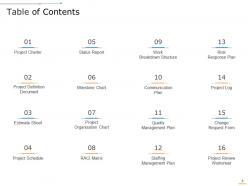
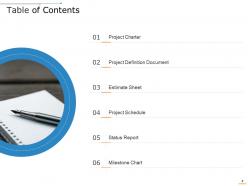
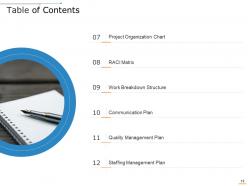
Slide 3: This slide presents Table of Content for the presentation.
Slide 4: This slide displays Table of Content describing- Project Definition Document, Estimate Sheet, Project Schedule, etc.
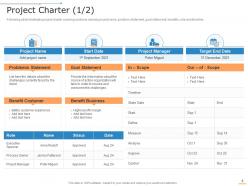
Slide 5: This slide represents project charter covering sections namely project name, problem statement, goal statement, benefits, role and timeline.
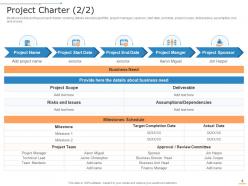
Slide 6: This slide showcases details about project title, project manager, sponsor, start date, end date, project scope, deliverables, assumption, risk and issues.
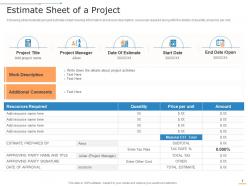
Slide 7: This slide shows project estimate sheet covering information about work description, resources required along with the details of quantity and price per unit.
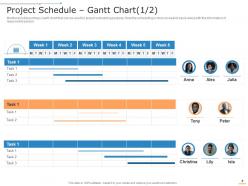
Slide 8: This slide presents Gantt chart that can be used for project scheduling purpose. Here the scheduling is done on weekly basis along with the information of responsible person.
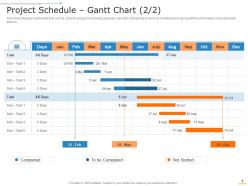
Slide 9: This slide displays Gantt chart that can be used for project scheduling purpose. Here the scheduling is done on monthly basis along with the information of responsible person.
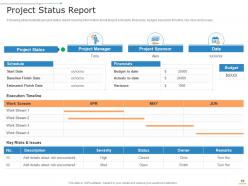
Slide 10: This slide shows illustrates project status report covering information about project schedule, financials, budget, execution timeline, key risks and issues.
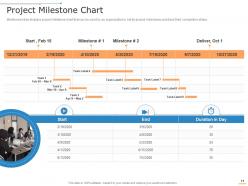
Slide 11: This slide displays project milestone chart that can be used by an organization to set its project milestones and track their completion status.
Slide 12: This slide shows Table of Content for the presentation.
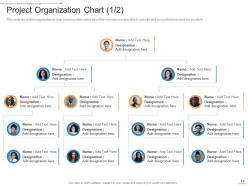
Slide 13: This slide presents chart covering information about the members responsible to execute and complete the project successfully.
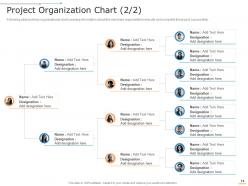
Slide 14: This slide displays organizational chart covering information about the members responsible to execute and complete the project successfully.
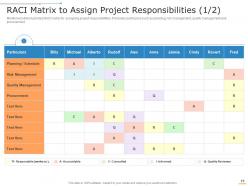
Slide 15: This slide shows RACI Matrix to Assign Project Responsibilities.
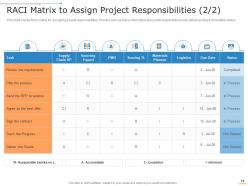
Slide 16: This slide showcases RACI matrix for assigning project responsibilities. It covers various tasks information along with responsible person details and task completion status.
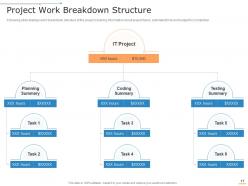
Slide 17: This slide shows work breakdown structure of the project covering information about project tasks, estimated time and budget for completion.
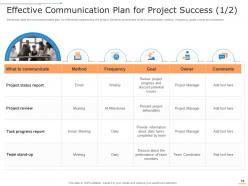
Slide 18: This slide presents communication plan for effectively implementing the project. Sections covered are what to communicate, method, frequency, goals, owner and comments.
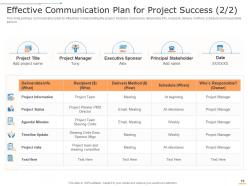
Slide 19: This slide displays Effective Communication Plan for Project Success.
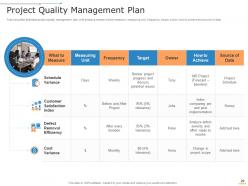
Slide 20: This slide shows illustrates project quality management plan with sections namely what to measure, measuring unit, frequency, target, owner, how to achieve and source of data.
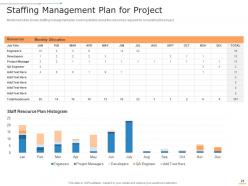
Slide 21: This slide showcases staffing management plan covering details about the resources required for completing the project.
Slide 22: This slide shows Table of Content for the presentation.
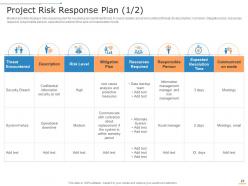
Slide 23: This slide presents risk response plan for resolving encountered threat. It covers details about encountered threat, its description, risk level, mitigation plan, resources required, responsible person, expected resolution time and communication mode.
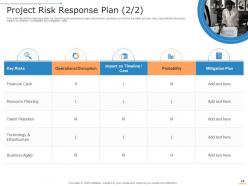
Slide 24: This slide illustrates response plan for resolving encountered project risk events. Sections covered in the slide are key risks, operational disruption, impact on timeline, probability and mitigation plan.
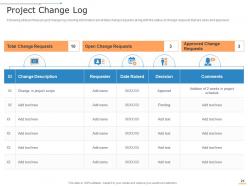
Slide 25: This slide shows.portrays project change log covering information about total change requests along with the status of change requests that are open and approved.
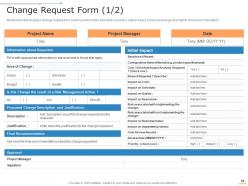
Slide 26: This slide displays change request form covering information about the requestor, initial impact, proposed change description, final recommendation.
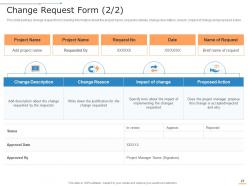
Slide 27: This slide portrays change request form covering information about the project name, requestor details, change description, reason, impact of change and proposed action.
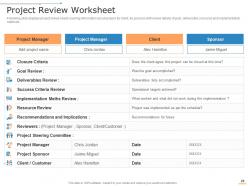
Slide 28: This slide presents project review sheet covering information about project, its client, its sponsor with review details of goal, deliverable, resource and implementation methods.
Slide 29: This slide displays Project Management Professional Toolkit Icons.
Slide 30: This slide is titled as Additional Slides for moving forward.
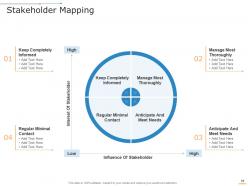
Slide 31: This slide shows Stakeholder Mapping describing- Interest Of Stakeholder, Influence Of Stakeholder, Regular Minimal Contact, etc.
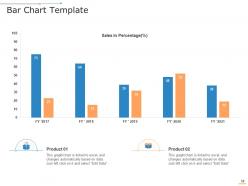
Slide 32: This slide presents Bar Chart Template with additional textboxes.
Slide 33: This is About Us slide to show company specifications etc.
Slide 34: This is Our Mission slide with related imagery and text.
Slide 35: This is Our Team slide with names and designation.
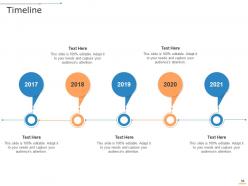
Slide 36: This is a Timeline slide. Show data related to time intervals here.
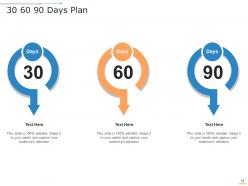
Slide 37: This slide shows 30 60 90 Days Plan with two products comparison.
Slide 38: This slide presents Venn with two products comparison.
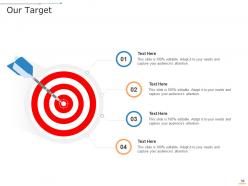
Slide 39: This is Our Target slide. State your targets here.
Slide 40: This is a Thank You slide with address, contact numbers and email address.
Project management professional toolkit powerpoint presentation slides with all 40 slides:
Use our Project Management Professional Toolkit Powerpoint Presentation Slides to effectively help you save your valuable time. They are readymade to fit into any presentation structure.
FAQs for Project management professional toolkit
Definitely grab a basic project template and some kind of timeline tool first - Gantt charts sound fancy but they're just visual schedules. Trello's my go-to for task management since it's super easy to pick up (Asana works great too). Communication plan, risk tracker, budget spreadsheet... honestly Excel handles most of this stuff fine when you're starting out. Oh, and stakeholder mapping - sounds corporate-y but it's just figuring out who needs to know what. Meeting templates are lifesavers too. The real trick is staying organized without going overboard. Start with free versions of everything, then upgrade once you know what actually works for you.
Honestly, templates are lifesavers - they give you all the basic structures already built out. Work breakdown sheets, timelines, risk stuff, resource planning. You just fill in your specific project details instead of building everything from zero each time. Way less reinventing the wheel, you know? Your team stays consistent across projects, and planning meetings actually stay on track since everyone knows the format. I'd start simple and tweak them as you figure out what clicks with your workflow. Saves so much headache in the long run.
Risk management is like having an early warning system plus safety net combo. Basically, you're trying to catch problems before they blow up in your face. I totally learned this lesson when one of my projects went completely sideways! Get your team together first thing and brainstorm what could go wrong - seriously, they'll think of stuff you'd never consider. Then grab some tools like risk registers and probability matrices (sounds fancy but they're pretty straightforward). Having backup plans ready beats scrambling around putting out fires later. Trust me, everyone feels way better knowing you've actually thought through the nightmare scenarios ahead of time.
Honestly, these tools are game-changers because everyone can finally see what's actually happening. No more "wait, who was supposed to handle that?" or digging through a million emails to find one decision. Real-time updates mean you're not constantly playing catch-up, and having all your files in one spot is clutch. Task assignments become crystal clear too. I swear the transparency thing alone probably cuts miscommunication in half - maybe more. Don't overthink it though. Just grab Trello or Asana to start. Pick one and stick with it instead of bouncing between different apps.
Start with user story templates and sprint planning sheets - those are non-negotiables. Daily standup trackers help too, though some teams just wing those. Retrospective templates are huge (seriously, teams that skip retros just keep making the same mistakes over and over). Product backlog template, definition of done checklist, and burn-down charts round out the essentials. Oh, and don't sleep on stakeholder communication templates - saves you so much time later. Risk register formats are smart to have on hand. Begin there, then tweak everything based on what's actually slowing your team down.
Honestly, treat performance metrics like a health checkup for your project - ignore them and you're asking for trouble. Pick 3-5 that actually matter (schedule variance, budget, quality stuff) instead of cramming your dashboard with every number possible. I learned this the hard way when my boss cornered me about budget overruns I hadn't been tracking properly. Set up whatever automation you can because manual tracking is soul-crushing. Weekly team reviews are clutch - catch problems while they're still fixable instead of explaining to stakeholders why everything's on fire.
Honestly, I'd go with **Asana**, **Monday.com**, or **ClickUp** for template stuff. Asana's super user-friendly if your team isn't tech-obsessed. ClickUp has tons of customization but holy crap it's overwhelming at first - learned that the hard way. Monday.com's got this sweet spot with really nice visual workflows. Oh, and **Notion** is solid too if you want templates for everything - tasks, docs, wikis, the whole nine yards. My advice? Grab free trials of like 2-3 options and test them on a small project. You'll know pretty quick which one doesn't make you want to pull your hair out.
Honestly, get a project management tool - it's a game changer for remote work. Instead of bouncing between a million different apps (seriously, who has time for that?), everything lives in one spot. Your team can see tasks, deadlines, and who's doing what without the constant "hey, what's your status on X?" messages. The automated updates are clutch when people are in different time zones. I'd say pick one tool first and move your biggest project over. Don't try to do everything at once or you'll just create more chaos.
So I'd go with three main things: project dashboards for tracking stuff in real-time, Gantt charts to see how everything connects timeline-wise, and regular status reports for keeping stakeholders happy. Dashboard should cover budget vs what you're actually spending, where you are with milestones, plus any roadblocks. Gantt charts are great for catching delays before they blow up - learned that the hard way on my last project. Weekly status updates keep everyone on the same page about what's done and what's coming up. Don't overthink the tools though. Half the teams I know get so caught up in finding the "perfect" software that they forget to actually manage their project.
Honestly, stakeholder analysis templates are a lifesaver for this stuff. Map out who has influence and how they like to communicate right from the start. I always use a stakeholder register first - captures all their contact info, roles, what they expect from the project. Communication plan templates help you figure out what each person actually needs to know (and when). Oh, and RACI matrices are amazing for sorting out who's responsible vs. just needs a heads up. I learned this the hard way after way too many "wait, I thought YOU were handling that" moments. Keep updating these though - they're only useful if they're current.
Honestly, just tweak the templates and workflows to fit what you actually do. Construction folks need those Gantt charts with safety stuff built in, but if you're in software? Agile boards work way better. Healthcare has all those compliance headaches that marketing teams never deal with - totally different worlds. Map out how your projects usually go, then see where the standard templates are useless. That's where you customize. Oh, and don't forget the terminology - nothing worse than using tech jargon when you're managing a creative campaign.
Don't treat templates like they're set in stone - they're just starting points. I've seen so many teams try to jam their project into whatever template they found online, and it never works out well. People get lazy too, like they'll use generic risk categories that make zero sense for what they're actually doing. Oh, and avoid those bloated templates with a million fields - nobody wants to fill those out. Strip away anything that doesn't help your specific situation. Honestly, sometimes the simplest approach works best. Customize it for your team and context, otherwise you're just creating busywork.
Honestly, project management tools are game-changers for seeing what's actually happening with your work. Real-time tracking means you'll catch problems early instead of scrambling later. Your team stops working in separate bubbles, which is huge. The communication stuff might be my favorite part - bye bye to those nightmare email threads where nobody knows who's responsible for what. You also get actual data on what works vs what's just fluff, so future projects run smoother. Start simple with basic task tracking and timelines. Don't go crazy with features right away.
Honestly, mix it up with quick guides, video walkthroughs, and hands-on practice stuff. Before/after examples are clutch - way easier to grasp when you see the actual changes. Different roles need different paths though, like a PM versus regular team members using the same tools. Oh, and throw in checklists or little self-assessments so people don't zone out. I'd start with basics first. Once they're comfortable, then hit them with the fancy advanced features. Interactive stuff always works better than just reading through documentation - learned that the hard way at my last job.
Honestly, visual aids are game-changers for project management. They turn messy, complicated info into something you can actually wrap your head around fast. Gantt charts, kanban boards, dashboards - pick whatever clicks with your team. Nobody's got time to wade through endless status reports just to see what's falling behind. You'll spot problems way quicker this way. Plus your stakeholders won't give you that glazed-over look when you're explaining project status (been there). Dependencies become obvious, bottlenecks jump out at you. The whole team stays on the same page without those awkward "wait, what are we doing again?" moments. Just start with one tool that fits how your people think.
-
Innovative and attractive designs.
-
Nice and innovative design.
-
Awesomely designed templates, Easy to understand.
-
Great quality slides in rapid time.