


Project management proposal template powerpoint presentation slides






Try Before you Buy Download Free Sample Product
 Impress Your
 Audience
 100%
100% Editable
 Save Hours
 of Time


Our Project Management Proposal Template Powerpoint Presentation Slides are topically designed to provide an attractive backdrop to any subject. Use them to look like a presentation pro.
People who downloaded this PowerPoint presentation also viewed the following :
Content of this Powerpoint Presentation
Slide 1: This slide introduces the Project Management Proposal Template.
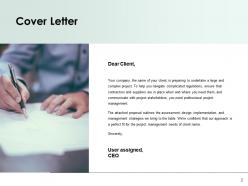
Slide 2: This slide shows the Cover Letter.
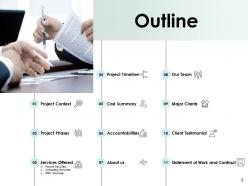
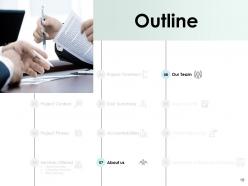
Slide 3: This slide portrays the Outline such as- Project context, Project Phases, Services Offered, Payroll Services, Consulting Services, PMO Services, Project Timeline, Cost Summary, Accountabilities, About us, Our Team, Major Clients, Client Testimonial, Statement of Work and Contract, Outline.
Slide 4: This slide again portrays the Project Context.
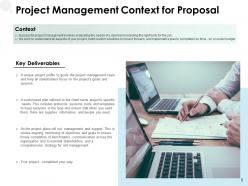
Slide 5: This slide unveils the Project Management Context for Proposal.
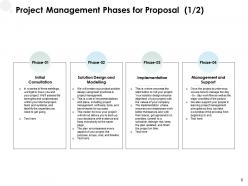
Slide 6: This slide unveils the Project Management Phases for Proposal such as Initial Consultation, Solution Design and Modelling, Implementation, and Management and Support.
Slide 7: This slide unveils the Project Management Phases for proposal.
Slide 8: This slide portrays the Outline.
Slide 9: This slide shows the Pro Payroll Services.
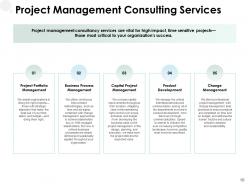
Slide 10: This slide portrays the Project management Consulting services such as- Project Portfolio management, Business Process Management, Capital Project Management, Product Development, Change Management.
Slide 11: This slide portrays the Services Offered for Project Management.
Slide 12: This slide portrays the Project Management Proposal Timeline.
Slide 13: This slide shows the Outline.
Slide 14: This slide showcases the Cost Summary for Project Management Proposal.
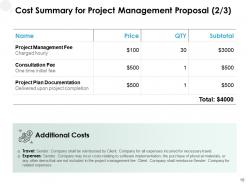
Slide 15: This slide again showcases the Cost Summary for Project Management Proposal.
Slide 16: This slide also shows the Cost Summary for Project Management Proposal.
Slide 17: This slide portrays the Accountabilities for Project Management Proposal.
Slide 18: This slide shows the Outline.
Slide 19: This slide shows About Us.
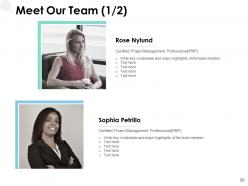
Slide 20: This slide depicts the key credentials, names and designation of Our Team.
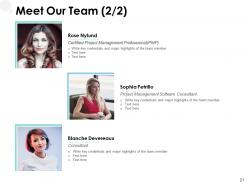
Slide 21: This slide again depicts the key credentials, names and designation of Our Team.
Slide 22: This slide depicts the Outline.
Slide 23: This slide depicts the Major Clients of various companies.
Slide 24: This slide unveils the Client Testimonials.
Slide 25: This slide depicts the Client Testimonials.
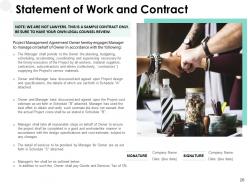
Slide 26: This slide reveals the Statement of Work and Contract.
Slide 27: This is a Contact us slide consisting of Address, contact numbers and email address.
Slide 28: This slide is titled as Additional Slides for moving forward.
Slide 29: This slide shows Our Mission.
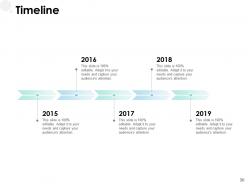
Slide 30: This slide presents the Timeline for various years.
Slide 31: This slide presents the 30,60,90 Days Plan.
Slide 32: This slide presents the Roadmap
Project management proposal template powerpoint presentation slides with all 32 slides:
Use our Project Management Proposal Template Powerpoint Presentation Slides to effectively help you save your valuable time. They are readymade to fit into any presentation structure.














FAQs for Project management proposal template
So you'll want these sections: executive summary, project scope/objectives, timeline with milestones, resources needed, and budget breakdown. Oh, and definitely add a risks section - stakeholders eat that stuff up because it shows you're not just winging it. Honestly, the executive summary is everything since most people won't read past page one anyway. When you write objectives, be super specific with numbers and dates instead of fluffy language. Start simple and tweak it based on who you're pitching to. I always forget how much the audience changes everything.
Dude, visuals are a game-changer for proposals. Charts and timelines beat boring text blocks every time. People reviewing tons of proposals? They'll actually look at your stuff if there's a clean Gantt chart or budget pie chart. Shows you care about presentation too. Flowcharts work great for explaining processes - way better than trying to describe everything step by step. Just keep it simple though. I've seen proposals that look like someone went nuts with clip art and it's... not good. Stick to purposeful graphics that actually help tell your story.
Break your timeline into clear phases with specific milestones for each one. I learned this the hard way - always add 15-20% buffer time because something will go wrong. Trust me on that! Start with kickoff and work through to final delivery. Gantt charts make everything way easier to read, or even just simple tables work. Don't forget to mark when you need stakeholder input and approvals - people hate being surprised with last-minute requests. Oh, and tie each timeline piece back to your costs. It'll justify your pricing and prove you're not just winging it.
Add a risk section covering identification, impact assessment, and mitigation strategies. I'd list potential roadblocks - budget overruns, delays, resource issues - then rate each by likelihood and severity. Stakeholders eat up those visual risk matrices, honestly. For major risks, include backup plans and assign someone to monitor each one. Shows you actually thought ahead instead of just improvising. Oh, and keep it under half a page. Nobody wants to wade through pages of doom scenarios. Make it thorough but digestible - covers your bases without scaring everyone off.
Your stakeholder analysis is like the foundation for your whole proposal template - it'll determine your project scope, communication strategy, all of it. Map out who's got the power and influence early on. Trust me, I've watched proposals crash because someone forgot about a key player (usually happens with the finance folks). This analysis feeds right into your risk management and timeline sections. Short sentences work here. Update it as you build each section though - way better than scrambling to fix everything later when you realize you missed the department head who actually signs off on budgets.
Split your budget into personnel, materials, and overhead - then show it as both a detailed table and summary chart. Pie charts or bar graphs are your friend here since nobody wants to stare at giant spreadsheets (learned that the hard way). Lead with the total cost upfront, then stick detailed breakdowns in an appendix. Don't forget contingency costs - usually 10-15%. Also be super clear about what's included vs. what's not. Trust me, stakeholders will thank you for keeping the main proposal clean while still giving them the option to dig deeper.
Honestly, just look at what your industry actually cares about first. Healthcare and finance are obsessed with compliance stuff, but tech companies? They want to hear about sprints and agile whatever. Construction needs all those safety protocols that'd be totally weird in a marketing proposal. Don't use PM buzzwords if you're talking to regular clients - they'll just get confused. Manufacturing timelines are way different than digital work too. Here's what actually helps: find 2-3 good proposals from your field and see which sections they focus on most. Way easier than guessing what matters to them.
Make a "Success Metrics" section with both numbers and feedback stuff. I always throw in 3-5 specific targets - like "cut processing time by 30%" or "hit 95% user adoption in 60 days." Budget tracking, timeline completion, quality scores, stakeholder happiness ratings. The whole SMART goals thing actually works here. Honestly, don't just write "improve efficiency" because that tells you nothing. Be super specific about how you'll measure each thing and when you're checking progress. Oh, and make sure everyone can actually track this stuff without needing a PhD in data science.
Start with their actual problems, then show how you'll fix them. Executives want numbers they can wave around in meetings, so throw in detailed timelines and budget breakdowns. Most proposals are snooze-fests - boring walls of text that nobody reads. Use bullet points, visuals, white space. Makes it way more scannable. Case studies help if you've got them. Always add risk mitigation stuff because it shows you're not winging it. They love seeing you've thought ahead about what could go wrong. End with clear next steps and when they need to decide. Don't make them guess what happens next.
Build flexibility into your template right from day one. Add a "Scope Management" section that spells out how changes get requested, reviewed, and approved. Honestly, I learned this the hard way - scope creep is gonna happen no matter what. Include spots for assumptions (they'll change constantly), revised timelines, and budget adjustments. Don't forget stakeholder sign-offs for modifications. The goal is treating changes as normal instead of surprises. When things inevitably shift, you'll handle it systematically rather than running around like crazy trying to figure out next steps.
Honestly, just start with whatever you're already using - Word or Google Docs work fine for basic templates. Canva's actually pretty solid if you want something that looks professional without being a design wizard. Monday.com and Asana have these cool interactive templates where you can embed timelines and task breakdowns directly (though maybe overkill if you're just starting out). Notion's another option but it has this weird learning curve. The main thing is picking something your team won't complain about using. You can always upgrade later once you figure out what you actually need.
Ditch all that PM corporate speak and write like you're talking to a regular person. Instead of "deliverables" say "what you'll get." Swap "stakeholders" for "people involved" - way clearer. Use bullet points and headings because honestly, execs just skim this stuff anyway. Throw in a simple timeline visual and budget breakdown that doesn't need a PM degree to decode. Write like you're explaining it over coffee, not trying to sound smart. Oh, and definitely test it on someone outside your team first - they'll catch the jargon you missed.
Honestly, the worst thing you can do is be super vague about what you're actually delivering. Like, clients hate fluffy language - they want specifics. Timeline-wise, don't promise the moon... we've all screwed that up before lol. Break down your budget so they're not wondering where their cash is going. Oh, and define who does what upfront or you'll be dealing with "I thought YOU were handling that" drama later. Skip those crappy online templates too - customize it for their actual situation. Be detailed from the start and you'll thank yourself later.
Build in checkpoints and review stages right from the start. After each big deliverable, schedule stakeholder feedback sessions. Regular pulse surveys work great for tracking team satisfaction too. Oh, and those "lessons learned" meetings? They're honestly where the best insights come from - people always surprise you with what they noticed. Set up structured reviews with clear agendas so nobody's winging it. Define who's giving feedback and when, but more importantly, how you'll actually use it. Otherwise it's just busywork nobody wants to do.
Honestly, there's a bunch of good stuff out there depending on what you're doing. Tech companies love their agile templates with sprints and user stories. Construction goes heavy on Gantt charts and resource tracking - makes sense. Marketing agencies though? Their templates are actually gorgeous, probably because they have to sell the visual side too. Healthcare ones focus way more on compliance and risk stuff, which is smart but kinda boring to look at. I'd start with templates from your industry, then steal the good parts from others. PMI has decent generic ones if you need a starting point.
-
Editable templates with innovative design and color combination.
-
The content is very helpful from business point of view.
-
Thanks for all your great templates they have saved me lots of time and accelerate my presentations. Great product, keep them up!