

Project Administration Powerpoint Presentation Slides





Try Before you Buy Download Free Sample Product
 Impress Your
 Audience
 100%
100% Editable
 Save Hours
 of Time


Adorn your thoughts with our Project Administration Powerpoint Presentation Slides. They will add all the frills.
People who downloaded this PowerPoint presentation also viewed the following :
Content of this Powerpoint Presentation
Slide 1: This slide introduces Project Administration. State Your Company Name and get started.
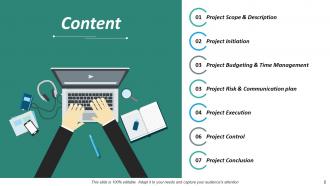
Slide 2: This slide presents Content which presents Project Scope & Description, Project Initiation, Project Budgeting & Time Management, Project Risk & Communication plan, Project Execution, Project Control, Project Conclusion.
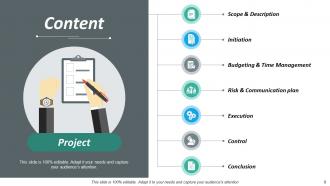
Slide 3: This slide presents Project and Content Scope & Description, Initiation, Budgeting & Time Management, Risk & Communication plan, Execution, Control, Conclusion.
Slide 4: This slide shows Project Scope & Description which further presents - Project Description, Project Brief, Project Management Process, Project Lifecycle.
Slide 5: This slide shows Project Brief which further presents - Project Name, XYZ Framework, Project Fund: $ 5M, Duration: 01 September 2017- 31 August 2018 Expected Outcomes Status, Project Brief/ Summary, Objectives, Mention in brief about the project, its objectives and the final expected outcomes.
Slide 6: This slide presents Project Description. Describe in detail, what the project is all about.
Slide 7: This slide shows Project Management Lifecycle. We have mentioned a framework of the project lifecycle, you can use it as per your requirements.
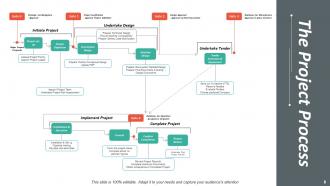
Slide 8: The Project Process which showcases a flow diagram.
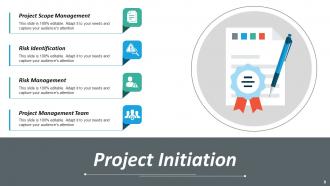
Slide 9: This Slide presents Project Initiation which further presents Project Scope Management, Risk Identification, Risk Management, Project Management Team.
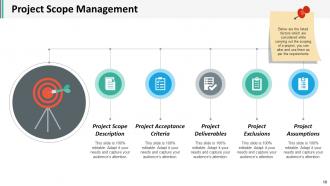
Slide 10: This slide shows Project Scope Management which further showcases Project Scope Description, Project Deliverables, Project Acceptance Criteria, Project Exclusions, Project Assumptions, Below are the listed factors which are considered while carrying out the scoping of a project, you can alter and use them as per the requirements
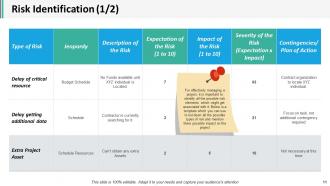
Slide 11: This slide presents Risk Identification (1/2). For effectively managing a project, it is important to identify all the possible risk elements which might get associated with it. Below is a template which you can use to list down all the possible types of risk and mention there possible impact on the project.
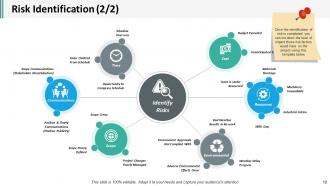
Slide 12: This slide showcases Risk Identification (2/2). Once the identification of risk is completed, you can list down the level of impact these risk factors would have on the project using this template below.
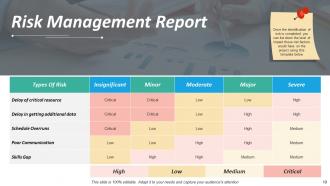
Slide 13: This slide presents Risk Management Report. Once the identification of risk is completed, you can list down the level of impact these risk factors would have on the project using this template below.
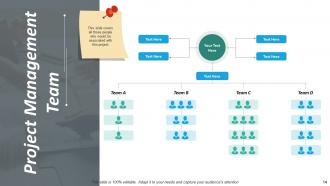
Slide 14: This slide shows Project Management Team. This slide covers all those people who would be associated with this project.
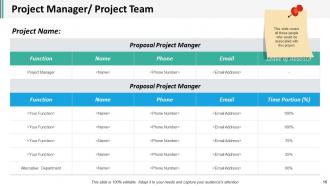
Slide 15: This slide presents Project Manager/ Project Team which further showcases. This slide covers all those people who would be associated with this project.
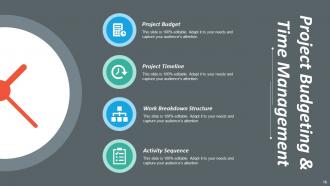
Slide 16: This slide shows Project Budgeting & Time Management which further presents- Project Budget, Project Timeline, Work Breakdown Structure, Activity Sequence.
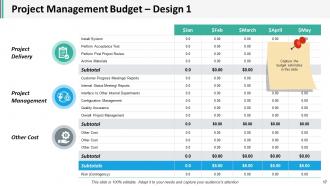
Slide 17: This slide presents Project Management Budget – Design 1 which further presents- Project Delivery, Project Management, Other Cost, Capture the budget estimates in this slide.
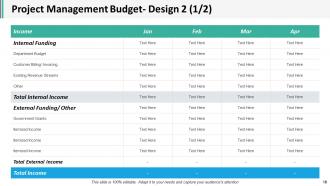
Slide 18: This slide showcases Project Management Budget- Design 2 (1/2).
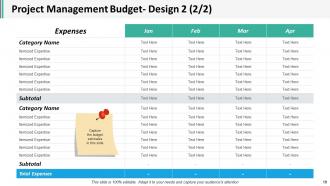
Slide 19: This slide shows Project Management Budget- Design 2 (2/2). Capture the budget estimates in this slide
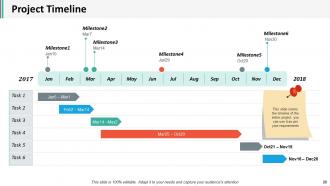
Slide 20: This slide presents Project Timeline. This slide covers the timeline of the entire project, you can use it as per your requirements.
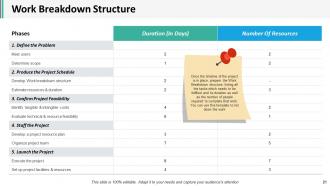
Slide 21: This slide presents Work Breakdown Structure. Once the timeline of the project is in place, prepare the Work Breakdown structure, listing all the tasks which needs to be fulfilled and its duration as well as the number of people required to complete that work. You can use this template to list down the work.
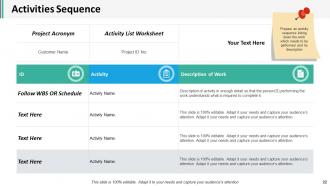
Slide 22: This slide shows Activities Sequence. Prepare an activity sequence listing down the work which needs to be performed and its description.
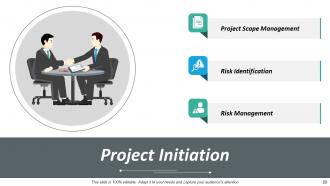
Slide 23: This slide presents Project Initiation which further presents- Project Scope Management, Risk Identification, Risk Management.
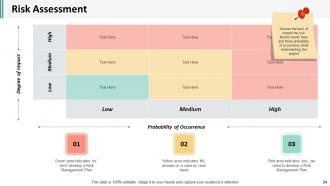
Slide 24: This slide presents Risk Assessment which further showcases- Probability of Occurrence, Degree of Impact, Assess the level of impact the risk factors would have and there probability of occurrence while implementing the project
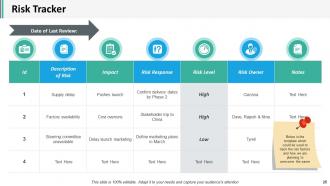
Slide 25: This slide shows Risk Tracker which further presents-Date of Last Review. Below is the template which could be used to track the risk factors and how we are planning to overcome the same.
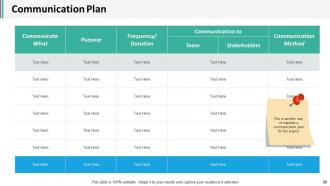
Slide 26: This slide presents Communication Plan. This is another way of maintain a communication plan for the project.
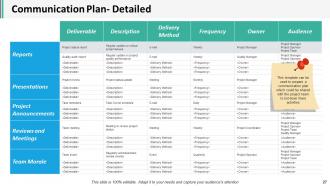
Slide 27: This slide showcases Communication Plan- Detailed. This template can be used to prepare a communication plan which could be shared with the project team to list down there activities.
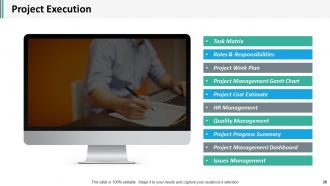
Slide 28: This slide presents Project Execution which also presents- Task Matrix, Roles & Responsibilities, Project Work Plan, Project Management Gantt Chart, Project Cost Estimate, HR Management, Quality Management, Project Progress Summary, Project Management Dashboard, Issues Management.
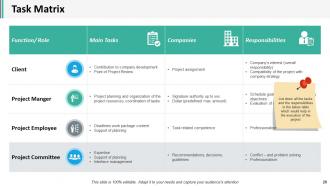
Slide 29: This slide presents Task Matrix. List down all the tasks and the responsibilities in the below table which would help in the execution of the project.
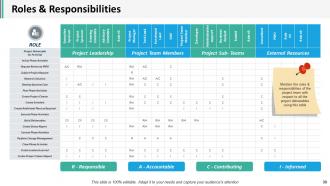
Slide 30: This slide showcases Roles & Responsibilities.Mention the roles & responsibilities of the project team with respect to all the project deliverables using this table.
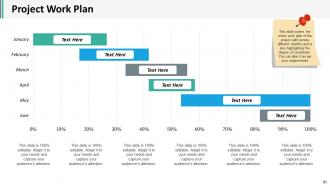
Slide 31: This slide presents Project Work Plan. This slide covers the entire work plan of the project split across different months and is also highlighting the degree of completion. You can alter it as per your requirements.
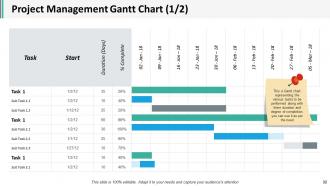
Slide 32: This slide shows Project Management Gantt Chart (1/2). This a Gantt chart representing the various tasks to be performed along with there duration and degree of completion, you can use it as per the need.
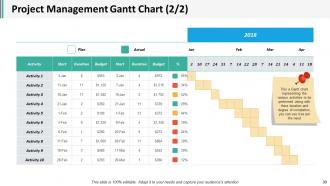
Slide 33: This slide presents Project Management Gantt Chart (2/2). This a Gantt chart representing the various activities to be performed along with there duration and degree of completion, you can use it as per the need.
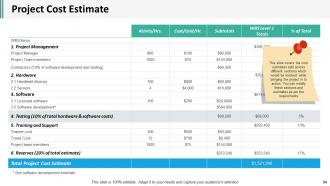
Slide 34: This slide shows Project Cost Estimate. This slide covers the cost estimates split across different sections which would be involved while bringing the project in to action. You can modify these sections and estimates as per the requirements.
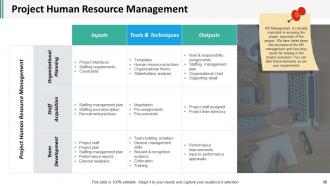
Slide 35: This slide presents Project Human Resource Management.HR Management is critically important in ensuring the proper execution of the project. We have listed down the key tasks of the HR management and how they would be helping in the project execution. You can alter these elements as per your requirements.
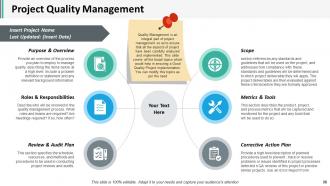
Slide 36: This slide shows Project Quality Management. Quality Management is an integral part of project management so as to ensure that all the aspects of project have been carefully analysed and implemented. This slide covers all the broad topics which would help in ensuring a Good Quality Project implementation. You can modify this topics as per the need.
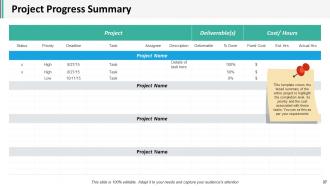
Slide 37: This slide presents Project Progress Summary. This template covers the broad summary of the entire project to highlight the completion level, its priority and the cost associated with these tasks. You can se this as per your requirements.
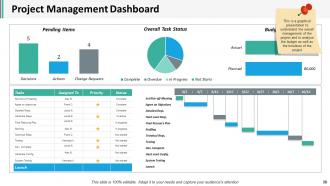
Slide 38: This slide presents Project Management Dashboard which further presents- Set Kick-off-Meeting, Agree on Objectives, Detailed Reqs., Hard ward Reqs., Final Resource Plan, Staffing, Technical Reqs., Testing, Dev. Complete, Hard ward Config, System Testing, Launch, This is a graphical presentation to understand the overall management of the project and to analyse the budget as well as the timelines of the project.
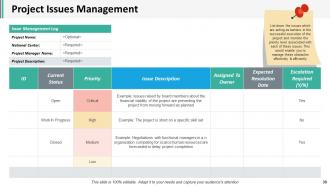
Slide 39: This slide presents Project Issues Management. List down the issues which are acting as barriers in the successful execution of the project and mention the priority level associated with each of these issues. This would enable you to manage these obstacles effectively & efficiently.
Slide 40: This slide shows Project Control which further shows- Project Status Report, Actual Vs. Planned Comparison, Cost Performance Index, Project Health Card, Project Dashboard- KPI’s.
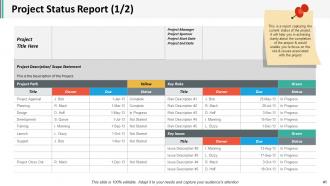
Slide 41: This slide presents Project Status Report (1/2). This is a report capturing the current status of the project. It will help you in achieving clarity about the completion of the project & would enable you to focus on the risk & issues associated with the project.
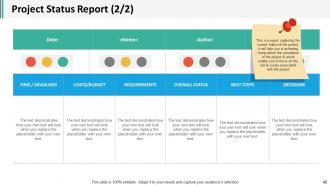
Slide 42: This slide shows Project Status Report (2/2). This is a report capturing the current status of the project. It will help you in achieving clarity about the completion of the project & would enable you to focus on the risk & issues associated with the project.
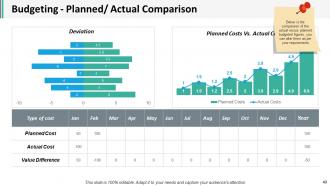
Slide 43: This slide presents Budgeting - Planned/ Actual Comparison. Below is the comparison of the actual versus planned budgeted figures, you can alter them as per your requirements.
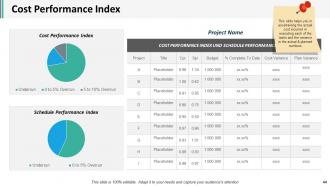
Slide 44: This slide shows Cost Performance Index.This slide helps you in ascertaining the actual cost incurred in executing each of the tasks and the variance in the actual & planned numbers.
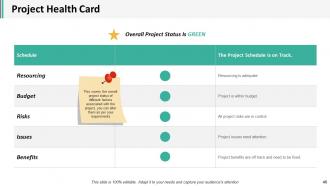
Slide 45: This slide showcase Project Health Card.This covers the overall project status of different factors associated with the project, you can alter them as per your requirements.
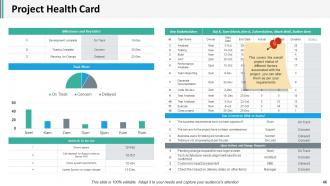
Slide 46: This slide presents Project Health Card. This covers the overall project status of different factors associated with the project, you can alter them as per your requirements.
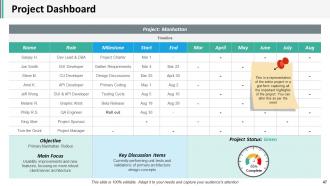
Slide 47: This slide showcases Project Dashboard which further showcases- Objective, Main Focus, Key Discussion Items, Project Status, Complete. This is a representation of the entire project in a gist form capturing all the important highlights of the project. You can alter this as per the need
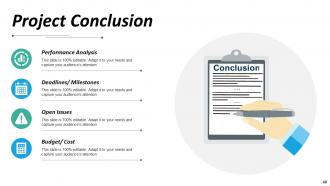
Slide 48: This slide presents Project Conclusion which further showcases Performance Analysis, Deadlines/ Milestones, Open Issues, Budget/ Cost.
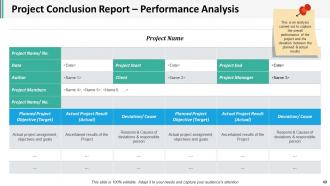
Slide 49: This slide presents Project Conclusion Report – Performance Analysis.This is an analysis carried out to capture the overall performance of the project and the deviation between the planned & actual results.
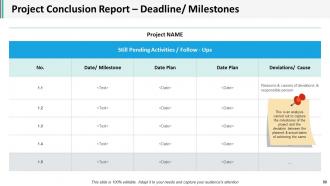
Slide 50: This slide shows Project Conclusion Report – Deadline/ Milestones. This is an analysis carried out to capture the milestones of the project and the deviation between the planned & actual dates of achieving the same.
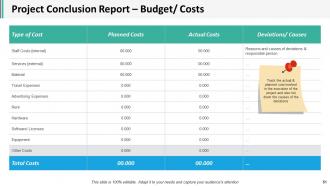
Slide 51: This slide presents Project Conclusion Report – Budget/ Costs. Track the actual & planned cost involved in the execution of the project and also list down the causes of the deviations.
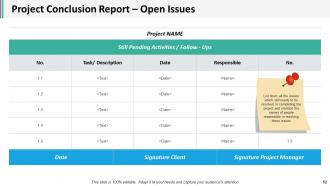
Slide 52: This slide showcases Project Conclusion Report – Open Issues. List down all the issues which still needs to be resolved in completing the project and mention the names of people responsible in resolving those issues.
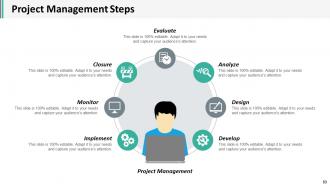
Slide 53: This slide presents Project Management Steps which are- Evaluate, Closure, Analyze, Monitor, Design, Implement, Develop, Project Management.
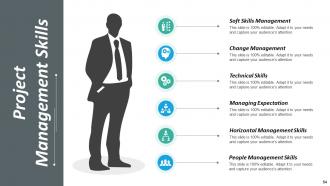
Slide 54: This slide presents Project Management Skills- Soft Skills Management, Change Management, Technical Skills, Managing Expectation, Horizontal Management Skills, People Management Skills.
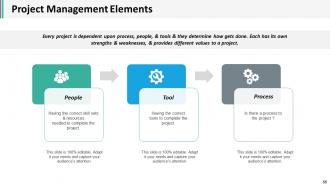
Slide 55: This slide presents Project Management Elements.
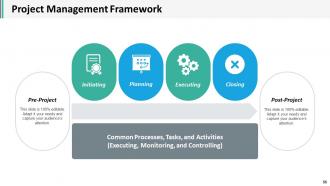
Slide 56: This slide shows Project Management Framework Common Processes, Tasks, and Activities, Initiating, Planning, Executing, Closing, Pre-Project, Post-Project.
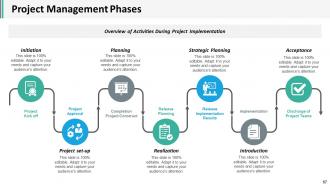
Slide 57: This slide presents Project Management Phases which further presents-Overview of Activities During Project Implementation Project Kick off, Project Approval, Completion, Project Construct, Release Planning, Release Implementation Results, Implementation, Discharge of Project Teams, Initiation, Project set-up, Planning, Realization, Strategic Planning, Introduction, Acceptance.
Slide 58: This slide is a Coffee Break image for a halt.
Slide 59: This slide is titled Additional Slides.
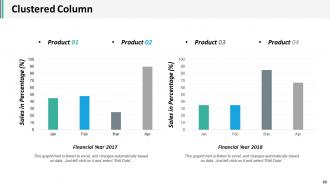
Slide 60: This slide shows Clustered Column.
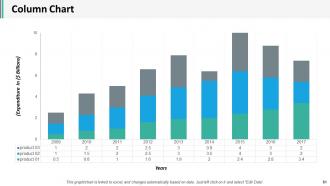
Slide 61: This slide presents Column Chart.
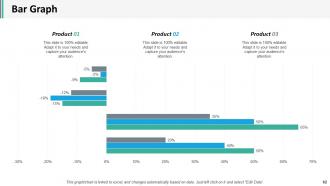
Slide 62: This slide shows Bar Graph.
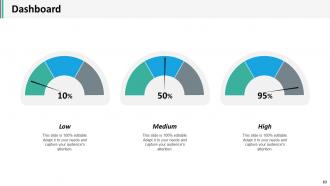
Slide 63: This slide presents Dashboard.
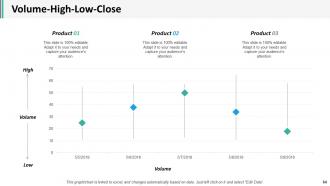
Slide 64: This slide shows Volume-High-Low-Close.
Slide 65: This slide shows financial chart.
Slide 66: This slide presents About Our Company.
Slide 67: This slide showcases Our Team with Name and Designation to fill.
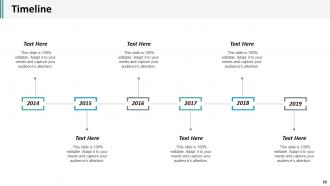
Slide 68: This is a Timelines slide to show- Plan, Budget, Schedule, Review.
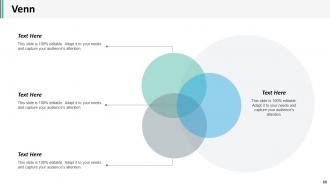
Slide 69: This slide displays a Venn diagram image
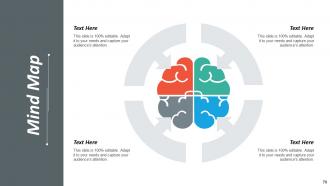
Slide 70: This slide shows a Mind map for representing entities.
Slide 71: This slide presents Target Achievement.
Slide 72: This is a Thank You image slide with Address, Email and Contact number.
Project Administration Powerpoint Presentation Slides with all 72 slides:
Increase the amount of interaction with our Project Administration Powerpoint Presentation Slides. Create conditions for frequent gatherings.
-
Project Administration
-
Content
-
Content
-
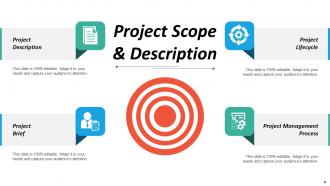
Project Scope Description
-
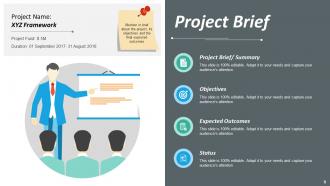
Project Brief
-
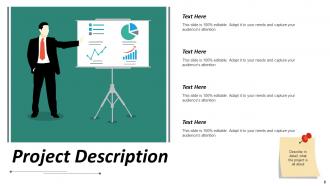
Project Description
-
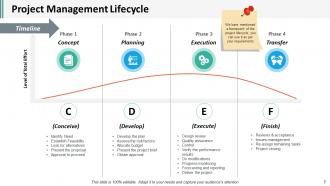
Project Management Lifecycle
-
The Project Process
-
Project Initiation
-
Project Scope Management
-
Risk Identification 1 2
-
Risk Identification 2 2
-
Risk Management Report
-
Project Management Team
-
Project Manager Project Team
-
Project Budgeting Time Management
-
Project Management Budget Design 1
-
Project Management Budget Design 2 1 2
-
Project Management Budget Design 2 2 2
-
Project Timeline
-
Work Breakdown Structure
-
Activities Sequence
-
Project Initiation
-
Risk Assessment
-
Risk Tracker
-
Communication Plan
-
Communication Plan Detailed
-
Project Execution
-
Task Matrix
-
Roles Responsibilities
-
Project Work Plan
-
Project Management Gantt Chart 1 2
-
Project Management Gantt Chart 2 2
-
Project Cost Estimate
-
Project Human Resource Management
-
Project Quality Management
-
Project Progress Summary
-
Project Management Dashboard
-
Project Issues Management
-
Project Control
-
Project Status Report 1 2
-
Project Status Report 2 2
-
Budgeting Planned Actual Comparison
-
Cost Performance Index
-
Project Health Card
-
Project Health Card
-
Project Dashboard
-
Project Conclusion
-
Project Conclusion Report Performance Analysis
-
Project Conclusion Report Deadline Milestones
-
Project Conclusion Report Budget Costs
-
Project Conclusion Report Open Issues
-
Project Management Steps
-
Project Management Skills
-
Project Management Elements
-
Project Management Framework
-
Project Management Phases
-
Coffee Break
-

Additional Slides
-
Clustered Column
-
Column Chart
-
Bar Graph
-
Dashboard
-
Volume High Low Close
-

Vision Mission Goal
-
About Our Company
-

Our Team
-
Timeline
-
Venn
-
Mind Map
-
Target Achievement
-

Thank You
FAQs for Project Administration
So basically you're the one keeping everyone on track and making sure nothing falls through the cracks. Scheduling meetings, watching deadlines, managing budgets - all that fun stuff. Communication is huge though. Keep stakeholders updated regularly or they'll start panicking (trust me on this one). You're also documenting everything because someone always forgets what was decided. Watch for problems early. Don't wait for things to blow up. Oh, and you're basically connecting all the moving pieces together. Stay ahead of issues instead of just putting out fires all the time.
Dude, you gotta stay on top of communication or your project will completely fall apart. Set up regular check-ins so people actually know what they're doing. I swear, half the problems I see happen because someone didn't speak up early enough. Mix it up - do weekly reports for the formal stuff, then just shoot quick messages for the day-to-day things. Hallway chats work too, honestly. The trick is getting ahead of issues instead of scrambling later. Pick your communication schedule early and actually stick to it. Trust me, you'll hit way more deadlines this way.
Definitely get a project management tool first - Asana or ClickUp work great. Spreadsheets are such a nightmare for tracking stuff, trust me. Slack's probably your best bet for team chat, way better than endless email chains. You'll need Zoom or Teams for meetings obviously. Google Workspace keeps all your docs in one place which is clutch. Oh and Toggl's solid for time tracking if you need to bill clients or just see where hours are going. I'd start simple though - pick one PM tool and one chat app, then build from there as you figure out what's actually missing.
Break everything into smaller chunks first, then work backwards from your deadline. Map out what depends on what - like you can't launch without testing, that kind of thing. Always build in buffer time because stuff will go wrong, trust me. Check in weekly and don't wait to tell people about delays - that's the worst. I learned this the hard way honestly. Each Monday I look at what's coming and hunt for potential issues before they blow up. Way better than scrambling to fix things after they've already derailed your timeline.
Honestly, risk management is like having a good backup plan for everything that could go sideways. Start by thinking through what might screw up your project - missed deadlines, money running out, team drama, whatever. Figure out how likely each thing is to actually happen. Then make a plan for dealing with it before it becomes a disaster. I learned this the hard way on my first big project lol. Build these check-ins into your regular meetings so you're not scrambling later. Way better to catch problems early than spend weeks fixing everything afterward.
Honestly, daily standups are your best bet even though they feel super awkward at first. Get everyone sharing what they're working on in quick check-ins. Slack channels help too - people can actually see progress and jump in when someone needs help. I'd pair people up on specific tasks rather than hoping collaboration just happens naturally. Oh and definitely celebrate team wins, not just individual ones. Quieter people need extra nudging to speak up, so watch for that. Start with maybe one weekly ritual and add more once it clicks.
Honestly? Timeline and budget are the obvious ones - are you hitting your milestones and not bleeding money? Resource utilization matters too. But here's what most people miss: team velocity and how happy your stakeholders actually are. Those two will make or break you long-term. Quality scores for your deliverables are crucial obviously. Don't track everything though - pick maybe 5-7 metrics tops and check them weekly. I've seen teams drown in spreadsheets and miss the actual problems. Start basic, you can always add more complicated stuff later if you need it.
Honestly, think of project documentation as your safety net. It stops you from having to repeat the same explanations over and over (which gets old fast). Write down your scope, timelines, and major decisions so everyone can just look stuff up instead of bugging you constantly. Trust me, you'll thank yourself when your boss asks "remind me why we went this direction?" months later and you actually have an answer ready. Even simple meeting notes help a ton - doesn't have to be fancy. Just something so you're not scrambling when people leave or new folks join mid-project.
Honestly, you gotta jump on this stuff before it gets ugly. I've watched way too many projects completely fall apart because someone ignored the drama for weeks - it's painful to see. Talk to each person separately first so you actually understand what's going on. Then get everyone in a room for real conversation, not just surface-level politeness. Focus on the actual work problems, not who said what to whom. Sometimes you can fix it by clarifying roles so people aren't stepping on each other. Other times? Just put them on different tasks and call it a day.
Honestly, document everything from the start and set up regular check-ins with everyone involved. Create a shared tracker for all stakeholder requirements - trust me on this one. I've watched so many projects crash because people thought they were aligned when they definitely weren't. Get written approval on big deliverables and changes, no exceptions. Weekly touchpoints work way better than scrambling to fix misunderstandings later. Also set up some kind of reminder system for requirement reviews. Don't let scope creep sneak in without proper sign-offs either.
Make a solid baseline budget first - and don't lowball the numbers just to get it approved, trust me on this one. Weekly tracking beats monthly every time. Use a shared spreadsheet so everyone can see what's happening. You'll want approval limits set up too, otherwise you're either drowning in tiny decisions or missing the big stuff. Always pad it with 10-15% for surprises because something always goes sideways. Oh, and bring up budget stuff in regular meetings - nobody likes finding out they're broke at the last minute.
Document the changes first - seriously, write down what's shifting and why. Otherwise you'll forget half of it later. Next step is figuring out how this messes with your timeline and budget. Most PMs I know just say "sure, no problem" without thinking it through (big mistake). Get your project plan updated ASAP and tell everyone what this actually means for deadlines. Being proactive beats scrambling later. Oh, and set up those regular team check-ins - scope creep is sneaky and you'll want to catch it before it completely derails things.
Definitely start with project management tools - Asana, Monday, or Jira. You'll practically live in these things. Communication is massive since you're constantly juggling between teams and clients. Learn some basic data analysis too because everyone wants fancy dashboards these days (trust me on this one). Budgeting and timeline stuff is crucial. Oh, and get certified in Agile or PMP - makes you look legit and actually gives you solid frameworks. The trick is staying detail-focused without losing sight of the bigger picture. It's honestly harder than it sounds but super rewarding once you get the hang of it.
Oh dude, you need to automate that stuff ASAP. I'd start with something like Asana or Monday for project management - they handle all the scheduling and task tracking automatically. Set up those automated reminders so you're not constantly nagging people. The digital document thing is huge too, no more digging through endless email chains looking for one stupid approval. I swear the time savings are insane once you actually commit to setting it up right. Pick whatever's driving you most crazy first (probably scheduling?) and go from there.
Honestly, scope creep will mess you up every time - people always want "just one more thing." Document everything upfront because clients have selective memory about what they actually agreed to. Set up regular check-ins too, otherwise communication goes to hell fast. Timeline-wise? Always pad them because Murphy's Law is real in project management. Oh, and that kickoff meeting thing is clutch - get everyone in a room to hash out roles and deliverables from day one. Being proactive beats scrambling to fix problems later.
No Reviews