

Project Budgeting Powerpoint Presentation Slides





Try Before you Buy Download Free Sample Product
 Impress Your
 Audience
 100%
100% Editable
 Save Hours
 of Time


Project budgeting involves various procedural steps. Addressing all such significant steps we have come up thoroughly researched content-ready project budgeting PowerPoint presentation. You can use this project accounting PowerPoint templates to showcase your project's planned sales volume and revenues, resource quantities, expenses and cash flows. In this project cost management PPT, we have incorporated slides like business budget management, business timeline, work breakdown structure, activities sequence, and financial dashboard etc. This amazingly designed business costing PPT presentation help to present various topics such as budgeting control, budget planning, cost estimation, planning cost management, estimating cost, determining budget, controlling cost, program expenses and productivity, PMBOK, earned value management funds management and business accounting etc. Download this project financial estimate PowerPoint slides to make realistic and effective Presentations. Our appealing project budgeting PPT slide is useful to measure business expenditure and productivity. Our Budget Presentation Slides believe in a clutter free approach. Their excellent graphics are a great example.
People who downloaded this PowerPoint presentation also viewed the following :
Content of this Powerpoint Presentation
Slide 1: This is an introductory slide to Project Budgeting.
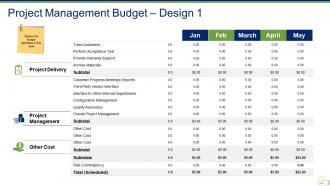
Slide 2: This slide presents Design 1 of Project Management Budget. Capture the budget estimates in this slide for- Project Management Budget, Project Delivery, Other cost.
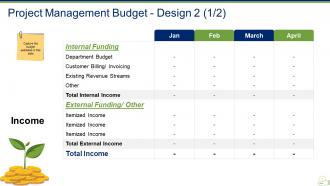
Slide 3: This slide presents Design 2 (Income aspect) of Project Management Budget. State your budget with Internal or External funding in terms of months etc.
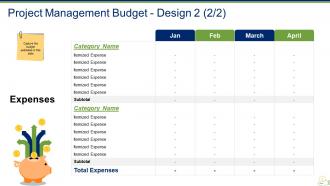
Slide 4: This slide presents Design 3 (Expenses) of Project Management Budget. Capture the budget estimates in this slide.
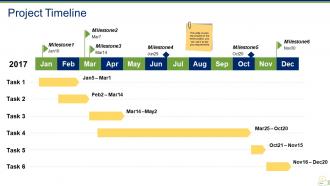
Slide 5: This slide presents a Project Timeline. It covers the timeline of the entire project, you can use it as per your requirements.
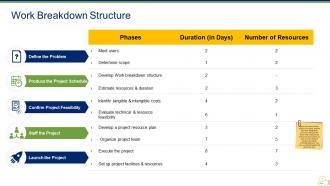
Slide 6: This slide presents a Work Breakdown Structure. List all the tasks needed to be fulfilled, its duration as well as the number of people required to complete that work. The main sub headings include- Define the Problem, Produce the Project Schedule, Confirm Project Feasibility, Staff the Project, Launch the Project.
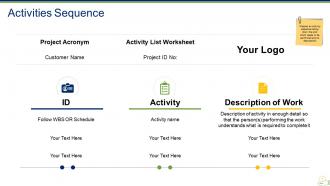
Slide 7: This slide showcases Activities Sequence. Prepare an activity sequence listing down the work which needs to be performed and its description.
Slide 8: This is a Coffee Break slide to halt.
Slide 9: This slide is titled Charts & Graphs to proceed forward to use them.
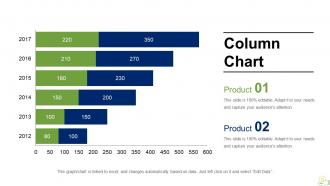
Slide 10: This is a Column Chart to compare two products etc.
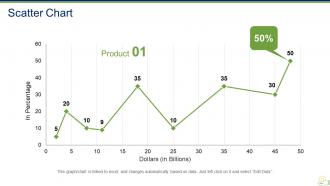
Slide 11: This is a Scatter Chart to show two products, entities in comparison.
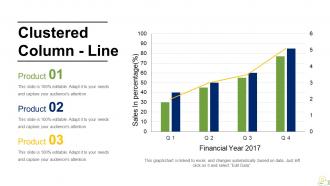
Slide 12: This slide presents a Clustered Column - Line graph in terms of Sales In percentage (%) and Financial Year to calculate.
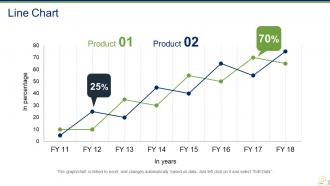
Slide 13: This is a Line Chart slide to show product/entities comparison.
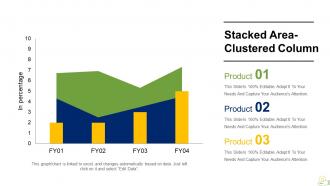
Slide 14: This is a Stacked Area-Clustered Column graph slide to show product or entity comparison.
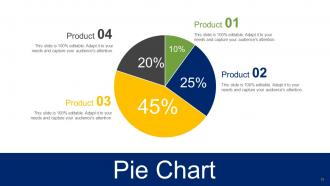
Slide 15: This slide presents a Pie Chart for product, entity comparison.
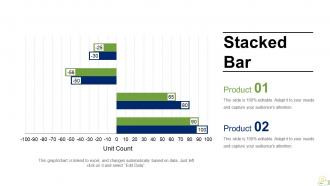
Slide 16: This slide presents a Stacked Bar for product, entity comparison.
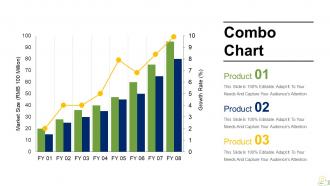
Slide 17: This is a Combo Chart slide to show product growth, comparison etc.
Slide 18: This slide is titled Additional slides to move forward.
Slide 19: This is Our Mission slide with- Vision, Mission, Goal to state.
Slide 20: This is an Our Team slide with image box, name and designation.
Slide 21: This is an Our Goal slide. State your goals here.
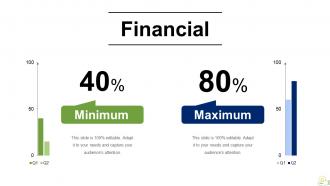
Slide 22: This is a Financial scores slide. State your Minimum & Maximum values here.
Slide 23: This is a Quotes slide. State anything to highlight, or present company values here.
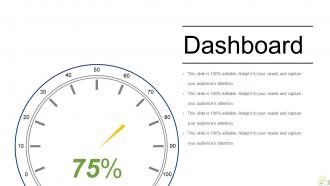
Slide 24: This is a Dashboard slide to show value for a certain entity etc.
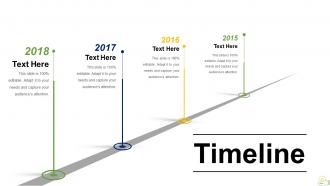
Slide 25: This is a Timeline slide. Show company milestones etc. here.
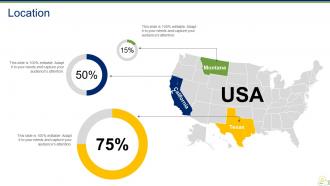
Slide 26: This is a Location slide with USA map o show/mark US specific company growth, considerations etc.
Slide 27: This is a Puzzle slide with text boxes. State information data etc. here.
Slide 28: This is a Mind Map slide with text boxes.
Slide 29: This is a Bulb Or Idea slide to show innovative aspects, a new idea or the sort.
Slide 30: This is a Thank You slide with Address # street number, city, state, Email Address, Contact Numbers.
Project Budgeting Powerpoint Presentation Slides with all 30 slides:
Play a melody with our Project Budgeting Powerpoint Presentation Slides. Your thoughts will strike the right chords every time.
-
Project Budgeting
-
Project Management Budget Design 1
-
Project Management Budget Design 2 1 2
-
Project Management Budget Design 2 2 2
-
Project Timeline
-
Work Breakdown Structure
-
Activities Sequence
-

It s Time For A Coffee Break
-

Charts Graphs
-
Column Chart
-
Scatter Chart
-
Clustered Column Line
-
Line Chart
-
Stacked Area Clustered Column
-
Project Budgeting
-
Stacked Bar
-
Combo Chart
-

Additional slides
-

Our Mission
-

Our Team
-
Our Goal
-
Financial
-

Project Budgeting
-
Dashboard
-
Timeline
-
Location
-
Puzzle
-
Mind Map
-
Bulb Or Idea
-

Thank You
FAQs for Project Budgeting
Okay so first list out your direct costs - labor, materials, equipment, all that obvious stuff. Then tackle indirect costs like overhead and admin fees. Software licenses and facility usage? Yeah, those sneak up on you big time. I'd phase it out by timeline so you know when cash is actually going out the door. Scope creep is basically guaranteed, so build in buffer room for that mess. Oh and definitely tie everything back to your actual deliverables and milestones. Once you've got everything down, tack on like 10-15% contingency because something always goes sideways.
Honestly, stakeholder input changes everything about your budget. Get them involved early and they'll catch stuff you totally missed - requirements, realistic cost estimates, what's actually urgent vs wishful thinking. Department heads and end users know way more about day-to-day expenses than you'd think. The people controlling money? Yeah, definitely talk to them first. Here's the thing though - if you get their buy-in upfront, you won't get blindsided later when asking for approval. I learned this the hard way on a project last year. Just make sure you're talking to the right people and do it before you finalize anything.
Honestly, it's all about what you're dealing with. Simple project? Just use Excel or Google Sheets - I swear people overlook how much you can do with a good spreadsheet. Bigger team or more moving parts? Try Monday.com or Smartsheet for better collaboration stuff. Microsoft Project's solid too but can be overkill sometimes. Enterprise level? Look into Clarity or Planview. My advice though - start with whatever your team already uses and upgrade only when the tool starts getting in your way. Most of these have free trials anyway, so you can mess around and see what works.
Dude, definitely set aside 10-20% for random stuff that'll go wrong - trust me on this one. My first big project? We ran out of money halfway through because I thought I had everything figured out. Check your spending every week so you catch problems early. When weird expenses pop up, write down exactly what caused them - broken equipment, clients changing their minds, whatever. I know it sounds boring but those notes will save your ass next time you're making a budget. Even if you're already deep into this project, start tracking now. Future you will thank you.
So basically fixed costs don't budge no matter what - your software licenses, equipment rentals, that flat-rate consultant fee. Variable costs are the opposite. They go up and down with whatever you're actually doing - materials, hourly workers, travel expenses. Here's what gets annoying though: some costs look fixed but really aren't. You'll want to sort everything into these buckets right when you start budgeting. That way you know where you can adjust if things change and where you're stuck paying regardless. Trust me, it saves headaches later when your scope inevitably shifts around.
Start by breaking your project into actual deliverables, then match each budget item to those specific goals. For every expense, ask yourself "what does this actually accomplish?" - seriously, it's a game changer. Most people just dump numbers into categories and wonder why their budget feels useless. Put your biggest money toward stuff that directly hits your main objectives. Check it against your project plan regularly (I know, boring but necessary). Be ready to move funds around when priorities shift. Oh, and if you can't connect a budget line to a concrete goal? Just cut it. Ruthless but effective.
So contingency funds are basically your "oh shit" money when projects go haywire. I usually tell people to budget 5-20% extra for the inevitable surprises - vendors jacking up prices, random new requirements popping up, you know the drill. It's like insurance for your project. You really don't want to touch it for regular scope creep though, that's just bad planning on your part. Save it for the genuine curveballs. Oh and write down what you spend it on! Future you will thank you when estimating gets easier.
Honestly, your old budgets are gold for planning ahead. I'd dig into where you always blow past estimates - there's usually a pattern hiding there. My "misc expenses" used to be such a joke, like triple what I thought they'd be. Track what you actually spent vs what you planned, then use those real numbers for next time. Similar projects with similar team sizes? That's where you'll see the clearest trends. Even a basic spreadsheet comparing budget vs reality will save you headaches later. Trust me, start collecting this stuff now before you forget the details.
Check your spending against budget every week - don't wait until month-end or you'll get blindsided. Have your team estimate remaining work regularly so you catch overruns early. Set approval limits for bigger expenses too. Oh, and instead of one massive buffer at the end, I'd sprinkle smaller contingency amounts into each major task. Way better approach. Weekly reviews are clutch for spotting cost drift before it turns into a nightmare. Pick a day (maybe Fridays?) and actually stick to it.
So I usually check my budget vs actual costs monthly and whenever we hit major milestones. Just calculate the variance percentage for each category - most teams shoot for 10-15% accuracy but honestly that's pretty tough when scope creep hits. Keep a running list of where you're always going over or under budget, those patterns are gold for future projects. The trick is catching variances early before they spiral into massive overruns. Oh and don't beat yourself up if you're off at first - estimating is harder than people think!
Scope creep will absolutely kill you - I've seen it happen too many times. Always pad your estimates by at least 20% because stuff WILL go wrong. Hidden costs are the worst though. Software licenses, training new people, contractor setup fees... it all adds up crazy fast. Get your team involved in estimating instead of flying solo. Document everything you're assuming upfront. Oh, and start tracking your actual spending against the budget immediately - like day one. You'll catch problems way earlier that way. Honestly, being too optimistic with timelines is probably the most common mistake I see.
Build contingency right into your budget - usually 5-15% depending on how messy your project might get. I always make separate line items for the risks I can actually see coming, then throw in a management reserve for all the curveballs that'll definitely hit you later. If you've got time, run some Monte Carlo sims or sensitivity analysis to model different scenarios. Track your burn rate against these reserves as things unfold and adjust when risks either blow up or disappear. Honestly, just start by listing your top 5 risks and what they'd cost - that's your foundation right there.
First thing - document everything that changed and why. Stakeholders WILL ask later. Compare your actual costs to what you originally budgeted to find the biggest gaps. Here's the thing though: don't just tweak numbers. Really look at what work's left and what resources you actually need based on what you've learned. Your team leads know the real costs better than anyone, so get their input. Oh, and communicate changes early - way better than hoping nobody notices (they always do). Set up regular budget check-ins so you catch problems before they explode.
Big projects are a whole different beast - you can't budget them like small ones. Simple stuff? Yeah, rough estimates work fine. But complex projects with multiple teams and dependencies? You need better methods like three-point estimating. I swear, people always underestimate how messy things get. Build way bigger contingency buffers and break your budget into smaller categories. That way when stuff inevitably goes wrong, you'll actually know where your money went. Trust me, treating a massive overhaul like a basic website update never ends well.
Don't wait until you're already screwed - speak up early! I made this mistake once and tried fixing a budget mess myself first (terrible idea). Shoot them a clear email explaining what changed, why it happened, and how you want to handle it. Give real numbers and timelines, not some wishy-washy "we'll figure it out" response. Here's the key though: always give them options. Like "we can cut this feature or push the deadline back two weeks." Nobody likes getting blindsided, but most people are pretty reasonable when you're upfront about it.
-
Perfect template with attractive color combination.
-
Much better than the original! Thanks for the quick turnaround.