


Budget Management Powerpoint Presentation Slides





Try Before you Buy Download Free Sample Product
 Impress Your
 Audience
 100%
100% Editable
 Save Hours
 of Time


Select our content ready Budget Management Powerpoint Presentation Slides to frame financial policies for your business. Budget planning PowerPoint complete deck includes set of PPT slides such as financial management goals, objectives of financial management, U.S financial system along with regulatory bodies, types of financial instruments we trade in, rights issue, debenture, financial instruments comparison between companies, time value of money, money parameters, money working methodology, valuation of bonds, financial statements, comparative income and balance sheets statements, common size income statement & cash flow statements, trend analysis, graphical representation, ratio analysis, statement showing working capital, fixed capital analysis, leverage analysis, capital structure, cost of capital, working capital analysis, receivables management, inventory management template, tools & techniques, economic order quantity, FIFO & LIFO, commodity exchange basics & types, commodity market in US, financial risk structure, capital assets pricing model etc. Download this ready to use financial plan management presentation deck to monitor spending and forecast future spending. Highlight your hard work by adding vibrant full color Budget Management Powerpoint Presentation Slides to your presentations. We work hard to compliment your hard work.
People who downloaded this PowerPoint presentation also viewed the following :
Content of this Powerpoint Presentation
Slide 1: This slide introduces Budget Management. State Your Company Name and begin.
Slide 2: This is Our Agenda slide. State your agendas here.
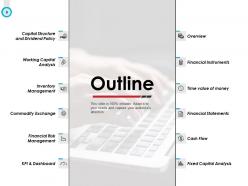
Slide 3: This slide presents financial management Outline along with Overview, Financial Instruments, Financial Statements, Cash Flow, Fixed Capital Analysis, Capital Structure and Dividend Policy, Working Capital Analysis, Inventory Management, Commodity Exchange, Financial Risk Management, Time value of money, KPI & Dashboard.
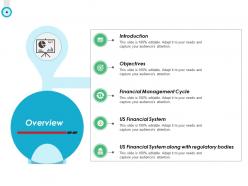
Slide 4: This slide presents an Overview along with the following points to state- US Financial System Along with Regulatory Bodies, US Financial System, Financial Management Cycle, Objectives, Introduction.
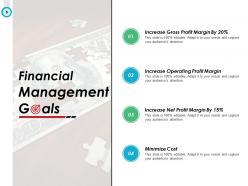
Slide 5: This slide shows Financial Management Goals.
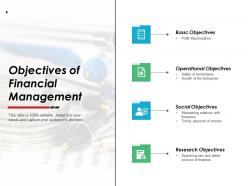
Slide 6: This slide shows the Objectives of Financial Management divided into four categories that we have mentioned.
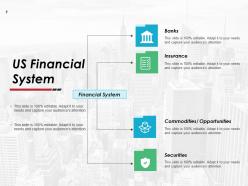
Slide 7: This slide shows certain elements like banks, insurance, commodities, opportunities etc. of US Financial System.
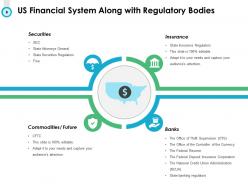
Slide 8: This slide shows US Financial System along with regulatory bodies- Insurance, Banks, Commodities/ Future, Securities.
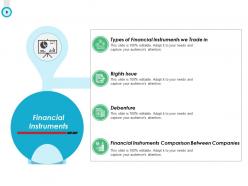
Slide 9: This is Financial Instruments slide which shows Financial Instruments Comparison Between Companies, Debenture, Rights Issue, Types of Financial Instruments we Trade in.
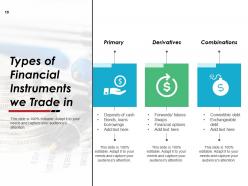
Slide 10: This slide shows Types of Financial Instruments we Trade in under three main categories- Primary, Derivatives, Combinations.
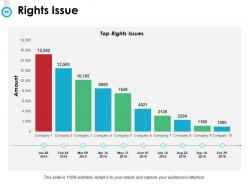
Slide 11: This slide shows Rights Issue in a bar graph/ chart form.
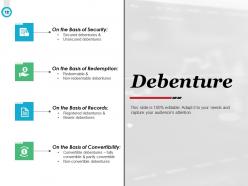
Slide 12: This slide shows the division of Debenture into the following categories- On the basis of security, On the basis of redemption, On the basis of records, On the basis of convertibility.
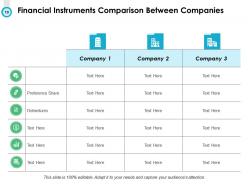
Slide 13: This slide shows Financial Instruments Comparison Between Companies. Use it for analysis or comparison purposes by adding in the relevant text.
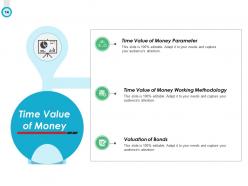
Slide 14: This slide shows Time Value of Money with reference to Valuation of Bonds, Time Value of Money Working Methodology, Time Value of Money Parameter.
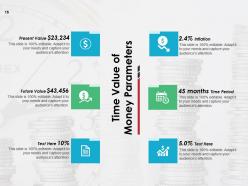
Slide 15: This slide shows Time Value of Money Parameters such as- Inflation, Time Period, Future Value, Present Value. Add relevant stats and use it.
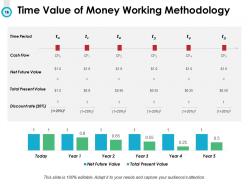
Slide 16: This is Time Value of Money Working Methodology slide with Time Period, Cash Flow, Net Future Value, Total Present Value, Discount rate to show.
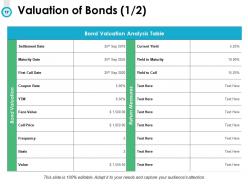
Slide 17: This slide shows the Valuation of Bonds through Bond Valuation Analysis Table.
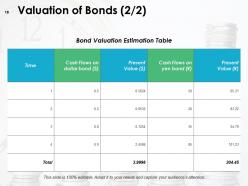
Slide 18: This slide also shows Valuation of Bonds through Bond Valuation Estimation Table.
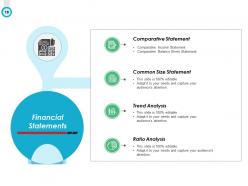
Slide 19: This slide shows Financial Statements with points and sub points.
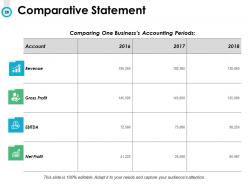
Slide 20: This slide shows Comparative Statement which compares one business’s accounting periods.
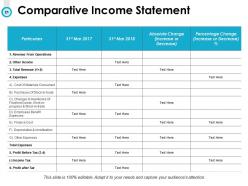
Slide 21: This slide shows Comparative Income Statement with Particulars, years, Absolute Change (Increase or Decrease) and percentage of change to add.
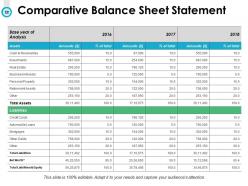
Slide 22: This slide shows Comparative Balance Sheet Statement containing two or three year data respectively.
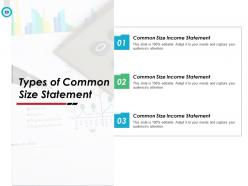
Slide 23: This slide shows Types of Common Size Statement such as- Common size income statement, Common size balance sheet statement, Common size cash flow statement.
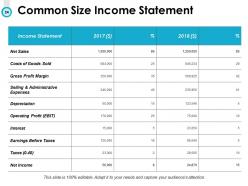
Slide 24: This slide shows Common Size Income Statement with components and their stats as mentioned.
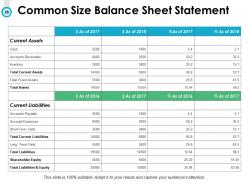
Slide 25: This slide shows Common Size Balance Sheet Statement of different years.
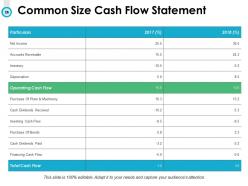
Slide 26: This slide shows Common Size Cash Flow Statement of two years respectively.
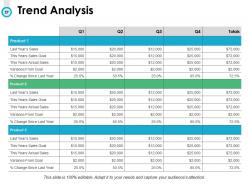
Slide 27: This slide shows the Trend Analysis.
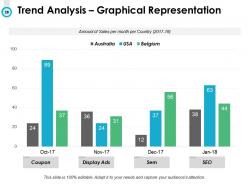
Slide 28: This is also a Trend Analysis slide which shows the Amount of Sales per month per Country.
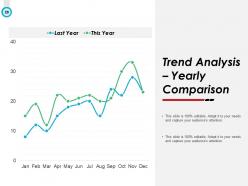
Slide 29: This slide presents an Yearly Comparison of Trend Analysis in a graphical form.
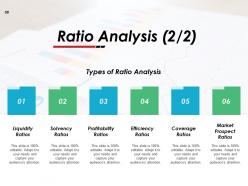
Slide 30: This is a Ratio Analysis slide which shows six Types of Ratio Analysis: Liquidity Ratios, Solvency Ratios, Profitability Ratios, Efficiency Ratios, Coverage Ratios, Market Prospect Ratios.
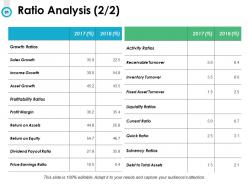
Slide 31: This slide also presents a table showing two year Ratio Analysis.
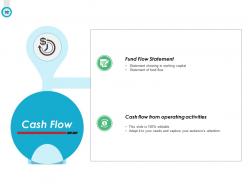
Slide 32: This slide shows Cash Flow with- Cash Flow from Operating Activities, Fund Flow Statement.
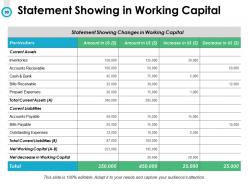
Slide 33: This slide presents a Statement showing changes in working capital.
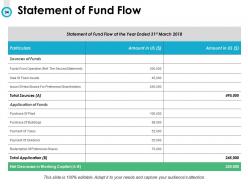
Slide 34: This slide shows Statement of Fund Flow.
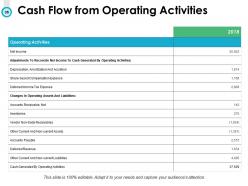
Slide 35: This slide shows Cash Flow from Operating Activities that we have mentioned. You can alter the data according to your business needs.
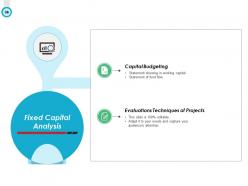
Slide 36: This slide shows Fixed Capital Analysis with two aspects that we have listed- Evaluations Techniques Of Projects, Capital Budgeting.
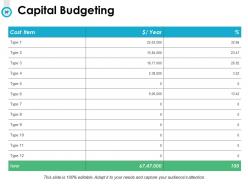
Slide 37: This is a Capital Budgeting slide. Add the name of your cost item, year and % accordingly.
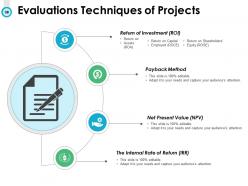
Slide 38: This slide shows Evaluations Techniques of Projects. These are- Return of Investment (ROI), Payback Method, Net Present Value (NPV), The Internal Rate of Return (IRR).
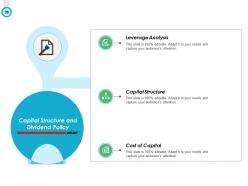
Slide 39: This slide shows Capital Structure and Dividend Policy with these aspects- Cost Of Capital, Capital Structure, Leverage Analysis.
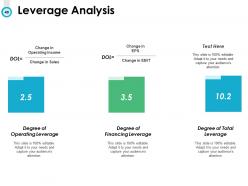
Slide 40: This slide presents Leverage Analysis with- Degree of Operating Leverage, Degree of Financing Leverage, Degree of Total Leverage.
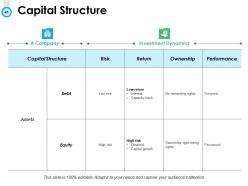
Slide 41: This slide shows Capital Structure with the following sub headings Risk, Return, Capital Structure, Ownership, Performance to state.
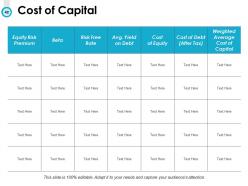
Slide 42: This slide shows the Cost of Capital.
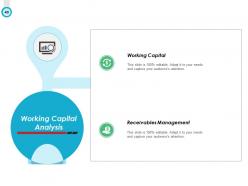
Slide 43: This slide presents Working Capital Analysis with these aspects- Receivables Management, Working Capital.
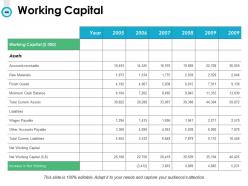
Slide 44: This slide shows Working Capital of several years.
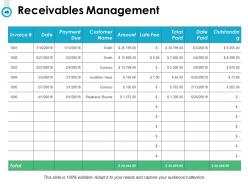
Slide 45: This slide presents a table showing Receivables Management.
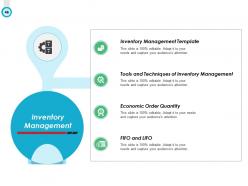
Slide 46: This slide shows Inventory Management with- FIFO and LIFO, Economic Order Quantity, Tools and Techniques of Inventory Management, Inventory Management Template.
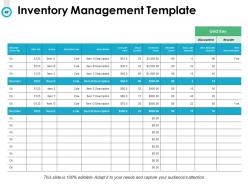
Slide 47: This slide presents Inventory Management Template.
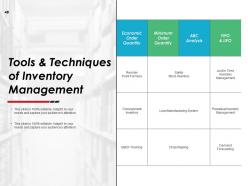
Slide 48: This slide shows TOOLS & TECHNIQUES OF INVENTORY MANAGEMENT such as Economic Order Quantity, MinimumOrder Quantity, ABC Analysis, FIFO & LIFO, Batch Tracking, Dropshipping, Demand Forecasting, Consignment Inventory, Perpetual Inventory Management, Lean Manufacturing System, Just In Time Inventory Management, Safety Stock Inventory, Reorder Point Formula.
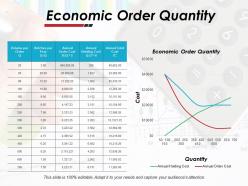
Slide 49: This slide shows Economic Order Quantity with a table and a graph.
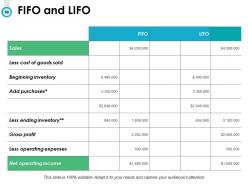
Slide 50: This is FIFO and LIFO slide.
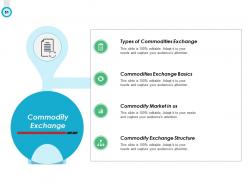
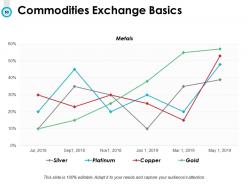
Slide 51: This slide shows the following aspects of Commodity Exchange- Commodity Exchange Structure, Commodity Market in US, Commodities Exchange Basics, Types of Commodities Exchange.
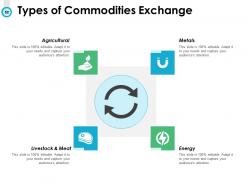
Slide 52: This slide shows Types of Commodities Exchange categories as- Metals, Energy, Livestock & Meat, Agricultural.
Slide 53: This slide presents a graph showing Commodities Exchange Basics. The commodities shown are- Silver, Platinum, Copper, Gold.
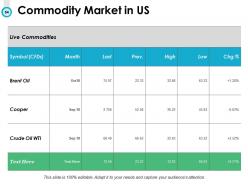
Slide 54: This slide shows Commodity Market in US with commodities like Brent Oil, Cooper etc.
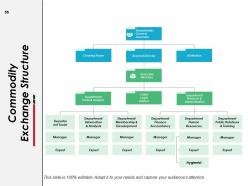
Slide 55: This slide shows Commodity Exchange Structure with Shareholders General Assembly as the main sub heading.
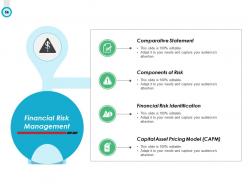
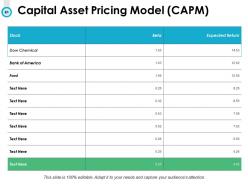
Slide 56: This slide shows Financial Risk Management with aspects like- Capital Asset Pricing Model (CAPM), Financial Risk Identification, Components of Risk, Comparative Statement.
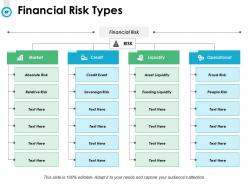
Slide 57: This slide shows Financial Risk Types LIQUIDITY, CREDIT, OPERATIONAL and MARKET for you to state.
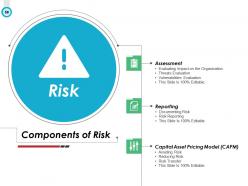
Slide 58: This slide shows Components of Risk under the sub headings- Assessment, Reporting, Controlling.
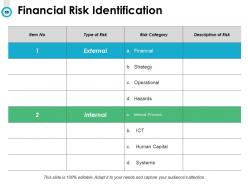
Slide 59: This is Financial Risk Identification slide.
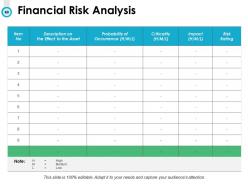
Slide 60: This slide shows Financial Risk Analysis in terms of High, Medium and Low.
Slide 61: This slide shows Capital Asset Pricing Model (CAPM).
Slide 62: This is a KPIs and Dashboard slide containing- KPI dashboards, KPI metrics.
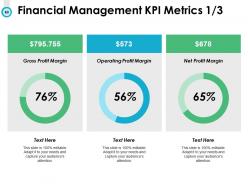
Slide 63: This slide shows Financial Management KPI Metrics- Gross Profit Margin, Operating Profit Margin, Net Profit Margin.
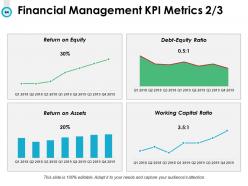
Slide 64: This slide also shows Financial Management KPI Metrics in charts and graphs.
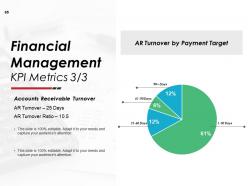
Slide 65: This is another Financial Management KPI Metrics slide showing Accounts Receivable Turnover, AR Turnover by Payment Target.
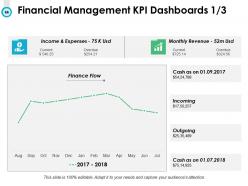
Slide 66: This slide shows Financial Management KPI Dashboards.
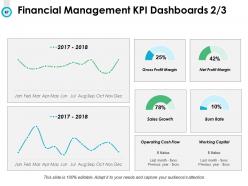
Slide 67: This is also a Financial Management KPI Dashboards slide showing Gross Profit Margin, Net Profit Margin, Sales Growth, Burn Rate, Operating Cash Flow, Working Capital.
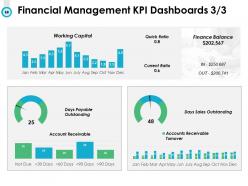
Slide 68: This is another Financial Management KPI Dashboards slide showing Quick Ratio, Current Ratio, Finance Balance, Working Capital, Days Sales Outstanding, Days Payable Outstanding.
Slide 69: This slide shows Budget Management Icons.
Slide 70: This is another slide displaying Budget Management Icons.
Slide 71: This slide reminds about 15 minutes coffee break.
Slide 72: This slide is titled as Additional Slides for moving forward.
Slide 73: This is Our Mission slide with related imagery.
Slide 74: This is Our Team slide with names and designation.
Slide 75: This is a Venn slide with text boxes.
Slide 76: This is a Bulb & Idea slide to state a new idea.
Slide 77: This is Our Goal slide. State your important goals here.
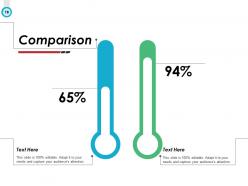
Slide 78: This is a Comparison slide to state comparison between commodities, entities etc.
Slide 79: This is a Target slide. Show your targets here.
Slide 80: This is a Thank You slide with address, contact numbers and email address.
Budget Management Powerpoint Presentation Slides with all 80 slides:
Use our Budget Management Powerpoint Presentation Slides to effectively help you save your valuable time. They are readymade to fit into any presentation structure.




FAQs for Budget Management
Honestly, it comes down to four things. Set some realistic money goals first - don't go crazy here. Track literally everything you spend and earn (yeah, I hate this part too but it actually works). Review it monthly and adjust when life inevitably messes with your plans. Oh, and always budget for random stuff that pops up because something always does. The flexibility thing is huge - rigid budgets just break. Start small with one month and see what happens. You might be surprised how much those little expenses add up when you're actually paying attention to them.
First thing - figure out which budget categories actually match your big goals. Sounds obvious but most people skip this step. Rank everything by ROI and real strategic impact, not whatever's screaming loudest for attention. Use a basic 1-5 scoring system for how well stuff aligns with your main objectives. Honestly, the squeaky wheel approach is overrated. Anything that doesn't support your top 3-5 priorities? Cut it or scale it way back. Set up monthly check-ins to tweak things - your strategy will shift and the budget needs to move with it.
Honestly, just start with what you already have - Excel or Sheets work fine if you don't mind setting everything up yourself. YNAB is amazing for personal stuff but ugh, that monthly fee. Mint's free though. For business, QuickBooks and Xero are pretty standard choices. I'd avoid the fancy enterprise tools like Adaptive Insights unless you're dealing with serious money and need heavy forecasting. My brother went down that rabbit hole and regretted it. Really though, figure out what's actually bugging you about your current setup first, then pick something that fixes those specific problems.
Ugh, surprise expenses are the worst - they'll blow up your whole budget instantly. I always try to pad each category by like 5-10% now because stuff just happens. Our printer literally died the day before a huge presentation once and I was scrambling. Start tracking where these curveballs usually come from so you can spot patterns. Having a separate emergency stash helps too, but honestly sometimes you just gotta move money around and postpone other stuff. Write it all down though - I've gotten way better at predicting this chaos by looking back at what actually happened vs what I planned for.
Honestly, visuals are a game-changer for budget meetings. People's eyes just glaze over when you throw spreadsheets at them. Bar charts for comparing departments work great, or try pie charts for expense breakdowns. It's so much easier to spot problems and trends when you can actually see the data instead of hunting through endless rows of numbers. I learned this the hard way after watching people check their phones during my first budget presentation! Everyone stays way more engaged, and you'll actually get useful feedback instead of blank stares.
Honestly, I'd check in monthly - just quick looks to spot any weirdness early. Then do bigger quarterly reviews where you actually change stuff based on what's happening. Most places I know that have their act together do it this way. Monthly keeps you from getting blindsided, but quarterly is where the real work happens with your team. Annual reviews are pretty much useless now since everything moves so fast. Oh and those quarterly sessions? Get the important people in the room and actually think through different scenarios. Set some calendar reminders for monthly checks and block out time for Q1 planning.
Dude, forecasting is like having a heads up on your finances before stuff hits the fan. You can see what money's coming in, what's going out, and when you might be screwed (or have extra to blow on something fun). I update mine every few months - honestly sometimes I'm lazy and skip a month but whatever. The point is catching problems early instead of scrambling later. Without it? You're basically guessing and that never ends well. It's like driving with your eyes closed. Plus you'll know when you actually have cash to invest or need to cut back on expenses.
Okay so first thing - write down all your fixed costs like rent, salaries, insurance. The boring stuff that doesn't change. For variable costs, look at what you spent last year and make realistic guesses from there. Honestly, I learned this the hard way but always add like 10-15% extra because something will definitely go over budget. Maybe it's shipping costs or whatever, but it happens every time! Break everything into separate categories so you can actually see where your money's going. Check in monthly to see how you're doing vs what you planned, then adjust quarterly.
Oh man, you're gonna spend way more on groceries than you think - I swear it's like black magic how that happens. Don't get too obsessed with perfect categories either, life's messy and your budget should be too. Track everything for like a month first so you actually know where your money goes instead of guessing. Check in weekly or you'll completely lose the plot. Also build in buffer room because being super rigid just makes you want to quit. Honestly, most people fail because they make fantasy budgets based on who they wish they were, not their actual spending habits.
Think of your budget like percentages, not dollar amounts. Set aside 15-20% for long-term stuff right off the bat - treat it like rent, totally untouchable. Then work with what's left for immediate needs. Honestly, this saved my ass so many times because I used to constantly steal from future goals whenever something urgent popped up. And urgent stuff ALWAYS pops up, you know? Prioritize short-term needs by what'll hurt most if you ignore it. The percentage thing sounds boring but it actually works way better than trying to juggle specific dollar amounts. Check your percentages every few months if things change dramatically.
Start with the why before hitting them with numbers - people freak out when they don't understand what's happening. Trust me, I've watched managers completely botch this by just announcing cuts out of nowhere. Don't bury it in an email either, actually sit down with your team. Walk them through how it affects their specific stuff. Here's the thing though - get them involved in figuring out solutions. They usually come up with way better ideas than whatever you're thinking. Oh, and definitely send a follow-up email afterward so nobody's confused about what was decided.
Looking at your past spending is like having a budget cheat sheet honestly. Pull your last 2 years of data and compare month by month - you'll spot weird patterns super fast. Maybe marketing always goes crazy in Q3, or you burn through office supplies way too early (happens to everyone). I'd focus on 2-3 years max since anything older gets pretty irrelevant. Short spikes versus actual trends become obvious once you lay it all out. Makes forecasting way less of a guessing game. Trust me, those consistent overspend areas will jump out at you immediately.
Honestly, start with variance analysis - that's your bread and butter for seeing actual vs budgeted numbers. Forecast accuracy is huge too, plus how long your budget cycles take. ROI on planning is worth tracking but kinda messy to calculate. Check how often departments need revisions and if they're actually hitting spending targets. Cash flow predictability matters more than people think - surprises there will ruin your day fast. I'd pull these monthly, maybe throw together a basic dashboard. But seriously, focus on variance and forecast accuracy first. Those two will tell you pretty quickly if your process is broken or not.
So basically zero-based budgeting means you justify every expense from ground zero each time, instead of just tweaking last year's budget. Yeah, it's annoying at first - I won't lie. But that's kinda the point? You can't just sleepwalk through your spending anymore. Every dollar has to earn its place, which forces you to actually look at stuff you'd normally ignore. Really helps catch waste and those random expenses that somehow stuck around forever. My advice? Don't go crazy - try it on one department first and see how it goes.
Oh dude, your finance team is honestly your best friend here - they get weirdly pumped about teaching budget stuff. Start with basic tracking templates first though, don't dive straight into forecasting madness. Coursera and LinkedIn Learning have decent courses if you want something more formal. Most companies do internal training sessions too, which are usually pretty good. I made the mistake of overwhelming my team with complex stuff right away... big nope. Get everyone comfortable with the basics first. Once they're not terrified of spreadsheets, you can build up from there.
-
Unique design & color.
-
Excellent design and quick turnaround.
-
Professional and unique presentations.
-
Innovative and attractive designs.