


Business Budgeting Powerpoint Presentation Slides




Try Before you Buy Download Free Sample Product
 Impress Your
 Audience
 100%
100% Editable
 Save Hours
 of Time


Introducing our content ready Business Budgeting Powerpoint Presentation Slides. Outline your organization’s financial and operational goals with the help of this professionally designed budget variance presentation deck. The visually appealing financial forecasting PowerPoint complete deck contains ready-to-use templates such as actual cost vs budget, month-wise forecasting, overhead cost analysis, quarterly budget analysis, variance analysis, actual vs target variance, budget vs plan vs forecast, forecast, and projection, etc. Incorporate the professional-looking finance budgeting PPT slides to set savings and debt pay off goals. Make use of the self-explanatory actual vs budget variance PowerPoint templates to record spending and track progress. Utilize the easy-to-understand budget variance analysis PPT visuals to design progress and allocate resources strategically. Furthermore, the budget projection PowerPoint presentation also helps you to organize your savings and spending. Therefore, download this high-quality budget vs actual variance analysis PowerPoint presentation to link cost management efforts to budgeting and reduce complexity. Our Business Budgeting Powerpoint Presentation Slides are construction blocks of communication. They enable effective exchange.
People who downloaded this PowerPoint presentation also viewed the following :
Content of this Powerpoint Presentation
Slide 1: This slide introduces Business Budgeting. State Your Company Name and begin.
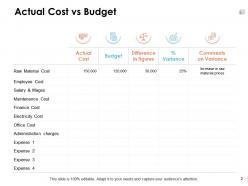
Slide 2: This slide shows Actual Cost vs Budget in tabular form.
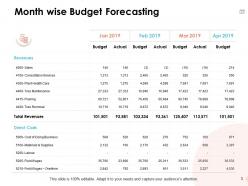
Slide 3: This slide presents Month Wise Budget Forecasting.
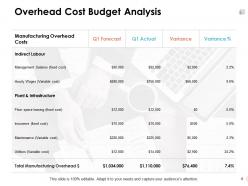
Slide 4: This slide displays Overhead Cost Budget Analysis.
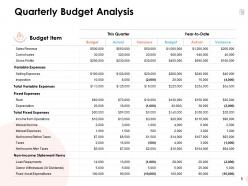
Slide 5: This slide represents Quarterly Budget Analysis in tabular form.
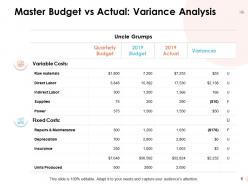
Slide 6: This slide showcases Master Budget vs Actual: Variance Analysis with variable and fixed costs.
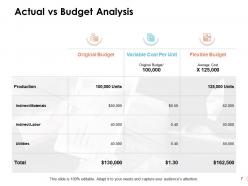
Slide 7: This slide shows Actual vs Budget Analysis with categories as original budget, variable cost per unit and flexible budget.
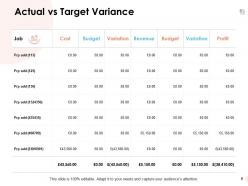
Slide 8: This slide presents Actual vs Target Variance.
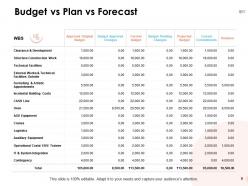
Slide 9: This slide displays Budget vs Plan vs Forecast. You can add data as per requirements.
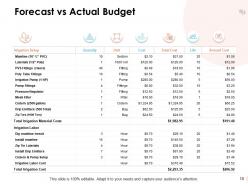
Slide 10: This slide represents Forecast vs Actual Budget.
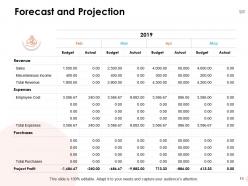
Slide 11: This slide showcases Forecast and Projection on monthly basis.
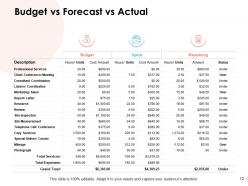
Slide 12: This slide shows Budget vs Forecast vs Actual.
Slide 13: This slide is titled as Additional Slides for moving forward.
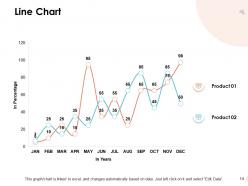
Slide 14: This slide presents Line Chart with two products comparison.
Slide 15: This is Our Mission slide with related imagery and text.
Slide 16: This is Our Team slide with names and designation.
Slide 17: This is a Quotes slide to convey message, beliefs etc.
Slide 18: This is a Financial slide. Show your finance related stuff here.
Slide 19: This is an Idea Generation slide to state a new idea or highlight information, specifications etc.
Slide 20: This is a Thank You slide with address, contact numbers and email address.
Business Budgeting Powerpoint Presentation Slides with all 20 slides:
Use our Business Budgeting Powerpoint Presentation Slides to effectively help you save your valuable time. They are readymade to fit into any presentation structure.


FAQs for Business Budgeting
So you'll need your revenue projections first - that's the big one. Then map out fixed costs like rent and salaries, plus variable stuff like materials. Cash flow timeline is crucial too. Honestly, the buffer for unexpected costs might be the most important part because something always goes sideways. Oh, and don't forget capital expenses if you're buying equipment or whatever. Make your projections realistic, not wishful thinking - I see people mess this up all the time. Use historical data if you've got it, then tweak based on what's happening in your market. Update it monthly or it becomes useless pretty fast.
Honestly, dig into your sales data from the last 2-3 years first - you'll see patterns and seasonal stuff pretty clearly. But don't just copy-paste those numbers forward, that's where people mess up. Think about what's actually changing: new products launching, economic weirdness, marketing budget shifts. Oh, and definitely consider if you might lose any big clients (always keeps me up at night lol). Your pipeline matters too, plus whether you can even handle more business capacity-wise. I always do three versions - best case, worst case, realistic. Use the realistic one but honestly? Be conservative. Better to beat your forecast than scramble later.
Monthly variance reports are your best friend - just compare what you planned to spend versus what actually happened. Excel or QuickBooks can automate most of this stuff, which honestly saves so much time. I'd start with monthly reviews since weekly gets overwhelming fast. Rolling forecasts help too because you can adjust predictions based on what's actually happening. Oh, and definitely loop in department heads for regular budget meetings. They'll catch weird spending patterns before they become real problems. Monthly gives you enough data to spot trends without drowning in spreadsheets.
Monthly budget checks are a must, but honestly? The quarterly deep dives save your ass. I found this out when our software costs randomly doubled and we didn't catch it for three whole months – still mad about that. Quick monthly reviews help you spot problems before they explode. But those quarterly sessions are where you actually dig into trends and figure out what's coming next. Block out like 2-3 hours this Friday for your first real review. Trust me, just put it on repeat in your calendar or you'll forget.
Honestly, forecasting is what makes or breaks your whole budget. You're predicting future revenue and expenses based on past data and market trends - way better than just guessing randomly. Without decent forecasts, you'll end up with completely unrealistic numbers that don't help anyone. Your historical performance is usually the best starting point since patterns tend to repeat themselves. I learned this the hard way when I ignored my own advice last year! Better forecasts mean your budget actually makes sense and you can plan properly instead of scrambling later.
Dude, seasonal swings will wreck your budget if you don't plan for them. Look at your last two years month by month - you'll see clear patterns of when money flows in versus when it's basically crickets. Don't just average everything out (huge mistake). Make separate budgets for your busy months and slow ones. Like, retail gets slammed in December then dies in January - totally different planning needed. Some months you're drowning in cash, others you're scraping by. The trick is expecting those ups and downs instead of getting blindsided every time.
Honestly, most people are way too rosy with their revenue numbers. Like my cousin did this with his coffee shop - forgot winter would kill foot traffic. Build in a 10-15% cushion for random stuff that'll definitely happen. Don't make your budget super rigid either. Also, actually talk to your department heads instead of just guessing what they need. That's how you end up with targets nobody cares about meeting. Oh and check your actual numbers against projections monthly, not once a year when it's too late to fix anything.
Look at what each department spent last year and what they actually accomplished with it. Sales, marketing, and product dev should get priority since they directly bring in money. Yeah, finance will want fancy spreadsheets, but honestly? Just talk to the department heads about what they really need versus what they're dreaming about. Work backwards from your yearly goals - which teams need more cash to hit those numbers? Set up quarterly check-ins because priorities always change. Oh, and don't overthink it - sometimes the department screaming loudest isn't the one that needs the most funding.
Look, if you're running a startup, cash flow forecasting is everything - and I mean questioning literally every expense because your runway's probably shorter than you think. Update those forecasts monthly since, let's be honest, most of your early assumptions will be totally off. Bigger companies? They get to use normal incremental budgeting, building off what they already know works. Must be nice having predictable revenue streams, right? Start with a 13-week cash flow model and watch that burn rate like a hawk. Trust me on this one.
Dude, budgeting software is a total game changer. It pulls data straight from your accounting systems automatically - no more spreadsheet hell. You'll get real-time dashboards and your whole team can work together without that annoying version control mess. The variance analysis happens instantly too, which used to take me forever to do manually. I'm honestly kicking myself for waiting so long to make the switch. Check out something like Adaptive Insights, or if you're not ready for the full commitment, at least upgrade your Excel game with some of the advanced features.
Think of contingency funds as your "oh crap" money for when things go wrong. Because they will. I'd put away 5-10% of your total budget for random stuff like broken equipment or market shifts. Last year I forgot about this and got burned when my laptop died right before a big project. Look back at what surprise expenses hit you over the past 12 months - that'll give you a decent idea of what to save. Nobody's budget ever goes perfectly according to plan, so you might as well plan for the chaos.
Dude, pull your financial statements from the last few years and actually look for patterns. Most people just wing their budgets which is honestly insane to me. Check where your money comes and goes each month - you'll spot seasonal stuff you never noticed. Then compare what you predicted last time versus what actually happened. That's where you find your blind spots. I swear, once you map out those peaks and valleys, budgeting gets so much easier. Even just looking at 3 years of data will show you what really drives your costs and revenue.
Dude, definitely put away 5-10% for random stuff that'll inevitably break or go wrong. Our AC crapped out last July and I was scrambling to find $3K I didn't have budgeted. Now I treat that emergency fund like rent - it's just part of the plan, no negotiating. Keep track of what you actually blow on surprise expenses each year though. Maybe you need more than 10%, maybe less - depends on your setup. If you don't have this buffer yet, start working it into next quarter's numbers. Trust me on this one.
Track variance analysis first - just compare what you actually spent vs what you planned by category. Cash flow's critical too since timing matters more than people think. I'm obsessed with ROI on big expenses because it shows what's actually worth it. Burn rate if you're scaling quickly, plus whatever KPIs make sense for your specific departments. Monthly check-ins are clutch for catching problems before they spiral. Oh and honestly? Don't get too caught up in tracking everything - focus on the metrics that'll actually change your decisions.
Honestly, good communication saves you so much drama during budget season. You know how departments always seem to want completely different things? That happens when nobody's clear about what's actually possible. I'd start by being upfront about your constraints and deadlines - like, don't make people guess. Weekly check-ins work way better than one giant meeting where everyone's exhausted. People need to feel heard or they'll just get frustrated. Oh, and definitely use shared docs so everyone can see the same info. Trust me, when your team understands the big picture, everything flows smoother.
-
Qualitative and comprehensive slides.