

Sales Budget Powerpoint Presentation Slides





Try Before you Buy Download Free Sample Product
 Impress Your
 Audience
 100%
100% Editable
 Save Hours
 of Time


Create your next sales budget plan with our professional Sales Budget PowerPoint Presentation Slides. Sales budgeting is a key function of sales management. Sales cost report PPT slide is the tool that can help you plan the potential cost and divide into all departments. The sales financial plan PowerPoint complete deck come up with slide visuals such as budgeting templates, channel marketing budget, planned/actual cost comparison, product launch budget plan, company budget, event budget, product launch marketing budget, social media budget etc. In addition, sales forecasting and budgeting PPT template likewise be utilized for few more concepts such as cost analysis, cost structure, financial management, cash flow, budget planning, sales forecast, sales cost, sales management, financial plan, funding sources etc. Producing sales budget is very crucial for achieving the financial targets. Download sales cost management presentation background to list down all the critical areas of sales budget. Our Budget Presentation Slides are a useful tool. Engrave your ideas in the minds of your listeners.
People who downloaded this PowerPoint presentation also viewed the following :
Content of this Powerpoint Presentation
Sales are an important aspect of any business. After all, it is the source of the company's revenue. As a result, it is not surprising that many businesses have a sales budget.
However, developing and managing a sales budget can be difficult, especially if you lack experience with it. Fortunately, you can simplify the process by using sales budget templates.
A sales budget template is a pre-designed resource that helps you monitor your sales revenue and expenses. You can also use it to set sales targets and track progress.
In this blog, we will look at some of the best sales budget templates you can use. We will explain each template and how you can use it to benefit your business. Our PowerPoint Templates are 100% editable and customizable, providing you with the structure and flexibility you need to edit your presentations.
Let’s explore!
Template 1: Budgeting Template
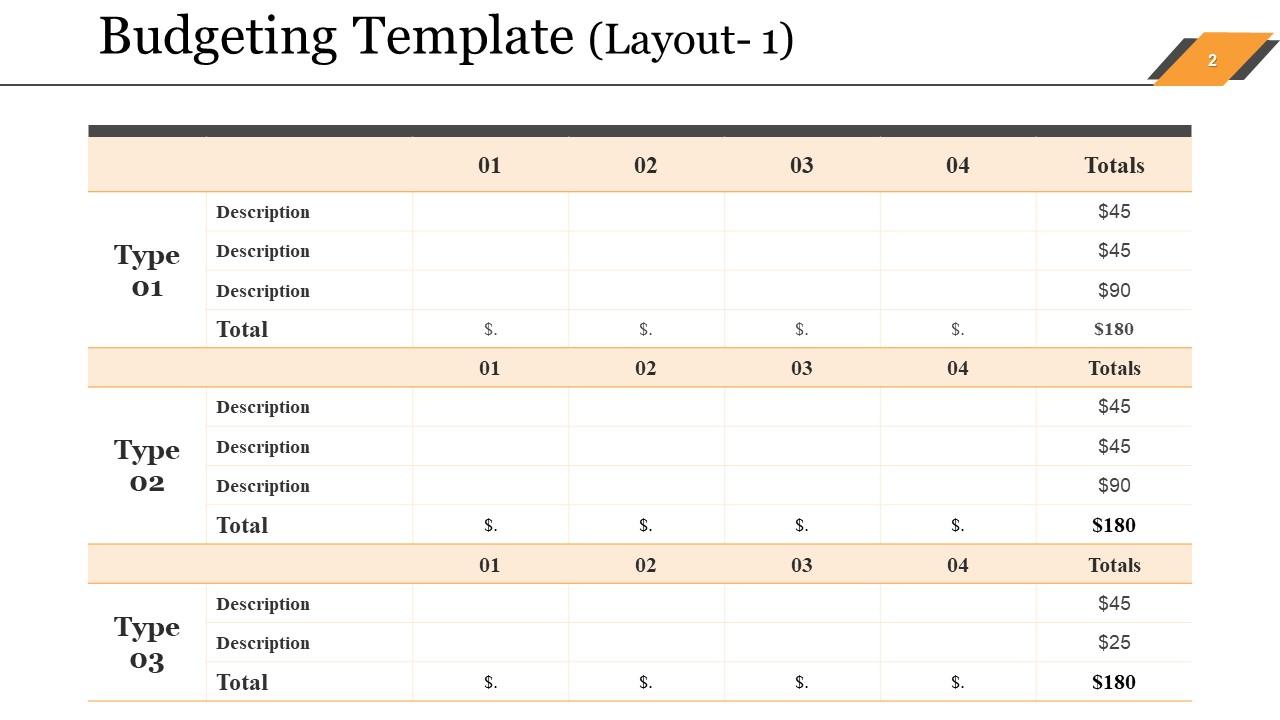
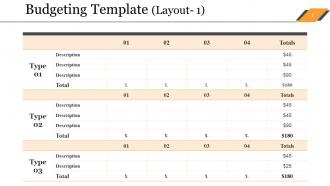
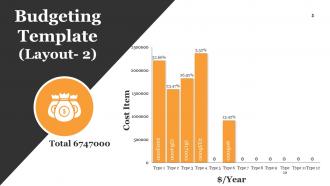
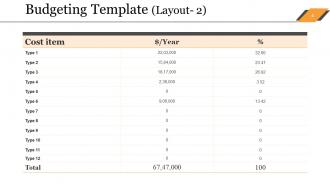
This PowerPoint Slide shows a Budgeting Template organized in a simple, straightforward format that is ideal for financial planning and tracking. The template includes types, each with rows for descriptions and columns for financial entries over four time periods, culminating in totals. This layout is intended to make it easier to enter and review budget allocations and expenses, making it an essential tool for financial managers and teams to monitor and manage financial resources.
Template 2: Channel Marketing Budget
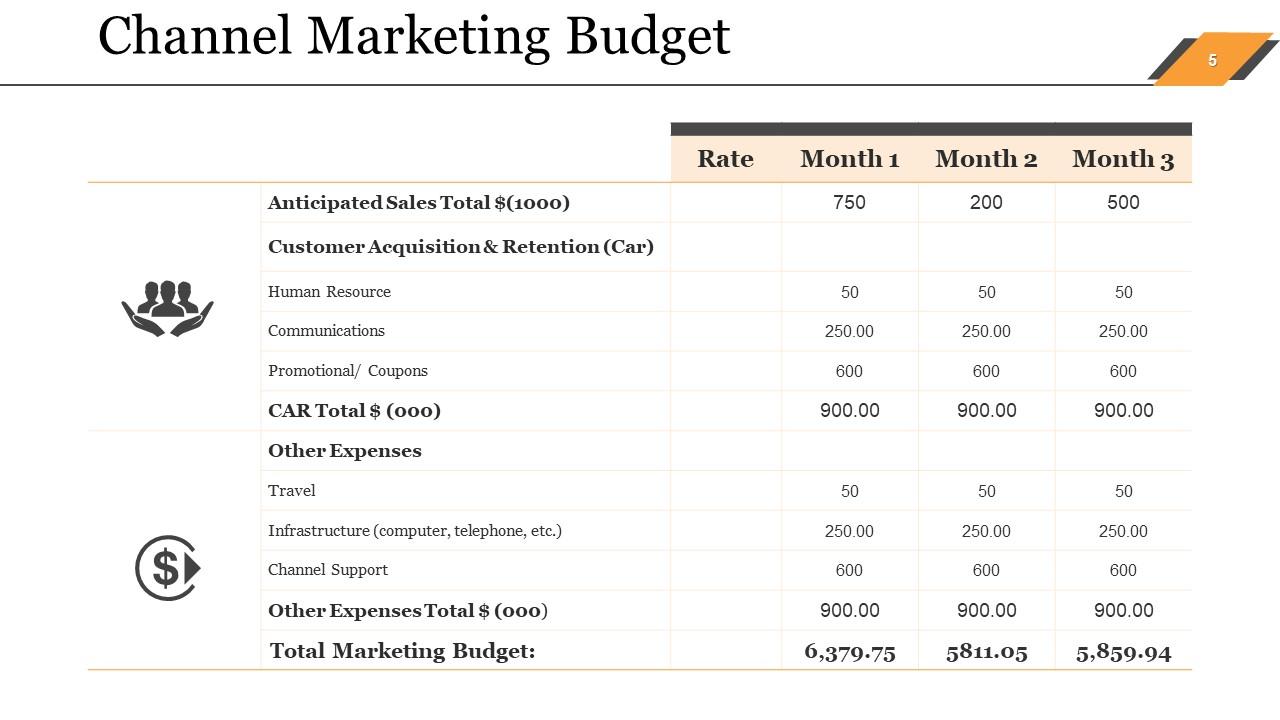
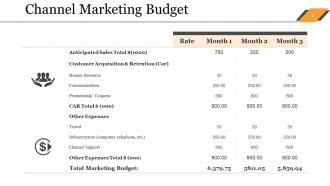
This PowerPoint presentation includes a detailed channel marketing budget breakdown for three months. It categorizes expenses into several categories, including anticipated sales, customer acquisition and retention, human resources, communications, and promotions. This PowerPoint presentation will assist you in effectively tracking and managing financial planning, ensuring clarity in budget allocation and spending. It allows marketing teams to track expenses and make more informed budgetary decisions for strategic channel marketing efforts.
Template 3: Budgeting (Planned vs. Actual Comparison)
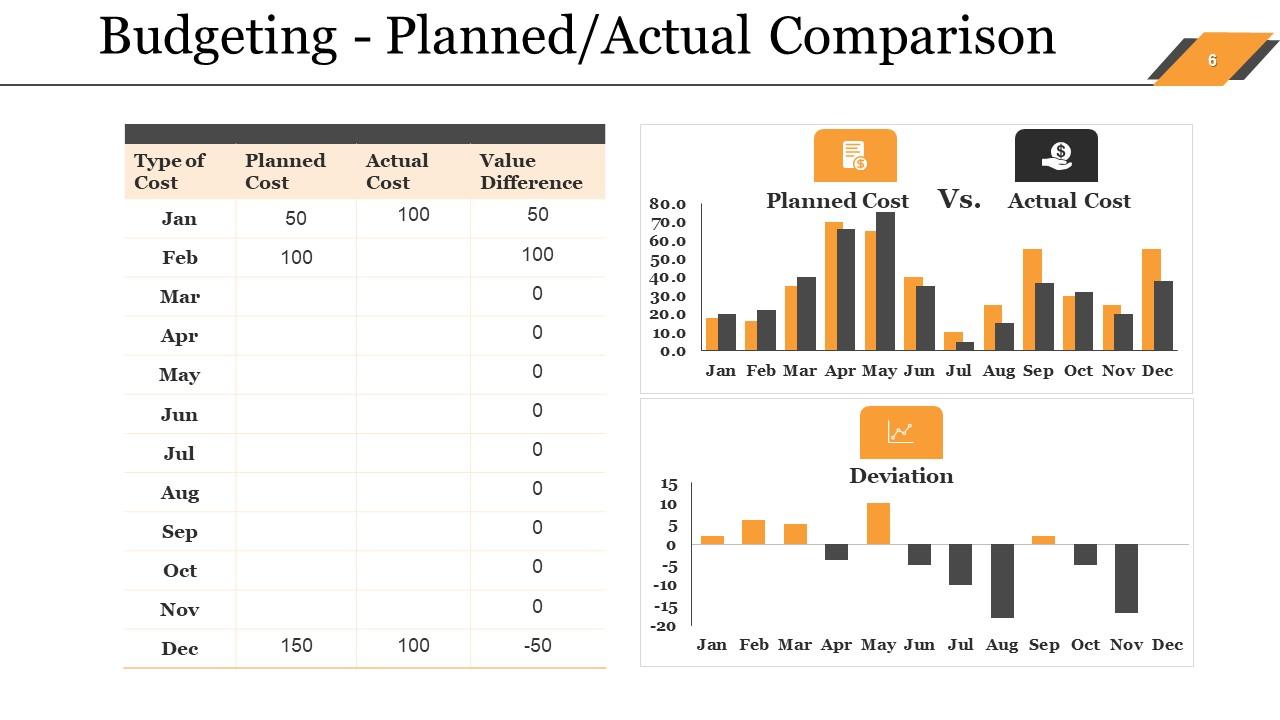
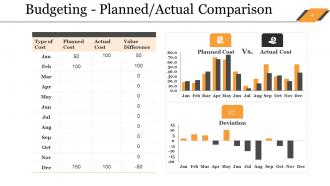
This PowerPoint Presentation includes a Budgeting — Planned/Actual Comparison, which provides a thorough monthly breakdown of planned vs. actual expenses for the year. The layout includes a tabular format that lists the cost type and the associated planned and actual spending, as well as a value difference column to show variances. Also, graphical representations compare these costs, to bring out differences. This PPT is useful for financial reviews, assisting with fiscal accountability and budget management.
Template 4: Product Launch Budget Plan
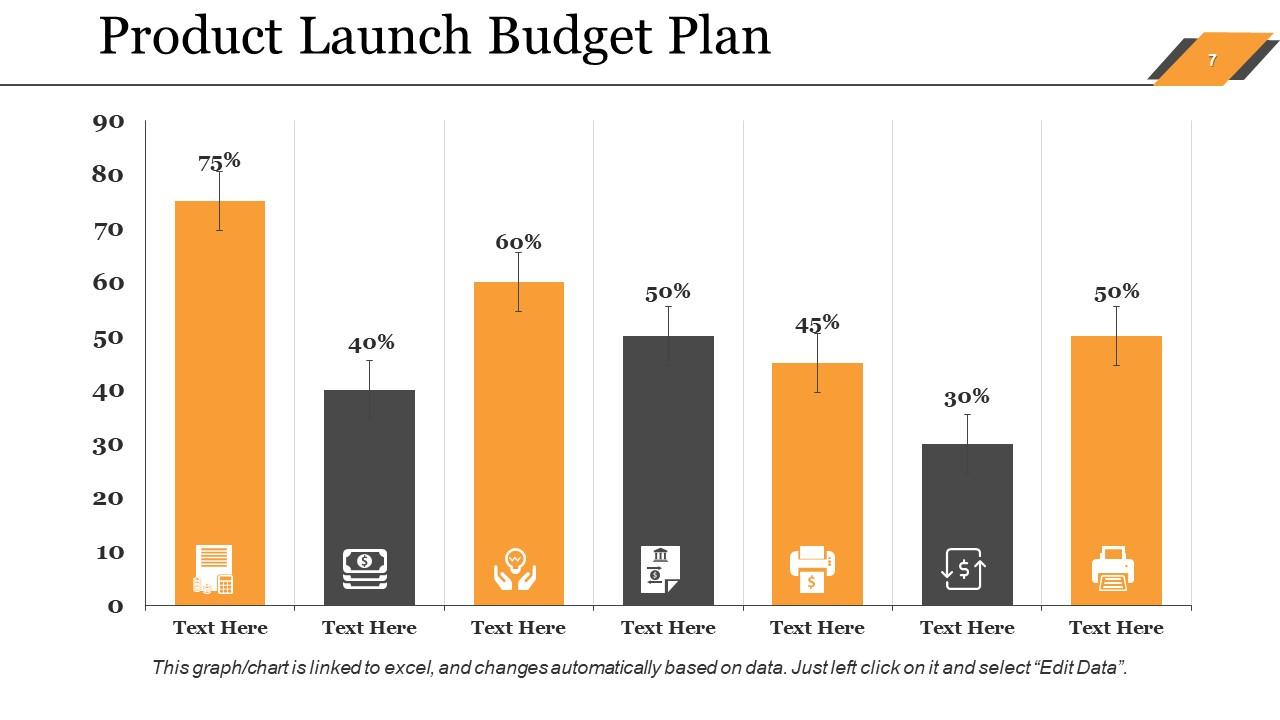
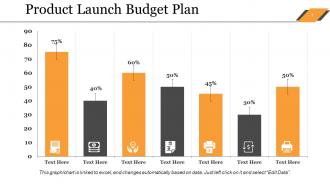
This PPT Preset includes a product launch budget plan represented by a series of bar graphs that show percentage allocations for budget categories. Each category is represented by distinct icons and color-coded bars, with percentages displayed on top to show the proportion of the budget allocated to each area. This graphical presentation enables stakeholders to understand financial planning for product launches.
Template 5: Company Budget

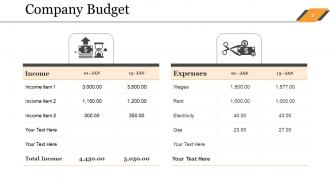
This PPT Slide depicts a detailed company budget layout, including a clear comparison of income and expenses for two specific dates. The template organizes income and expenses for easy tracking and financial management. This format enables businesses to keep organized financial records, monitor their financial health, and plan accordingly. It is useful for carrying out financial audits and maintaining transparency and control over financial flows.
Template 6: Event Budget
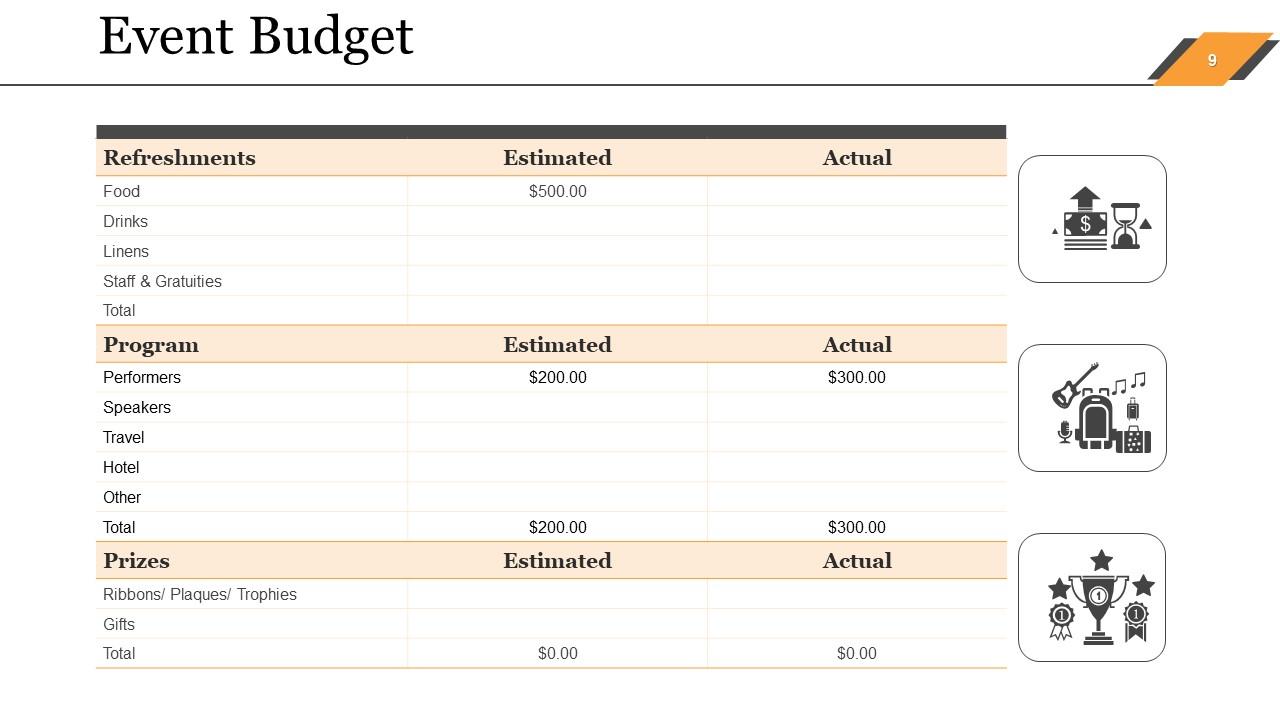
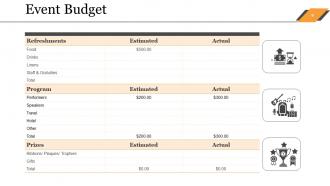
This PowerPoint presentation compares estimated and actual expenses for various categories, such as refreshments, programs, and prizes. The layout includes specific items like food, drinks, performers, and travel, making it easier for event planners to track budget allocation. This PowerPoint presentation is an essential tool for managing event finances and staying on budget. It is fully editable, allowing for changes based on the specific event needs.
Template 7: Social Media Budget Template
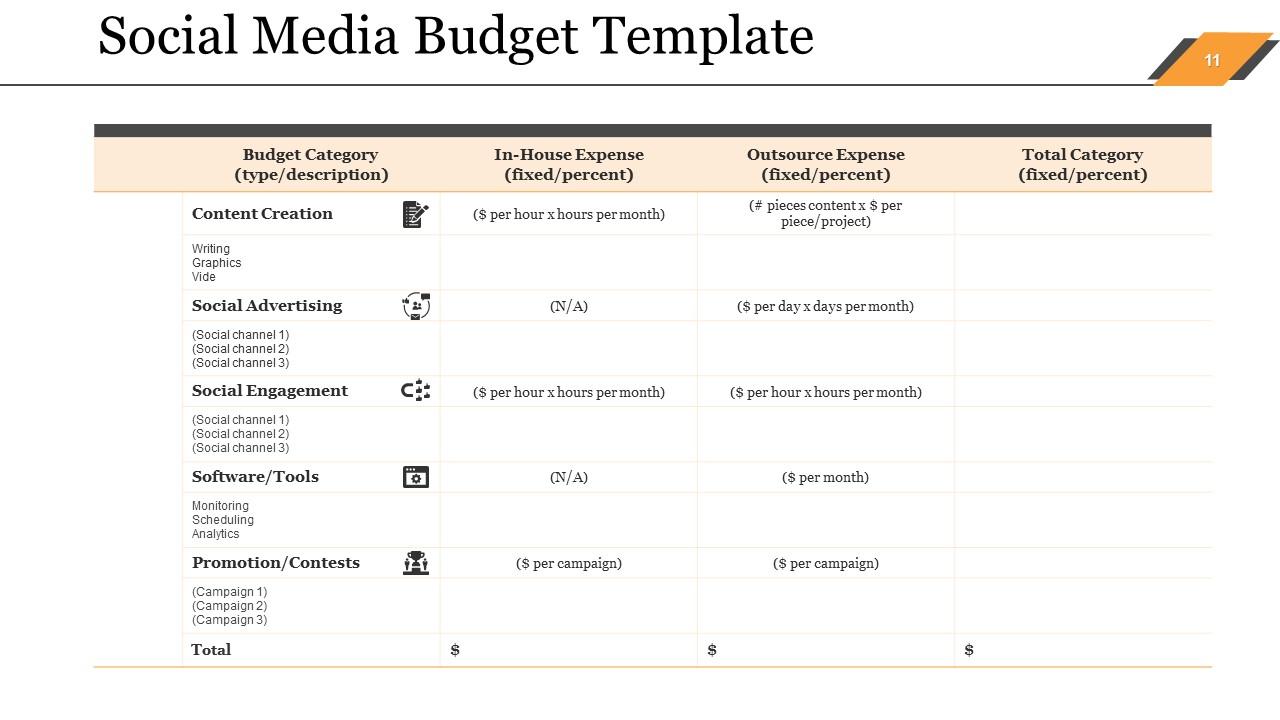
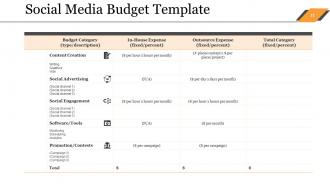
This PowerPoint presentation contains a detailed social media budget to aid in financial planning for social media activities. This PowerPoint Presentation divides budgetary items into five categories: content creation, social advertising, social engagement, software/tools, and promotions/contests. Each category includes both in-house and outsourced expenses, making it simpler for teams to track and manage costs. This template is ideal for marketing managers who want to make the most of their social media spending by providing a simple framework for budgeting and financial management.
Let's Make Your Numbers Work for You
Managing your sales budget should be simple and stress-free, which is exactly what our Sales Budget PowerPoint Presentation Slides accomplish. These templates help you simplify complex financial data, set realistic goals, and track your expenses. Give them a try and see how they can help you improve your budgeting process.
Sales Budget Powerpoint Presentation Slides with all 40 slides:
Our Sales Budget Powerpoint Presentation Slides contain every conceivable design. You will be astounded by their coverage.






FAQs for Sales Budget
So for your sales budget, start with last year's numbers - way easier than doing it from scratch. Break down your projected revenue by each product line, include unit volumes and your pricing assumptions. Monthly breakdowns work better than quarterly IMO. Don't forget seasonal stuff because that'll mess you up every time. Oh and include all your sales costs - team salaries, commissions, promo expenses, the works. If you have different territories or sales channels, split those out too. Just be realistic with your forecasts based on what actually happened before and current market conditions.
Your sales data is like having a crystal ball for budgets, honestly. Pull the last 2 years if you can - I learned the hard way that one year tells you nothing if something weird happened. Look for those seasonal spikes and dips, figure out which products are your stars vs duds. Growth rates from past data help you project forward too. Oh and don't forget external stuff that threw things off - like that supply chain mess last year. Plot everything monthly first so you can actually see what's happening. Way easier than staring at spreadsheet numbers.
Honestly, just check in on your numbers monthly (or weekly if things are moving fast). Build in some cushion - like 5-10% extra for when opportunities pop up. Most people blow their budgets because they see some cool new tactic and just... forget the plan exists. Set up alerts when you hit 75% and 90% of your budget so you're not scrambling later. Oh, and make sure anyone spending over a certain amount has to get approval first. Your team should know to pump the brakes if they're trending over mid-quarter. Sounds boring but it actually saves your ass.
Check your sales budget every month, but do the real heavy lifting quarterly. Monthly reviews help you catch problems early instead of scrambling halfway through the year (trust me, I've been there). Those quarterly sessions are where you'd actually change numbers based on what's happening - new products, market shifts, team changes, whatever. My old boss used to say budgets are like houseplants - ignore them and they die. Sounds cheesy but it's true. Don't just set those numbers in January and forget about them. Your budget needs to move with your business or it becomes useless pretty fast.
Dude, you absolutely need market research for your sales budget - it's the difference between educated guesses and total shots in the dark. Look at industry reports first, then check out what competitors are charging and how customers actually behave. This stuff reveals your real market size, demand patterns, and those annoying seasonal dips nobody talks about. Honestly, even basic competitor stalking will beat pulling numbers from thin air. Without it, you're setting revenue targets based on wishful thinking. Customer surveys help too, though they're kind of a pain to do right. Bottom line: research = realistic budgets that won't embarrass you later.
Honestly, just tie your sales targets straight to whatever your company's actually trying to achieve - like hitting new markets or revenue goals. Don't just recycle last year's budget (I swear half the sales teams I know do this and then act shocked when execs aren't thrilled). Talk to marketing, product, ops early on. They'll give you the real scoop on what's realistic. Oh and definitely build in quarterly reviews - business priorities change way more than people think they will. Your budget needs to flex with that stuff or you'll be stuck defending numbers that don't make sense anymore.
Honestly, the biggest trap is being way too optimistic with revenue projections. People forget about seasonality all the time. Don't just copy last year's numbers either - markets move fast and what worked then might not now. Sales cycle timing screws up quarterly targets more than you'd think. Oh, and always build in buffer for deals that slip. I've seen too many forecasts crash because someone assumed every deal would close on time (spoiler: they won't). Start conservative, then bump up as you hit milestones. Better to crush expectations than spend Q4 explaining why you're 30% short.
Dude, seasonality will absolutely wreck your budget if you're not ready for it. Like retail goes crazy during holidays, but B2B software? Total ghost town in summer when everyone's at the beach or whatever. Construction companies might as well close shop in winter - we found that out the painful way at my old job! You've gotta look back at least 2-3 years to see the real patterns. Then actually build those ups and downs into your quarterly numbers instead of just dividing everything by 12. Trust me, you don't want to be panicking in July wondering where all your sales went.
Honestly, sales forecasting is what makes or breaks your whole budget. Everything flows from there - revenue, hiring plans, inventory, cash flow timing. Get it wrong by 20% and watch every department's numbers fall apart. Your sales team knows the pipeline way better than you do, so definitely loop them in early. I've seen too many budgets crash because someone just pulled numbers out of thin air. The methodology matters more than people think - might seem boring but it's worth the extra time upfront. Otherwise you're basically throwing darts blindfolded.
Honestly, tech is a game-changer for sales budgets. Your CRM automatically pulls data so you're not stuck wrestling with spreadsheets all day (thank god). Predictive analytics catches trends you'd totally miss otherwise. The forecasting models handle way more variables than any human could - I mean, who has time for that? Cloud tools keep everyone on the same page instead of doing random stuff. Short version: the software handles calculations while you focus on actual strategy. Oh, and definitely connect your CRM to budgeting software first - that's your best starting point.
Look, your sales budget is basically your crystal ball for cash flow. Say you're expecting $50K in March but most deals actually close in April - boom, you're scrambling for cash when you thought you'd be flush. Timing is everything here, honestly. Even if your yearly numbers look solid, those monthly swings can really mess with your working capital. The budget also helps you figure out when to stock up on inventory or hire more people (or when to pump the brakes on spending). My advice? Map it out month by month instead of just staring at that annual total.
Oh definitely get your sales team involved in budgeting! They know what's actually happening out there - customer trends, competitive stuff, seasonal weirdness that finance might miss. Let them help with territory planning and quota setting instead of just dropping numbers on them from above. That never works anyway. The back-and-forth approach gives you way better forecasts, plus when reps help create the targets they're way more likely to actually hit them. It's honestly just common sense - they've got the best pipeline visibility so why wouldn't you tap into that?
Honestly, start with variance analysis - just compare what you actually sold versus what you budgeted by product and region. Revenue growth rate matters obviously, but conversion metrics are where it gets interesting because they show if your original assumptions were even close to reality. Sales cycle length and customer acquisition costs tell you a lot too. Pipeline velocity is huge. Oh, and don't ignore the outside stuff like market conditions that might explain why you're off target. Pull last quarter's numbers first and see where you crushed it or bombed - that'll show you which metrics actually matter for your business specifically.
Here's what I'd do - create three different budget scenarios: best case, realistic, and worst case. Your conservative version should assume maybe 15-30% lower revenue (depends on your industry though). Look back at how your sector did during the last recession - that's usually a pretty good indicator. Sales cycles get longer when things get weird economically, and you'll probably see more customers bail too. Honestly, having multiple versions ready is a lifesaver because you can switch gears fast when the market shifts. Better to be prepared than scrambling later.
Monthly variance reports are your best friend - just compare what you actually made vs what you budgeted. Salesforce or HubSpot dashboards work great for real-time tracking (I check mine way too much honestly). Rolling forecasts help too since they adjust your predictions based on how things are actually going. Pick whether you want weekly check-ins or monthly deep dives and stick with it. The daily dashboard habit is weirdly addictive once you start.
-
Great experience, I would definitely use your services further.
-
Excellent work done on template design and graphics.