

Project Scope Management Plan Powerpoint Presentation Slides




Try Before you Buy Download Free Sample Product
 Impress Your
 Audience
 100%
100% Editable
 Save Hours
 of Time


Scope in project management establishes control factors for what is and is not needed in a project plan that results in its changes. Project managers require an effective strategy, manage, execute, and control projects to deliver successful projects in an organization. This deck is a company profile for project scope management courses and certifications. We have showcased an institute overview that focuses on the management institution's history, mission vision, management structure, courseware, and valuable customers. Here is a professionally designed template on Project Scope Management Plan that will trace the project details and ensure that the requirements are fulfilled for what has been done, who had done it, when it was done, what is required to be done, etc. The project management timeline and costs are covered in this PowerPoint template. Reasons for choosing our institute for project management plan are discussed in this module. This learning approach will enhance the ability of the participants to work well in their companies and improve their skills and boost their knowledge. Talk to our research team to customize the template based on needs and book a free demo with our experienced and influential expert team. Download this 100 percent editable template on Project Scope Management Plan and get access now.
People who downloaded this PowerPoint presentation also viewed the following :
Content of this Powerpoint Presentation
Slide 1: This slide introduces Project Scope Management Plan. State Your Company Name and begin.
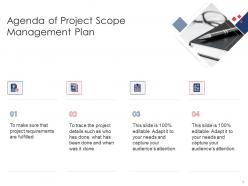
Slide 2: This is an Agenda slide. State your agendas here.
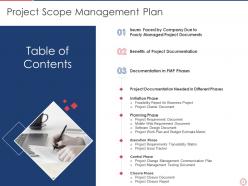
Slide 3: This slide shows Table of Content for the presentation.
Slide 4: This slide presents Table of Content highlighting Issues Faced by Company Due to Poorly Managed Project Documents
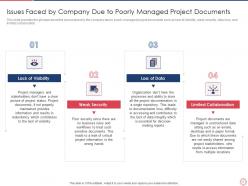
Slide 5: This slide displays Issues Faced by Company Due to Poorly Managed Project Documents.
Slide 6: This slide shows Table of Content highlighting Benefits of Project Documentation.
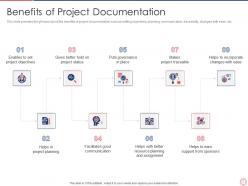
Slide 7: This slide represents the benefits of project documentation such as setting objectives, planning, communication, traceability, changes with ease, etc.
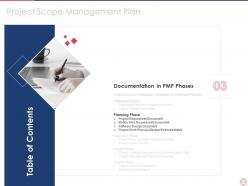
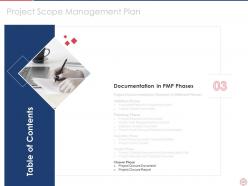
Slide 8: This slide shows Table of Content highlighting Documentation in PMP Phases.
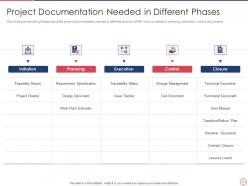
Slide 9: This slide presents project documentation needed in different phases of PMP such as initiation, planning, execution, control and closure.
Slide 10: This slide displays Table of Content for the presentation.
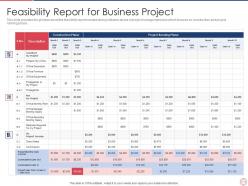
Slide 11: This slide shows feasibility report needed during initiation phase of project management plan which focuses on construction and project running phase.
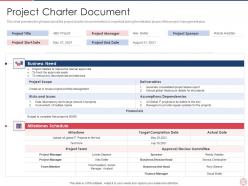
Slide 12: This slide represents project charter document which is important during the initiation phase of the project management plan.
Slide 13: This slide shows Table of Content for the presentation.
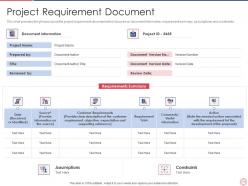
Slide 14: This slide presents project requirement document which focuses on document information, requirement summary, assumptions and constraints.
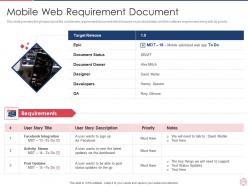
Slide 15: This slide displays mobile web requirement document which focuses on product details and the software requirement along with its priority.
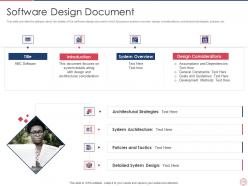
Slide 16: This slide shows details of the software design document which focuses on system overview, design considerations, architectural strategies, policies, etc.
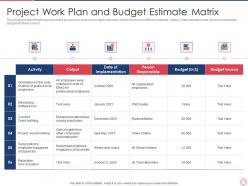
Slide 17: This slide represents project work plan and budget estimation which focuses on different activities, output, implementation date, person responsible, budget and fund source.
Slide 18: This slide shows Table of Content for the presentation.
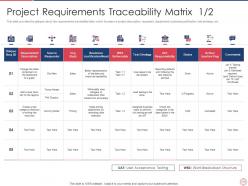
Slide 19: This slide presents the requirements traceability table which focuses on project description, requestor, department, business justification, test strategy, etc.
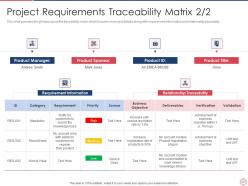
Slide 20: This slide displays traceability matrix which focuses on project details along with requirement information and relationship traceability.
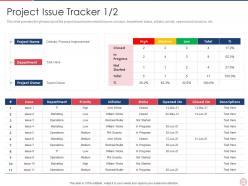
Slide 21: This slide shows project issue tracker which focuses on issue, department, status, initiator, priority, opened and closed on, etc.
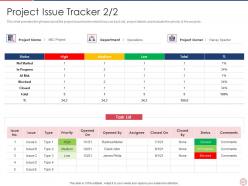
Slide 22: This slide represents project issue tracker which focus on track list, project details and evaluate the priority of the projects.
Slide 23: This slide shows Table of Content for the presentation.
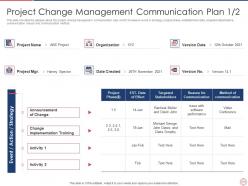
Slide 24: This slide presents project change management communication plan which focuses on event or strategy, project phase, establishment date, etc.
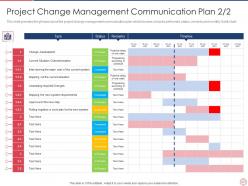
Slide 25: This slide displays Project Change Management Communication Plan.
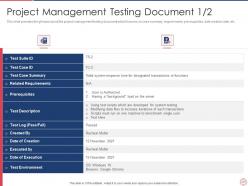
Slide 26: This slide shows project management testing document which focuses on case summary, requirements, pre requisites, date creation date, etc.
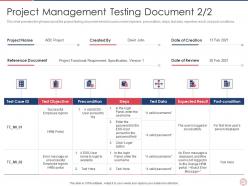
Slide 27: This slide represents project testing document which focuses on test objective, precondition, steps, test data, expected result, and post conditions.
Slide 28: This slide shows Table of Content for the presentation.
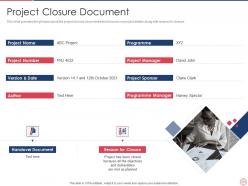
Slide 29: This slide presents project closure document which focuses on project details along with reason for closure.
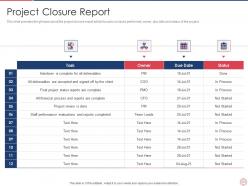
Slide 30: This slide displays project closure report which focuses on tasks performed, owner, due date and status of the project.
Slide 31: This slide shows Icons Slide for Project Scope Management Plan.
Slide 32: This slide is titled as Additional Slides for moving forward.
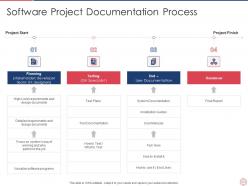
Slide 33: This slide shows Software Project Documentation Process.
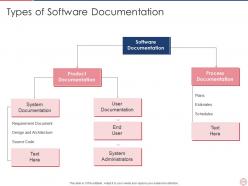
Slide 34: This slide shows Types of Software Documentation.
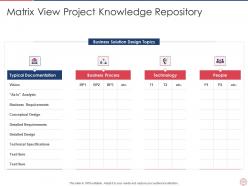
Slide 35: This slide displays Matrix View Project Knowledge Repository.
Slide 36: This is Our Mission slide with related imagery and text.
Slide 37: This slide shows Venn diagram with text boxes.
Slide 38: This is Our Target slide. State your targets here.
Slide 39: This is a Timeline slide. Show data related to time intervals here.
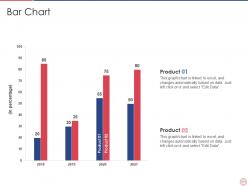
Slide 40: This slide displays Bar chart with two products comparison.
Slide 41: This slide shows Roadmap with additional textboxes.
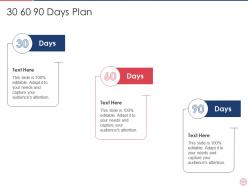
Slide 42: This slide shows 30 60 90 Days Plan with text boxes.
Slide 43: This is a Thank You slide with address, contact numbers and email address.
Project Scope Management Plan Powerpoint Presentation Slides with all 43 slides:
Use our Project Scope Management Plan Powerpoint Presentation Slides to effectively help you save your valuable time. They are readymade to fit into any presentation structure.



FAQs for Project Scope Management Plan
So basically you've got five main parts: planning, defining, creating your WBS, validating, and controlling scope. First thing - collect requirements and nail down what's actually included (and what's not). This is where projects usually crash and burn if you mess it up. Break everything into smaller chunks with your work breakdown structure. Validate deliverables as you go with stakeholders. Oh, and have a solid change management process because trust me, someone will always want to squeeze in "one tiny addition." Getting everyone to agree on boundaries upfront is half the battle.
Dude, scope management is like having a GPS for your project - stops you from getting lost in feature creep hell. Define what's in and what's out right from the start. Your team stays focused, stakeholders know what they're getting. I can't tell you how many projects I've watched explode because someone went "oh, just one tiny feature won't hurt." Wrong. You'll blow past your deadline and budget so fast it's not even funny. Always start with a clear scope doc. Make any changes go through formal approval - trust me on this one, even the "small" requests add up quick.
So you've got a few options here. One-on-one interviews are perfect for digging deep with important people. Surveys work when you need to hear from tons of stakeholders - way more efficient than interviewing everyone. Focus groups can be gold, but honestly sometimes they just turn into argument sessions if you're not careful facilitating. Don't sleep on just watching people work either - you'll catch stuff they'd never think to mention in an interview. Document reviews help too, especially if there's existing requirements floating around. I'd probably mix 2-3 methods depending on how complex your project is.
Okay so first thing - get crazy specific about what you're actually delivering. Like "5-page website with contact form" not some vague "better online presence" BS. Make everyone sign off on exactly what's included AND what's not (this part is huge). I learned this the hard way when clients kept assuming random features were part of the deal. Write everything down and create some kind of change process - any new requests need approval plus extra time/money. Trust me, those "tiny" additions always snowball into major headaches that mess up your whole timeline.
Honestly, a WBS is just your sanity-saver for big projects. Break everything down into smaller pieces so you're not staring at this massive overwhelming thing. Start with your main deliverables, then chop those up until each task feels doable. It's like meal prep but for work - sounds boring but totally worth it. You'll use it to figure out who does what, estimate time and resources, track where you're at. Trust me, skip this step and scope creep will destroy you. My old boss used to say "if you can't explain the task in five minutes, break it down more."
Honestly, you've gotta stick to a proper change control process or you'll get burned. Document every proposed change first, then figure out how it'll mess with your timeline and budget. Get stakeholder sign-off before doing anything - I've watched so many projects implode when people wing it here. Those change request forms aren't just busywork, they actually save your butt later. When stakeholders want to add Feature X, be brutally honest about what gets pushed back or scrapped. Regular meetings help too. Your project charter is basically your lifeline for separating must-haves from wishlist items.
Dude, there's tons of options out there. Microsoft Project is solid for detailed planning, Jira works great for tracking requirements and changes. Asana and Monday.com are good if you want something simpler. But honestly? I've watched teams stress over expensive software when a basic spreadsheet does the job just fine. Pick whatever lets you document scope clearly and track changes with proper approvals. The real trick is getting everyone to actually use it - doesn't matter how fancy your tool is if half the team ignores it. Consistency beats features every time.
Okay so here's the deal - product scope is what your thing actually does (like if it's an app, what features it has). Project scope? That's all the work to build it. Coding, testing, meetings, documentation, the whole mess. I literally confused these for months when I started out lol. The tricky part is your project scope might change depending on how you tackle building stuff, but product scope should stay pretty locked down. Oh and when stakeholders start asking for "changes" - figure out which one they're even talking about first. Trust me on that.
Okay so first thing - get a proper change control process set up from day one. Document your original scope really clearly because people will definitely try to shift things later (trust me on this one). Regular check-ins with stakeholders help catch changes before they snowball into disasters. Never agree to scope changes without looking at how they'll mess with your timeline and budget first. Oh and once you approve something, tell your team right away - nothing's worse than half the team working on the old plan. I botched this on my last project and it was a nightmare to fix.
Look, stakeholder engagement basically makes or breaks your project scope. You want those people involved from day one - defining requirements, validating what you're building, catching scope creep before it kills you. I learned this the hard way on a project that went completely off the rails because we didn't loop in key stakeholders early enough. They'll help you figure out what's actually critical vs just wishful thinking. Plus they're the ones who'll tell you if your deliverables are garbage or gold. Don't skip the regular check-ins throughout planning either - trust me on this one.
Track scope creep percentage first - basically how much your original plan grew beyond what you mapped out. Change requests are another big one, both how often they come up and approval rates. Timeline delays from scope issues will bite you if you're not watching. Budget variance is honestly where most PMs get burned during reviews, so don't sleep on that one. Requirements traceability helps too, shows you're actually managing deliverables properly. Oh, and start measuring this stuff early in the project - monthly check-ins work well to catch problems before they snowball into disasters.
Oh man, miscommunication is basically scope management's worst enemy. You know how clients say something's "obvious" but it totally wasn't? That's how you end up with endless feature creep. Half the time your team thinks stuff is out of scope while the client's like "obviously that was included." Document everything in writing - seriously, don't trust verbal agreements. Make sure everyone's defining deliverables the same way too. Changes need proper approval through your process, otherwise things get messy fast. I learned this the hard way on my last project honestly.
Yeah, totally look at your old projects first. What keeps causing scope to blow up? Usually it's fuzzy requirements upfront, stakeholders who can't make up their minds, or timelines that were wishful thinking from day one. Honestly, most teams just repeat the same mistakes because nobody wants to dig into what actually went wrong. Take those lessons and fix your current process - better scope definition, tighter stakeholder communication, real change control. Make a quick checklist of your usual problem spots so you can catch them early this time.
First thing - nail down what's in scope and what isn't. Trust me, this'll save your sanity later. Write requirements in plain English, not PM speak that puts people to sleep. Visuals help tons - flowcharts, wireframes, whatever clicks. Always get stakeholders to sign off in writing (learned this the hard way). You'll need version control since requirements change constantly - it's honestly inevitable. A traceability matrix keeps everything tied back to business goals. Oh, and actually review your docs regularly. Nothing worse than documentation that just sits there gathering digital dust while everyone ignores it.
Don't treat scope, budget, and timeline like separate things - they're basically joined at the hip. Right from the start, define all three baselines together. When scope changes come up (and trust me, they will), run them through change control that looks at cost AND time impacts. I can't tell you how many PMs I've watched approve "small" scope changes without thinking through the domino effect. Your stakeholders need to get the triple constraint thing - bigger scope means more money or more time, period. Earned value management is pretty solid for tracking whether your scope delivery matches your planned spending and schedule. Catches problems before they spiral.
-
Enough space for editing and adding your own content.
-
Graphics are very appealing to eyes.
-
Unique research projects to present in meeting.
-
Informative design.
-
Qualitative and comprehensive slides.