

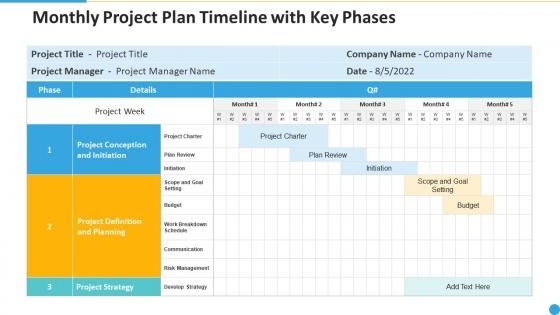
Monthly project plan timeline with key phases




Try Before you Buy Download Free Sample Product
 Impress Your
 Audience
 100%
100% Editable
 Save Hours
 of Time


Our monthly project plan timeline with key phases are topically designed to provide an attractive backdrop to any subject. Use them to look like a presentation pro.
People who downloaded this PowerPoint presentation also viewed the following :
Monthly project plan timeline with key phases with all 9 slides:
Use our monthly project plan timeline with key phases to effectively help you save your valuable time. They are readymade to fit into any presentation structure.








FAQs for Monthly project plan timeline
Honestly, start with your big milestones and who's doing what - that's the foundation. Map out which tasks depend on others finishing first, then add realistic deadlines. I always build in buffer time because stuff inevitably takes longer than expected. Mark those external approvals and dependencies super clearly - they're project killers if you forget them. Set up regular check-ins so nobody goes rogue for weeks. Oh, and definitely call out the risky stuff upfront. The whole point is making something your team can actually use without texting you every five minutes asking what's next. Just put it somewhere everyone can see and update it.
Dude, Gantt charts are game-changers for stakeholder meetings. You can show dependencies, milestones, and progress without burying people in spreadsheets. Everyone sees what's happening now and what's next. Plus they get how delays mess with the whole timeline - way better than explaining it verbally. Status meetings actually move faster since you're all staring at the same visual. It's honestly like GPS vs telling someone "drive north and figure it out." Though I'll admit, some stakeholders still find ways to get confused no matter how clear you make it.
Honestly, I update mine every Friday afternoon - helps me start Monday with a clear head. Weekly updates are the bare minimum, but jump on it immediately if something big changes. Track your real progress against what you planned, not just shuffle dates around to look good (we've all been tempted lol). When deadlines shift, tell your stakeholders ASAP. Being ahead of problems beats scrambling to catch up every time. Set those calendar reminders or you'll totally forget. Oh, and document why stuff changed - you'd be surprised how much you can learn from those patterns later.
Oh man, dependencies are such a pain but you've gotta figure them out early. Basically when Task A has to finish before Task B can start, any delay just cascades down the line. Map out which tasks rely on others first - this shows you your critical path (the longest chain that sets your minimum timeline). I always add buffer time around dependent stuff because something will go wrong, trust me. Also worth having a Plan B ready when you can. The domino effect is real and it'll mess up your whole schedule if you're not careful.
Honestly, timeline templates are a game changer for keeping teams on the same page. No more confusion about deadlines or who's doing what. Everyone can see how their work connects to everyone else's, which actually makes people care more about hitting their dates. The visual part is what really sells it though - way easier to discuss priorities when you're all staring at the same timeline instead of guessing. You can catch bottlenecks early too, before they screw everything up. Just grab a template that matches your project's complexity and make sure the whole team uses it from the start. Trust me on this one.
So basically you gotta match your timeline to how that industry actually works. Like construction is all sequential - you can't just skip steps or ignore weather delays. Software's totally different though - devs can work on multiple things at once. I made this mistake once using a construction template for a coding project and it was a mess lol. The trick is figuring out where things always get stuck in your field. Map out those bottlenecks first, then build your timeline around them. Some industries are super rigid, others let you run stuff in parallel.
If your company's got money, Microsoft Project is solid. Otherwise I'd go with Asana, Monday.com, or ClickUp - they're way more user-friendly. Excel works too if you're organized about it (I've seen some pretty impressive spreadsheets honestly). Gantt charts will save your sanity - TeamGantt and ProjectLibre make them dead simple. The real trick? Pick whatever your team will actually stick with. I can't tell you how many fancy tools I've seen abandoned after two weeks. Start basic with something that feels natural, then upgrade when things get crazy.
For milestones, I'd go with something visually distinct - diamonds, stars, whatever makes them pop against your regular tasks. Most PM tools already have this built in, which is nice. Make sure they look different so you can spot them fast when scanning the timeline. I always stick dates and quick descriptions right next to the markers. Use them for stuff like deliverable deadlines, big decisions, or when phases wrap up. Honestly, it's a game-changer for helping your team find the critical checkpoints without drowning in all the smaller task details.
Figure out what could go wrong first, then pad your timeline with extra buffer - like 20% on anything critical. External vendors will mess you up every single time, so have backup plans ready. Break big tasks into smaller chunks so you can pivot fast when stuff hits the fan. Check in with people regularly instead of waiting for problems to explode. And honestly? Don't sit on bad news until the next meeting - tell everyone immediately when timelines start slipping. Nobody likes surprises, especially the ugly kind.
So agile basically throws traditional timelines out the window. You work in these short bursts called sprints - usually 2-4 weeks each. Way better than waterfall where you plan everything upfront then pray it works out (spoiler: it never does). Each sprint you're planning, building, testing, reviewing - rinse and repeat. The timeline stays flexible, which honestly saves your sanity because you can pivot when things inevitably change. I'd start by planning your first couple sprints in detail. Keep everything else pretty high-level for now until you're closer to tackling it.
Dude, you HAVE to talk to each other constantly or everything goes to hell. I've watched so many projects completely implode because someone knew about a huge problem but just... didn't mention it? Like for weeks. It's wild. Quick daily check-ins are a lifesaver - catch the small stuff before it becomes a disaster. Make sure everyone knows to speak up about issues right away, not wait around for some official meeting. Also set up those weekly syncs where people actually share what's going wrong. Trust me, surprises will kill your timeline faster than anything.
Dude, visuals totally save timelines from being boring text dumps. Color-code your phases, throw in some icons for different task types, maybe add progress bars - anything beats paragraphs that make people's eyes glaze over. Gantt charts are clutch for showing dependencies at a glance. Plus it helps when you've got team members who speak different languages or just learn better with pictures than words. I swear, even simple stuff like consistent symbols makes everything clearer. Try it on your next project - you'll actually see people paying attention instead of pretending to read.
Oh man, time estimation is brutal - I always mess this up! Your team should estimate their own work since they actually know what's involved. Buffer time is huge too, like 15-20% padding minimum. I made this mistake last quarter where Sarah got stuck with three critical things at once and everything fell apart. Also don't forget people take vacation days (shocking, I know). Figure out your critical path dependencies right away or you're screwed. And honestly? Push back on those crazy deadlines stakeholders love throwing around - they're usually impossible anyway.
Honestly, project timelines are lifesavers for resource planning. You can spot conflicts before they happen - like when Sarah's supposed to be on two different tasks at once (physics says no). Map out when you'll need people, equipment, whatever. The busy periods become super obvious, so you know when to bring in extra help or when you can move folks around. I learned this the hard way on my last project - total chaos without it. Short version: put your resources right on the timeline and watch the conflicts jump out at you. Saves so much scrambling later.
So basically, high-level timelines are like the bird's eye view - just your big milestones and major phases. Detailed ones have every single task, who's doing what, all the dependencies. I always start with the high-level stuff first because that's what executives actually want to see in meetings. They don't care about the weeds. Save the detailed version for your team - that's where you put all the real deadlines and task assignments everyone needs to hit. Honestly, getting approval on the big picture first will save you tons of rework later. Way easier than redoing a massive detailed timeline.
-
Understandable and informative presentation.
-
The Designed Graphic are very professional and classic.
-
Qualitative and comprehensive slides.