

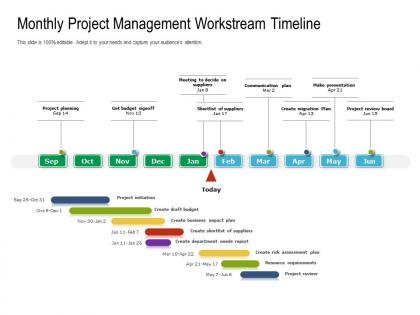
Monthly project management workstream timeline





Try Before you Buy Download Free Sample Product
 Impress Your
 Audience
 100%
100% Editable
 Save Hours
 of Time


Our Monthly Project Management Workstream Timeline are explicit and effective. They combine clarity and concise expression.
People who downloaded this PowerPoint presentation also viewed the following :
Monthly project management workstream timeline with all 2 slides:
Give your audience a fulfilling experience. They will find our Monthly Project Management Workstream Timeline elevating.
FAQs for Monthly project
Okay so for your timeline you need the basics: project phases, tasks with deadlines, who's doing what, and dependencies between everything. Dependencies are super easy to miss but they'll bite you later. Build in extra time because literally nothing goes according to plan - I learned this the hard way lol. Oh and map out when people are free vs swamped so you're not dumping work on someone who's already drowning. The whole point is making something people will actually look at instead of some fancy chart that gets ignored.
Gantt charts are honestly your best friend here - try Asana or Monday.com. Color-code everything so people can instantly spot their stuff. I've watched so many teams overcomplicate this when a basic bar chart works perfectly fine. Make those milestones pop and update things constantly. The whole point is someone should understand it in 30 seconds max. Oh, and definitely build in buffer time because I promise something will break. My old boss used to say timelines are just pretty lies, but at least make yours useful pretty lies.
Microsoft Project's solid if you want all the bells and whistles - resource management, critical path stuff. Asana and Monday.com hit that sweet spot though. I'm lowkey obsessed with tweaking Asana's views (probably waste too much time on it lol). TeamGantt works for simpler projects, or honestly just use Google Sheets if money's tight. Don't overthink it - match your tool to how complex your project actually is. Try something basic first, see what you're missing, then upgrade if needed. Most people go way overboard initially.
Honestly, just break everything down into bite-sized pieces first. Then look at similar stuff you've done before - that's your best baseline. Historical data from your team is super helpful if you've got it. I always tack on extra time because something always goes sideways, trust me on that one. Think about what depends on what, how swamped everyone is right now, and where you might hit snags. Oh and reviews/approvals? They drag on forever. Start with your gut estimate, then tweak it as you figure out what you're actually dealing with.
Honestly, the worst mistake is thinking tasks will take exactly as long as you estimate - they never do. Buffer time is your best friend, trust me. Also, don't pile too much on people at once because that's how projects totally fall apart. Map out your dependencies super clearly too (like if Sarah can't start her thing until Mike finishes his). Oh and account for holidays, PTO, competing deadlines - all that real-world stuff. I'd throw an extra 20-30% padding on estimates and get the team involved early so they can call out anything that sounds completely unrealistic.
Honestly, just pad everything by 15-20% right from the start - saves your sanity later. Chop the whole thing into smaller chunks so when stuff inevitably goes sideways, you're not scrambling to fix everything at once. I do this thing where I plan out the next few sprints in detail but keep the later stuff loose. Weekly check-ins are a lifesaver for catching problems early. Oh, and don't be that person who hides delays hoping they'll magically fix themselves - just tell people what's happening. Also write down all your assumptions now because you'll definitely forget them otherwise.
Look, stakeholders are gonna change their minds no matter what - might as well get their input early instead of dealing with surprises later. They know the real constraints and what's actually doable with resources and timing. Without their buy-in, you're basically planning in a vacuum. They'll spot dependencies you missed and warn you about roadblocks before they bite you. I learned this the hard way on my last project - should've looped them in sooner. Keep checking with them throughout planning, not just once at the start.
Put your milestones wherever there's a natural stopping point - like when you finish a big deliverable or switch between project phases. Space them every 2-4 weeks depending how long everything takes. Here's the thing though: make them super specific. Don't write "work on design stuff" - say "finish the UI mockups" instead. That way you actually know if you hit it or not. I learned this the hard way after too many vague milestones that meant nothing. They're honestly great for catching problems early and keeping everyone updated without drowning in status meetings.
Check your timeline weekly minimum, but honestly? If stuff's moving quick, do it more often. Compare what actually happened vs what you planned for each milestone, then tweak future dates based on what you're learning. Don't just push everything back the same amount - sometimes tasks finish early! Be upfront about delays right away instead of crossing your fingers you'll magically catch up later. Get your team involved too since they know what's really happening. I learned this the hard way - make reviewing timelines a regular thing, not some panic scramble before meetings.
So waterfall is basically old school - you map out every single phase upfront (requirements, design, dev, testing) and stick to that plan no matter what. Pretty rigid timeline from the start. Agile's the opposite though, you work in these short 1-4 week sprints and can actually adjust as you go. Way better IMO because you learn what users really need instead of guessing. I've honestly watched so many waterfall projects completely tank because they couldn't change direction. If your requirements might shift or you need room to adapt, agile's definitely the move.
Dude, Gantt charts are honestly a game changer. You can see all your tasks, who's doing what, and how everything connects - no more digging through messy spreadsheets. Spotting bottlenecks becomes super obvious before they screw you over. Your boss will think you're way more organized when you show up with an actual visual timeline instead of just bullet points. Critical path stuff becomes clear real quick too. I mean, I used to hate project planning but these actually make it bearable. Monday and Asana can build them automatically from whatever task list you've already got going.
Just shoot out an email explaining what changed and why - don't dance around it. New timeline, impacts on deliverables, the whole deal. Honestly, I've learned it's way better to just own the inconvenience upfront rather than pretend it's no big deal. Call or text your main stakeholders separately if it's a major shift since they'll probably have questions. Update all your shared docs and calendars immediately so nobody's working off old info. The key is getting ahead of it fast. People hate surprises but they're usually cool with changes if you communicate early.
Honestly, start with the basics - track if you're hitting your planned dates vs reality, plus budget stuff and milestone completions. Resource utilization matters too because nobody wants burned out teammates (or people twiddling their thumbs). Scope creep is gonna happen, so might as well track it. Quality metrics like defect rates help catch issues early. Oh, and don't forget stakeholder happiness - quick check-ins work fine. Here's the thing though: keep your dashboard stupid simple. Pick maybe 5 metrics you'll actually check weekly, not some monster spreadsheet that'll collect digital dust.
Honestly, a good timeline is what keeps your project from becoming a total mess. You'll have clear milestones to work toward, and you can catch problems before they blow up in your face. Resource planning becomes so much simpler too. Stakeholders will actually leave you alone when they see real progress against dates - trust me on this one. The best part? It forces you to map out dependencies early, which saves you from major headaches down the road. Oh, and always pad each phase with extra time because literally everything takes longer than you think it will.
Skip the boring bullet points - try a visual roadmap with icons instead. Timeline formats work really well too, especially if you make them look like subway maps with different project tracks. Gantt charts are solid but honestly kind of a snooze fest. Interactive stuff where people can click through milestones keeps everyone awake. I've seen people do story formats too - "here's where we are, here's where we're going" type thing. Before/after comparisons are surprisingly effective. Just match whatever you pick to your audience. Execs want the big picture view while project teams need all the nitty-gritty milestone details.
No Reviews