


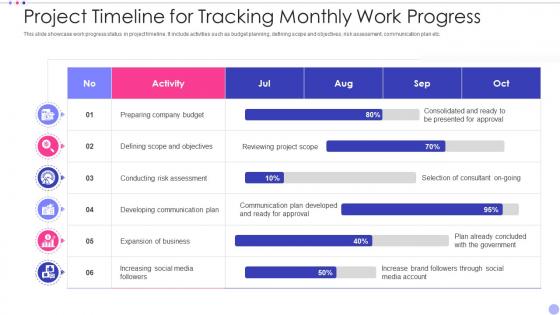
Project Timeline For Tracking Monthly Work Progress




Try Before you Buy Download Free Sample Product
 Impress Your
 Audience
 100%
100% Editable
 Save Hours
 of Time


Our Project Timeline For Tracking Monthly Work Progress are topically designed to provide an attractive backdrop to any subject. Use them to look like a presentation pro.
People who downloaded this PowerPoint presentation also viewed the following :
Project Timeline For Tracking Monthly Work Progress with all 6 slides:
Use our Project Timeline For Tracking Monthly Work Progress to effectively help you save your valuable time. They are readymade to fit into any presentation structure.





FAQs for Project Timeline For Tracking
Ok so first sketch out your big milestones and main phases. Then figure out who's doing what - seriously, this is where everything usually goes to shit because people just assume someone else has it covered. Build in buffer time too because stuff always takes way longer than you think. Map out your deliverables and which tasks depend on others finishing first. Oh and definitely mark any external deadlines or dependencies that could mess you up. I always do the high-level stuff first then get into the weeds after.
Honestly, project management tools are game-changers for keeping timelines on track. They automatically crunch the numbers and show you real-time progress vs your original estimates. No more late-night panic recalculating everything in Excel! When you set up dependencies in something like Monday or Asana, delayed tasks automatically push out everything that depends on them. Super helpful. The best part? These tools learn from your past projects, so your estimates actually get better over time. I'd say just pick whatever your team's already comfortable with and make sure everyone logs their actual hours consistently.
So basically, timelines are just straight lines - event A, then B, then C. Simple stuff. Gantt charts show which tasks can happen at the same time and what's blocking what. Way more complex but honestly? They're clutch for bigger projects. I used to hate them because they look crazy overwhelming at first glance. But if you've got multiple people doing different pieces that connect, you'll want the Gantt chart. Regular timelines work fine for simple sequential stuff though.
So I usually break tasks into smaller pieces first, then look at similar stuff I've done before. Check who's actually doing the work too - their experience level matters a ton. Used to be terrible at this tbh, always way too optimistic! Now I tack on like 20-30% extra time because random stuff ALWAYS comes up. Your team knows their own workload better than anyone, so definitely ask them. Oh and start keeping track of actual vs estimated time - you'll get way better at spotting patterns. Dependencies between tasks can really mess things up if you're not careful.
Honestly, start by writing down all your tasks and what actually has to finish before other stuff can begin. I swear, half the time things look like they can run at the same time but they really can't. Gantt charts are great for this, or just use a spreadsheet if you're not fancy. Always add buffer time between connected tasks - trust me on this one. Someone should own each task that's happening at once. Set up quick check-ins so you don't end up with a mess later. Oh, and do the dependency mapping first - it'll save you so much headache.
Honestly, good stakeholder communication is what saves your butt when projects go sideways. Keep everyone looped in on progress and delays so they can adjust their stuff accordingly. When roadblocks hit (which they will), stakeholders are way more likely to have your back if you've been transparent. Weekly updates might seem excessive at first, but trust me on this one. You'll catch scope creep before it gets ugly, and getting timeline changes approved becomes so much easier. Oh, and people actually appreciate knowing what's going on - even the boring status updates.
Honestly, I'm checking mine almost daily when things get crazy. Weekly reviews are the sweet spot though - catches problems before they snowball into disasters. Complex projects? Maybe twice a week, especially near big milestones. Don't wait for your next formal meeting to realize you're behind. Set a calendar reminder and actually stick to it (I'm terrible at this sometimes). The whole point is staying ahead of issues instead of scrambling to fix them. If you keep seeing the same delays pop up, that's when you know something's seriously wrong with your process.
Ugh, delays are the worst but they happen constantly. First thing - tell your stakeholders right away, don't try to secretly fix it (learned that the hard way). Look at what you can run at the same time instead of one after another. Can you cut some features or move them to phase 2? More people might help if you've got budget left. Sometimes you can push out deadlines for the less critical stuff too. The main thing is being upfront about what you're trading off - faster timeline probably means less scope or cutting corners somewhere. Just update your timeline with what's actually realistic now.
Templates are honestly a game changer for timelines. You'll have the same colors for each phase, consistent spacing, all that good stuff - makes it way easier to read. No more squinting at walls of text trying to figure out what happens when. Dependencies become super obvious too. I used to waste so much time making timelines from scratch every single project (ugh, never again). Now stakeholders can actually see the big picture right away instead of getting lost in details. Start with a basic Gantt chart and just tweak the colors to match your phases. Trust me on this one.
Honestly, we all suck at estimating how long stuff actually takes - like, monumentally suck at it. Don't pack your timeline super tight without breathing room. One delayed task will domino into everything else, so map out what depends on what first. Stakeholders will definitely want changes later if you don't loop them in early (ugh, but necessary). I always add 20-30% buffer time to big milestones now. Also figure out who's waiting on who for what - sounds obvious but you'd be surprised. Learned this the hard way lol.
Ugh, I made this mistake before and it was a nightmare - don't build your timeline first then try to squeeze dependencies in later. Map out what depends on what first. Like, which tasks literally can't start until other stuff is done? Then build your schedule around that. Always pad extra time for handoffs between teams because they're slower than you think. External dependencies? Even worse lol. Set up regular check-ins with everyone too so you catch issues early. Honestly, once you treat dependencies as your foundation instead of an afterthought, everything clicks way better.
Look at your old projects - they're honestly the best predictor you've got. Check how long similar stuff actually took vs what you planned. We always think "oh this'll be quick" but then reality hits, you know? I swear I do this every time. Track what went wrong too, not just the timeline gaps. Maybe you always underestimate testing or client feedback takes forever. Once you see the patterns, build in extra time for those problem areas. Trust me, you'll be way less stressed when things inevitably take longer than expected.
Honestly, start with schedule variance - are you hitting your planned dates or falling behind? Milestone completion rate matters too. What percentage of your key deliverables are actually done on time? Budget variance is critical since delays usually blow up costs. Resource utilization shows if your team's swamped or twiddling their thumbs (both mess up timelines). Oh, and track scope creep incidents - that's project killer
-
Satisfied with the way SlideTeam resolved my query regarding the right business PPTs that I was having difficulty finding. I found the perfect match with their assistance.
-
The website is jam-packed with fantastic and creative templates for a variety of business concepts. They are easy to use and customize.