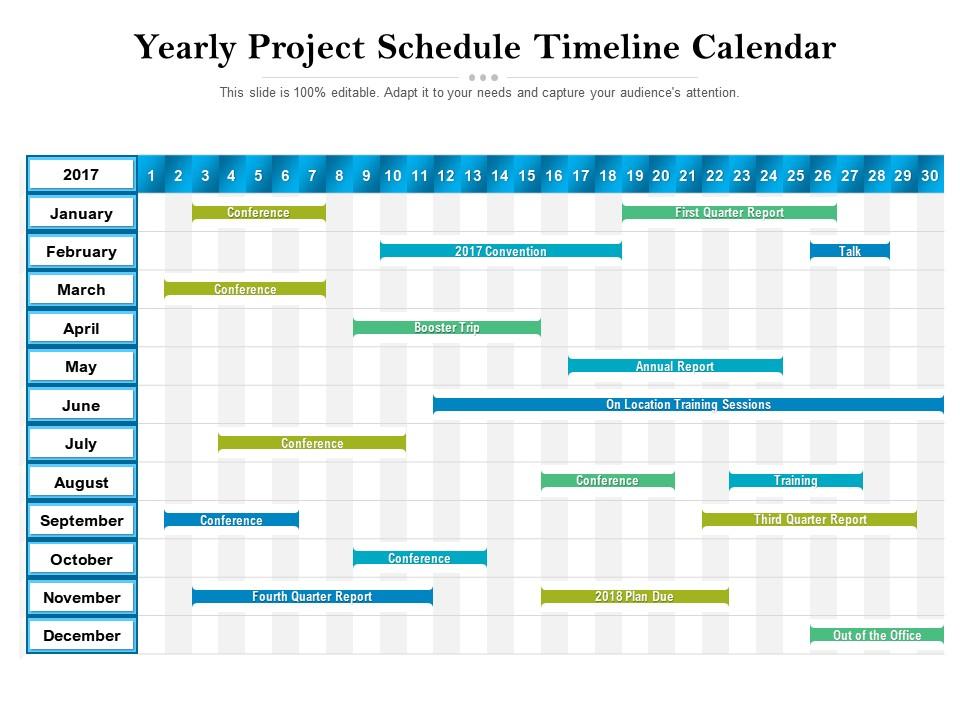
Yearly project schedule timeline calendar

Rating:
92%
Yearly project schedule timeline calendar
Slide 1 of 2
Favourites Favourites

Try Before you Buy Download Free Sample Product

Audience Impress Your
Audience
Editable 100%
Editable
Time Save Hours
of Time
The Biggest Sale is ending soon in
0
0
:
0
0
:
0
0
Rating:
92%
Presenting this set of slides with name Yearly Project Schedule Timeline Calendar. The topics discussed in these slide is Yearly Project Schedule Timeline Calendar. This is a completely editable PowerPoint presentation and is available for immediate download. Download now and impress your audience.

People who downloaded this PowerPoint presentation also viewed the following :

FAQs for Yearly project

So you need clear milestones and realistic timeframes for each task first. Map out which tasks depend on others - that's crucial. Find your critical path and definitely add buffer time because stuff always runs late, trust me. Break everything into phases, then chunk those down further with actual deadlines. Visual tools help tons - Gantt charts or kanban boards so people can see what's happening at a glance. Oh, and assign someone to own each deliverable. Regular check-ins are a must too, otherwise things just drift.

Honestly, just match it to who you're talking to. Executives? Give them a high-level Gantt or milestone view - they want the big picture stuff. Your actual team needs the nitty-gritty with dependencies and daily tasks. I swear, people way overthink this whole thing. Visual formats work great when you're presenting to stakeholders. Simple lists are totally fine for internal planning though. Really depends if they need to see how tasks connect or just care about key dates. Oh, and don't stress too much about making it perfect - I've seen amazing projects tracked on basic spreadsheets.

Honestly, just start with whatever feels easiest to you. Trello's super straightforward for basic stuff, though Monday.com and Asana are solid if you need more features. Microsoft Project is overkill unless you're doing something massive. Google Sheets works surprisingly well too - I've used it for tons of projects and it's free. Notion's trendy right now and pretty flexible. The real trick? Pick something your team will actually stick with. I've seen too many fancy tools get abandoned after a week. You can always upgrade later if you outgrow it.

Honestly, I'd say weekly at minimum, but it really depends on your project's pace. When things are moving fast or you've got a ton of variables, maybe bump it up to daily updates - especially after big meetings. I've watched so many projects go sideways because someone updated the timeline once at kickoff and then... nothing. Total nightmare by month two. Don't wait until you're already behind schedule to fix things. Set up a recurring reminder (I know, boring admin stuff) to actually look at your dates and dependencies. Your team will thank you for keeping everyone in the loop about what's really going on.

Dude, you absolutely need to talk to your stakeholders before locking in any timeline. They know all the messy details - who's actually available, what other projects are competing for resources, which deadlines are set in stone. Ask them upfront about their capacity and what they're expecting. Trust me, if they don't buy into your schedule from day one, you're screwed when crunch time hits. I learned this the hard way on my last project - spent weeks redoing timelines because I skipped the stakeholder conversations initially. Schedule those interviews early and save yourself the headache later.

Okay so first thing - connect your big deadlines directly to what you're actually trying to achieve. I always do these check-ins every couple weeks to see if I'm still heading toward the real goal, not just crossing stuff off lists (which feels productive but honestly isn't always). Cut anything that doesn't serve your main objectives - sounds harsh but you'll thank me later. Monthly timeline audits are a game changer too. Just ask yourself: will finishing everything on time actually deliver what I promised? Sometimes the answer surprises you and you need to pivot.

Ugh, time estimates are where everyone screws up - myself included. We're way too optimistic and forget to add buffer time. Also don't make your designer start before requirements are actually done (classic mistake). Your team should help with estimates since they actually know the work. Holidays and vacations will mess up your timeline if you don't plan for them. Oh and dependencies need to be realistic - can't have people waiting around for stuff that isn't ready. Always pad your estimates by 20% minimum. Seriously, it'll save you later.

Okay so work backwards from your deadline first - that's the trick. Space out milestones every week or two so you can actually catch problems before they blow up. Each one needs a real deliverable though, not some vague "research done" nonsense. I totally messed this up on my last project btw. Always add little buffer time between them because honestly? Something will take longer than you think. Oh and actually review your timeline weekly with the team - don't just make it and forget it exists.

Gantt charts are your best friend here - they make all the dependencies super obvious. I always color-code my milestones by priority because honestly it just looks way cleaner and easier to scan. Weekly standups are a must for catching problems before they blow up. Document any timeline changes right away and blast it to the whole team, not just the higher-ups. People forget what we talked about three days ago, let alone last week, so you gotta overcommunicate everything. Oh, and set up those automated deadline reminders - trust me, stuff will slip through otherwise.

Oh man, scope changes are the worst but super common. First thing - don't just say "sure, no problem" and try to make it work (trust me on this one). You gotta document everything that's shifting and figure out how much extra time you'll need. Then present your stakeholders with real options: push the deadline, cut other features, or get more people. Be totally honest about the trade-offs instead of pretending you can magically fit more work into the same timeline. Update your project plan officially and make sure everyone knows what's changing. Transparency saves your butt later.

So basically, your high-level timeline is the big picture stuff - like major phases over months or quarters. Perfect for showing your boss or stakeholders who don't want all the nitty-gritty details. Your detailed schedule though? That's where you break everything down into actual tasks, dependencies, what's happening day by day. It's what you'll actually use to manage your team and track if things are on track. Honestly, I always do the high-level one first to get everyone on board, then dive into the weeds once we've nailed down scope.

For complicated stuff with dependencies, go with Gantt charts. Simple projects? Just use timeline bars. Asana and Monday are solid, but honestly I've seen people work magic with basic Google Sheets and some color coding - don't underestimate spreadsheets! Show start/end dates, milestones, and who's doing what. But seriously, don't make it complicated. Anyone should look at it and immediately know what's happening when. Start with your must-haves first, then add the extras later. Update weekly or it becomes useless office decoration.

Track planned vs. actual dates for your milestones - that's the main one that'll save you. Percent complete on each task is solid for quick health checks. Burn rate shows how fast you're chewing through time, which honestly catches problems before they blow up. Critical path delays matter too since they mess with your whole end date. I'd probably check these weekly (maybe I'm paranoid but whatever). Throw them in a simple dashboard and go over it during team meetings. Four metrics, done.

Dude, try a Gantt chart - it'll make everything way more visual. You can actually see which tasks depend on others and spot bottlenecks before they wreck your timeline. Honestly, stakeholders eat this stuff up because it looks super professional even though it's not that hard to make. Color-code delays in red, add progress bars for stuff that's in motion. Monday or Asana can build these automatically from your project data (Excel works too if you're old school like me). Just start with your big milestones and work backwards from there.

Make it visual and outcome-focused, not just a bunch of dates. Clean timeline with the big milestones highlighted - learned that lesson after promising impossible deadlines like an idiot! Start with your goals, then walk through major phases. Show clear deliverables and what depends on what. Don't dump every tiny task on them, just stick to stuff stakeholders actually care about. Oh, and definitely prep for the "what if everything goes wrong" questions. They always ask about risks, so have your backup plans ready to go.

Ratings and Reviews

92% of 100
Review Form
Write a review
Most Relevant Reviews
  1. 100%

    by Columbus Vasquez

    Informative presentations that are easily editable.
  2. 100%

    by Devin Daniels

    Use of different colors is good. It's simple and attractive.
  3. 100%

    by Jack Johnson

    Great designs, Easily Editable.
  4. 80%

    by Dee Hicks

    Content of slide is easy to understand and edit.
  5. 80%

    by Murphy Green

    Great quality slides in rapid time.

5 Item(s)

per page: