

Website Development And Marketing Proposal Powerpoint Presentation Slides





Try Before you Buy Download Free Sample Product
 Impress Your
 Audience
 100%
100% Editable
 Save Hours
 of Time


Explaining the website design process can be difficult, select our Website Development And Marketing Proposal PowerPoint Presentation Slides to make it simpler. Using web design proposal PPT template you can easily introduce your company to prospecting customers. This website design PPT includes set of slides such as on proposal outline, target audience demographic archetypes, project objectives, design process, marketing approach, mobile apps, social media approach, search marketing, project phases, and timeline, about us, our team, clientele, a record of success, case study and company logo, etc. Web design and development proposal PowerPoint complete deck may be used to showcase your business expertise and methods you use while designing a website. In this website design proposal presentation template complete structure is laid out you can easily illustrate step by step of the web design process. Download the website development PPT presentation designs to grab a lucrative deal for your business. Our Website Development And Marketing Proposal Powerpoint Presentation Slides are full of go. Everyone around gets extremely energetic.
People who downloaded this PowerPoint presentation also viewed the following :
Content of this Powerpoint Presentation
Slide 1: This slide introduces Website Development And Marketing Proposal. State your company name here and get started.
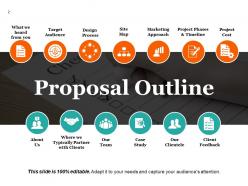
Slide 2: This slide presents the Proposal Outline with the following points- Target Audience, Site Map, Marketing Approach, Project Phases & Timeline, Project Cost, Design Process, About Us, Case Study.
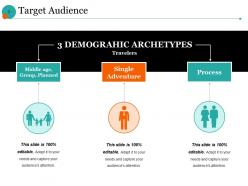
Slide 3: This is a Target Audience slide with 3 demographic archetypes namely- Middle age, Group, Planned, Single Adventure, Process.
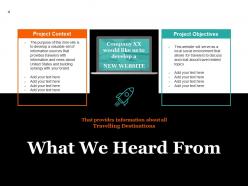
Slide 4: This slide presents What We Heard From containing project context and project objectives.
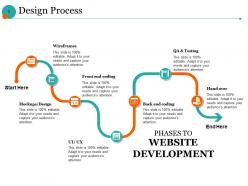
Slide 5: This slide presents the Design Process using Phases to website developement containing the following points- Back end coding, QA & Testing, Hand over, Front end coding, Wireframes, Mockups/Design, UI/ UX.
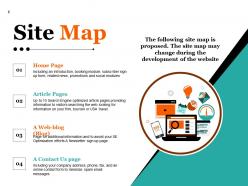
Slide 6: This slide presents Site Map containing home page, articles page, a web- blog (blog), a contact us page.
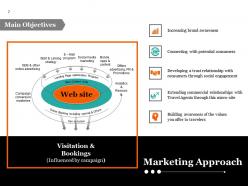
Slide 7: This slide presents Main Objectives with the following Marketing Approach- Increasing brand awareness, Connecting with potential customers, Developing a trust relationships with consumers through social engagement, Extending commercial relationships with travel agents through this micro-site, Building awareness of the values you offer to travelers.
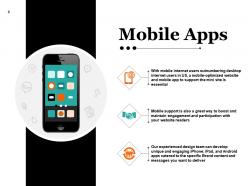
Slide 8: This slide shows Mobile Apps with respective imagery.
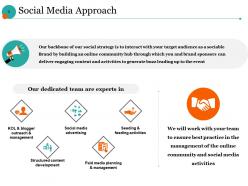
Slide 9: This slide presents the Social Media Approach. Our backbone of our social strategy is to interact with your target audience as a sociable Brand by building an online community hub through which you and brand sponsors can deliver engaging content and activities to generate buzz leading up to the event.
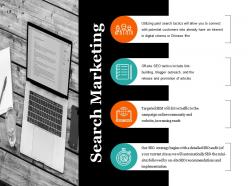
Slide 10: This is a Search Marketing slide which includes the following points- Utilizing paid search tactics, Off-site SEO tactics, Targeted SEM, SEO strategy.
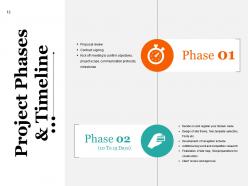
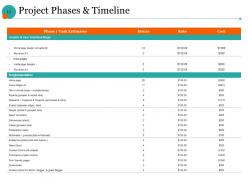
Slide 11: This slide presents Project Phases & Timeline with Phase 01 and Phase 02.
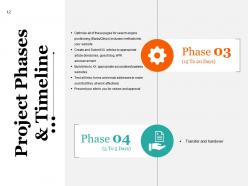
Slide 12: This slide too shows Project Phases & Timeline with Phase 03 and Phase 04.
Slide 13: This is another Project Phases & Timeline slide with Phase 1 task estimates.
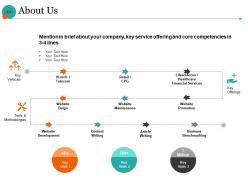
Slide 14: This is an About Us slide with the following- Key Verticals, Key Offerings, Tools & Methodologies. You can add your company key service offering, core competencies etc. here.
Slide 15: This is a Where We Typically Partner With Clients slide.
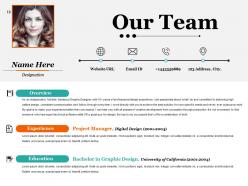
Slide 16: This is Our Team slide with name, designation, education etc.
Slide 17: This is a Case Study slide showing client objective and our approach.
Slide 18: This is Our Clientele slide with their respective imagery.
Slide 19: This slide presents A Proven Record of Success with name, designation etc.
Slide 20: This is a ‘COMPANY LOGO’ slide. State information, contact details etc. here.
Slide 21: This is a Coffee Break slide. You can change it as per need.
Slide 22: This slide is titled Charts And Graph to proceed further. You can change/alter it as per need.
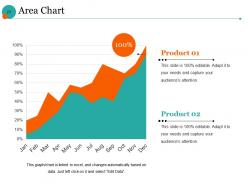
Slide 23: This slide presents Area Chart with a graph imagery stating comparison between products/entities.
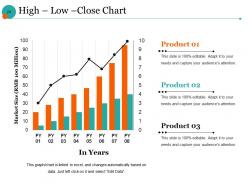
Slide 24: This is a High – Low –Close Chart image slide stating product/ entity comparison.
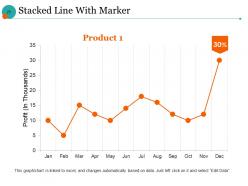
Slide 25: This is a Stacked Line With Marker slide with a graph image.
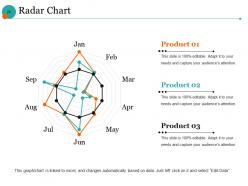
Slide 26: This is a Radar Chart slide to present information, comparison etc.
Slide 27: This slide is titled Additional Slides to move forward. You can change/alter it as per need.
Slide 28: This is Meet Our Team slide with name, designation etc.
Slide 29: This is About Our Company slide. Can be changed/ replaced as per need.
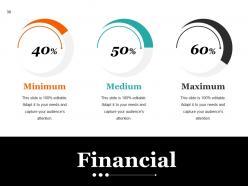
Slide 30: This is a Financial slide ranging from minimum, medium and low. State your financial aspects here.
Slide 31: This is OUR GOAL slide. State your goals, aspirations etc. here.
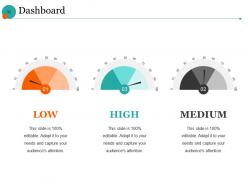
Slide 32: This slide presents the Dashboard with low, medium and high parameters.
Slide 33: This is a Mind Map image slide with text boxes to fill information.
Slide 34: This is a Blub Or Idea image slide to present innovative/ creative aspects.
Slide 35: This is a Thank You slide with Address, # street number, city,state, Contact numbers, Email address.
Website Development And Marketing Proposal Powerpoint Presentation Slides with all 35 slides:
Our Website Development And Marketing Proposal Powerpoint Presentation Slides have a fetish for being accurate. They eliminate errors of assessment.


FAQs for Website Development And Marketing Proposal
Start with the fundamentals - scope, timeline, and pricing that's crystal clear. Your portfolio examples should match their industry, not just random stuff you've done. Walk them through your process so they're not guessing what comes next. Here's the thing though - you've gotta show you actually read their brief and understand their specific problems. Don't just copy-paste some template. Include what support looks like after you finish the project too. Most people forget that part. End with concrete next steps and when you'll follow up. It's really about proving you listened instead of just pitching.
Look, market research shows you who's actually gonna use your site and what they care about. Skip this step and you're just guessing what looks cool. I've watched so many gorgeous sites crash because nobody wanted what the designer built. Your audience might love tons of product details right away, or maybe they want everything super minimal - you won't know until you ask. Test your ideas with real people first. Seriously, survey your target users before you waste time building the wrong thing. It'll save you from that awkward moment when you realize you designed for yourself, not them.
Honestly, you gotta think about SEO right from the start - like when you're sketching out your site structure and planning URLs. Don't just slap it on afterward, that's a nightmare to fix later. Map out your navigation based on how people actually search for your stuff. Get your developer to handle the technical bits early - proper headings, schema markup, all that boring but crucial stuff. Page speed matters too, so optimize from day one. I learned this the hard way on my last project. Way cheaper to build it in than retrofit everything later when your site's already live.
Honestly, UX is where you'll see your marketing dollars actually work. People bounce crazy fast if your site's confusing or slow - doesn't matter how much you spent getting them there. When navigation feels natural, users hang around longer and actually convert. Short sentences work. Your bounce rate drops, and you're guiding people toward buying instead of losing them at hello. Google notices this stuff too, so your organic rankings get better. I'd start by walking through your site like a first-time visitor - you'll spot the annoying parts pretty quick.
Ok so first things first - stick to your brand colors, fonts, and imagery style. Don't make it cluttered (seriously, those early 2000s websites were painful). Your layout should guide people naturally through the content with good spacing and contrast. I'd honestly start with a mood board before doing anything else - helps you visualize how it'll all work together. Make sure each page feels cohesive but still does its job. Oh, and definitely test on mobile since that's where everyone browses now. Clean and organized beats fancy every time.
Dude, responsive design is seriously make-or-break for your marketing. Most people browse on their phones now - like 60% of traffic is mobile. If your site looks terrible on mobile, they'll bounce instantly instead of buying anything. Google punishes sites that aren't mobile-friendly too, so your search rankings tank. I learned this the hard way with my last project, honestly. Your conversion rates will thank you when everything works smoothly across devices. Just grab your phone and test your site right now - you'll probably spot issues immediately. Fix those first, then worry about the smaller stuff later.
Okay so you definitely need Google Analytics and Search Console set up first - that's like step one. Track your organic traffic growth and bounce rate to see if people are actually sticking around. Page load speed matters way more than you'd think, honestly. Nobody waits for slow sites anymore. Check your search rankings for important keywords too. Goal completions are huge - forms, signups, sales, whatever you're going for. Time on page tells you a lot. I'd review everything monthly so you can catch trends before they get out of hand.
So here's what works - pitch it as both tech AND marketing boost. Clients go crazy when they see their Instagram pics auto-updating on their homepage, trust me. Start with the basics: social login, share buttons, live feeds. Then phase in the fancy stuff like social commerce later. The key thing? Don't just say "cool feature" - connect each integration to their actual business goals. Like, share buttons = more traffic, social login = easier checkout process. Oh and definitely quote realistic dev time upfront. Nothing kills a proposal faster than underestimating how long API integrations actually take.
So basically a CMS lets you update your website without coding everything from scratch. You can add pages, edit text, upload photos - all through a dashboard like WordPress or whatever. Your team won't have to bug a developer for every tiny change, which is honestly huge. Most come with SEO stuff and security built in too. I mean, mobile responsiveness is pretty standard now. For your proposal, definitely mention how they'll have control and save money on maintenance. It's one of those things that just makes sense for most businesses.
Honestly, set up feedback checkpoints at specific stages - wireframes, mockups, content drafts. Don't just ask "what do you think?" because you'll get useless responses like "make it pop more" (been there!). Create actual questionnaires about functionality and brand alignment instead. Build revision rounds into your timeline from the start. Give them deadlines for responses or you'll be waiting forever. The trick is making it feel collaborative, not like you're testing them. Oh, and always repeat back what you heard before making changes - saves so much confusion later.
Okay so first figure out where your people actually spend time online. Google Ads and SEO are solid starting points - people are literally searching for what you're selling. For social, LinkedIn if you're B2B, Instagram/Facebook for consumer brands. Email marketing is weirdly still amazing for ROI if you can actually get people to sign up (which is the hard part lol). But seriously, don't try to be everywhere at once. Pick maybe 2-3 channels and nail those instead of doing a crappy job across ten different platforms. Test small first to see what actually works before you blow your whole budget.
Dude, your site speed is killing you. People bounce if it takes more than 3 seconds to load - like 40% just peace out immediately. Google hates slow sites too, so you're getting dinged in search results. Mobile users? Even worse, they have zero patience. Honestly, I've seen marketing budgets completely wasted because the landing pages were trash slow. Two quick fixes that actually work: compress your images (they're probably huge) and get better hosting. Those alone can cut your load time in half. Worth every penny IMO.
Okay so basically split it into three chunks: development, marketing, and maintenance. Development covers your design, coding, testing - all that technical stuff. Marketing is where things get expensive fast honestly - ads, content, SEO tools, maybe some influencer collabs. Then there's the unsexy maintenance stuff like hosting and security updates. Oh, and definitely add like 15-20% buffer to everything because shit always goes sideways. Get quotes from a few different places first though so you're not just guessing on costs. Trust me on the buffer thing - learned that one the hard way.
Honestly, don't wait to add A/B testing - build it into your site from the start. Way easier than trying to retrofit it later. Test everything: headlines, button colors, page layouts, forms. I know button colors sounds ridiculous but I've literally seen 30-40% conversion bumps from stuff like that. The trick is changing just one thing at a time so you actually know what worked. Focus on your homepage and landing pages first since they get the most traffic. Even tiny improvements there make a huge difference. Oh, and make testing part of your pre-launch routine - you'll thank me later.
Look for AI stuff and PWAs in those proposals - they're everywhere now. Voice search is kinda big too since people won't stop talking to their phones. Mobile-first design should be obvious by now, but you'd be surprised how many still mess that up. Core Web Vitals matter tons for SEO, so make sure they mention page speed optimization. Headless CMS and accessibility-first design are smart moves (plus accessibility keeps you out of legal trouble). Oh, and sustainable web practices if you care about that. Just ask them for examples from recent work - that'll tell you everything you need to know about whether they actually get these trends.
-
Wonderful templates design to use in business meetings.
-
Enough space for editing and adding your own content.