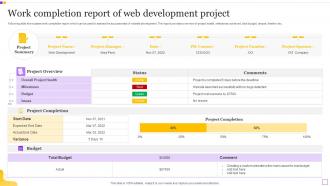
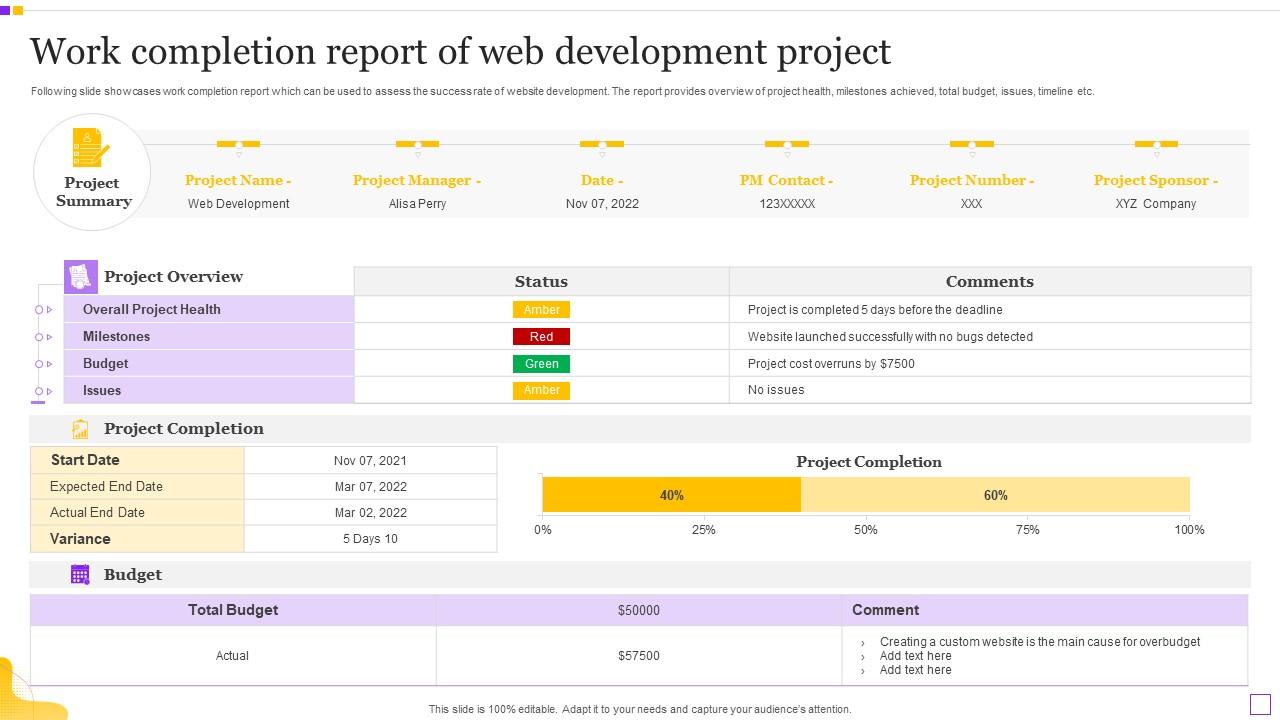
Work Completion Report Of Web Development Project
Try Before you Buy Download Free Sample Product
Audience
Editable
of Time
Following slide showcases work completion report which can be used to assess the success rate of website development. The report provides overview of project health, milestones achieved, total budget, issues, timeline etc.
People who downloaded this PowerPoint presentation also viewed the following :
Work Completion Report Of Web Development Project with all 6 slides:
Use our Work Completion Report Of Web Development Project to effectively help you save your valuable time. They are readymade to fit into any presentation structure.
FAQs for Work Completion Report Of
Okay so PWAs are actually pretty massive right now - users get that app feel without downloading anything, which is genius. AI stuff is literally everywhere (kind of exhausting tbh), but chatbots and personalized content actually work. Voice search optimization matters more since everyone's constantly talking to Siri now. Server-side rendering is back for better SEO and performance. Dark mode? Not trendy anymore, people just expect it. I'd say audit your site against these things first, then pick one area to dive into. Don't try to tackle everything at once or you'll go crazy.
So responsive design is basically making sure your website doesn't look like garbage on phones and tablets. It automatically resizes everything - text, images, menus - based on whatever screen someone's using. Way better than those awful separate mobile sites from like 2010 (ugh, remember those?). Your users won't have to do that annoying pinch-and-zoom thing anymore. Google's really pushing mobile-first stuff now too, so it's kinda mandatory if you want decent search rankings. I always start with mobile layouts first these days - saves you headaches later when everything actually works across devices.
Here's the thing - SEO needs to be baked into your site from day one, not slapped on later. Focus on the technical basics first: fast loading times, mobile-friendly design, clean URLs. Use proper HTML structure with good heading tags and don't forget alt text on images. Meta tags and schema markup matter too, though schema can feel overwhelming at first. Run everything through Google PageSpeed Insights to catch the obvious performance problems. Trust me, fixing this stuff after launch is such a pain. Way better to get it right during development.
So front-end is basically everything users see - HTML, CSS, JavaScript, React, all that visual stuff. Back-end handles the behind-the-scenes work like databases, server logic, and APIs with Python, Java, Node.js, whatever. Front-end devs worry about making things look good and work across different browsers. Meanwhile back-end people deal with data processing and keeping everything secure. I always thought front-end would be more creative, but honestly both sides have their own problem-solving challenges. Really depends if you're more into visual design or building systems that just work smoothly.
Start with security from the beginning - don't just slap it on at the end. Sanitize every user input and use HTTPS everywhere. Strong password policies are a must, but here's the thing that gets everyone: never rely on frontend validation alone. That's basically useless since anyone can bypass it. Always validate server-side too. Keep your dependencies updated because old packages are easy targets. Oh, and run security scans while you're developing, not right before launch. Way easier (and cheaper) to fix stuff early. Trust me on that one.
Yeah, no-code stuff is definitely eating into basic website work - can't blame businesses for going that route when budgets are tight. But honestly? Complex projects still need real developers. You can't build sophisticated apps with drag-and-drop tools, at least not well. What I'd do is learn these platforms instead of fighting them. Use them for quick prototypes, then spend your time on the challenging stuff that actually pays well. There's tons of integration work now too since everyone's using different platforms that don't talk to each other. It's almost like these tools create more work sometimes.
Dude, don't rush the testing part - that's where everything goes wrong. Test on mobile first because that's probably how most people will see it anyway. Your hosting better be able to handle traffic or you'll crash on day one (learned that the hard way). SSL cert, analytics setup, form testing - all that boring stuff needs to happen before launch. I always forget to test contact forms and then nobody can actually reach you lol. Honestly just make a checklist and actually follow it. Different browsers can be weird too so check Safari, Chrome, whatever.
Honestly? Get everyone talking from day one. Weekly check-ins are clutch - review mockups, hash out what's actually doable tech-wise, and sync timelines. Figma's great for design handoffs, shared docs for content stuff. I learned the hard way that being brutally honest about technical constraints upfront saves so much drama later. Build out style guides and component libraries everyone can actually use. Oh, and definitely loop designers into QA - they'll spot visual bugs you'd totally miss. Don't wait until you're halfway through to start these convos.
Honestly, these frameworks are lifesavers. React, Vue, Angular - they handle all the DOM stuff automatically so you don't have to. Pre-built components, routing, state management... it's all there. Without them, vanilla JS gets messy fast - I've seen codebases that look like someone threw spaghetti at a wall. The component approach makes everything more reusable too. React's probably your best bet since everyone's hiring for it, though Vue's actually really nice to work with. All solid picks really, just depends what you're building.
Dude, slow websites are conversion killers. People bounce if your page takes forever to load - we're talking zero patience these days. There's actually research showing a one-second delay drops conversions by 7%, which is wild when you think about it. Fast sites keep people engaged and buying stuff. You want everything loading under 3 seconds if possible. I'd run your site through Google PageSpeed Insights first to see what's broken, then fix the worst problems. Trust me, your conversion rates will definitely improve once things load quickly.
Privacy and data protection should be your top priorities - only grab what you actually need and get real consent. Accessibility matters too, make sure disabled users can navigate everything smoothly. Those manipulative dark patterns? Total BS, avoid them completely. Your code and hosting choices have environmental impact too, which honestly more devs should think about. Short sentences work. So do longer ones that flow naturally when you're explaining complex stuff. Always question whether you're genuinely helping users or just padding metrics. If it feels sketchy, it probably is.
Build accessibility in right from the start - trust me, it's way easier than fixing it later. Semantic HTML and proper headings are honestly no-brainers that don't slow you down at all. Alt text for images too. Throw axe-core into your build process to catch the obvious stuff automatically. I'd also get into the habit of testing with just your keyboard and maybe a screen reader during regular QA. It becomes second nature pretty quick. Actually, you should totally audit one of your existing pages this week using browser dev tools - you'll probably be surprised what you find.
Dude, set yourself a monthly maintenance thing - like 2 hours to handle security updates and check for broken links. Every quarter, go through your content and see what needs updating. UptimeRobot is clutch for monitoring if your site goes down (learned that the hard way). Get automated backups running ASAP. Most people ignore this stuff until everything's on fire, which... don't do that. Annual performance audits are smart too. Oh, and always test updates on a staging site first - I can't stress this enough. Make a simple checklist so you don't forget the boring plugin updates and speed checks.
Dude, AI can totally speed up your dev work. GitHub Copilot is probably the best place to start - I've been using it for months and it's wild how much faster I code now. Bug detection tools catch stuff way quicker than doing it manually. You can also get AI to generate code snippets and suggest UI improvements based on user data. Oh, and automated testing is huge - saves so much time. Later you could add chatbots for support or personalization features. Honestly though, just try Copilot first and see if you vibe with it before going crazy with other tools.
Track page load times, mobile scores, and broken links on the tech side. Business metrics matter more though - bounce rate, time on site, conversions. Those are what your boss actually cares about. SEO rankings and accessibility scores too, obviously. Set up a dashboard pulling from Google Analytics and whatever monitoring tools you're using. Oh, and start tracking before you launch so you've got something to compare against later. Otherwise you're just guessing if things got better or worse.
-
Visually stunning presentation, love the content.
-
Thank you SlideTeam for such an excellent service.