

Building Construction Project Progress Status Report




Try Before you Buy Download Free Sample Product
 Impress Your
 Audience
 100%
100% Editable
 Save Hours
 of Time


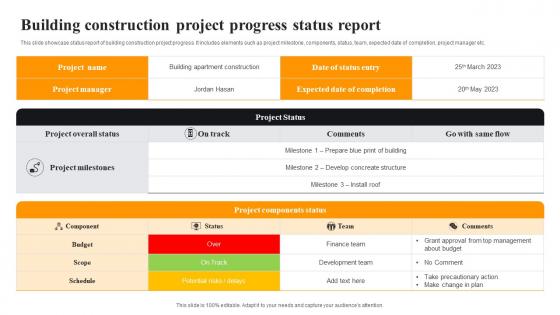
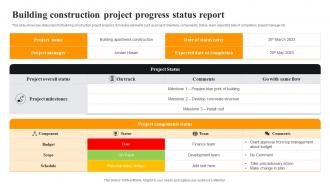
This slide showcase status report of building construction project progress. It includes elements such as project milestone, components, status, team, expected date of completion, project manager etc.
People who downloaded this PowerPoint presentation also viewed the following :
Building Construction Project Progress Status Report with all 6 slides:
Use our Building Construction Project Progress Status Report to effectively help you save your valuable time. They are readymade to fit into any presentation structure.





FAQs for Building Construction Project
Honestly, just focus on the key stuff - project status, budget, timeline, and any risks or problems that need fixing. Start with an executive summary because let's be real, most people won't read beyond that anyway. Then cover your milestones, what's coming up next, and how you're using resources. Definitely throw in some photos or visuals - way better than walls of text. Weather delays, permit headaches, whatever could mess with your schedule needs to be in there too. Keep it short but don't skip the important details. Always end with clear next steps and who's responsible for what.
Honestly, going digital is a game changer for accuracy. Mobile apps let you enter data right from the site - no more messy notes that get butchered when you transcribe them later. Photos with GPS stamps are clutch when clients start questioning timelines. IoT sensors handle equipment tracking automatically, which saves me hours of logging (though setup can be a pain initially). Cloud platforms keep everyone synced up instead of working off outdated info. I'd start with just one tool and build from there - don't overwhelm yourself trying to digitize everything at once.
Hey! So the big ones are schedule (staying on track), budget variance, and quality stuff like defect rates. Safety incidents are huge - that's non-negotiable obviously. I'd track how well you're using your crew and equipment too. Stakeholders eat up those milestone completions, gives them something to celebrate. Oh and change orders - ugh, those things multiply like rabbits so definitely monitor their impact. Honestly though, start simple with these basics then add project-specific metrics later. Don't go crazy with data or people's eyes will glaze over reading your reports.
Honestly, regular reporting is a game changer - it stops those super awkward meetings where everyone's like "wait, what's going on?" You'll want to share progress updates and budget stuff consistently so people feel in the loop instead of getting hit with random surprises. Saves you from a million individual phone calls too, which is honestly the best part. Don't go overboard with details though. Find that balance between giving context and drowning people in info. Set up some kind of template so everyone knows what's coming and when. Way better than scrambling to explain things after stuff goes sideways.
Honestly, the worst part is dealing with data silos - every team's using different systems so you can't see the big picture. Weather delays will screw up your timeline constantly, plus change orders come out of nowhere. Your reports probably look like a mess too since everyone formats them differently. What's helped me: get everyone using the same reporting templates first. Then grab some integrated project management software that actually connects field stuff to office systems. Daily automated reports are a game-changer. Oh, and always build in buffer time - I learned that one the hard way. Having backup plans ready saves your sanity when things inevitably go sideways.
Honestly, it's all about knowing your audience. Clients want the big picture stuff - are we on time, on budget, any problems they need to worry about. Don't bog them down with technical details unless they ask. Your team though? They need everything - resource breakdowns, task updates, safety issues, the whole nine yards. I made this mistake once sending a crazy detailed report to a client who literally just wanted to know if we were still on track. Now I always ask people upfront what they actually want to see in these reports. Saves everyone time.
Dude, predictive analytics is like having a crystal ball for your construction projects. Looks at old data and current stuff to warn you about cost overruns, delays, material shortages - all that fun chaos. Weather delays, sketchy subcontractors who'll probably flake, material price jumps. You know the drill. Honestly beats scrambling when everything hits the fan. My advice? Don't go crazy trying to predict everything at once. Pick something simple like schedule tracking first, then build from there. Way less overwhelming that way.
Honestly, visuals are a game-changer for construction reports. People can look at a chart showing budget vs actual costs and instantly get it, instead of reading through paragraphs of numbers. Before/after photos are great too - they tell the whole story. I always throw in some Gantt charts for timeline stuff and basic bar graphs for budget tracking. Most executives would rather look at pictures than read anyway, let's be real. Oh, and progress photos work really well because you can literally see what's happening on site. Keep it straightforward and people will actually read your reports instead of just pretending they did.
Honestly, just set up automated reminders from the start and you'll save yourself so much stress. I use project management tools to ping team leads before deadlines - works way better than hoping people remember. Weekly check-ins or milestone updates, whatever fits your vibe. Template everything so nobody's reinventing the wheel each time. Oh, and buffer time is clutch because someone's always gonna be late with something last minute. I almost tanked a whole project once because reports came in delayed. Not fun! Stick to whatever schedule you pick though - consistency is everything.
Honestly, start with templates for your main stuff - daily logs, safety reports, budget tracking. Makes everything way easier. Get your naming conventions sorted early because hunting for files later is the worst. Train everyone on the same tools and schedules, otherwise you'll have chaos across sites. I'd do weekly check-ins to catch problems before they blow up. The trick is keeping it simple enough that people won't just ignore it. Focus on your most critical reports first, then add more once that's running smooth. Trust me on this one.
Look, you NEED to document everything or you're gonna get screwed when clients start arguing about extra costs. I learned this the hard way on a project last year - what a nightmare. Write down what changed, why, who said yes, and how much time/money it'll cost. Do it right when stuff happens, not later when you can't remember the details. This paperwork literally saves your ass during disputes. Plus it helps you quote better on future jobs since you'll actually know what went wrong before. Trust me, make this a habit now.
Ditch those weekly reports and go for real-time dashboards instead. Hook up automated feeds from whatever project tools you're using - that way people can see budget burns and timeline changes as they happen. I've watched way too many teams make dumb decisions off week-old data, which is pretty painful when everything's shifting daily. Exception reporting is your friend here. Only flag what's actually changed or needs attention. When scope creep hits (and it will), you can pivot fast. Oh, and start simple - pick your three most important metrics and automate those first. You can build from there.
Dude, Procore is probably your best bet if you've got the budget - it's expensive but handles everything. PlanGrid and Buildertrend are solid too. Smaller projects? Monday.com or Smartsheet won't kill your wallet and they're way easier to learn. I swear some of these construction software companies think we all have engineering degrees or something. Just grab free trials of like 2-3 options and see what doesn't make your crew want to throw their tablets. The main thing is finding something that actually works with how you guys already do things.
Look, regulations are gonna tell you exactly what to track and when to report it. Safety incidents, environmental stuff, labor standards, permit compliance - honestly the paperwork is insane. Each location has its own rules too, which makes it even more fun. Daily safety reports for some projects, weekly or monthly for others. I learned this the hard way, but set up your tracking systems right from the start. You don't want to be digging through piles of data when an inspector rolls up or you hit a deadline.
Ok so first thing - figure out what data actually matters most to your project. Don't try tracking everything at once, you'll burn out. Set up daily logs and take photos as you go. Those project management apps are honestly game-changers for this stuff, way better than trying to remember everything in your head. Get your subcontractors on the same page about what they need to report and when. Consistency beats perfection here. Oh, and make sure everyone knows the reporting standards upfront - saves so much headache later. Build simple systems first, then add more tracking once you've got the basics down.
-
I've been looking for a good template source for some time. I'm happy that I discovered SlideTeam. Excellent presentations must try!
-
Innovative and Colorful designs.