


Daily Status And Project Progress Report For Construction Company




Try Before you Buy Download Free Sample Product
 Impress Your
 Audience
 100%
100% Editable
 Save Hours
 of Time


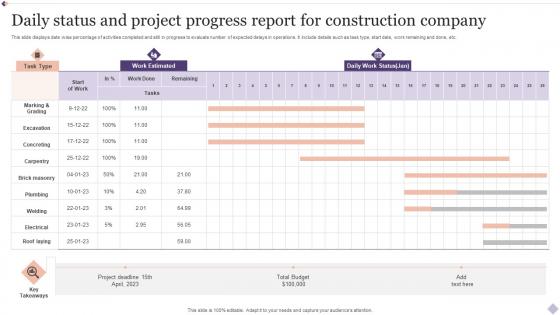
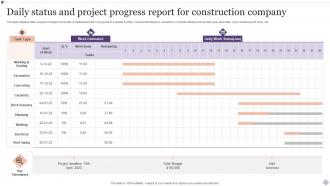
This slide displays date wise percentage of activities completed and still in progress to evaluate number of expected delays in operations. It include details such as task type, start date, work remaining and done, etc.
People who downloaded this PowerPoint presentation also viewed the following :
Daily Status And Project Progress Report For Construction Company with all 6 slides:
Use our Daily Status And Project Progress Report For Construction Company to effectively help you save your valuable time. They are readymade to fit into any presentation structure.





FAQs for Daily Status And Project Progress Report
Timeline stuff is huge - show where you're at with milestones and budget (actual vs what you planned). Safety incidents need to be front and center because that's when people freak out. Quality updates, change orders, weather issues - all that matters. Photos are honestly your best friend here. Way better than writing paragraphs nobody reads anyway. Schedule performance is what stakeholders really care about, plus what's coming next. Resource allocation too, though that can get boring fast. Keep it tight - one page max or people zone out.
Honestly, the biggest win is just getting rid of all those manual data entry mistakes. Mobile apps let your field crews report stuff instantly instead of scribbling notes on paper - which half the time you can't even read anyway. Drones are pretty cool for progress shots, and IoT sensors automatically track equipment so you're not constantly wondering where things are. The real-time updates are clutch because you'll actually know what's happening on site. Plus everything gets timestamped so there's no question about who entered what and when. I'd start with something basic like a mobile app first though.
Honestly, just stick to the big four and you'll be fine: schedule, budget, safety, and quality. Track your critical path milestones religiously - delays love to cascade. Weekly budget checks are a must because cost overruns will destroy you if you're not paying attention. Safety incidents are obvious no-brainers to monitor. Quality-wise, watch your rework rates and inspection pass/fail numbers. Oh, and definitely set up some kind of auto-updating dashboard. Trust me on this one - manually pulling all that data every week gets old fast. You'll thank yourself later when everything's just... there.
Weekly reports are your sweet spot for most construction projects. Daily makes sense if you're dealing with something really complex or risky. Honestly, nobody wants to be buried in paperwork - weekly gives you enough detail to spot problems early without killing your productivity. Smaller jobs? Maybe bi-weekly works, but I'd just stick with weekly to keep things simple. The real trick is being consistent about it. Cover your basics: progress, budget, safety stuff, delays. Oh, and actually set a calendar reminder or you'll totally forget (trust me on this one).
So stakeholders are basically who you're writing these reports for, and honestly, they can be a pain sometimes. Owners just want to know if you're on budget and schedule. Contractors need all the technical stuff. Regulatory people? They only care about compliance. The trick is not treating them like they just sit there and read whatever you send. They'll come back with questions, demand changes, make decisions off your info. Super annoying but that's the job. Map out who needs what details upfront - saves you from rewriting everything later when someone complains they didn't get what they needed.
Honestly, the main stuff that trips people up is being all over the place with when they report things, using super vague descriptions, and forgetting to take photos. Also - and I learned this the hard way - don't bury the important problems in these massive paragraphs because nobody's gonna read that mess. Document delays and changes right when they happen, not three weeks later when you can barely remember what went wrong. Weather delays and subcontractor drama? Write it all down because that stuff always becomes a huge deal later during fights. I'd set up some basic weekly template so you don't forget the important bits when everything gets hectic.
Dude, trust me on this - throw some visuals into your construction reports. Charts and progress photos beat the hell out of boring spreadsheets every time. Executives can actually spot problems quickly instead of squinting at endless number tables (which let's be honest, nobody wants to do). Timeline charts are clutch for showing delays, and before/after photos make it super obvious when teams aren't hitting their marks. I started swapping budget tables for simple bar charts last year and people actually started reading my reports. It's wild how much difference it makes. Start small and you'll see what I mean.
Look, Procore and Autodesk Construction Cloud are your best bets - they've got daily reports, RFIs, change orders all built in. PlanGrid's decent too if your crew likes using phones for everything. Don't make the mistake I've seen where teams try forcing regular project management software to work. Trust me, it's a headache. Microsoft Project's fine for scheduling but feels ancient for field stuff. My buddy's company wasted like 3 months trying to customize some generic tool when construction-specific ones just... work. Try free trials of both Procore and Autodesk first - whichever one your team actually uses is the winner.
Dude, regulatory requirements basically run the whole show for construction reporting. They tell you what data to collect, reporting schedules, formats - the works. Safety incidents, environmental stuff, labor stats, quality checks... honestly it's a massive headache but you can't mess around with it or they'll shut you down. Different areas have totally different rules too which makes it even more fun. Map out which agencies you're dealing with right off the bat - like, before you do anything else. Figure out your project type and location first, then identify who's gonna be breathing down your neck.
Honestly, consistency is everything with these reports. Same day every week, same format - dashboards work way better than walls of text (learned that one the hard way when my 3-page updates got ignored). Progress bars, budget status, timeline stuff - keep it visual. Photos of actual work are gold because execs eat that up. Here's the thing though - call out risks super early with your fix already mapped out. Nobody wants to be blindsided by problems, but they also don't want just a laundry list of issues without solutions. Makes you look proactive instead of just complaining.
Just add a risk section to your regular project reports - track what's happening with each risk and how you're handling them. Visual stuff like risk matrices really help, especially when you're presenting to executives who don't want to dig through paragraphs. Weekly updates should cover new risks you've found, ones you've knocked out, and any budget hits. Oh, and watch for early warning signs like safety issues or delivery problems - those usually mean bigger headaches are coming. Make it a standard thing so everyone stays in the loop and can actually help prioritize what needs attention first.
Honestly, capture that stuff right after each phase wraps up - your brain's still got all the details. Make a simple template covering what worked, what sucked, and what to do differently. Teams always think they'll remember everything if they wait until the end... spoiler alert: they don't. Quick debriefs with your key people work great. Document the technical headaches AND the process stuff that went sideways. Throw it all in a shared folder that people can actually find later - not buried in some random drive. Start this on whatever you're working on now. Even tiny wins are worth writing down.
Dude, reporting is like your safety net for construction projects. I've watched so many jobs fall apart because nobody tracked the basics - schedule slips, budget overruns, you name it. Weekly reports are your friend here. Cover your schedule, money situation, and any red flags you're seeing. The thing is, catching problems early saves your ass later. Your team stays on the same page, stakeholders actually know what's happening, and you can pivot when things go wrong (which they will). Trust me, the projects where I stayed on top of documentation? Way smoother. The ones where I got lazy with it... let's just say lessons were learned the hard way.
Think about who's actually reading your reports, then tailor accordingly. Executives just want the big picture - budget, timeline, major issues. They'll glaze over if you mention every tiny permit hiccup. Your project managers? They need all the operational details you can give them. Clients are somewhere in between - they love progress photos and want to see their investment paying off. I learned this the hard way after sending way too much detail upward once. Figure out what each group actually cares about first, then write to those specific concerns. You'll save yourself tons of revision time.
Dude, you can pull up project data from literally anywhere - coffee shop, your truck, whatever. Game changer when you're hopping between sites all day. The whole crew updates stuff instantly instead of those painful weekly check-ins. I swear by the auto-backup thing too after losing a massive spreadsheet last year (still traumatized lol). Everyone stays on the same page, and it plays nice with whatever scheduling app you're already using. Honestly? Try it on your next decent-sized job. You'll wonder why you waited so long to make the switch.
-
The quality of the templates is as fine as it could get. It was a purchase well made!
-
I am not the best at presentations but using SlideTeam’s PPT template made it easier for me. Thank you SlideTeam!