

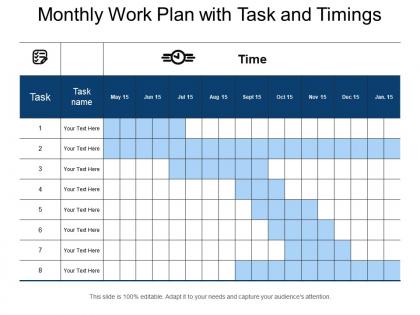
Monthly work plan with task and timings




Try Before you Buy Download Free Sample Product
 Impress Your
 Audience
 100%
100% Editable
 Save Hours
 of Time


Join the argument with our Monthly Work Plan With Task And Timings. Give them a better insight into issues.
People who downloaded this PowerPoint presentation also viewed the following :
Monthly work plan with task and timings with all 5 slides:
Halve the effort with our Monthly Work Plan With Task And Timings. Depend on them to contribute their bit.

FAQs for Monthly work plan with
So for a solid work plan template, start with your main objectives and break tasks into bite-sized pieces. Add realistic deadlines - don't be that person who thinks everything takes two days. Assign who's doing what, include your budget stuff, and map out key milestones. Risk planning is huge because Murphy's law is real. Also throw in some measurable goals so you actually know when you've succeeded. Charts help if your team's visual. Honestly, start simple and tweak it as you go - no need to overcomplicate things from the jump.
Honestly, visual stuff is a game-changer for work plans. People can actually see what's happening instead of reading through walls of text - which nobody wants to do anyway. Charts and timelines help you catch problems way faster, like when tasks are gonna crash into each other or deadlines are totally unrealistic. Most people learn better visually too (I definitely do). Your team gets how their piece fits with everyone else's work. If Sarah's thing gets delayed, you can see exactly what breaks next. Start simple - even colored sticky notes work better than a boring list!
Honestly, get your team involved right from the planning stage - huge difference maker. During those initial meetings, ask what they think about timelines and where they see potential issues coming up. People actually care more when they've helped shape the plan, weird how that works. Don't just tell them their tasks either. Explain the why behind everything so they see how their piece fits. When someone raises concerns, hear them out and tweak things if needed. Oh, and those regular check-ins? Total momentum keeper. Basically treat them like partners instead of just people following orders.
Honestly, start with your biggest deliverables and work backwards - that's what actually works. Map everything out with real start/end dates, not just rough estimates. Gantt charts are solid but even a basic table works if that's more your team's vibe. Here's the thing though: make your milestones concrete. Like actual deliverables, not fluffy stuff like "research done." Always build in buffer time because literally everything takes longer than you think it will. Oh and make sure hitting each milestone genuinely pushes the project forward - otherwise what's the point?
Honestly, think of risk management as your project's insurance policy. You're basically figuring out what could go sideways before it actually does. List out your biggest threats first - maybe 3-5 things that would really mess you up. Then figure out how likely each one is and how badly it'd hurt. I learned this the hard way on a project last year when our main vendor just... disappeared. Build in extra time for the risky stuff, have backup plans ready, and don't wait until things blow up to deal with them.
Honestly, it really depends on what kind of project you're dealing with. Creative stuff needs way more back-and-forth with clients - like, expect multiple rounds of changes. Tech projects are all about sprints and testing phases now (waterfall is basically dead, thank god). Construction and manufacturing? Super strict about safety checkpoints and regulations - no shortcuts there. For service work, focus on when you'll actually interact with clients and what you're delivering. The trick is making your timeline match how things really work in your industry, not some generic template. Look at what's worked for similar projects before - saves you tons of headaches.
Okay so for tools, I'd grab maybe 2-3 max or it gets messy. Asana or Monday.com are solid for tracking deadlines - super visual which helps. Miro's great for those timeline graphics that actually make sense to people. Though honestly? Sometimes a clean Google Slides does the job just fine if you're not trying to be fancy about it. Oh, and if your team needs updates, Slack keeps everyone in the loop without endless email chains. I learned that one the hard way lol. Just don't go overboard with too many platforms - you want clarity, not chaos.
Start with all your deliverables - what actually needs to get done? Then figure out who's best at what and assign leads accordingly. Politics will definitely creep in here, but whatever. Create a RACI matrix for the big stuff (who's responsible vs just helping out). Trust me, it saves you from those awkward "wait, whose job was this?" moments later. Build in backup people too because someone always gets sick at the worst time. Oh, and put everything in one shared doc the whole team can access. Don't make it complicated - just clear roles everyone can see and update.
Honestly, most people mess up by being way too optimistic about timing. Like, they never account for the random stuff that goes wrong. Also don't make tasks super vague - saying "research competitors" is useless, but "analyze top 3 competitors' pricing" actually means something. Make sure someone owns each task too. I've seen so many plans where nobody knows who's responsible for what. Oh, and be realistic about capacity - you can't squeeze 40 hours into a 20-hour week, trust me on that one. Basically just be specific and always pad your deadlines.
Honestly, just bake the feedback stuff right into your timeline from the start. Weekly check-ins, monthly surveys - whatever works for your team size. I used to think these were total time-wasters but they actually save your ass by catching problems early. Pick a few key metrics to watch and make collecting input automatic, not something you scramble to do when everything's on fire. The trick is starting small though - maybe just one quick 15-minute session in your next sprint? You can always add more later once people get used to it.
Track both the doing and the results, you know? So like completion rates, hitting deadlines, budget stuff - that's your doing. But also measure if you're actually getting somewhere on the big goals. Revenue, users, whatever matters for your thing. I've seen so many teams just check boxes without thinking about why they're doing the work. Quality counts too - are people getting deliverables right the first time? Just make a simple dashboard you check weekly. Don't go crazy with metrics though. Five to seven max or you'll be swimming in numbers that don't help anyone.
Get them involved right from the start - like when you're still figuring out the basics, not after you've done all the work. Draft up a rough outline and ask what they think about priorities and timelines. I do short 30-min sessions usually, or surveys if everyone's swamped. Don't just ask for "thoughts" though - be specific about what you actually need from them. Then use their feedback! Seriously, people get annoyed when you ask for input and ignore it. Circle back later to show how you worked in their suggestions.
Look, budgeting keeps you grounded in reality - otherwise you'll promise the moon and crash halfway through (trust me on this one). Break everything down into clear chunks: people costs, materials, overhead stuff. I always add a buffer because something *always* goes wrong. Connect each budget line to actual deliverables so people can see where their cash is going. If you're already in progress, show both what you estimated versus what you're actually spending. Makes you look way more credible than just throwing numbers around.
Your work plan becomes this shared reference point that actually saves you from chaos. Everyone can see who's doing what and when stuff's due. No more "wait, didn't you handle that?" awkwardness in meetings. People start checking it before asking questions, which honestly makes everything smoother. It helps coordinate handoffs between tasks too - like when Sarah finishes her part and needs to pass it to Jake. Just don't let it get outdated or you'll have a fancy paperweight. Oh, and it prevents that thing where two people accidentally work on identical stuff.
Dude, visuals are a game changer for work plans. People actually *get* it when they can see timelines and charts instead of just listening to you ramble. I swear, nothing kills a presentation faster than walls of text - you'll lose everyone in like 30 seconds. Graphs make resource stuff super clear, and stakeholders love having something to point at during meetings. They're way more likely to catch problems or give decent feedback when they can see the whole picture laid out. Oh, and keep each visual focused on one main thing - don't cram everything into one messy chart.
-
Great quality slides in rapid time.
-
Attractive design and informative presentation.