

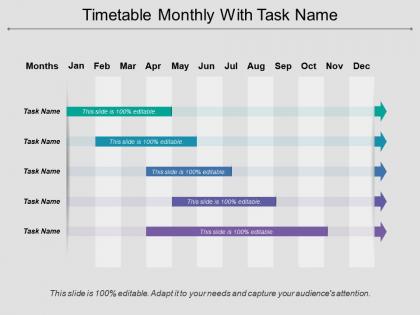
Timetable monthly with task name




Try Before you Buy Download Free Sample Product
 Impress Your
 Audience
 100%
100% Editable
 Save Hours
 of Time


Ensure accurate changes in course with our Timetable Monthly With Task Name. Display dexterity at the helm.
People who downloaded this PowerPoint presentation also viewed the following :
Timetable monthly with task name with all 5 slides:
The color combos of our Timetable Monthly With Task Name have an advantage. They bring in a carnival effect.

FAQs for Timetable monthly
Start with last month's schedule - easiest way to build from what already works. Block out your recurring stuff first: deadlines, meetings, project milestones. Then add buffer time because something always comes up (learned that the hard way). Deep work sessions are crucial - pick times when people won't bug you. Don't skip those manager check-ins either. Color-coding is a game changer for seeing your whole month at once. Oh, and if you have direct reports, schedule regular one-on-ones or you'll end up playing catch-up constantly.
Honestly, visual templates are a game changer for monthly planning. Instead of staring at walls of text, you get everything broken down visually. Color coding is your friend - use different colors for priority levels or project types. Calendar grids show your deadlines instantly, and progress bars let you track what's actually getting done. I always catch scheduling conflicts way faster this way. It's kinda like the difference between reading instructions vs. seeing a diagram, you know? Start simple with a basic calendar template, then add the color categories as you go. Your brain will thank you.
Honestly, I'd go with **Notion** or **ClickUp** first - they've got solid templates and can automate stuff which is clutch. **Google Calendar** + **Todoist** is my personal go-to combo though, never fails me. **Trello** works if you want something dead simple, just set up monthly boards. **Asana's** timeline thing is decent too but feels kinda corporate sometimes? The real trick is just picking whatever your team won't abandon after two weeks. I always tell people to start with what they already know instead of learning some fancy new system from scratch.
Get everyone on the same tool - Asana or Monday work great. You'll want clear task owners and realistic deadlines (seriously, those Friday 5pm things are the worst). Weekly check-ins help catch problems before they explode. The magic happens when everyone can actually see what's on each other's plates. Dependencies become obvious, and you stop stepping on toes. Oh, and it kills that frantic last-minute "wait, who was supposed to do this?" situation we've all been in. Start moving your current stuff over to a shared platform this week - rip the band-aid off.
Honestly, we all think we can do way more in a month than we actually can - classic mistake. Don't pack everything into week one because something will definitely go sideways. Those random "urgent" emails and last-minute meetings? They're gonna happen whether you plan for them or not. I learned this the hard way lol. Block out your must-do stuff first, then squeeze other things around it. Leave yourself breathing room though - like 20% buffer time minimum. Trust me, you'll need it when your coworker decides Friday afternoon is perfect for a "quick brainstorm session."
Oh man, I used to be terrible at this! What saved me was blocking out like 20-25% of my month as "flex time" - sounds fancy but it's basically just buffer slots. Do your must-do stuff first, then those flex periods catch the overflow or random urgent crap that always comes up. Also try grouping similar tasks so if one runs late, you're not scrambling between totally different work. I keep a list of "would be nice" tasks I can ditch if things go sideways. Honestly, planning to be flexible is way better than just crossing your fingers and hoping everything fits perfectly.
Honestly, you gotta figure out your big 3-5 priorities first or you'll just end up with another overwhelming to-do list. I made this mistake SO many times - getting caught up in random busy work while actual deadlines snuck up on me. Super annoying. What works is blocking time for your important stuff before anything else takes over your calendar. There's this whole urgent vs important thing, but basically put your high-impact tasks when you're most focused. I usually do this at the start of each month and build everything else around those priorities. Otherwise you're just spinning your wheels.
Honestly, just watch how your team actually operates first. Some people thrive on constant collaboration and group planning sessions. Others? They'd rather work solo with occasional check-ins - which is totally fine btw. Remote teams definitely need more structured touchpoints since you can't just walk over to someone's desk. In-person teams can wing it more with spontaneous coordination. Also pay attention to when everyone's most productive during the day. There's no point scheduling heavy stuff when half your team is brain-dead. Build your monthly schedule around how they already work instead of forcing some cookie-cutter approach that'll just create friction.
Oh man, color coding is seriously clutch for monthly schedules. I group all my marketing stuff in blue, admin tasks in yellow, deadlines in red - you get the idea. Makes everything so much easier to scan quickly instead of staring at boring black text forever. Your brain just processes it faster, especially if you're visual like me (and honestly most people are). When I'm showing my team the schedule, they actually pay attention instead of looking confused. Just don't go crazy with colors though - stick to 3 or 4 max or it'll look like a rainbow exploded.
Check your monthly tasks weekly - same day each time so it sticks. I do Fridays when my brain hasn't completely died yet lol. Catch stuff early before it spirals: tasks running long, random urgent things popping up, or when you totally misjudged how long something would take. Way better than scrambling at month-end when everything's already a mess. Honestly, 10 minutes beats trying to fix a disaster later. Set a calendar reminder or you'll forget like I always do.
Kanban boards with color-coded swimlanes are solid for different priority levels. Calendar heat maps work well too - darker colors show where you're swamped. I've been really into circular calendar layouts lately, gives off this cool "wheel of tasks" energy that just looks clean. Gantt charts are clutch when you've got dependencies to track. Oh, and dashboard layouts with progress bars always look impressive in meetings. Honestly though, just pick whatever clicks with how your team thinks about deadlines and workflow. Some people are visual, others need that timeline structure.
Honestly, monthly schedules are a game changer because they make huge projects way less overwhelming. Instead of staring at some massive goal thinking "how tf do I even start," you break it down month by month. Each chunk feels doable, you know? You'll spot problems before they hit too - like if February suddenly looks insane, move stuff around now. I learned this the hard way after pulling too many all-nighters. Just be realistic about what you can actually get done in 30 days and leave room for when life inevitably throws you curveballs.
Honestly, I'd track your completion rates and how long stuff actually takes you. Deadline hits are huge too - plus whether you're constantly shoving tasks to next month (guilty as charged lol). Don't forget the subjective side though! Rate your stress levels because burnout is real. Quality scores matter if you want to avoid redoing everything later. Those completion percentages will tell you if your schedule's realistic or if you're being way too optimistic. Track this for a couple months, then dial back your task loading based on what actually happened versus what you planned. Your future self will thank you.
Dude, seriously - get your team's feedback after each month. It's like having cheat codes for scheduling. Ask them specific stuff about timing and workload, not just vague "how'd it go?" questions. They'll tell you which tasks always run long or when deadlines are totally unrealistic. I learned this the hard way honestly. People notice workflow issues you'd never see from the planning side. Do like a quick 15-minute chat when each cycle ends. Then you're working with actual data instead of just guessing what'll work next time.
Honestly, get that monthly schedule out like a week early. People absolutely hate last-minute surprises and need time to work around your stuff. I used to skip this step and got bombarded with "wait when's that due again??" emails - so annoying. Just use whatever's easiest - shared calendar, basic table, doesn't matter as long as it shows who's doing what and when. Always pad in extra time because things go wrong. Oh, and flag anything that'll mess with other teams' work. Set a reminder to check in halfway through the month too.
-
It saves your time and decrease your efforts in half.
-
Excellent work done on template design and graphics.