


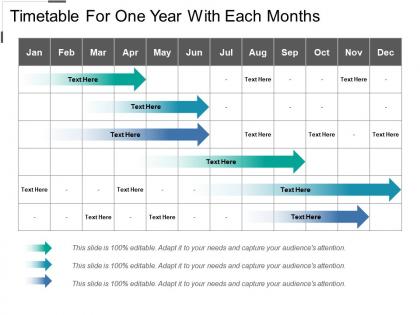
Timetable for one year with each months




Try Before you Buy Download Free Sample Product
 Impress Your
 Audience
 100%
100% Editable
 Save Hours
 of Time


Make a date with our Timetable For One Year With Each Months. You will have a pleasant time.
People who downloaded this PowerPoint presentation also viewed the following :
Timetable for one year with each months with all 5 slides:
Initiate folks into the business with our Timetable For One Year With Each Months. Enlighten them about finding a good deal.
FAQs for Timetable for one year
Start with the big stuff that's set in stone - quarterly reviews, budget deadlines, product launches. Then add your seasonal busy periods and recurring events. Seriously though, check everyone's vacation schedules first because I've seen too many "critical" projects crash when key people are gone. July launches are basically cursed if your team has beach plans. Color-code different activity types so you can catch scheduling disasters before they happen. Leave buffer time between major things. Life always throws curveballs, and you'll thank yourself later for that breathing room.
Honestly, having that yearly overview is a game-changer because you can see conflicts coming from miles away. Map out your non-negotiable dates first, then work backwards - way easier than trying to build forward. Your team will actually know what's happening when, and you won't double-book yourself during crunch time. Stakeholders eat this stuff up too. Makes you look like you have your act together even when things get chaotic (which they will). Oh, and definitely pad time between big milestones - trust me on this one. Projects always take longer than you think they will.
Honestly, I'd start with all the stuff you already know is happening - vacations, holidays, those big project deadlines everyone's been talking about. Map that out first. Then work your milestones around what's already set in stone instead of trying to force things. I made this mistake once scheduling a huge launch right when half my team was on spring break... not smart. Get everyone using the same shared calendar so people can block off their busy times early. Also, pad everything with extra time because projects always run longer than you think. Oh, and definitely revisit this quarterly - don't just set it and forget it.
Color coding is honestly a game changer - try different colors for each project phase. Throw in some icons or little symbols for big milestones too. Progress bars are super helpful, and anything visual beats staring at boring spreadsheet rows all day. Different font sizes can highlight your priorities. Charts work well if you're into that. Oh, and don't forget small graphics or logos for major events - people love that stuff. Start with just colors on your next version. You can always add more visual elements later once you see what clicks.
Honestly, **Microsoft Project** or **Smartsheet** are your best bet if you want the full project management experience with proper timeline views. **Google Calendar** works fine for basic stuff though - sometimes simple is better, you know? **Trello** with calendar add-ons is pretty decent for visual people. I've seen people do amazing things with **Notion** if you're into building custom setups. Even **Excel** still kicks ass for yearly overviews if you use conditional formatting right. But here's the thing - just use whatever your team already has access to. Pick something, set it up once, and don't keep switching around like I always do.
Honestly, it totally depends on what field you're in. Schools are stuck with that whole academic calendar thing - summers off, semester breaks, you know the drill. Corporate world runs on fiscal years and quarterly stuff, which can feel like you're always prepping for the next review (exhausting tbh). Event planning is wild because you're basically working backwards from deadlines while juggling like ten different projects. The trick is figuring out your industry's natural rhythm. Don't try to launch something huge during your busiest season - you'll just make life harder for yourself.
Honestly, the trickiest part is when everything shifts halfway through the year - which always happens, no matter how well you plan. Getting departments on the same page is a nightmare at first, especially when some teams move fast and others... don't. Resource planning gets messy since you're basically guessing what you'll need months out. I learned to build in extra time everywhere and do check-ins every quarter. That way you can pivot without throwing your whole schedule in the trash. Oh, and buffer weeks are your friend - seriously saved me multiple times.
Build feedback into your planning from the start. Before drafting anything, send your team a quick survey about last year - workload balance, crazy deadlines, scheduling nightmares, whatever. Draft your timeline, then hold a meeting so people can voice concerns. Honestly? Some of my best feedback comes from random hallway conversations, not formal meetings. Ask early, ask often. But here's the thing - you gotta actually make changes based on what they tell you. People notice when their input gets ignored and they'll stop bothering to help.
Think of it as your GPS for getting stuff actually done. You take those massive yearly goals and chop them into smaller chunks - quarterly milestones, monthly tasks, whatever works. Otherwise you'll hit December wondering where the hell your year went (been there). The trick is making sure you're scheduling things that actually matter, not just random busy work. Oh, and don't set it in stone - I usually tweak mine every few months because life happens. It sounds super basic but honestly most people skip this step then stress about missing deadlines.
Look at your historical data first - figure out when you're swamped vs. dead. Then plan everything around those cycles. Retail's obvious with holiday madness, but some industries have weird patterns you wouldn't think of. Construction basically hibernates in winter, so they front-load projects earlier in the year. Schedule your big hiring pushes and major projects when you know demand will spike. Scale back during slow periods instead of panicking about it. Honestly, most businesses could avoid so much stress if they just accepted their seasonal reality and worked with it instead of against it.
Honestly, focus on the basics first - completion rates, hitting milestones, and whether you're burning through budget too fast. The timeline variance thing is where I get a little nerdy, but seriously it's like a crystal ball for how good your planning actually is. Don't sleep on stakeholder happiness either. Dependencies will absolutely wreck your year if you're not watching them closely. Monthly dashboard checks are clutch - waiting till December to see you're totally off track is brutal. Oh, and definitely track if your team capacity guesses were even close to reality.
Honestly, ditch the whole "everyone needs to be somewhere at X time" mentality. Focus on what actually gets delivered and when deadlines hit instead. Everything takes way longer with remote teams - like, way longer - so pad your timelines for all the back-and-forth messaging. You can't just pop over to someone's cube anymore, which is actually kind of nice but also a pain. Regular check-ins become super important. Figure out what stuff really needs everyone on a call together versus what people can knock out on their own time. Be way more specific about expectations since nobody can read body language through Slack.
Honestly, there are so many ways to ditch the boring calendar grid! Visual timelines with milestones look super clean. Color-coded quarterly themes work well too. I'm weirdly into Gantt chart layouts lately - they show how projects overlap and depend on each other. You could do a circular "wheel of the year" thing, or interactive dashboards if your team likes poking around with data. Month-by-month cards are nice for pinning up. Seasonal themed layouts, infographic style... the list goes on. Just think about whether people need quick glances or detailed planning. That'll help you pick the right format.
Honestly, having that full year mapped out is a game changer. You'll catch conflicts way ahead of time - like when your whole team's on vacation during crunch time or two big projects are competing for the same resources. It's kinda like checking the weather before a road trip, you know? Not foolproof but way better than just winging it. I always start with the massive projects first, then squeeze in everything else around them. The real magic happens when you can spot those crazy busy periods and actually plan some breathing room. Trust me on this one.
Honestly, you gotta assign owners to each milestone from day one - that's where most plans die. Have them check in weekly or every two weeks, because nobody's naturally watching this stuff. Set up those automated reminders and shared dashboards so delays become obvious fast, not three months later when you're screwed. Short sentences work better for updates. Quarterly reviews are clutch too - you can actually adjust timelines instead of pretending your original plan still makes sense (spoiler: it probably doesn't). The whole point is catching problems early enough to fix them.
-
Best way of representation of the topic.
-
Informative design.