


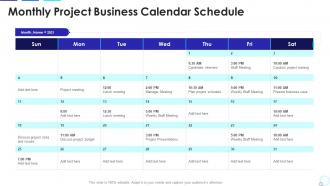
Monthly project business calendar schedule





Try Before you Buy Download Free Sample Product
 Impress Your
 Audience
 100%
100% Editable
 Save Hours
 of Time


Our Monthly Project Business Calendar Schedule are topically designed to provide an attractive backdrop to any subject. Use them to look like a presentation pro.
People who downloaded this PowerPoint presentation also viewed the following :
Monthly project business calendar schedule with all 2 slides:
Use our Monthly Project Business Calendar Schedule to effectively help you save your valuable time. They are readymade to fit into any presentation structure.
FAQs for Monthly project
Start with clarity - people need to actually read the dates and have room to write. I'd make the grid boxes bigger than you think you need because cramped calendars are the worst. Your audience matters too - families want different stuff than offices do. Clear headers for month/year are obvious but important. Colors should print decently if that's a thing. Maybe throw in space for notes or whatever. Honestly, just make something simple first and use it yourself for a week. You'll spot the annoying parts pretty quick that way.
Okay so color schemes are honestly huge for calendars. You want dark text on light backgrounds - way easier to read. High contrast helps you spot different events fast. But don't go nuts with bright colors or you'll hurt your eyes (learned this the hard way). Keep it simple - maybe 4-6 colors tops. Also think about colorblind people when picking colors. Here's what I do: squint at your screen and see if you can still tell events apart. If yes, you're good to go!
Look for time-blocking and recurring event templates - those are lifesavers. Make sure it plays nice with your email and task apps too. Honestly, I can't deal with calendars that spam you with notifications every five minutes, so find one with smart alerts. Color-coding is a must for staying organized visually. The really cool ones will spot scheduling conflicts and suggest better meeting times automatically. Oh, and obviously it needs to sync across your phone, laptop, whatever. Pick something with a clean interface you won't hate opening every day.
Honestly, calendars are such a smart marketing move because people actually use them all year long. Throw your logo and contact info on there, then sprinkle in some strategic stuff throughout the months. Like if you're in landscaping, highlight those spring cleanup dates. Holiday promos work great too. The trick is picking dates that actually matter for your business cycle - not just random stuff. Make it useful first, promotional second. I've seen companies do branded desk calendars or even digital templates with their products featured on relevant days. It's way less pushy than most marketing but you're still getting that consistent exposure. Plus people don't throw away calendars like they do with flyers.
Oh totally, calendar layouts mess with your head! Monthly views make everything seem far away so you end up procrastinating. But weekly? That's where it gets good - only 7 days feels way more doable for planning stuff. Daily layouts either turn you into a productivity machine or stress you out completely, depends on your vibe. My mom still swears by those paper desk calendars and honestly she's onto something - writing by hand hits different memory spots in your brain. When your current setup isn't working, just switch it up. Sometimes that's all you need.
Honestly, calendars are game-changers because they stop you from just randomly hoping stuff gets done. I block out chunks for big projects first - otherwise random emails and "quick questions" eat your whole day. You'll start noticing when you actually focus best too (I'm useless after 3pm, turns out). The weirdly addictive part? Checking things off feels amazing. But here's the thing - treat it like real appointments with yourself, not some flexible maybe-list. Schedule your important work like you would a doctor's visit. Fill smaller tasks around those blocks. Trust me, it beats constantly feeling behind on everything.
Gantt charts are perfect for project stuff - they show how tasks connect and when deadlines hit. Way better than trying to cram everything into a basic calendar. Personal scheduling though? Just go simple with weekly grids or time-blocking. I made the mistake of using project templates for my personal life once and it was such a mess lol. Projects need all that complexity because you're juggling tons of moving pieces. Your daily routine doesn't. Pick whatever doesn't make your brain hurt first - you can always switch things up once you figure out what actually works for you.
Oh man, calendars are way more complicated than you'd think! Different cultures have totally different setups - like Middle Eastern countries start their week on Saturday, Europeans go with Monday, and we Americans are still doing Sunday for some reason. Date formats are all over the place too. Plus you've got religious holidays that move around each year, and people have different expectations about when it's cool to schedule meetings (like avoiding prayer times). Honestly, if you're building something global, just research whatever cultures you're targeting and let people customize stuff. Way easier than dealing with confused users later.
Honestly, putting your to-do list right in your calendar changed everything for me. You can finally see how much time you actually have instead of just hoping tasks will magically fit somewhere. No more overbooking yourself because everything's visible in one spot. What I love is dragging tasks straight into time blocks - makes planning feel so much more real. Your brain stops doing that exhausting back-and-forth between "what's scheduled" and "what needs doing." I always block out time for my biggest tasks first now. Way less stressful than just winging it.
Color-coding is honestly a game changer - I use red for deadlines, blue for meetings, green for personal stuff. You'll instantly know what's coming up without reading every detail. Icons help too if you're visual like me. Bold text for urgent things, bigger fonts for priorities - sounds basic but it works. Oh and don't cram everything together! White space saves your sanity when the week gets insane. Just pick a system and stick with it, otherwise your calendar turns into rainbow chaos that defeats the whole purpose.
Honestly, holidays and events are what make or break calendar design. First thing I'd do is figure out what holidays actually matter to your users - like yeah Christmas is obvious, but what about Diwali or Ramadan? Start with your top 10 celebrations, then build flexible spaces around those. Color coding helps a ton. You'll want expandable sections too because December gets crazy busy (learned that the hard way). Don't forget cultural stuff beyond the mainstream holidays. Design for those peak times when everyone's scheduling like mad - back-to-school season is brutal for families.
Okay so first thing - get those multiple time zones showing in your calendar app. Color code everything too: meetings, focus time, when you're actually free to chat. I've found blocking out deep work hours saves my sanity because people can see when I'm heads-down versus available for random calls. Oh and be super clear about meeting formats - like, actually put the Zoom link AND whether it's in-person in every invite. Honestly, your calendar should basically do half the communicating for you. Makes everything way smoother when everyone knows what's happening without having to ask.
Honestly, minimalist stuff is everywhere for 2023 calendars - clean fonts with tons of white space. Way better than cluttered designs if you ask me. Sage greens and terracotta colors are replacing those super bright palettes everyone was doing. Oh, and illustrated monthly themes instead of boring stock photos (thank god). Interactive features are getting popular too - like QR codes that link to digital planners. Pretty smart actually. I'd check Etsy first for templates, then maybe Canva. You'll see what's actually selling versus what design blogs claim is "trending."
Three things matter most: visual accessibility, navigation, and clear content. High contrast colors are a must - plus scalable fonts so people with vision issues can read dates properly. Your calendar needs to work with screen readers and keyboard navigation since not everyone's using a mouse. Keep date formats consistent and don't stuff tiny cells with tons of info (seriously, it's unreadable). People access calendars on everything from phones to desktops, so test across devices. Run it through accessibility checkers first, then - and this is key - get feedback from actual users who have different accessibility needs.
Oh dude, calendars are so much more than just meetings! I started tracking habits on mine - just mark off days when you actually go to the gym or whatever. Color-coding is weirdly satisfying too, like red for low energy days, green for good ones. You can see patterns over time that way. Block out time monthly to reflect on what's going well (sounds cheesy but it works). My friend schedules self-care reminders as recurring events since she'd otherwise forget. Pick one weird calendar hack this week - it'll totally change how you think about it.
-
Informative presentations that are easily editable.