

Monthly business plan animation timeline






Try Before you Buy Download Free Sample Product
 Impress Your
 Audience
 100%
100% Editable
 Save Hours
 of Time


Convince folks that they are indeed appreciated with our Monthly Business Plan Animation Timeline. Be able to handle jilted feelings.
People who downloaded this PowerPoint presentation also viewed the following :
Content of this Powerpoint Presentation
Description:
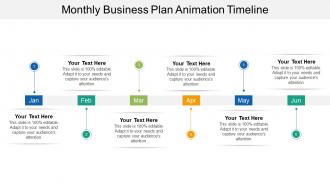
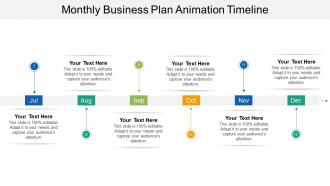
The image depicts a slide titled "Monthly Business Plan Animation Timeline," designed for presenting plans or activities distributed over a six-month period, from January to June. The timeline is segmented and each month is illustrated with a different colored pinpoint, numbered from 1 to 6. Each pinpoint has space for descriptive text, labelled "Your Text Here," where specific details pertaining to each month can be inserted.
Use Cases:
This type of slide is versatile and could be used in various industry settings for different purposes. In each industry, the slide can assist in establishing timelines, delegating tasks, setting milestones, tracking progress, and communicating planning to interested parties.
1. Marketing:
Use: To outline a marketing campaign schedule.
Presenter: Marketing Manager
Audience: Marketing Team
2. Software Development:
Use: To present a software release roadmap.
Presenter: Project Manager
Audience: Development Team
3. Event Planning:
Use: For scheduling events and associated preparatory tasks.
Presenter: Event Coordinator
Audience: Event Stakeholders
4. Education:
Use: To plan an academic curriculum or school activities over the semester.
Presenter: Academic Dean or Teacher
Audience: Faculty or Students
5. Construction:
Use: Illustrating the phases of a construction project.
Presenter: Construction Manager
Audience: Project Team and Investors
6. Finance:
Use: Unveiling a fiscal plan or budget development process.
Presenter: CFO or Finance Manager
Audience: Department Heads or Shareholders
7. Pharmaceutical:
Use: Showcasing drug development and trial phases.
Presenter: R&D Manager
Audience: Company Executives and R&D Team
Monthly business plan animation timeline with all 5 slides:
Counter hazards with our Monthly Business Plan Animation Timeline. They allow you to deal with them effectively.

FAQs for Monthly business
So you'll need keyframes for your major poses, plus timing markers to track beats and dialogue sync. Layer organization is huge - trust me, you don't want characters and backgrounds all mixed up when you're scrambling to fix something. Frame rates matter too, obviously. Camera movements if you've got them. I always throw in notes about easing because future me never remembers what I was thinking. The whole thing should be like a roadmap that makes sense to anyone else who picks it up. Start basic though - you can get fancy with details once you figure out what actually works for your workflow.
So it really depends on what style you're using. Frame-by-frame 2D? You'll need tons of keyframes since you're literally drawing every pose. 3D is way more forgiving - you can set broader timing blocks and let the software interpolate between them. Stop-motion though... ugh, that's brutal. Every single frame movement has to be planned perfectly because once you mess up, good luck fixing it without starting over. Puppet animation's somewhere in between - you get to reuse stuff but timing those poses is still crucial. Basically, the less wiggle room your style gives you later, the more obsessive you gotta be upfront with your timeline.
After Effects is probably your best bet - most people love the timeline and it's great for motion graphics. For 2D stuff, check out Adobe Animate or Toon Boom Harmony. Maya's solid for 3D work, but honestly? Blender's free and just as good these days. DaVinci Resolve has a surprisingly decent timeline too if you're already familiar with it. I'd grab a few trials first though - you'll be staring at whichever timeline you pick for hours, so make sure it doesn't drive you crazy. The interface really makes or breaks the whole experience.
Honestly, pacing is like the secret sauce of animation - it totally controls how people feel watching your stuff. Slow down for the heavy moments so viewers can actually absorb what's happening. Speed up during action scenes or funny bits to get that rush going. I swear nobody talks about this enough! Map out your emotional beats first, then match your timeline's rhythm to that arc. Like, build up slowly then hit them with rapid-fire sequences for those big climactic moments. Oh and next time you're planning - figure out where you want people leaning forward vs. just chilling and taking it all in.
Dude, sound design can totally make or break your animation. I've watched so many cool projects just die because they slapped on random audio at the end. You want to sync those audio cues with your key visual beats - that's what grabs people and builds the tension. Start thinking about sound early, not after everything's done. Match it to your pacing too. Like, use silence to build suspense or nail those action moments with perfect timing. Honestly, good sound is what separates amateur stuff from work that actually connects with people emotionally.
Dude, color theory is a game changer for animation timelines! I always use warm colors like reds and oranges for my main keyframes - makes them pop right out. Cool blues and greens work great for background stuff or idle animations. Honestly, most software sucks at this by default, which is annoying. Try grouping similar elements with the same color families too. Saturated colors for primary actions, muted ones for secondary. You'll spot problems way faster when you're scanning through everything. Trust me, it makes juggling complex scenes so much easier once you get the hang of it.
Okay so first thing - get your audio waveforms visible, that's like half the battle right there. Scrub through and find the beats or dialogue hits where you need sync points. Zoom in super close on the timeline when you're doing the detailed stuff, trust me on this. Put your keyframes just a tiny bit before the audio hits because visuals need that slight head start to look right. Oh and use onion skinning to check your motion flow. I usually nail the big obvious beats first, then go back for all the nitpicky timing stuff later. Test playback constantly or you'll hate yourself.
Honestly, there's no magic formula for this - it's mostly about feel. I usually break everything down by story beats first (setup, conflict, etc.) then figure out timing based on what needs the most emotional punch. Action stuff definitely needs more frames or it looks choppy. Dialogue can be way tighter though. One trick that actually works? Act out each segment yourself and time it. Sounds weird but it's surprisingly spot-on for realistic pacing. Oh, and give your big moments room to breathe - those matter way more than quick transitions. Your storyboard will help tons here too.
Honestly, the real game-changer is nailing your easing curves and keyframe spacing. Linear interpolation feels super robotic unless you're going for that vibe. Use ease-in/ease-out for natural acceleration - it makes everything feel way more organic. Pack more keyframes into complex movements, fewer for simple stuff. Graph editors are clutch for tweaking velocity curves between poses. Oh and definitely check out the 12 principles of animation if you haven't already, especially slow-in/slow-out. Just start playing with your timing curves in whatever software you're using and you'll see the difference immediately.
So basically you want to mix up your pacing and throw in different content types. Visual people go crazy for diagrams and color-coding - like, they actually get excited about that stuff. For audio learners, add clear narration or sound cues. Interactive controls are huge for hands-on learners, but honestly everyone loves being able to pause and scrub through at their own speed. I'd chunk everything into smaller sections so people aren't overwhelmed. Oh, and definitely explain things multiple ways - show it visually, say it out loud, and add text callouts. That way you're covering all your bases and people can revisit whatever they need.
Honestly, the worst thing you can do is jam too many keyframes together - makes everything feel super jittery. Also don't make motion too linear, real stuff has that natural easing, you know? Objects need anticipation before they move, like they're winding up first. Keep your best moments in those first few seconds since people's attention drops fast. Oh and test on different devices because performance is all over the place. I learned this the hard way but start with way fewer keyframes than you think. You can always add more later if it actually helps tell your story.
So basically, match your animation beats to stuff people already get - like a roller coaster. Slow climbs = building tension, fast drops = excitement, smooth curves let viewers catch up. I've totally seen people go nuts with this though lol. Pick ONE solid metaphor that actually fits your story's vibe. Then map your pacing and visual intensity to match that rhythm. Oh, and try sketching your metaphor above your timeline while you work - it's a game changer for staying on track.
Track engagement time and completion rates first - those tell you if people actually stick around for your animations. Bounce rates during animated bits are huge too. Test cognitive load with real users because honestly, pretty animations can be more distracting than helpful if you go overboard. Conversion rates matter since smoother timelines usually lead to better user actions. A/B test different speeds and easing - what feels right to you might be totally off for your audience. Oh, and grab baseline metrics before you launch anything so you'll actually know if your timeline changes are working.
Yeah, cultural stuff is huge for animation timelines! Like, Japanese audiences are used to manga's right-to-left flow, but it's way more than just reading direction. Some cultures dig slower, thoughtful pacing while others want everything fast and punchy. Your colors and symbols hit different too - what feels emotional in one place might seem weird somewhere else. Honestly, I learned this the hard way on a project once. Best bet? Do some research on your audience first, maybe even test it with people from that culture before you lock everything down.
Try jumping between time periods or switching perspectives - that's where things get interesting. Flashbacks can run alongside present scenes, or you can do that parallel editing thing where multiple storylines eventually meet up. Some people are making interactive timelines now where viewers pick the path, which is pretty wild. Playing with speed works too - slow down the emotional moments, speed through transitions, maybe even reverse stuff. Oh, and don't get so caught up in being clever that you forget the story. I'd say pick one experimental thing per project and see how it feels.
-
Use of different colors is good. It's simple and attractive.
-
The Designed Graphic are very professional and classic.