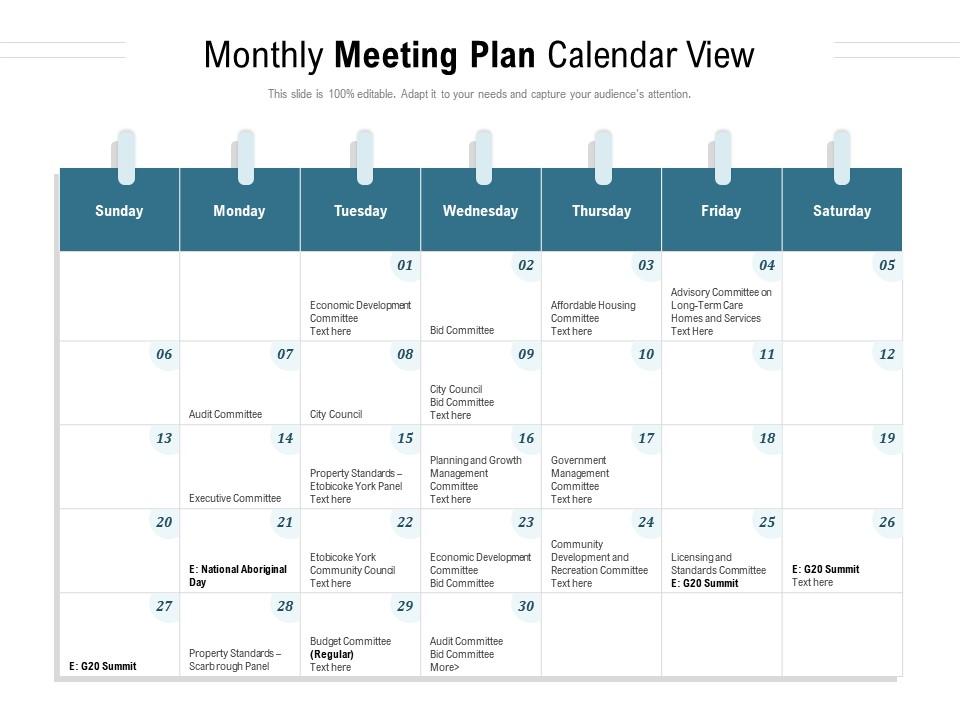
Monthly meeting plan calendar view

Monthly meeting plan calendar view
Slide 1 of 2
Favourites Favourites

Try Before you Buy Download Free Sample Product

Audience Impress Your
Audience
Editable 100%
Editable
Time Save Hours
of Time
The Biggest Sale is ending soon in
0
0
:
0
0
:
0
0
Presenting this set of slides with name Monthly Meeting Plan Calendar View. The topics discussed in these slides are Monthly Meeting Plan Calendar View. This is a completely editable PowerPoint presentation and is available for immediate download. Download now and impress your audience.

FAQs for Monthly meeting

Ok so three things you definitely need: recurring meetings at set times, buffer space between stuff, and actual clear goals for each meeting. Honestly? Those back-to-back days are the worst - you'll just zone out after hour two anyway. Don't forget prep and follow-up time because that's honestly where you get stuff done. Oh, and throw in some quarterly planning sessions so you're not constantly in crisis mode. Start with your must-haves first, then fill in around those. Way easier than trying to build the whole thing at once.

Honestly, templates are a game-changer for monthly meetings. You won't be scrambling around wondering what to talk about next. They keep everything structured - like where updates go, decision time, action items, all that stuff. Everyone knows what's coming so they actually show up prepared (shocking, I know). The formatting stays consistent too, which sounds boring but trust me, it helps. Time management gets way easier when you're not winging the whole thing. I'd make maybe 2 or 3 different ones depending on what kind of meeting you're running, then just swap them out. Way less stressful than starting from scratch every month.

Monthly meetings don't have to suck, honestly. Get people talking upfront by asking for quick wins or challenges - breaks the ice immediately. Switch up who's presenting each time, throw in breakout rooms, maybe do a random poll. Food works wonders if you're in person (remote teams... well, you're kinda screwed there). Short sentences keep energy up. Don't let anyone drone on forever. The biggest thing is making sure everyone gets to contribute somehow, not just listen to updates they could've read in an email. Always end with actual next steps or people will leave feeling like they wasted an hour.

Honestly, just pick a day and stick to it - like first Tuesday every month or whatever works. Consistency beats everything else. I'd block the whole year out in advance because people's calendars get crazy. Send invites two weeks early too. Fast-moving teams might need bi-weekly stuff, but if you're calling it "monthly" then actually do monthly, you know? I've seen too many "monthly" meetings that randomly happen every three weeks or whatever. Also, same time slot each month makes it easier for everyone to remember. Way less back-and-forth scheduling drama.

Digital calendars are honestly lifesavers for meeting chaos. Apps like Google Calendar or Outlook handle the boring stuff - sending invites, syncing between your phone and laptop, stopping you from accidentally booking two things at once. Calendly's pretty solid too if you're constantly scheduling with outside people. The best part? Everything connects now. Your calendar talks to Zoom, Slack, whatever project tools you're using. Though honestly, getting everyone to actually use the same platform is half the battle. Pick something your whole team will stick with and you're golden.

Dude, color coding your calendar is a total game changer. I assign different colors to meeting types - blue for team stuff, red for client calls, green for one-on-ones. Your brain picks up on colors way faster than reading text, so you'll instantly see what's coming up without squinting at every meeting title. I started with just 3 basic categories and added more later. Honestly took me forever to figure this out but now I can't imagine going back. It's such a simple thing but makes scanning your whole month so much easier.

Oh man, don't do what I did and pack your calendar like a game of Tetris! Back-to-back meetings will destroy you. I swear that "quick 15-minute sync" never stays 15 minutes either. Build in buffer time between everything. Map out your must-dos first - holidays, vacations, that random company picnic nobody wants to attend but we all have to. Then work around those. And please sync your calendars! Double-booking yourself is such an amateur move. Start with your anchor points, then fill in the gaps. Your future self will thank you.

Honestly, just hit them from multiple angles since everyone checks different stuff. Calendar invites a week out, then hit Slack 24 hours before each meeting. I throw the monthly calendar in our main channel too - probably half the team has it bookmarked by now which is clutch. Always include what the meeting's actually about in the invite though. Nobody wants to show up blind to some mystery discussion. Oh and stick to the same timing for sending these - like if you always do Friday afternoon calendar drops, people start expecting it. Makes your life easier too.

Honestly, I'd start by checking if people are actually showing up and engaged - not just physically there but mentally checked in. Track whether action items from last month actually got done (this one's usually brutal). Are decisions happening or is everyone just talking in circles for an hour? Send out a quick survey every few months asking if these meetings are worth their time. Also watch how fast problems get solved after you discuss them. Throw it all in a basic spreadsheet and check monthly. You'll spot the patterns pretty quick - trust me, the data doesn't lie about whether these things are working.

Honestly, team size makes a huge difference here. With 3-5 people you can just have normal conversations and skip the rigid agenda stuff. But once you hit like 8+ people? You need actual structure or it becomes a nightmare - trust me, I sat through a 12-person meeting that was basically just people talking over each other for an hour. Also think about your team's vibe. Some groups are all about brainstorming and throwing ideas around, others just want the facts and updates. Don't try to force everyone into the same format - figure out what actually works for how your people communicate and go with that instead.

Dude, get those notes out within 24 hours - trust me on this one. Your brain's gonna forget half the details otherwise. Make sure every action item has a real person's name on it AND an actual date. None of that "we'll circle back soon" nonsense that never happens. I'd stick with the same template each time so people aren't hunting around for info. Put the next steps right at the top, then separate out decisions from all the random discussion stuff. Oh and actually put everything somewhere your team checks regularly - not some forgotten folder that's basically a digital graveyard.

Honestly, just start paying attention to what people actually tell you after meetings. Those surveys? Read them. When someone mentions the meeting dragged, cut stuff out or set tighter time limits. Nobody wants to sit through pointless discussions - I learned this the hard way. Focus on what got people engaged and drop the topics that made everyone zone out. Give it 3-4 months to spot the real patterns. Here's what really matters though: tell your team what you're changing based on their feedback. Otherwise they'll stop being honest with you.

Honestly, just go with Google Calendar first - it's free and syncs with everything. Most people already have it anyway. Outlook's solid too if you're stuck in Microsoft land. For fancier stuff, Calendly is amazing because people can just pick their own time slots. No more email ping-pong trying to find when everyone's free (I swear that back-and-forth used to drive me crazy). Notion or Airtable are cool if you want to get really organized with meeting notes and action items all in one spot, but that's probably overkill unless you're super Type A. Start simple though - you can always switch later.

Oh man, monthly themes are such a lifesaver! You're not sitting there going "uh, what do we even talk about today?" Pick something like "Process Improvement" for March and boom - you've got workflow stuff, efficiency numbers, team complaints, whatever fits. I used to hate how meetings would just wander all over the place. Honestly felt like we talked for an hour but said nothing useful. Try rotating 3-4 main business areas every few months. Your meetings will actually have a point instead of being total time-wasters.

Dude, you'll get way better visibility when you connect your meeting calendar to project tools. Like, you can actually see if you're scheduling big discussions too late in sprints or missing key people for decisions. The auto-sync thing where meeting notes flow back to tasks? Total game changer - saves me 20 minutes every time. Your team stays on the same page because they see how conversations link to real work. Oh, and definitely test it on just one project first before going crazy with it everywhere. Trust me on that one.

Ratings and Reviews

0% of 100
Review Form
Write a review
Most Relevant Reviews

No Reviews