

Monthly calendar 2023




Try Before you Buy Download Free Sample Product
 Impress Your
 Audience
 100%
100% Editable
 Save Hours
 of Time


Our Monthly Calendar 2023 are topically designed to provide an attractive backdrop to any subject. Use them to look like a presentation pro.
People who downloaded this PowerPoint presentation also viewed the following :
Content of this Powerpoint Presentation
Description:
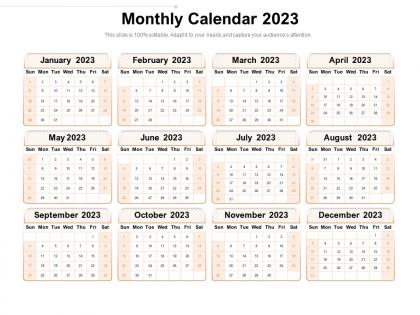
The image displays a "Monthly Calendar for the year 2023." This calendar is presented as a slide, likely from a presentation template, and it features all twelve months of the year, each in its own designated box. The months are arranged in a grid format, with two months per row, starting with January at the top left and ending with December at the bottom right.
Each month is laid out in a traditional Sunday-to-Saturday format, and the dates are clearly numbered. The slide is marked as "100% editable," indicating that the calendar is customizable for various needs, such as marking important dates, holidays, or events. The design is clean and simple, making it easy to read, with a color scheme that's soft on the eyes.
This type of calendar slide could be used in a variety of settings, including business presentations, educational materials, personal planning, or project management, allowing individuals or teams to keep track of dates and plan for specific events throughout the year. The top of the slide encourages the user to "Adapt it to your needs and capture your audience's attention," reinforcing its adaptability and user-friendly design.
Use Cases:
Calendars are essential tools for planning and scheduling in various sectors. They help track key dates and organize future activities.
1. Education:
Use: Academic scheduling, holidays, and exam timelines.
Presenter: Administrators.
Audience: Teachers, students, parents.
2. Healthcare:
Use: Staff shifts, patient appointment slots, and medical event planning.
Presenter: Hospital administrators.
Audience: Medical staff, patients.
3. Construction:
Use: Project milestones, delivery dates, and safety audit schedules.
Presenter: Project managers.
Audience: Construction workers, stakeholders
4. Finance:
Use: Fiscal year planning, tax deadlines, and financial reporting periods.
Presenter: Financial officers.
Audience: Department heads, employees.
5. Manufacturing:
Use: Production cycles, maintenance, and inventory checks.
Presenter: Operations managers.
Audience: Floor managers, production staff.
6. Retail:
Use: Sales events, inventory restocking, and staff rotas.
Presenter: Store managers.
Audience: Sales teams, store employees.
7. Marketing:
Use: Campaign launches, content schedules, market analysis timelines.
Presenter: Marketing directors.
Audience: Marketing teams, stakeholders.
Monthly calendar 2023 with all 2 slides:
Use our Monthly Calendar 2023 to effectively help you save your valuable time. They are readymade to fit into any presentation structure.
FAQs for
So for 2023 calendars, minimalist is everything right now. Clean layouts, tons of white space, those muted colors like sage green. Typography that doesn't make your eyes hurt - thank god! Nature themes are huge too, plus anything sustainability-focused. Oh and readable fonts are finally trendy again, which honestly should've happened years ago. Most people want something calming, not chaotic. Digital designs matter since everyone's bouncing between phone and wall versions. My advice? Pick maybe two trends tops. Don't go overboard or it'll just look like a hot mess.
Throw your logo and brand colors all over it - contact info, website, the works. Each month can highlight different promotions or important business dates. Honestly, calendars are genius because people actually keep them up all year long. That's literally 12 months of your brand staring them in the face. QR codes are smart too - link them to special deals or your Instagram. The trick is making it genuinely useful so they don't just toss it in a drawer. Oh, and start this process soon because print shops get absolutely slammed once we hit November.
Honestly, interactive stuff is where it's at right now - drag-and-drop scheduling, custom colors, built-in tasks. Monthly grids are still solid for the big picture, but you gotta pair them with daily/weekly views people can flip between. Weekly layouts are having a serious moment because they hit that perfect balance. Users want everything customizable though - time blocks, notifications, the works. I'd probably start by figuring out which views your people actually use most. Oh, and make sure it feels snappy when they're clicking around - nothing kills the vibe like a sluggish interface.
Dude, animated calendar templates will totally save your presentations from being snooze-fests. I've used them for project timelines and quarterly reviews - way better than static slides that put everyone to sleep. The ones where months fade in progressively? *Chef's kiss.* Perfect for client meetings or team updates when you need to show scheduling stuff. PowerPoint and Canva both have solid "animated 2023 calendar" options if you search around. Just don't go overboard with the animations or people will focus on the flashy stuff instead of your actual content. Trust me on that one!
Oh for client stuff? Go with clean monthly/yearly layouts - tons of white space so it's easy to read. Customizable colors are huge because you can match their branding and they eat that up. I'd add note sections for milestones too. Grid layouts just look way more professional than anything cramped. Make sure it prints well since some clients are still old school about hard copies (which honestly surprises me sometimes). Keep fonts readable but sharp, maybe throw their logo at the top. Definitely test your screen share first - learned that one the hard way!
Okay so colors totally mess with your brain when you're looking at calendars. Blues help you focus better, greens are easier on your eyes when you're staring at dates forever. I made the mistake of getting this super bright red planner once - gave me headaches after like 20 minutes of planning. Orange and warm colors pump you up but they're kinda intense for everyday stuff. Go with blue or green as your base color, then throw in some brighter accent colors for birthdays or deadlines or whatever. Trust me, your future self will thank you when you're not squinting at neon pink every morning.
Honestly, most people I know are doing this weird hybrid thing now. They keep their main stuff digital because syncing is just easier, but then they'll print out weekly views when they want to actually focus or get away from screens for a bit. Young people are surprisingly into printable habit trackers and goal sheets - didn't see that coming. Digital calendars are definitely winning overall, but it's not like physical ones are dead. If you're building anything calendar-related, just make sure it prints nicely. Don't force people to pick sides.
So I've been messing around with this stuff lately - Canva's probably your best bet to start. They've got tons of calendar templates you can make clickable and add animations to. PowerPoint works great too if you're already comfortable with it. Google Slides is clutch for collaboration since people can jump in and edit together. If you want to get fancy, Prezi has that cool zooming thing, or Figma if you're feeling ambitious and want total design control. Honestly though? Just try Canva's free templates first and see how it goes.
Honestly, thematic calendars are game-changers for presentations. They give your audience something familiar to follow instead of random dates flying at them. Pick seasons, holidays, or business cycles that make sense - like Q4 being crazy busy, everyone knows that vibe. You can build emotional connections too. Start with New Year goals, then show how your project pays off by December. Don't just choose themes because they're cute though. Map your main points to calendar moments first, then design slides around that flow. It's way more engaging than boring chronological stuff.
Definitely hit the big holidays - New Year's, Valentine's, Easter, Memorial Day, July 4th, Labor Day, Halloween, Thanksgiving, Christmas. Mother's Day and Father's Day are huge too. Back-to-school season always does well. Oh, and those random national days can be surprisingly popular - like National Pizza Day actually matters when you're planning meals, weirdly enough. More people want cultural celebrations now too. Black History Month, Pride Month, Hispanic Heritage Month. Check what sold best before and maybe ask your audience what they actually care about? That's probably smarter than just guessing.
Dude, just grab some education calendar templates - they've got all the academic year stuff already mapped out. Holidays, semester breaks, the works. Way easier than starting from zero (seriously, ain't nobody got time for that). Most templates handle both semester and quarter systems, which is clutch. You can focus on adding your school's specific stuff like parent conferences and testing weeks. Oh, and they're usually designed with teacher planning days built in too. Download a few different ones first and see which fits your schedule best - some are way better than others honestly.
Honestly, calendars are way more versatile than you'd think for fundraising! Make branded ones with photos of your work - donors eat that stuff up because they can actually see their impact. They sell really well at events too. For internal stuff, map out your whole campaign timeline on calendar templates - grant deadlines, gala planning, all of it. The cool thing is they're basically year-round marketing sitting on people's desks. You can even give them as thank-you gifts to major donors. Just figure out what fits your current goals first, then go from there.
Honestly, I just started color-coding everything in my planner and it's been amazing. Green for workouts, blue for meditation - you get the idea. Block out wellness time slots like they're actual meetings because otherwise they'll never happen. I add little habit trackers in the margins too, plus water intake stuff (probably overkill but whatever). The trick is making your self-care as visible as work stuff. Oh, and definitely add sections for mood tracking alongside your regular appointments. Sleep ratings help too if you're into that. Makes staying consistent way easier when it's all right there staring at you.
Dude, infographics are what make calendars actually worth looking at instead of just boring grids. They're perfect for showing data trends and highlighting important stuff at a glance - nobody wants to read tiny text anyway. You see them everywhere now: seasonal patterns, monthly goals, company stuff. I mean, think about it - would you rather stare at a plain calendar or one with cool visuals? They totally transform how people interact with the information. If you're making anything calendar-related, definitely throw in some visual elements to make your data pop.
Social media integration basically makes your 2023 calendars way more shareable and fun. Throw in some QR codes that link to your Instagram, or add those social media holidays people actually follow. Photo spaces work great too - gives people something to post about. You could try hashtag campaigns for different months, though I'd probably start simple. People genuinely love calendars they can show off online! The whole point is making it feel like part of their feed, not just wall decor. Oh, and definitely research which social holidays fit your brand first.
-
Editable templates with innovative design and color combination.
-
Excellent template with unique design.
-
Out of the box and creative design.
-
Use of icon with content is very relateable, informative and appealing.