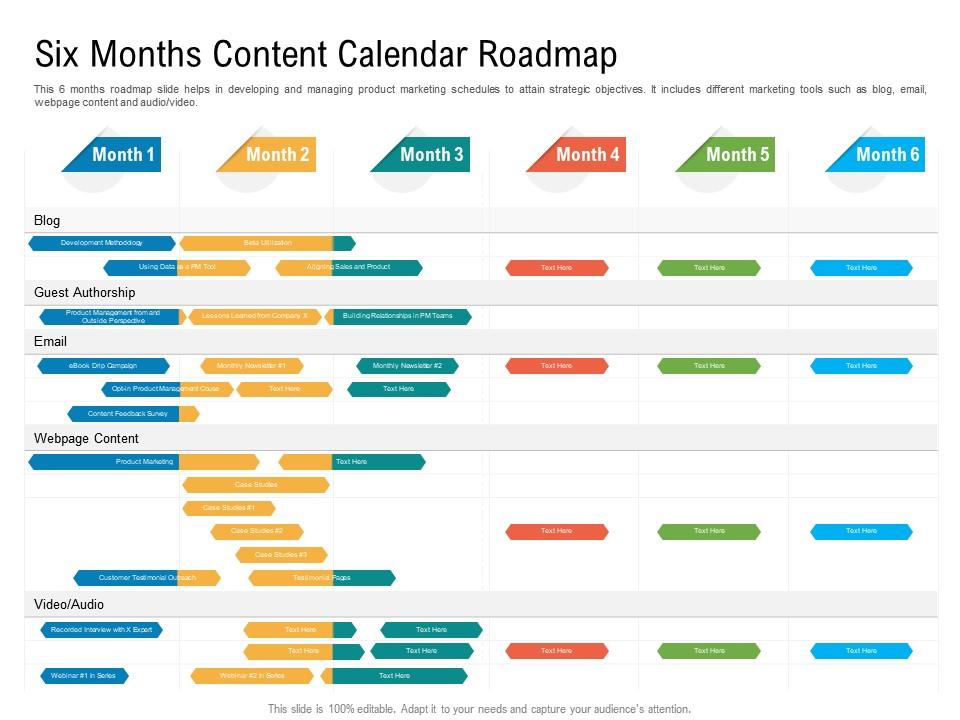
Six months content calendar roadmap timeline powerpoint template
Try Before you Buy Download Free Sample Product
Audience
Editable
of Time
Our Six Months Content Calendar Roadmap Timeline Powerpoint Template are topically designed to provide an attractive backdrop to any subject. Use them to look like a presentation pro.
People who downloaded this PowerPoint presentation also viewed the following :
Six months content calendar roadmap timeline powerpoint template with all 2 slides:
Use our Six Months Content Calendar Roadmap Timeline Powerpoint Template to effectively help you save your valuable time. They are readymade to fit into any presentation structure.
FAQs for Six months content calendar roadmap
So you'll definitely need publication dates and content titles - that's obvious stuff. Target platforms too, plus what type of content (blog, video, whatever). Assign team members so nobody's confused about who's doing what. Content status is huge though - seriously, I've seen people lose entire drafts because they didn't track this properly. Add target keywords and campaign tags if you're doing specific promotions. Hashtags and links go in there too. Honestly, don't go crazy with columns at first or you'll never actually use the thing. Start basic and build from there as you figure out what works.
Honestly, you need one place where everyone can see what's getting published and when. No more of those annoying "wait, what happened to that blog post?" messages cluttering up Slack. Your team will actually know who's doing what and where everything stands in the pipeline. It prevents people from working on the same thing twice (such a waste of time) and makes passing projects between teammates way less awkward. You'll catch scheduling conflicts early too. Just pick a shared calendar that people will actually use - not some fancy tool that sits empty.
Honestly, just start with Google Sheets or Excel - they're free and you probably already know how to use them. Notion is pretty amazing if you want something more organized (I'm kind of obsessed with it lately). Trello's good too if you like the visual board thing. For social media stuff specifically, Buffer and Hootsuite are solid choices. Oh, and CoSchedule if you don't mind paying a bit more. Teams can use Asana or Monday.com so everyone can jump in and edit. My advice? Don't overthink it at first. Try the simple Google Sheets route, see what you're actually missing, then upgrade from there.
Honestly? I check mine twice a week - Mondays and Fridays usually work best. Ten minutes max each time. Stuff changes way too fast to only look at it weekly. Your boss will randomly drop new ideas, trending topics explode overnight, or campaigns get shuffled around. Super annoying but that's how it goes. I learned the hard way that setting phone reminders actually helps - otherwise I totally forget. The trick is tweaking small stuff while keeping your bigger strategy on track. Don't stress about pivoting when something major pops up though. Sometimes the chaos leads to better content anyway.
Try color-coding your content types - blue for educational stuff, green for promos, red for user posts. That way you can spot if you're spamming too much of one thing. Separate rows help too. Honestly? Most people go way overboard with categories and end up with like 20 different types... such a headache. Keep it simple - maybe 4-6 main buckets to start. You want them broad enough that you're not constantly making new ones, but specific enough to actually catch patterns. Only add more if you really need them later.
Start by looking at what crushed it for you last year - that's your baseline. Map out the big stuff first: Black Friday, back-to-school, whatever hits your customers hardest. Block those dates immediately since they're basically mandatory content. After that, sprinkle in trending moments that actually fit your brand (not every meme needs your take, honestly). The magic number is planning 2-3 months out. Trust me, you don't want to be that person creating Valentine's content on Feb 13th in a panic. Cultural moments are great too, just make sure they align with how your audience talks.
Honestly, audience research is everything when it comes to your content calendar. It shows you what topics actually matter to your people and when they're online scrolling. Plus what formats they actually engage with - stories vs posts vs whatever. I used to just post random stuff and wonder why nobody cared lol. Now I check my analytics first to see what's already hitting, then survey my followers about what they want more of. Way better than guessing what'll work. Start there before you plan out your whole month - it'll save you so much wasted effort.
Honestly, visual elements are a game-changer for content calendars. I color-code everything by platform or content type - makes it super easy to catch those weeks where you've only shared blog posts (guilty as charged). Icons help too, so you're not squinting at tiny text trying to figure out if something's a video or carousel post. Status badges are clutch for tracking what's live vs. still sitting in your drafts folder collecting digital dust. Just don't go overboard with the visuals or it'll look like a rainbow exploded. Stick to 3-4 consistent elements and you're golden.
So you'll want to track the usual stuff - likes, shares, comments, click-through rates for each post. Reach and impressions matter too, plus conversion rates if you're sending people somewhere specific. Oh, and save rates! I literally always forget about those but they're huge for seeing what people actually want to keep. Also track when you're posting and how often - might find your people are way more active on like Tuesday mornings or whatever. Here's what works: add a "performance notes" section to your calendar so you can actually see patterns. Way better than just guessing what should work.
Honestly, just assign different people specific permissions based on what they actually do. Marketing gets strategy stuff, sales handles product launches, customer service can flag when they're seeing trends that need content. Leadership approves the big stuff - you know how that goes. Don't let everyone edit everything though, that's a nightmare waiting to happen. Color code it so you can actually tell who's supposed to handle what. Oh and do weekly check-ins or things will definitely slip through the cracks. Trust me on that one!
Honestly, the worst mistake is overcomplicating your template from day one. You'll hate using it and quit after like three days. Just stick to the basics: dates, content type, platform, who's doing what, and status. Don't try cramming every single detail into one massive view - it gets messy fast. Oh, and always build in buffer time because nothing ever gets approved on the first try (learned that the hard way). Trends change constantly, so leave room to pivot when campaigns inevitably shift direction. Start simple, then add stuff later if you actually need it.
Honestly, you won't believe how much easier this makes everything. Instead of panicking about what to post next (been there), you'll have everything mapped out ahead of time. Batch creating content saves so much mental energy too. I usually plan just a week out to start - keeps me consistent without feeling overwhelming. The best part? No more "oh crap, Mother's Day is tomorrow" moments because you can see holidays and events coming from miles away. You can spot those awkward gaps before they happen and actually stick to posting regularly. Trust me, even planning one week ahead will make you feel way more organized.
Look at HubSpot - they're killing it with educational posts, webinars, and case studies throughout the week. E-commerce brands usually drop product launches on Tuesdays (weird but it works) and save user content for weekends. Restaurants do behind-the-scenes stuff mid-week, then push menu highlights before weekends hit. What you should actually copy though? They post consistently and don't just throw random content up there. Everything connects back to what they're trying to sell or achieve. That's honestly the difference between brands that grow their following and ones that just... exist.
I'd split your template into two sections - daily/weekly stuff and then quarterly big picture campaigns. Color coding is honestly a game changer here, makes it so much easier to spot what's urgent vs strategic. Your daily posts should tie back to those bigger goals though, otherwise you're just posting random content. I usually review everything weekly to make sure it all connects. Short-term section handles immediate deadlines and quick posts. Long-term maps out product launches, seasonal campaigns, major themes. Whatever tool you're using, just set up both timeframes and you'll be good to go.
Okay so deadlines are honestly a lifesaver for content calendars. Without them, everything just becomes this endless "we'll get to it eventually" situation - and spoiler alert, you won't. I always work backwards from the publish date and throw in extra time for revisions because something always takes longer than expected. Your team needs to know exactly when drafts are due, when reviews happen, all that stuff. Plus you'll catch problems early, like when you accidentally schedule three posts for the same week. Trust me, that scramble at the end is not fun for anyone involved.
-
Appreciate the research and its presentable format.
-
Great designs, Easily Editable.
-
Easy to edit slides with easy to understand instructions.
-
Best way of representation of the topic.