


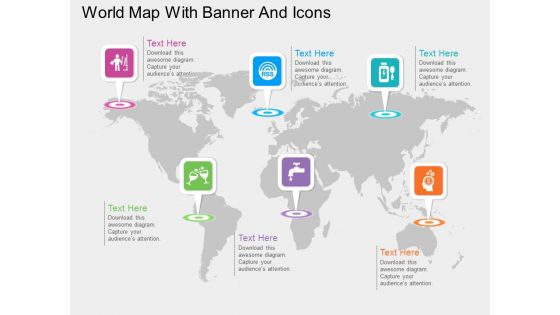
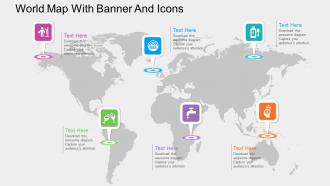
World map with various banners and icons ppt presentation slides




Try Before you Buy Download Free Sample Product
 Impress Your
 Audience
 100%
100% Editable
 Save Hours
 of Time


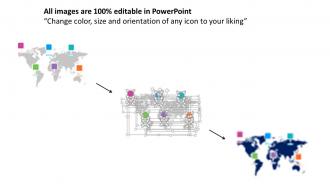
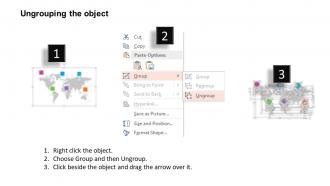
It is often believed that maps display data in a way that is not only different from other methods but also by adding a new meaning to the word information. Displaying desired information on maps is quickly becoming a prominent technique to enthral the viewers. Are you looking for an example of PPT slide which exactly does that and more? Go ahead and download our world map with various banners and icons PowerPoint layout slide. Make liberal use of colors for added contrast. Pick icons from a vast collection and add them on your slide. Change their shape and size. Group or ungroup objects and move them throughout the map area for specifying certain cities, countries or maps. Use the pre-added text areas for adding further information or meta data. We make sure you never lose precious time by designing Apt PPT Infographic template designs with appropriate use of available space. Our PowerPoint slide templates can be easily downloaded at a single click. Our World Map With Various Banners And Icons Ppt Presentation Slides ensure a fair game. They adhere to accepted ethics.
People who downloaded this PowerPoint presentation also viewed the following :
World map with various banners and icons ppt presentation slides with all 5 slides:
Dazzle your audience with our World Map With Various Banners And Icons Ppt Presentation Slides. Overawe them with the brilliance of your ideas.
FAQs for World map with various banners and icons
Look for ones with high-res maps you can actually edit - colors, highlighting specific countries, the whole deal. Different projections matter too since some just look way better for certain presentations. Clean fonts are key, plus enough white space so your data doesn't look like a mess. Oh and make sure it has decent infographic stuff - icons, charts, those little callout boxes for stats. Honestly, I'd test it with your real data first before buying anything. Also check it works with whatever software you're using and exports properly. Nothing worse than finding out it doesn't work after you've already started.
Maps are all about the colors - they make or break whether people actually get your data. Go with what feels natural: blues for water/cold stuff, warm colors for heat or high numbers. Sequential palettes (light to dark) work for ranges, diverging ones are clutch when you've got a clear middle point. God, I can't tell you how many terrible rainbow maps I've suffered through in meetings! They're the worst. Check out colorbrewer2.org - it's got solid tested options. Oh and definitely make sure colorblind people can read it too.
Maps are super flexible for data viz! Choropleth maps are your go-to - just color-code regions by whatever metric you're showing. Heat maps work well too, especially for stuff like disease spread or internet usage patterns. Bubble charts are solid where bigger circles = higher values. Flow maps are perfect if you're dealing with migration or trade routes. Oh, and 3D bars can look pretty slick rising from specific spots on the map. Really depends what story you're trying to tell. Just don't overcomplicate it - your audience shouldn't need a PhD to understand what they're looking at.
Oh man, this is actually super tricky! Different cultures have completely different ideas about what a "normal" map looks like. Asian countries often center theirs on the Pacific instead of the Atlantic, and tons of places prefer their local names over whatever Western version we're used to. The projection you pick matters too - honestly, I never thought about this stuff until I had to present to a global team once. Colors can be weird across cultures as well. I'd definitely ask someone from that region to look at your map first, or at least do some quick research on how they usually see their world laid out.
Honestly, consistency is your best friend here - same fonts, colors, placement style throughout. Europe's gonna be a nightmare with how packed it is, so use callout lines or numbers for crowded spots. Text needs good contrast or nobody's reading it. Countries get labels in the center, but offset smaller cities so you're not covering key stuff. Oh and do that thing where you step back across the room for a final check. Trust me, what looks readable up close can be total garbage from presentation distance.
Look, animated transitions literally stop people from scrolling Instagram mid-presentation. Smooth zooms between regions? Data points that appear gradually? That stuff creates an actual story instead of boring static slides. Your audience won't get lost trying to follow complex world maps (trust me, happens constantly). Movement gives their brains time to process each point too. But here's the thing - don't get carried away with flashy effects that overshadow your data. Keep transitions clean and purposeful. I've seen too many presentations where the animations were cooler than the insights. You'll notice people actually paying attention when you nail this balance.
So basically, scale dictates how much detail you can pack in and what actually makes sense to show people. Global maps? You're talking big picture stuff - countries, continents, major trends. Don't try cramming neighborhood-level data onto a world map because honestly, it'll just look like a hot mess. Your scale choice impacts everything from which projection to use to how you bunch up your data. Oh, and here's the thing - shorter sentences sometimes work better for clarity. Match your scale to what you're trying to say. Climate patterns across continents? World scale's perfect. Need regional details though? Zoom in or maybe use a few different maps instead.
Hotspots are clutch for highlighting specific countries - people can click and get instant data or stats. Hover effects work great too. Zoom is probably the most popular feature since everyone wants to dig into local details. Pop-ups with images or videos make things way more engaging when someone clicks around. I'd definitely add interactive legends for filtering info. Animation's cool for showing stuff like trade routes over time, though honestly don't go overboard with flashy effects that don't actually help. Start with maybe two features and see what works.
Dude, map projections mess with people's heads more than you'd think. Mercator makes Greenland look huge compared to Africa, but Africa's actually 14 times bigger - wild, right? Your audience might totally misread population or economic data because of this stuff. Some projections keep sizes accurate, others preserve shapes better. Pick one that fits your story. Oh, and definitely mention the weird distortions to people beforehand - saves you from awkward questions later when someone's like "wait, is Alaska really that massive?"
Honestly, the biggest mistake is cramming way too much info on one map - I've seen people try to show like 15 different data points and it's a mess. Wrong map projections will make your data look weird too. Those rainbow color schemes might seem cool but they confuse everyone. Make your text big enough so people can actually read it! Also check that your political boundaries are current - nothing's more embarrassing than showing the wrong country borders. Simple legends work best. Oh and definitely test it on the actual projector you're using because colors look completely different than on your laptop screen.
Okay so first figure out who you're presenting to - executives want big picture regional stuff, but analysts need the nitty-gritty country details. Political maps are clutch for market expansion pitches. Demographic heat maps? Perfect when you're talking population strategy. I've literally watched presentations crash and burn because someone threw up this crazy detailed map when a basic regional view would've made way more sense. Your map should back up whatever point you're making without drowning people in visual chaos. Match it to your story and don't overthink it.
Honestly, **ArcGIS Online** or **QGIS** are your best bet if you want proper mapping with data layers and custom styling. QGIS is free which is nice. PowerPoint's map charts are actually way better than they used to be - works fine for basic stuff. **Tableau** crushes it for data visualization on maps, though sometimes it feels like bringing a rocket launcher to a water balloon fight. Google My Maps is solid for quick presentations when you're in a rush. Start with whatever your company already pays for. If you've got Tableau or ArcGIS licenses sitting around, use those. Otherwise just grab QGIS since it won't cost you anything but still handles most presentation needs pretty well.
Pick a central theme first - like tracing where coffee comes from or how music genres spread. Then walk through each location like you're telling a story, not just randomly pointing at countries. Use connecting phrases like "this led to..." or "meanwhile, halfway across the world..." Makes it way less boring, trust me. Drop in real examples or weird historical facts to keep people interested. Oh, and definitely end by circling back to your main point so the whole thing feels connected. Way better than the usual "here's France, here's Japan" approach that puts everyone to sleep.
Dude, you HAVE to include legends and keys or people will be totally lost. Think of them as your map's translator - without one, your audience is just staring at random colors and symbols wondering what the hell they're looking at. I always put mine somewhere obvious, usually top right corner works well. Keep the symbols super simple too. Oh and here's something I learned the hard way - explain your key right at the start of your presentation. Gets everyone on the same page before you dive into the actual data. Trust me on this one.
Honestly, user feedback is everything for map templates. People will straight up tell you when regions are too tiny to read or when your color scheme screws over colorblind users. I've watched so many gorgeous maps completely bomb in real presentations - looks mean nothing if nobody can actually use the thing. Your users know which interactive features they genuinely need vs. the flashy stuff that just eats up development time. Survey your current users about what's driving them crazy first. Then test changes with a small group before you push anything live to everyone.
-
Good research work and creative work done on every template.
-
Unique research projects to present in meeting.