


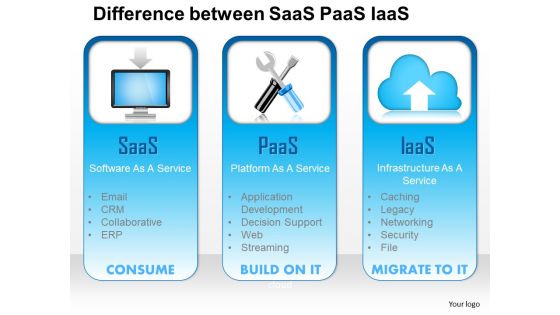
1114 difference between saas paas iaas as a service consume build migrate ppt slide




Try Before you Buy Download Free Sample Product
 Impress Your
 Audience
 100%
100% Editable
 Save Hours
 of Time


Saas (Software as a service), Paas (Platform as a service), and Iass (Infrastructure as a service) are different categories of cloud computing. Saas is a model through which software are licensed on subscription. Also, known as “on-demand software”, saas is often centrally hosted. Paas is another category of cloud computing that presents an opportunity for customers to build, run and manage different applications. The customers don’t have to go through the hassle of building the infrastructure. Iass is the third form of cloud computing which presents virtual computing resources across the internet. All three services make cloud computing a robust application. Talking about them and presenting details to the viewers via graphical design is another thing. You need an efficient PPT slide presentation tool to present this information to your viewers. The difference between saas paas iaas as a service consume build migrate Presentation deck is the go to medium for your needs. Download this PPT sample for maximum benefit. Our 1114 Difference Between Saas Paas Iaas As A Service Consume Build Migrate Ppt Slide conjure up a beautiful blend. An array of colors to charm any beholder.
People who downloaded this PowerPoint presentation also viewed the following :
1114 difference between saas paas iaas as a service consume build migrate ppt slide with all 5 slides:
Proper digestion is an important element. Offer it on a platter with our 1114 Difference Between Saas Paas Iaas As A Service Consume Build Migrate Ppt Slide.
FAQs for 1114 difference between saas paas iaas as a service consume build
Okay so there's three main types. IaaS is like renting virtual servers - AWS EC2 and stuff where you manage everything from the operating system up. Pretty flexible but more work. PaaS is way easier honestly - platforms like Heroku where you just push your code and they handle all the server headaches. Then SaaS is the full apps like Gmail or Salesforce, ready to go. The trade-off is always the same: more convenience means less control over how things work. I'd say figure out if you actually need to mess with infrastructure or if you just want to build your app without the hassle.
Honestly, cloud computing is like switching from buying to renting - way cheaper upfront. You're only paying for what you actually use instead of dropping huge money on servers and equipment. No more hiring IT people to babysit hardware or dealing with those brutal electricity bills from running everything 24/7. The scaling thing is pretty sweet too; busy season hits and you just dial up capacity, then dial it back down. I'd probably start small though - maybe move one system that won't kill you if something goes wrong, then see how much you're actually saving.
Honestly, the main things to worry about are data breaches and random people getting access to your stuff. Plus you're basically handing over control to some company - which yeah, feels weird. Their own employees could be sketchy too. If you're in healthcare or finance or whatever, there's compliance headaches. Oh and sometimes they just lose data, though that's pretty rare. My take? Encrypt everything before you upload it and use two-factor auth. That way if they mess up, you're still protected. Better safe than sorry with this stuff.
Pick cloud providers with SOC 2 or ISO 27001 certs already - saves you tons of work upfront. Know where your data's physically stored since GDPR gets really weird about location stuff. Encryption for data moving around AND sitting still is non-negotiable. Get a solid data processing agreement hammered out so nobody's confused about responsibilities later. Document literally everything though - I know it's boring but auditors are obsessed with paperwork. Oh, and negotiate hard on that agreement because some providers try to stick you with liability you shouldn't have.
Honestly, multi-cloud is pretty smart if you can handle the extra complexity. You're not stuck with one vendor's pricing bullshit or their random outages. Pick AWS for compute, Google's AI stuff is solid, Azure plays nice with enterprise tools - whatever works best for each thing you need. When you're not dependent on just one provider, you can actually negotiate better deals too. The failover thing is clutch - one cloud craps out, your important stuff keeps running elsewhere. Yeah, it's messier to set up at first, but the redundancy alone makes it worth it. I'd start by figuring out which workloads make sense to spread around.
Dude, cloud computing is a game changer for remote work. Everyone can jump into the same files and apps from wherever - no more emailing documents back and forth like it's 2005. Real-time syncing means you're never working on outdated stuff. Your team can edit docs together, hop on calls instantly, all that good stuff. Honestly the version control chaos used to drive me insane. Start by moving your biggest collaborative projects over first - you'll notice the difference right away. Way less IT drama too, which is always nice.
Honestly, start with security stuff that fits your industry - that's non-negotiable. Pricing models matter too, so pick one that matches how you'll actually use it. Performance and uptime guarantees are pretty standard now, but still worth checking. Regional coverage is where things get interesting - some providers are way better in certain areas, and latency can bite you. Support quality varies wildly between them. Also look at how well they play with your current tools and scaling options. Pro tip: make a scorecard with all this weighted, then test their free tiers first. Way better than jumping into a contract blind.
Dude, cloud services are a game changer for scaling. You can spin up new resources in minutes instead of waiting weeks for hardware - it's honestly pretty wild. No more guessing how much capacity you'll need and buying too many servers. Traffic spikes? Your infrastructure just handles it automatically, then scales back down when things chill out. You only pay for what you actually use, which is nice because who wants to waste money on idle servers, right? I'd say start small with one service and mess around with the auto-scaling features. You'll get why everyone's obsessed with it.
Honestly, cloud computing is what makes digital transformation actually work. You get the flexibility to modernize without being stuck with old infrastructure that's probably costing you a fortune to maintain. Scaling resources becomes super easy - just spin up what you need when you need it. The best part? You can experiment with new ideas without dropping serious cash upfront. I've seen companies waste months just planning around their legacy systems. My advice: pick one process that's driving you crazy and use that as your test case for moving to the cloud. Start small and see how it goes.
Dude, set up spending alerts right away - trust me on this one. Dev teams always forget to shut down their environments and boom, huge bill at month-end. Use those cost dashboards to track everything. I'd do monthly reviews with your team too, helps catch the weird stuff. Rightsize your instances based on what you're actually using, not what you think you need. Reserved instances are clutch for steady workloads. Oh and audit regularly for zombie resources - they're sneaky little budget killers. Governance sounds boring but it'll save your ass later.
Dude, serverless and edge computing are where it's at right now - crazy cost savings and speed improvements. We got burned by vendor lock-in at my old job, so multi-cloud is definitely the move. AI/ML stuff is literally everywhere now, can't escape it. Oh and everyone's obsessed with green cloud services lately. Kubernetes keeps getting better too, though honestly the learning curve still sucks. Start by checking what you're running 24/7 that could go serverless instead. That's usually the easiest quick win without breaking everything.
Look, cloud DR is honestly a total game changer. Your stuff gets copied to multiple regions automatically, so when your main site crashes, you're back up in minutes instead of waiting weeks. No more buying expensive backup servers that just sit there doing nothing - that always seemed like such a waste to me. You pay as you go, and most providers handle the failover and scheduling for you. Oh, and definitely start with your most critical systems first when you're setting up that cross-region replication. Way easier to tackle it piece by piece.
So edge computing is where you move processing closer to where your data actually lives - IoT sensors, mobile devices, that kind of stuff. Rather than sending everything back to some massive data center, you handle it locally. Super useful for anything that can't deal with lag. Honestly, once you see how much faster things run, it's hard to go back to the old way. You'll probably want to start small though - figure out which apps would actually benefit from the speed boost first. Then work on building out that hybrid setup so you can handle both edge and cloud workloads without everything breaking.
So there's a few ways to tackle this. Most cloud providers have pre-built APIs for common stuff - image recognition, language processing, that kind of thing. Just call the API and you're done. AWS SageMaker and Google AI Platform are pretty solid if you need custom models but don't want to deal with infrastructure headaches. Honestly way better than the old days of setting up your own servers. You can also grab GPU instances when you need serious computing power. My advice? Figure out what you actually need first, then see what's already built before you start coding everything from scratch. Save yourself the time.
Honestly, compatibility issues are gonna be your worst nightmare. Most legacy apps just weren't designed for cloud, so you're looking at major refactoring or starting from scratch. Data migration gets messy fast, and costs always spiral beyond what you budgeted - I've seen it happen so many times. Security becomes a real pain point too since older systems expose vulnerabilities you forgot existed. Don't even get me started on those random dependencies that pop up out of nowhere! Your team will need serious cloud training. Do a deep dive on your current setup first and map out everything before you make any moves.
-
Easily Understandable slides.
-
Great designs, Easily Editable.