


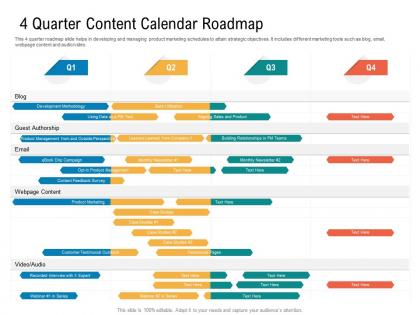
4 quarter content calendar roadmap timeline powerpoint template




Try Before you Buy Download Free Sample Product
 Impress Your
 Audience
 100%
100% Editable
 Save Hours
 of Time


Our 4 Quarter Content Calendar Roadmap Timeline Powerpoint Template are topically designed to provide an attractive backdrop to any subject. Use them to look like a presentation pro.
People who downloaded this PowerPoint presentation also viewed the following :
4 quarter content calendar roadmap timeline powerpoint template with all 2 slides:
Use our 4 Quarter Content Calendar Roadmap Timeline Powerpoint Template to effectively help you save your valuable time. They are readymade to fit into any presentation structure.


FAQs for 4 quarter content calendar roadmap
Start with the basics - dates, topics, who's doing what, and where it's going (blog, social, whatever). Honestly, the notes column saves my life because there's always random feedback or last-minute ideas. I'd add approval status too so you're not constantly asking "wait, did this get okayed?" Throw in your content themes or campaigns - makes everything look intentional instead of just throwing spaghetti at the wall. Some people dump hashtags and keywords right in there which isn't bad. Keep it visual enough that if someone else opens it, they won't be totally lost. You can always add more fancy stuff later.
Honestly, it's a game changer for keeping everyone on the same page. No more "wait, who was supposed to handle that?" moments that make you want to scream. You'll see exactly what's due when, who's doing what, and where everything stands. When deadlines start piling up, you can actually spot the chaos before it hits. And if someone calls out sick? Their work isn't stuck in limbo because all the details are documented. I'd start super simple - just a shared Google sheet works fine. You can always add fancy columns later once you figure out what actually matters for your team's workflow.
Honestly, you've got a bunch of options here. Google Sheets or Excel are solid for basic stuff - everyone already knows them and they're free. For more features, try Asana, Trello, or Monday.com since you can assign tasks and set deadlines easily. Don't overthink it though. I've watched teams spend forever researching fancy tools when a simple spreadsheet would've done the job perfectly. If you're doing social media specifically, Buffer or Hootsuite have calendar views built right in. My advice? Start with whatever you already have access to, then upgrade later if you actually need the extra features.
Honestly, content calendars are game changers because they stop you from that panicked "what do I post today??" feeling. I used to be terrible at this lol. Map everything out ahead of time so you can actually see your posting schedule instead of winging it. No more forgotten posts or awkward gaps that make you look inactive. The visual part is clutch - you'll spot holes in your content before they become a problem. I usually block out like an hour each week to plan everything in batches. Way less stressful than scrambling daily, trust me.
Look into what actually drives conversations in your space first - seasonal stuff, big industry events, whatever gets people talking. Then tweak those template categories to fit what your audience cares about. Healthcare folks need compliance review sections, retail needs product launch timelines, you know? I totally bombed this once with a finance client because I missed earnings season completely. Oops. If you're in a regulated industry, build in extra time for approvals or you'll hate yourself later. The whole point is making the template work for YOUR industry's weird quirks, not cramming your content into some cookie-cutter thing.
Honestly, just add specific columns for holidays and seasonal stuff right in your template. I do quarterly blocks where I map out the big seasons - back-to-school, holidays, summer - then work backwards from there. But here's the thing: skip the obvious holidays everyone's doing and focus on what your audience actually cares about. Like, my audience couldn't care less about National Donut Day, you know? Make a master list of your seasonal opportunities first. Use those as anchor points, then fill everything else around them. Way easier than trying to retrofit seasonal content later.
Just throw the basics in there - likes, shares, comments, click-through rates. I always forget about website traffic from social posts but honestly that's where the real value is. Add reach and impressions too if you want the full picture. Oh and definitely track which content types perform better - that's been a game changer for me. Publication dates obviously. Maybe audience growth if you're consistent about posting. Don't go overboard with metrics or you'll never keep it updated (learned that the hard way). Pick 3-4 things that actually matter for what you're trying to do.
Honestly, content calendars are a lifesaver. You can see everything at once - Instagram, LinkedIn, Twitter, whatever you're using. Makes it so much easier to batch your content creation and catch any gaps before you're scrambling last minute. The best part? You won't accidentally post identical stuff everywhere (we've all been there). I love being able to plan campaigns that work across platforms while keeping each one's vibe. Oh, and repurposing content becomes way less of a headache. Just start with a basic spreadsheet - date, platform, content type, copy. Nothing fancy needed at first.
Honestly, getting people to actually stick with it is probably your biggest headache. Change is hard - even when their current system is a total mess, they'll resist switching. Your template will either be too complicated (and scare people off) or too basic and miss important stuff. I'd test it with like 2-3 people first, see what breaks, then fix it before rolling out to everyone. Oh, and don't expect perfect adoption right away. Some people will "forget" to use it for weeks.
Oh dude, I totally messed this up at first - had everything in one giant calendar and couldn't find anything! Now I break it down by content type. Blog posts get columns for keywords, word count, publishing platform. Videos need duration tracking, thumbnail status, upload schedules. Social posts are trickier - character limits, hashtags, posting times for each platform. Color-coding works great, or just use separate tabs if you're organized like that. I'm definitely not lol. Start basic though - don't go crazy adding every possible field right away. You'll figure out what actually matters as you go.
Your audience feedback is like having a GPS for your content calendar - it shows you what's actually hitting vs what you assumed would work. Set up regular check-ins to look at engagement, comments, and any direct messages you get. Then tweak your themes, how often you post, and what formats you're using based on that info. Honestly, I've watched so many people create these gorgeous calendars that completely bomb because they never asked what their audience wanted. Make your template flexible enough to pivot fast when something's not working or people start asking for specific stuff. Short wins over pretty planning every time.
Honestly, having a content calendar saves your butt when holidays sneak up on you. I used to panic-create Valentine's posts at 11pm the night before - not fun. Now I block out the big ones first (Christmas, Black Friday, etc.) then add weird niche holidays that might work. Like if you run a coffee shop, National Coffee Day is pure gold for engagement. The trick is spotting conflicts early too. Don't accidentally schedule your product launch during Super Bowl week unless you want it buried. Start with obvious holidays, then layer in your industry stuff and company anniversaries. Trust me, future you will thank present you.
Honestly, you want something that auto-schedules posts at the best times and actually connects to your publishing platforms. Built-in collaboration stuff is clutch - like comment threads and approval workflows. Performance tracking is probably the biggest game changer though, lets you see what's bombing vs what's crushing it. AI content suggestions are pretty solid too, plus bulk editing saves tons of time. Oh, and visual previews help a lot. Don't go crazy trying to find one with everything - just grab a template with maybe 2-3 features you actually need first.
Honestly, don't pack your content calendar to the brim - you're just setting yourself up for stress. I always leave like 20-30% of mine open because trending stuff pops up constantly. Plan your big campaigns but stay flexible with the rest. Weekly reviews work way better than mapping out months ahead (learned this the hard way). Create different content buckets too - evergreen posts, timely stuff, promotional content. Makes it super easy to shuffle things when priorities change. Your calendar should bend with you, not break you. Oh, and buffer time is your best friend when deadlines get crazy.
Honestly, the worst thing you can do is get super rigid with your template. Like, don't feel pressured to post something just because there's an empty slot - that's how you burn out. Oh, and this one's huge: actually block out time to CREATE the content, not just when it goes live. I learned that the hard way lol. Leave wiggle room for random stuff that pops up or trends you want to jump on. Your calendar should help you, not stress you out. Just start with basic posting dates and topics first. You can always get fancier later once you've got the hang of it.
-
Perfect template with attractive color combination.
-
Content of slide is easy to understand and edit.
-
The content is very helpful from business point of view.
-
Amazing product with appealing content and design.
-
Content of slide is easy to understand and edit.
-
Wonderful templates design to use in business meetings.
-
Good research work and creative work done on every template.
-
Excellent work done on template design and graphics.
-
Excellent products for quick understanding.
-
Good research work and creative work done on every template.
-
Page:
- You're currently reading page 1
- Page 2
-
