


Four quarter content calendar roadmap




Try Before you Buy Download Free Sample Product
 Impress Your
 Audience
 100%
100% Editable
 Save Hours
 of Time


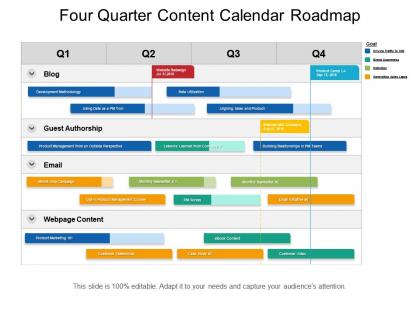
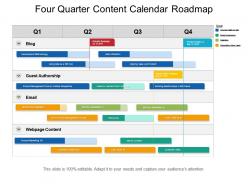
Express your objectives by the means of words and visuals, presenting you, four quarter content calendar roadmap PPT design. Validate your key concerns through suitable visuals and appropriate content are included in these PPT layouts. This PowerPoint deck will assist you in determining future goals, assess the future plans through this roadmap design. Explain your future plans and advanced technologies through a four-quarter content calendar template. Reflect on your internet services and webpage content apply rehearsed data in this PPT deck and get ahead of your plans for upward growth. Incorporate your data and customize at your convenience. One can have a plethora of data and insights implemented into a sole splash of the interestingly portrayed compact report through our design. Get them on the edge with our Four Quarter Content Calendar Roadmap. They will find you absolutely enthralling.
People who downloaded this PowerPoint presentation also viewed the following :
Four quarter content calendar roadmap with all 5 slides:
Our Four Quarter Content Calendar Roadmap discourage dogma. They allow you to excercise free will.


FAQs for Four quarter
Definitely need publication dates, content types, and who's handling what. Status tracking is clutch too - nothing worse than losing track of where stuff stands. I always add columns for keywords and topics because future you will hate current you if you don't. Campaign tags help tons when you're trying to figure out what actually worked. Oh, and approval stages if you've got multiple people signing off on things - that gets messy fast. Notes section is perfect for random ideas or those inevitable last-minute tweaks. Start basic then add whatever your team ends up needing.
Dude, trust me on this one - get a content calendar going. Your whole team will actually know what's happening instead of everyone doing random stuff. No more awkward meetings where someone's like "wait, didn't Sarah already write that?" You'll spot problems way earlier, and honestly? It just makes everything less chaotic. Even something super basic works - I started with just a Google Sheet and it saved my sanity. Everyone can see deadlines, who's handling what, all that good stuff. You don't need anything fancy to begin with.
Honestly, start with Google Sheets if you're just testing the waters - it's free and does the job. Notion's pretty popular right now, and Airtable's great if you like database-y stuff. For something more visual, Trello or Asana work well without being too complicated. CoSchedule is what most content teams swear by since it connects to social platforms and has analytics built in. But honestly? Don't overthink it at first. Pick whatever doesn't make you want to pull your hair out, then switch later if you outgrow it. I've seen people waste weeks researching the "perfect" tool instead of just... you know, making content.
Honestly, I check mine every week for quick tweaks and do the big picture stuff monthly. The weekly thing is clutch for catching trending topics or fixing posts that aren't hitting right. Monthly reviews? That's where I figure out what's actually working and plan ahead. I totally missed this viral trend once that would've been perfect for us because I wasn't staying on top of it - ugh, still bugs me! Just block out like 30 minutes each week to scan your upcoming posts. Way better than panicking when something's off. Don't overthink it though - you'll drive yourself crazy second-guessing everything.
Honestly? Don't go crazy with the planning. I see people mapping out three months of posts and then life hits and they abandon the whole thing. Super frustrating. Start small - maybe 2-3 weeks out. Leave room for spontaneous stuff too, like when something's trending or you have a random idea. Oh, and be real about how much you can actually handle. Quality's way better than cramming your calendar with mediocre content just because you feel like you should post something. Also don't forget seasonal stuff - I always mess that up and end up posting summer content in October.
Honestly, I learned this the hard way - you gotta plan seasonal stuff way earlier than feels natural. Like, start thinking about back-to-school in July, Christmas in September. Sounds crazy but trust me on this. Pull up your calendar and mark holidays, seasonal shifts, industry events at least 3-4 months out. Check what worked last year and what your people actually engage with. Nobody needs every random food holiday, seriously. Look at search trends to see when conversations peak around different topics. Then batch create everything early - December you will thank July you for having those holiday posts ready to go. Way less stressful.
Look at likes, shares, comments - that stuff tells you what actually hits with people. Reach and impressions show how far things spread. But honestly? Don't get sucked into vanity metrics. Focus on what matters for your business. Website traffic from each post, email signups, actual sales if that's your thing. I'd pick maybe 3-5 metrics max that match your goals. Check them weekly to see what's working. Click-through rates are solid too - shows if people care enough to actually click. The trick is not tracking everything under the sun, just what moves the needle for you.
Your audience totally changes how you should plan content. Gen Z scrolls way more at night and weekends, so post then. Millennials? Hit them midweek during lunch - we're all mindlessly scrolling anyway lol. Older folks actually prefer less content but make it meatier, usually during normal work hours. Also think about format - younger people want quick videos and stories, older demographics lean toward blog posts or those detailed infographics. Honestly, I'd map out when your specific audience is online first. Then just build your whole calendar around what they're actually doing, not what you think they should be doing.
So SEO is basically your roadmap for creating stuff people will actually search for. Before you lock in your content calendar, dive into keyword research and see what's trending. Amazing content means nothing if it's sitting there invisible, you know? I always check when certain keywords spike seasonally - helps you time things right. Plus you can spot gaps your competitors totally missed. The trick is finding that sweet spot between what people want and what makes sense for your business. Honestly, just pull that keyword data before finalizing next quarter's plan and you'll be way ahead.
Color coding is honestly a game changer - I use different colors for blog posts, social media, campaigns, whatever. Icons work great too so you don't have to read every single line to know what's what. Thumbnail images are clutch for visual content because you'll instantly remember "oh yeah, that's the beach post." I also throw in progress indicators so I can see what's still in draft mode. Start with just color coding by content type though - don't go crazy right away or you'll overwhelm yourself. Once you see how much faster you can scan everything, you can add more visual stuff later.
Honestly, the game-changer is baking repurposing right into your content calendar upfront. Like, when I write one blog post, I'm already thinking: okay, this'll become 3 Instagram posts, maybe a quote card, definitely a quick video recap. Your future self will thank you! Map out different formats when you're doing monthly planning - maybe 3-4 versions per piece. Oh, and don't sleep on refreshing your older hits with new stats or angles. I actually block out time slots just for those updates. Way better than scrambling to create everything from scratch every single time.
Honestly, content calendars are a game changer for keeping your editorial stuff and marketing campaigns from stepping on each other. Picture this: you can see your product launch date and build blog posts, social media, and emails around it. I learned this the hard way when we almost published a competitor takedown right before trying to partner with them - awkward much? Both teams need access to update it though, otherwise it becomes this useless document nobody touches. The visual aspect is weirdly satisfying too. Just keep it current and you'll avoid so many headaches.
Honestly, you've gotta match each platform's vibe. Instagram works best during lunch and evening scrolls. LinkedIn? Hit those Tuesday-Thursday mornings when people are actually checking work stuff. Facebook does well mid-week afternoons. Here's what saves me tons of time - I batch create everything first, then tweak it for each platform instead of starting over. Scheduling tools like Buffer are lifesavers for staying consistent without going crazy. Oh, and don't pack your calendar too tight! You'll want space for jumping on trends or responding to comments. Treat your schedule more like loose guidelines than rigid rules.
Get your stakeholders involved from day one - bring them to brainstorming sessions and those monthly planning meetings. Share calendar access so they can spot conflicts with their launches or whatever they're working on. Honestly, a weekly "here's what's coming" email saves you from those annoying last-minute freak-outs. Set up approval flows for anything sensitive. Maybe create a Slack channel where they can dump ideas or random requests. The trick is making them feel like actual partners instead of roadblocks - ask what they think early and keep asking.
Okay so Nike is absolutely insane at this - they map out campaigns months ahead around product drops, athlete deals, all the big sports moments. Perfect timing every time. Starbucks does the same thing with their seasonal drinks, teasing on Instagram then hitting email lists. Even smaller brands like Glossier get this right by batching their user content with product launches. What's wild is none of these brands just wing it, you know? They're building up hype over weeks, telling a whole story. I'd say start with your biggest moments next quarter and plan backwards from there.
No Reviews