


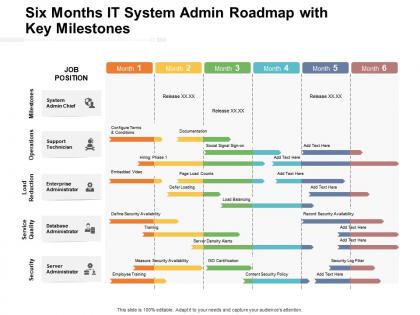
Six months it system admin roadmap with key milestones




Try Before you Buy Download Free Sample Product
 Impress Your
 Audience
 100%
100% Editable
 Save Hours
 of Time


Visualize your work plan and communicate your ideas impactfully with our pre designed Six Months It System Admin Roadmap With Key Milestones. Showcase the detailed overview of the project, the key deliverables, and the milestones to be achieved with the help of our fully customizable PowerPoint layout. You can easily emphasize on the project goals and discuss all the activities involved in an easy to comprehend manner by utilizing our professionally designed PPT theme. This roadmap PowerPoint layout is a perfect strategic planning tool that can help in keeping the project on track. With our attractive PowerPoint theme, you can articulate the workflow, track the work progress, and have a clear vision of the goal to be achieved. Download this versatile Six Months It System Admin Roadmap With Key Milestones and save your hours of work.
People who downloaded this PowerPoint presentation also viewed the following :
Six months it system admin roadmap with key milestones with all 2 slides:
Give your audience a fulfilling experience. They will find our Six Months It System Admin Roadmap With Key Milestones elevating.

FAQs for Six months it system admin roadmap
Honestly? Get the boring basics down first - command line stuff, networking fundamentals like TCP/IP and DNS, plus really know Windows Server and Linux inside out. Too many people I know rush straight into cloud certifications but can't even troubleshoot why their internet's acting up lol. PowerShell and Bash scripting will save your butt constantly. Also write everything down! Trust me, future you will hate current you if you don't document what you're doing. VirtualBox is great for practicing without breaking anything important.
Look, certs definitely help get you past those annoying HR screens. CompTIA, AWS, Microsoft - they all look solid on a resume. But honestly? I've met some brilliant admins who never touched formal certifications and could run circles around cert holders. My take is grab something foundational first - Network+ or Security+ are good starting points. Then maybe add vendor-specific ones later when you figure out what direction you're heading. Don't stress about getting every cert under the sun though. Start with whatever matches where you want to be next.
So on-premises is basically you owning all the physical stuff - server racks, cooling systems, power, the works. Cloud flips that completely. Now you're working with virtual resources and APIs instead of wrestling with actual hardware. You'll be doing way more automation and cost management, less time crawling around server rooms (honestly, kind of miss that sometimes). The skills do carry over though - networking and security knowledge transfers pretty well. I'd mess around with AWS or Azure's free accounts if I were you, really shows you the difference between the two approaches.
Dude, Windows Server and Linux are like the bare minimum you need to know. Corporate stuff runs on Windows - Active Directory, PowerShell, all that jazz. Linux powers pretty much everything else though: web servers, databases, cloud instances. I'd probably start with Windows Server if you're going the enterprise route, then get into Linux distros like Ubuntu or CentOS. Oh, and macOS is getting bigger too with all the BYOD stuff happening. Command line will save your life with both systems. Honestly, just spin up some VMs to mess around with everything safely first - way better than breaking production stuff lol.
Honestly, start with the basics - get your firewall locked down tight and patch everything constantly. I'd segment your network so critical stuff stays isolated from the rest. Log monitoring is huge since attackers are sneaky as hell. Set up intrusion detection to flag weird activity. Regular vulnerability scans and pen testing are non-negotiable too. Oh, and train your people because they'll click on anything if you're not careful. I know it sounds like a lot, but audit what you've got first and tackle the worst gaps. That'll give you the biggest bang for your buck.
Honestly, get yourself some good monitoring software first - Nagios or PRTG work great for catching problems before your users start complaining. Remote access is obviously crucial too, so set up RDP or SSH clients. PowerShell scripting changed my life, no joke - automate anything you find yourself doing repeatedly. Backup tools and a decent ticketing system will keep you organized. Oh, and Nmap's solid for network scanning when things get weird. My take? Don't go crazy buying everything at once. Pick one tool per category and actually learn it well first.
Honestly, skip the manual checks - you'll forget when shit hits the fan. Grab something like Nagios or Zabbix to watch CPU, memory, disk space automatically. Set alerts that'll ping you before users start complaining. Weekly dashboards are clutch for showing bosses you're on top of things (they eat up those trend graphs). The tricky part? Finding the balance between alert spam and actually catching problems early. I'd start basic and add complexity once you figure out what actually breaks. Oh, and built-in Windows/Linux monitoring works fine if you're on a budget.
Dude, you HAVE to learn scripting if you're gonna be a sysadmin. PowerShell, Python, Bash - pick one and start there. I spent way too much time my first year doing everything manually like an idiot. Now I automate deployments, config management, monitoring stuff. Look at whatever's eating up most of your time and script that first. Even simple automation saves me hours every week. It's honestly the difference between drowning in busy work and actually having time for the interesting projects. Trust me, once you start automating things you'll wonder how you ever survived without it.
Honestly? Three main things will save your butt. First, get monitoring set up that actually alerts you before everything explodes - way better than waking up to 50 angry emails. Keep your backups current and test them regularly (learned that one the hard way). When stuff inevitably breaks, having a solid runbook means you won't be googling basic commands while everything's on fire. Oh, and do those post-mortems after incidents - they're annoying but you'll catch patterns. I'd start by figuring out what monitoring gaps you have right now.
Definitely stick with the 3-2-1 rule - 3 copies total, 2 different storage types, 1 offsite. Your backups are useless if they're corrupted though, so test them regularly. I've watched teams scramble when their "perfect" backup system hadn't actually worked in months. Automation saves your sanity here. Document everything so Jim from accounting can restore files when you're on vacation. Figure out how much data loss you can actually stomach first - not everything needs daily backups. Start with your most critical stuff and work down from there.
Honestly, just pick like 2-3 good sources and actually stick with them - I use Ars Technica and a few vendor blogs. Reddit's where the real gold is though, especially those late night threads where someone's debugging the exact problem you'll face next month. Twitter/LinkedIn are decent for following people who actually work with your tech stack. But here's the thing - reading about stuff only gets you so far. Spin up some VMs or containers and mess around with new tools yourself. I'd start small, maybe 30 minutes a week, then build up from there when it becomes routine.
Start with weekly check-ins and shared Slack channels for each team you're working with. Write everything down in spaces everyone can see - trust me, assumptions will wreck your projects faster than anything else. Better to over-communicate than leave people guessing. Build some cross-functional runbooks both teams can actually use when things go sideways. Here's the thing though - figure out what each team actually cares about first. Frame your asks around their priorities, not yours. I'd grab coffee with key people from dev, security, and network teams this week. Just 30-minute chats to start building those relationships.
Honestly? Break stuff on purpose in your test lab - I learned more from accidentally destroying servers than any tutorial. Document every weird fix you find because trust me, you'll totally forget that random registry tweak that saved your ass. Logs are your best friend, so get comfortable with grep and PowerShell filters. The r/sysadmin subreddit is gold for real-world horror stories you can learn from. Don't just slap band-aids on problems though - actually figure out why your solution worked. Oh, and keep a personal cheat sheet of common issues. Future you will thank present you.
Don't document anything and you're screwed - seriously, that 2am "quick fix" will haunt you later. Never test changes in production first, even tiny ones. That's how disasters happen. Focus on basics before jumping into fancy stuff, and always back up before touching anything. I learned this the hard way lol. Skip proper change management and you'll regret it. Also, don't reinvent everything from scratch when good tools already exist. Keep a daily log of what you fix - sounds boring but it's a lifesaver when similar issues pop up.
Yeah so sysadmin work has totally changed - we're basically coding half the time now. You can't just babysit servers anymore, everyone expects you to automate stuff and write infrastructure as code. Honestly it's way cooler than being a glorified ticket monkey, but man the learning curve sucks. I'd start by automating whatever tedious crap you're doing manually right now. You'll need to pick up Docker, some scripting, cloud platforms. The whole role merged with dev work - you're building CI/CD pipelines and actually collaborating with developers instead of them just throwing things over the fence at you.
No Reviews