


Alm powerpoint presentation slides





Try Before you Buy Download Free Sample Product
 Impress Your
 Audience
 100%
100% Editable
 Save Hours
 of Time


Optimize the profits generated by your firm’s asset throughout their lifecycle with our ALM PowerPoint Presentation Slides. The predictive analysis PPT presentation provides multiple objectives of the asset management process like predictive analysis, low-cost procurement, and visual asset management; improvement in OEE, and asset optimization. Using the optimizing lifecycle PPT to display the tabular presentation of the company assets to be optimized along with location, cost of procurement, and annual maintenance cost. With this categorization PowerPoint slideshow, you can calculate the replacement cost and use our lifecycle management process including steps like a requirement, procurement, maintenance, and deployment. Use the multiple-step process for maintaining assets and mention the key performance indicators in our PowerPoint templates. The equipment lifecycle PPT presentation also includes multiple steps like retirement and proposal process, gap analysis to calculate challenges, and procurement process. In the end, use the asset life PPT layout to measure the long-term performance of your company’s assets.
People who downloaded this PowerPoint presentation also viewed the following :
Content of this Powerpoint Presentation
Slide 1: This title slide introduces ALM. Add the name of your company here.
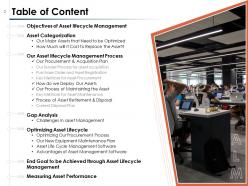
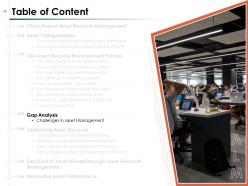
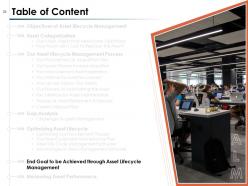
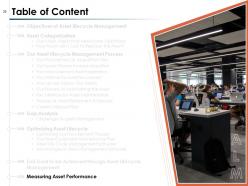
Slide 2: This slide contains the Table of Content. This includes Objectives of Asset lifecycle Management, Asset Categorization, Our Asset lifecycle Management Process, Gap Analysis, Optimizing Asset Lifecycle, Optimizing Our Procurement Process, End Goal to be Achieved through Asset Lifecycle Management, and Measuring Asset Performance.
Slide 3: This is a table of content slide showing the Objectives of Asset lifecycle Management.
Slide 4: This slide presents the Objectives for Asset Lifecycle Management. In this slide we have provided multiple objectives such as improving equipment effectiveness, lowering procurement cost, and asset optimization which can be achieved by efficiently managing the asset lifecycle.
Slide 5: This is a table of content slide showing the Objectives of Asset lifecycle Management which includes Asset Categorization and Our Major Assets that Need to be Optimized.
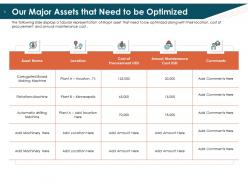
Slide 6: This slide presents Our Major Assets that Need to be Optimized. It displays a tabular representation of Major assets that need to be optimized along with their location, cost of procurement, and annual maintenance cost.
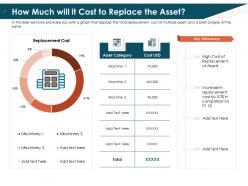
Slide 7: This slide shows How Much will it Cost to Replace the Asset? In this slide, we have provided you with a graph that displays the total replacement cost of multiple assets and brief analysis of the same
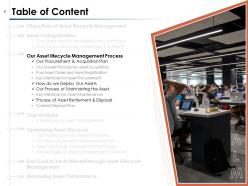
Slide 8: This is a table of content slide showing Our Asset lifecycle Management Process. This includes Our Procurement & Acquisition Plan, how do we Deploy Our Assets, Our Process of Maintaining the Asset, and the Process of Asset Retirement & Disposal.
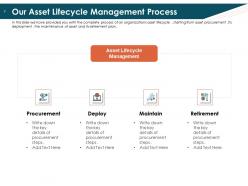
Slide 9: This slide presents Our Asset Lifecycle Management Process. In this slide we have provided you with the complete process of an organization’s asset lifecycle, starting from asset procurement, its deployment, the maintenance of assets, and its retirement plan.
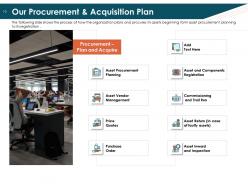
Slide 10: This slide presents Our Procurement & Acquisition Plan. It shows the process of how the organization plans and procures its assets beginning from asset procurement planning to its registration.
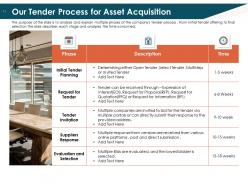
Slide 11: This slide presents Our Tender Process for Asset Acquisition. The purpose of the slide is to analyze and explain multiple phases of the company's tender process. From initial tender offering to final selection the slide describes each stage and analyses the time consumed.
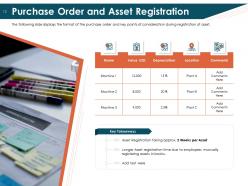
Slide 12: This slide presents Purchase Order and Asset Registration. It displays the format of the purchase order and key points of consideration during the registration of the asset. It includes the value, depreciation, and location.
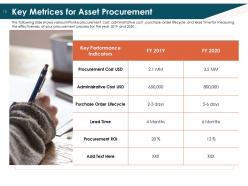
Slide 13: This presents the Key Metrics for Asset Procurement. It shows various KPIs like procurement cost, administrative cost, purchase order lifecycle, and lead time for measuring the effectiveness of your procurement process for the years 2019 and 2020.
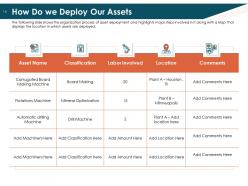
Slide 14: This slide presents How Do we Deploy Our Assets. It shows the organization process of asset deployment and highlights major steps involved in it along with a Map that displays the location in which assets are deployed.
Slide 15: This slide presents Our Process for Maintaining the Asset. Here we have provided you with Multiple steps that the organization takes to Maintain their respective asset beginning with Preventive maintenance planning and ending at Asset Health check.
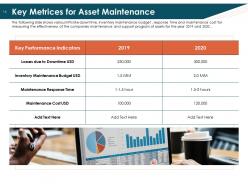
Slide 16: This slide presents the Key Metrics for Asset Maintenance. It shows various KPIs like downtime, inventory maintenance budget, response time, and maintenance cost for measuring the effectiveness of the company’s maintenance and support program of assets for the years 2019 and 2020.
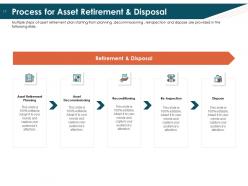
Slide 17: This slide presents the Process for Asset Retirement & Disposal. Multiple steps of asset retirement plan starting from planning, decommissioning, reinspection, and disposal are provided in the following slide.
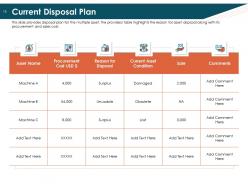
Slide 18: This slide presents the Current Disposal Plan. It provides a disposal plan for multiple assets, the provided table highlights the reason for asset disposal along with its procurement and sales cost.
Slide 19: This slide presents the Gap Analysis which includes the Challenges in asset Management.
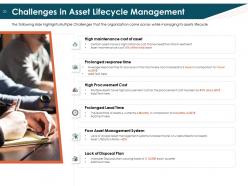
Slide 20: This slide presents the Challenges in Asset Lifecycle Management. These include High maintenance cost of assets, Prolonged response time, High Procurement Cost, Prolonged Lead Time, Poor Asset Management System, and Lack of a Disposal Plan.
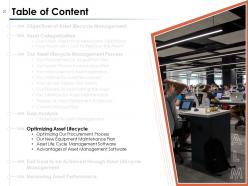
Slide 21: This is a table of content slide showing Optimizing Asset Lifecycle. It includes Optimizing Our Procurement Process, Our New Equipment Maintenance Plan, Asset Life Cycle Management Software, and Advantages of Asset Management Software.
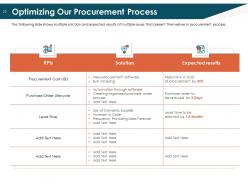
Slide 22: This slide presents Optimizing Our Procurement Process. It shows multiple solutions and expected results of multiple issues that present themselves in the procurement process.
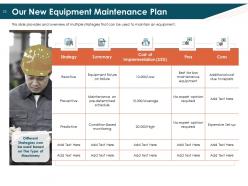
Slide 23: This slide presents Our New Equipment Maintenance Plan. It provides an overview of multiple strategies that can be used to maintain equipment such as reactive, preventive, etc.
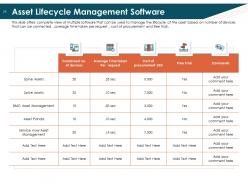
Slide 24: This slide presents the Asset Lifecycle Management Software. It offers a complete view of multiple software that can be used to manage the lifecycle of the asset based on the number of devices that can be connected, the average time is taken per request, cost of procurement, and free trial.
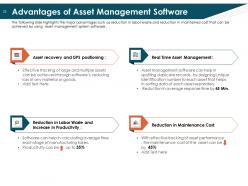
Slide 25: This slide shows the Advantages of Asset Management Software. It highlights the major advantages such as reduction in labor waste and reduction in maintained cost that can be achieved by using Asset management system software .
Slide 26: This is a table of content slide showing the End Goal to be Achieved through Asset Lifecycle Management.
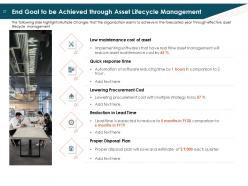
Slide 27: This slide presents the End Goal to be Achieved through Asset Lifecycle Management. It highlights Multiple Changes that the organization wants to achieve in the forecasted year through effective asset lifecycle management such as Low maintenance cost of assets, Quick response time, etc.
Slide 28: This is a table of content slide showing the Measuring Asset Performance.
Slide 29: This slide presents the Measuring Asset Performance and includes the Total Assets, Cost of Maintenance, and Procurement cost.
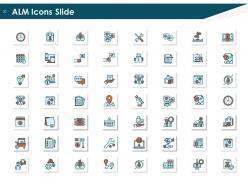
Slide 30: This slide contains a number of ALM Icons for you to choose from.
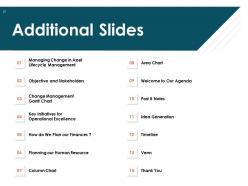
Slide 31: This slide introduces the Additional Slides. This includes Managing Change in Asset Lifecycle Management, Objectives and Stakeholders, Change Management, Gantt Chart, Key Initiatives for Operational Excellence, How do We Plan our Finances? Planning our Human Resource, Column Chart, Area Chart, Welcome to Our Agenda, Post It Notes, Idea Generation, Timeline, Venn, and Thank You.
Slide 32: This is a table of content slide showing Managing Change in Asset Lifecycle Management.
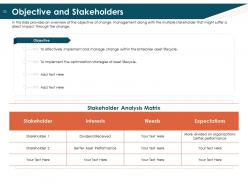
Slide 33: This slide presents the Objectives and Stakeholders. It provides an overview of the objective of change management along with the multiple stakeholders that might suffer a direct impact through the change.
Slide 34: This slide presents the Change Management Gantt Chart. It provides the process of strategy implementation of asset management along with financial risk and project management framework.
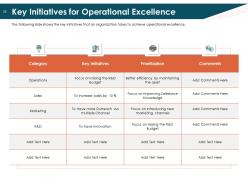
Slide 35: This slide presents the Key Initiatives for Operational Excellence. It shows the key initiatives that an organization takes to achieve operational excellence.
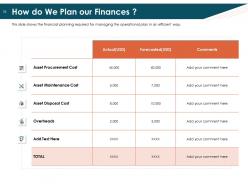
Slide 36: This slide presents How do We Plan our Finances? It shows the financial planning required for managing the operational plan in an efficient way.
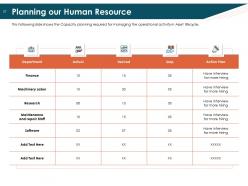
Slide 37: This slide presents Planning our Human Resources. It shows the Capacity planning required for managing the operational activity in the Asset lifecycle.
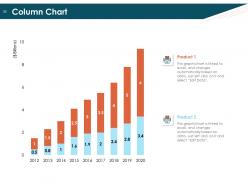
Slide 38: This slide shows a column chart that compares 2 products’ finances over a timeline of years.
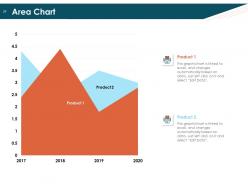
Slide 39: This slide shows an area chart that compares 2 products’ data over a timeline of years.
Slide 40: This slide presents Welcome to Our Agenda - the various agendas of the company.
Slide 41: This slide contains Post It Notes that can be used to express any brief thoughts or ideas.
Slide 42: This slide represents Idea Generation. It can be used to brainstorm ideas.
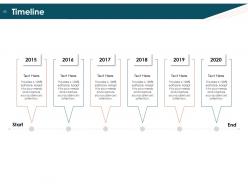
Slide 43: This slide contains a timeline chart that can be used to portray the sequence of events for any project or goal.
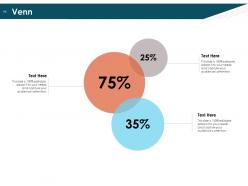
Slide 44: This slide provides a Venn diagram that can be used to show interconnectedness and overlap between various departments, projects, etc.
Slide 45: This is a Thank You slide where details such as the address, contact number, email address are added.
Alm powerpoint presentation slides with all 45 slides:
Use our ALM Powerpoint Presentation Slides to effectively help you save your valuable time. They are readymade to fit into any presentation structure.






FAQs for Alm
Hit the main lifecycle stuff - requirements, design, dev, testing, deployment. Visual flows are clutch since people need to see how it all fits together. Executives will want metrics and KPIs (they're obsessed with numbers). Tool integration and compliance slides are must-haves too. Keep slides simple with bullets, not paragraph dumps. Real examples from your projects work way better than generic theory - learned that the hard way. Oh, and definitely end with clear action items so everyone knows what's next instead of just wandering off confused.
Dude, flowcharts are your best friend here - they'll show the actual dev-to-deployment pipeline way better than paragraphs of text. Screenshots of your tools in action help too. ALM sounds boring as hell when it's just bullet points, but once people see code moving from IDE through CI/CD to production, they get it immediately. Timeline graphics work great for tracking how requirements flow through testing and release phases. Oh, and definitely throw in some examples from whatever projects your team's actually working on right now. Makes it feel real instead of theoretical.
Honestly, PowerPoint slides are perfect for this stuff. You know how people's eyes glaze over when you mention traceability matrices? Visual slides actually make that digestible. They're great for showing stakeholders ROI on testing tools and getting dev/ops teams aligned on release timelines. Create templates with clear workflows and metrics dashboards - executives love seeing the big picture fast. Before/after scenarios work really well too for demonstrating value. Plus they help standardize ALM practices across different teams. I've seen way too many meetings where complex lifecycle processes just confuse everyone, but good visuals totally change that dynamic.
For ALM dashboards, go with color-coded status indicators and bar charts - pie charts are basically useless here. Red/yellow/green is your friend for quick health checks. Progress bars work great for burndowns, and trend lines show you where things are heading. Each slide should focus on just one thing, like defect rates or test coverage. Otherwise people's eyes glaze over trying to process everything. Keep it simple enough that anyone can scan it in five seconds and know if they should panic or not. Trust me, your future self will thank you when stakeholders actually understand what they're looking at.
So basically make different versions for each group. Executives just want the big picture - flashy visuals, key numbers, barely any text. They're busy people. Technical folks need all the nitty-gritty stuff though - process flows, detailed timelines, risk analysis. Business people sit in the middle somewhere. Honestly, I'd even change the font size depending on who's reading it! Just keep your ALM terms consistent across versions (that's important) and always start with why it matters to the business before getting into technical weeds. Oh, and figure out what each group actually gives a damn about first - saves you tons of time.
Don't dump all your case studies at the end - that's boring as hell. Scatter them throughout instead. Open each big concept with a quick real-world example, then get into the theory. Before/after scenarios work great, especially with actual numbers. I always try to use recognizable company names since people eat that up. Keep each one to 2-3 slides max and actually connect it back to your ALM stuff with "this shows how..." or whatever. Oh, and end with something they can actually use in their own work - nobody wants theory without application.
Oh man, definitely go with navy/white/gray or those dark blue/light blue combos for ALM stuff - your audience expects that "we're serious about risk management" vibe. Sans-serif fonts are your friend here (Calibri, Arial, Helvetica). Trust me on the font size though - 24pt minimum for body text, 36pt+ for headers. I made the mistake of using some elegant serif font once and literally nobody could read my charts from the back. Actually embarrassing. Make sure your data visualizations stand out but don't go crazy with colors that'll distract from your numbers.
Honestly, templates are a game changer for ALM presentations. Your whole team ends up using the same terminology and visual style, which makes everything look way more professional to stakeholders. I mean, nobody wants to sit through presentations that look like they were thrown together last minute. You'll save a ton of time too since you're not starting from scratch every time. The best part? Your audience gets used to the format and can actually focus on your ALM insights instead of figuring out where everything is. Just create one solid master template and you're golden.
You know what actually works? Turn your ALM data into a story people give a shit about. Nobody wants to stare at boring charts all day. Walk them through what happened - how your assets performed, what went wrong, how you pivoted. It's like explaining drama to a friend instead of reading from a textbook. Structure it around problems and solutions, or use real scenarios they'll recognize. Honestly, this approach makes even the most complex stuff click for decision-makers. They'll get the "why" behind your recommendations instead of just glazing over at numbers.
Honestly, interactive risk heat maps are where it's at - executives go crazy for that stuff, clicking around to see different business units. You can embed clickable dashboards and drill-down charts right into PowerPoint. Hyperlinks are perfect for jumping between risk scenarios too. Live polling keeps people awake during presentations (trust me on this one). If your ALM system plays nice, throw in some real-time data feeds. PowerPoint's got built-in polling features that work pretty well. Start with just one interactive dashboard though - don't go overboard until you've got the hang of it.
Honestly, the worst thing you can do is dump a ton of technical specs on your slides - people's eyes glaze over instantly. Focus on business outcomes instead of getting stuck in ALM tool weirdness. Don't throw around acronyms without explaining them (we're all guilty of this lol). Make your slides visual with clear process flows rather than walls of bullet points. Oh, and definitely tailor content to who's listening - what works for devs will bomb with executives. Tell a story about solving actual problems, not just showing off your methodology. Practice timing beforehand so you don't race through the important stuff.
Yeah, totally get feedback after every ALM presentation - people are surprisingly honest about what sucked, which is actually helpful. Ask them where they got confused, what visuals worked, when they zoned out. Track patterns across presentations in a simple log or whatever. If everyone keeps saying your risk heat maps are confusing or the portfolio data feels overwhelming, time to redesign those slides. I learned this the hard way after bombing a few decks early on. Review your notes before building the next presentation so you're not making the same mistakes over and over.
Honestly, just stick with PowerPoint but make it less boring. Mentimeter's clutch for getting people to actually participate - throw in some polls or whatever. Lucidchart works well for those process diagrams ALM people are obsessed with. Oh, and if you've got metrics to show, Tableau charts look way more professional than PowerPoint's basic ones. Canva has decent templates too if you're trying to avoid that soul-crushing corporate look. Don't go crazy though. Pick one interactive thing and call it good - I've seen people overdo it and their presentation becomes a hot mess.
Okay so first thing - ditch the text walls because nobody reads those anyway. Start with one big overview slide, then break each phase down separately. Visual stuff works way better: flowcharts, icons, arrows, color coding to show how things connect. Skip the ALM jargon when you're talking to non-tech people. Real examples help tons - like showing before/after scenarios makes everything click. One concept per slide is your friend here. Oh and definitely end with a summary that ties it all back together, otherwise people forget half of what you covered.
DevSecOps integration is massive right now, so definitely include that. AI-powered testing and predictive analytics are everywhere too - your audience will expect those. Cloud-native toolchains have basically taken over, especially with everyone working remotely now. Oh, and don't sleep on continuous compliance stuff. Regulatory requirements keep getting messier and nobody wants to deal with manual governance anymore. Here's what I'd do though - pick maybe 3-4 of these and actually dive deep instead of just name-dropping them. People can smell buzzword bingo from miles away, and you'll look way more credible if you show you actually understand the space rather than just listing trending keywords.
-
Best Representation of topics, really appreciable.
-
Appreciate the research and its presentable format.
-
Qualitative and comprehensive slides.
-
Much better than the original! Thanks for the quick turnaround.
-
Amazing product with appealing content and design.
-
Informative design.
-
Wonderful templates design to use in business meetings.
-
Innovative and attractive designs.
-
Great product with highly impressive and engaging designs.
-
I discovered this website through a google search, the services matched my needs perfectly and the pricing was very reasonable. I was thrilled with the product and the customer service. I will definitely use their slides again for my presentations and recommend them to other colleagues.