

Approval Matrix For Confirming Purchase Order





Try Before you Buy Download Free Sample Product
 Impress Your
 Audience
 100%
100% Editable
 Save Hours
 of Time


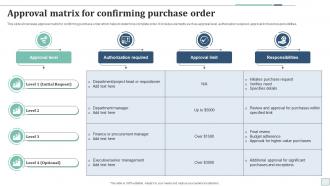
This slide showcases approval matrix for confirming purchase order which helps to determine complete order. It includes elements such as approval level, authorization required, approval limit and responsibilities.
People who downloaded this PowerPoint presentation also viewed the following :
Approval Matrix For Confirming Purchase Order with all 9 slides:
Use our Approval Matrix For Confirming Purchase Order to effectively help you save your valuable time. They are readymade to fit into any presentation structure.








FAQs for Approval Matrix For
So an approval matrix is just a chart showing who can approve what spending amounts and decisions on your project. Your PM might handle anything under $5K, but over $20K? That needs the executive sponsor. Trust me, you'll thank yourself later when you're not wondering whether to bother the VP over some random expense. It prevents those annoying bottlenecks too - nobody wants to sit around waiting for approvals that weren't even needed. Set it up early and make sure everyone knows the rules. Saves so much back-and-forth nonsense down the road.
Map your approval matrix to how decisions actually happen on your team - not what the org chart says should happen. Figure out who really makes what calls day-to-day. Set thresholds that make sense for your group's scope. Maybe you need dual approval over $1K, maybe your team handles $10K solo. Honestly, most templates are garbage because they don't fit real workflows. Test it out with a couple actual scenarios first - you'll probably find weird bottlenecks you didn't expect. The whole thing should feel natural, not like you're fighting the system every time someone needs sign-off.
So for your approval matrix, start with clear dollar thresholds - like what amounts need team lead vs VP sign-off. Map out who has authority at each level. Don't forget to set actual timelines or deals will sit there forever (learned that the hard way). You'll want escalation paths too for when someone's out sick or whatever. Oh, and build in extra review triggers for sketchy stuff or big contracts. The whole thing's useless if people don't know how to use it, so train everyone and keep updating it.
Honestly, approval matrices are game-changers. No more running around asking "wait, who signs off on this?" because everything's mapped out clearly. Decisions stop bouncing between departments like pinballs. Everyone knows their lane from day one, so stuff actually moves. The best part? It kills those cringe moments where someone thinks they're in charge but totally aren't. Your team stops playing approval ping-pong and gets back to real work. I swear, once you set one up you'll wonder how you survived without it. Makes everything so much less chaotic.
Honestly, most people overcomplicate their approval matrix from day one. I'm talking flowcharts that need their own flowcharts - it's ridiculous. Stick to 3-4 approval levels max with clear dollar amounts. Don't let roles overlap or you'll get that annoying back-and-forth between managers. Also? Don't set thresholds so low that your team leads are approving every pack of Post-its. Test it with real purchases before going live - trust me on this. My old company skipped that step and it was chaos for weeks. Start simple, add layers later if you actually need them.
Honestly, workflow tools are a game-changer for this stuff. DocuSign and Monday.com are solid options, or you could build something custom if you're feeling ambitious. Set up automatic routing based on dollar amounts or departments - saves you from constantly hunting people down for signatures. Real-time dashboards show you exactly where things get stuck, which is pretty helpful. The audit trail thing is nice too since everything gets tracked automatically. I'd map out your current process first though, then find tools that actually match how your team works. Way better than the email chaos most places deal with.
So approval matrices are basically your backup plan for managing risk and staying compliant. Low-risk stuff gets quick approvals while the big decisions go through multiple people - makes total sense. When auditors show up (ugh), you've got clear paper trails showing who signed off on what. Plus it catches compliance problems early, before they cost you serious money. The matrix routes things to people who actually know the regulations, which is clutch. Oh, and don't let your approval process get stale - I've seen companies stick with outdated matrices for years. Update it regularly or you're shooting yourself in the foot.
Look, approval matrices are super straightforward - they just show who can approve what based on dollar amounts or project types. So like your manager handles anything under $5K, directors get $50K, that kind of thing. Honestly saves so much time because nobody's wandering around asking "um, who signs off on this?" The whole team knows exactly where to go instead of doing that awkward email chain thing. Just keep it updated when people leave or get promoted (we forgot to do that once and it was a mess). Simple thresholds work way better than complicated rules.
Honestly, financial services and healthcare see the biggest impact since they're buried in compliance stuff. Manufacturing too - they can't mess up quality control. Map out your riskiest approval processes first, that's where you'll actually see results fast. Government agencies are obsessed with them (no surprise there). But really, anywhere you need solid audit trails will work. Think loan approvals, patient care decisions, stuff like that. The key is starting with high-stakes processes where screw-ups cost serious money or cause real problems.
Honestly, once a year isn't enough if your company's growing fast. I'd check it every 6 months, plus whenever big stuff changes - like promotions, people leaving, new budget limits. You don't want purchase orders stuck in some approval black hole because they're going to someone who left last month. That's happened to us before and it was a nightmare. After any restructuring too, or when approvals start taking forever. Set a reminder now or you'll totally forget. Oh, and make sure whoever manages the matrix actually tells you when things need updating - don't just assume they will.
Yeah, totally! Most approval tools these days play nice with project management platforms like Asana or Monday. You can set up workflows so approvals automatically kick off the next phase or ping your team when stuff gets signed off. Honestly, half the PM tools now have approval features baked right in – way better than switching between tabs all day. The whole thing syncs through APIs so your decisions update project timelines in real-time. I'd probably just peek at what integrations your current tool already has first, might save you some headaches.
Honestly, go with the multi-tiered setup. You can push small stuff to lower managers while the big decisions go upstairs - way more efficient that way. Flat structures sound nice in theory but they're a nightmare when everything piles up at one approval level. Each tier knows what they're handling too, so no confusion about who signs off on what. Routine approvals won't get stuck behind complex ones either. Start by sorting your decisions by dollar amounts or risk - that'll show you where to draw the lines. Trust me, the time savings alone make it worth setting up properly.
Honestly, you gotta make that thing visible first - email it out, stick it somewhere people actually look. Then walk through some real examples in your next team meeting because I swear these things just die in shared folders otherwise. The tricky part? Actually calling people out when they skip the process. I know it's awkward but if you don't, the whole thing becomes pointless. Maybe do a quick all-hands this week to go over it together. Oh, and definitely check in regularly - roles change, people get confused, you'll need to tweak it.
Dude, you're asking for trouble without proper approval processes. People won't know who can actually make decisions, so everything gets stuck in limbo. Projects die while everyone's emailing back and forth trying to figure out who's supposed to sign off. The worst part? You'll get conflicting decisions when two people think they're the boss of the same thing. Teams end up doing duplicate work because - honestly, I've seen this mess before - nobody knows what's already been approved. Just write down your dollar limits and who approves what, then share it with everyone. Trust me, it'll save you so many headaches.
Dude, visual aids are a game changer for approval matrices. People actually *get* the flow when they can see it instead of staring at some boring text wall. Try flowcharts for decision paths or color-coded boxes showing different approval levels. I swear, hand someone a spreadsheet and they'll zone out immediately. But add some arrows and diagrams? Everything clicks. Your team won't constantly bug you with "wait, who signs off on this?" They'll actually know what's next. Way less confusion, way more stuff getting done. Trust me on this one.
-
SlideTeam is very efficient when it comes to saving time. I am happy that I chose them for my presentation.
-
Templates are beautiful and easy to use. An amateur can also create a presentation using these slides. It is amazing.