

Purchase order table with description and amount




Try Before you Buy Download Free Sample Product
 Impress Your
 Audience
 100%
100% Editable
 Save Hours
 of Time


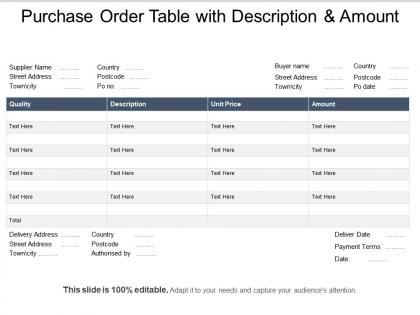
Showcase the process of tracking an order by using Purchase Order Table With Description And Amount slideshow. Take the advantage of supply chain auction PPT graphic to describe the formats of the purchase order by explaining electric purchase order, non-electric purchase order. Discuss how purchasing of products and services from external suppliers is controlled with the help of blanket order PowerPoint layout. Showcase the details like types, quantities, and agreed prices for products or services required in a purchasing document with the help of the sales order PowerPoint theme. Also, outline the delivery date and terms of payment for the buyer. Utilize this invoice PowerPoint graphic to showcase the process of tracking and electronic submission of orders to the supplier. As this slide is fully adaptable to your needs you can easily replace the content within the placeholder. Download this purchase order process PowerPoint presentation and showcase how purchasing pf products and services are controlled.
People who downloaded this PowerPoint presentation also viewed the following :
Purchase order table with description and amount with all 5 slides:
Our Purchase Order Table With Description And Amount will cleanse the air. They will enhance the purity of your thoughts.

FAQs for Purchase order table with
So you'll definitely need vendor info, item descriptions with quantities, and unit prices. Don't forget delivery dates and approval signatures - basically the obvious stuff. PO numbers are huge for tracking (learned this the hard way when I couldn't find an order for weeks). Shipping addresses and terms should go in there too. Honestly, the layout matters more than you think. If someone can't scan it quickly and figure out what's being ordered and when, you've failed. Oh and definitely customize it based on what your team actually looks at - no point having fields nobody uses.
Honestly, a good purchase order table is like having a control center for all your buying stuff. You can actually see what's going on with orders instead of constantly wondering where things are. Bottlenecks become obvious way faster, and you won't have those weird calls with vendors asking about missing orders. Reporting becomes so much easier too - I can't stress this enough. The key is having consistent fields and clear status updates so everyone knows what's happening. Oh, and standardize your PO fields first. That's where you'll see the biggest difference right away.
Honestly, most places just use Excel or CSV files - they're super easy to share with vendors. Manufacturing companies are different though, they love those EDI formats (X12 850) since their systems can process them automatically. Retail goes more for XML or JSON stuff for web ordering. Healthcare's got compliance requirements that make things tricky, but even they mostly stick with Excel. Government contracts are a pain - they want PDFs plus structured data for audits. My advice? Just ask your vendors what they actually want. You'll save yourself so much headache trying to convert formats later.
Mandatory fields are your best friend here - vendor info, item codes, quantities, the basics. I'd start with those since incomplete entries are such a pain. Dropdowns work way better than letting people type vendor names freely (seriously, the creative spellings I've seen...). Having someone double-check entries before finalizing helps catch stuff too. Focus on automating whatever fields give you the most headaches first. Oh, and same thing goes for frequently ordered items - dropdown menus will save you from "Paper clips" vs "paper clips" vs "Paperclips" nightmares.
So basically, PO tables are like your control center for tracking orders. You can see what's coming in, when it should arrive, and if your vendors are actually reliable (spoiler: some aren't). Honestly saves you from those awkward moments when you're scrambling because inventory ran out. The data shows trends too - like which suppliers consistently run late. Just keep everything updated or you'll be making decisions based on old info. Really helps with planning ahead since you know exactly what's sitting in your warehouse versus what's still coming.
APIs and database connections are your main options here. Most ERP systems already have connectors built in - honestly way easier than I expected when I first dealt with this. Vendor details, line items, approval stuff all syncs automatically once you get the field mapping right. That's the tricky part actually, making sure everything lines up correctly between systems. Zapier works great for simpler setups. If you don't need real-time updates, CSV imports work fine too but it's more manual work. I'd check what your current software supports first before going custom.
Okay so the biggest thing - people always forget basic stuff like PO numbers and vendor info. Drives me crazy! Your columns need to be wide enough for long vendor names too, otherwise everything gets cut off. Dates are huge - both when you created it AND expected delivery. Oh and set up data validation so people can't just type whatever random codes they want. Honestly the worst mistake though? Not having an auto-calculating total column. I've seen way too many spreadsheets where someone manually updates totals and screws up the math every time.
Dude, visual formatting is a game changer for PO tables. Color coding saves so much time - red for overdue stuff, green when it's approved, you know? Alternating row colors help too since your eyes don't get lost scanning down. Bold headers between sections obviously. I'm telling you, I used to dread going through these things until my manager showed me some tricks. Oh, and those little status icons? Way faster than reading through text every time. Just pick a system and stick with it - otherwise your team'll be confused as hell trying to figure out what everything means.
Seriously, color coding your purchase orders is a game changer. I use red for urgent stuff, green when things are approved, yellow for anything waiting on approval. Gray for completed orders - though honestly I rarely look at those anyway. It's so much faster than reading through everything line by line. You'll spot problems right away instead of missing deadlines or duplicate orders. Just don't go crazy with too many colors or it gets confusing. Three or four max. Trust me, once you start doing this you won't want to go back to boring black text everywhere.
First thing - map out how you actually buy stuff and figure out what data you really need. Yeah, PO numbers and vendor info are obvious. But what about project codes or approval workflows? Honestly, don't go crazy adding every field you can think of. You'll just overwhelm people. Start with what you'll actually use consistently. Custom statuses that match your approval process work great. Dropdown menus for regular vendors save time too. Oh, and definitely test it with your team first - they'll catch stuff you missed. You can always add more later.
Oh man, your PO table is basically a goldmine for tracking stuff. I'd start with supplier performance - like how fast they deliver and if their quality's actually decent. Spend analysis by department shows where money's going (sometimes shocking tbh). Price variance tracking catches when vendors sneak in price hikes. Lead times matter too. The biggest win though? Finding your top suppliers by volume and checking if you're getting those bulk discounts you should be. Pull monthly reports and patterns jump out fast. Honestly saved us thousands once I started paying attention to this data regularly.
Honestly, having good PO tables is a game changer for supplier meetings. You can pull up their actual delivery times and payment history instead of just saying "you guys are always late" - which never goes well. Suppliers respect you more when you show up with real numbers. I've caught some annoying patterns this way, like one vendor who was consistently behind by two weeks. The best part? You'll have solid data when it's time to renegotiate terms or give props to the suppliers who actually perform. Worth setting up those performance metrics now so you're not scrambling later.
So you'll want audit trails and timestamps built in from the start - trust me, retrofitting sucks. Auditors go crazy for approval chains and "who did what when" data. GDPR's a pain if you're storing vendor contacts, and SOX compliance is... well, that's its own nightmare if you're public. Build in segregation of duties so your approval workflows actually work. Oh, and data retention - some industries make you keep PO records forever basically. Add those approval fields now, not later when everything's already broken.
Honestly, digital purchase order tables will save you so much time it's ridiculous. We went from waiting days for approvals to getting stuff done in hours. No more digging through filing cabinets like some ancient librarian - you can search thousands of records instantly. Everything syncs automatically with your inventory and accounting systems too, which means way fewer screw-ups from manual data entry. The best part? You'll actually know what's happening with your orders in real-time instead of playing guessing games. Start with whatever you buy most often and work from there.
Honestly, just don't copy tables everywhere - that's when everything goes to hell. Set up role-based permissions instead so accounting gets financial stuff while warehouse only sees shipping details. Version control will save your sanity because teams working off different PO numbers is a nightmare I wouldn't wish on anyone. Usually procurement owns the master table but grants access as needed. Oh and automated notifications are clutch for status updates - beats people constantly pinging you for info. Start small though, maybe pilot it with just two departments first. Trust me, rushing into company-wide rollouts never ends well.
-
I discovered this website through a google search, the services matched my needs perfectly and the pricing was very reasonable. I was thrilled with the product and the customer service. I will definitely use their slides again for my presentations and recommend them to other colleagues.
-
Easily Editable.