


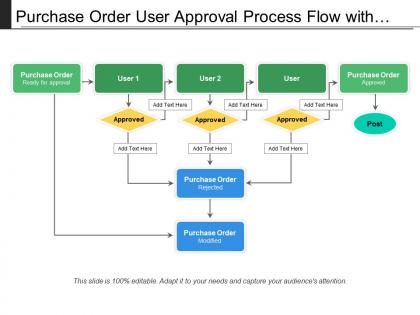
Purchase order user approval process flow with icons




Try Before you Buy Download Free Sample Product
 Impress Your
 Audience
 100%
100% Editable
 Save Hours
 of Time


Attract more customers to your fold with our Purchase Order User Approval Process Flow With Icons. Your business circles will expand.
People who downloaded this PowerPoint presentation also viewed the following :
Purchase order user approval process flow with icons with all 5 slides:
Our Purchase Order User Approval Process Flow With Icons team are fully hands on. They are for you from beginning to end.



FAQs for Purchase order user approval process
So basically someone submits the request with all their details and why they need it. Your department head reviews it first, then it goes to finance for budget approval - honestly this step can take forever if money's tight. After that, whoever has spending authority for that dollar amount gives final approval. Once everyone signs off, they generate the actual PO and send it to the vendor. The whole process? Usually 3-5 business days, but really depends on your company's approval limits and how fast people move.
Dude, automation seriously cuts PO approval time by like 60-80%. No more email chains where stuff just disappears into the void. You set up workflows that automatically route orders to whoever needs to approve them - based on dollar amount, which department it's for, whatever. The system handles tracking and sends those annoying reminder pings when someone's dragging their feet. Routine purchases under your threshold? Those can get auto-approved. My buddy's company does this and he can actually see where every PO is stuck. Just map out your current process first and pick the easiest steps to automate.
So basically, different spending levels need different approvals - you don't want your CEO approving every stapler purchase, right? Your manager might handle smaller stuff, then it goes up to department heads, finance, executives for the big ticket items. Honestly it's annoying when you just need something quick, but it stops people from going crazy with company money. The trick is having reasonable dollar limits so regular purchases don't get stuck in approval hell. Just make sure you know what your company's thresholds are or you'll be waiting forever for a simple order to go through.
Build those compliance checks right into your workflow instead of crossing your fingers that people will remember the rules. Automated validations are your friend here - budget limits, vendor requirements, spending authority, all that stuff. Make it literally impossible to approve sketchy purchases. Trust me, it beats those super awkward "wait, we can't actually buy this" moments later. Oh, and document everything with proper audit trails. I know it sounds boring, but you'll be so grateful when audit time comes around and you're not scrambling through random emails trying to piece together what happened.
Honestly, it's usually someone being out of office or managers who suck at checking email. Manual handoffs between departments kill you too. Set up auto-escalation when stuff sits there forever - like after 2-3 days max. Define clear dollar thresholds so people know their lane. Backup approvers are clutch when your main guy is in Cabo or whatever. The workflow system should bug people with reminders because apparently that's what it takes. Make everything visible so you can see exactly where things die. I swear half the time it's just sitting in someone's inbox while they're "prioritizing."
Honestly, start simple - pick like 2-3 things that actually matter to your company and check monthly. Average approval time is huge (nobody wants to wait weeks for a yes/no). Also track rejection rates and where stuff gets bottlenecked. Employee satisfaction matters too because grumpy people = bigger problems down the road. Oh, and don't forget cost savings - are you actually catching budget issues or getting better deals? The whole point is control without making everyone miserable. I'd probably focus on approval speed first since that's what people complain about most.
So first thing - map out how your approval process actually works right now. Coupa and SAP Ariba are solid if you've got the budget, they're made for this exact thing. Smaller teams can get away with Monday.com or Asana, just gotta set up those approval chains yourself. We've had decent luck with Microsoft Power Automate too, honestly wasn't expecting much but it worked. Whatever you pick needs multiple approval levels, automatic reminders (trust me on this one), and has to play nice with your accounting software. Oh and don't overthink it - I've seen people spend months choosing when they could've been using something basic that works.
Healthcare and pharma companies are crazy strict - they need multiple approvals even for small stuff because of all the compliance rules. Manufacturing is different though. They'll rush through orders for critical parts but then really scrutinize everything else. Tech companies? Way more flexible and all about speed. Financial services throw in extra fraud checks since hackers love targeting them. Honestly, copying another company's process is pretty pointless. You've gotta figure out what specific headaches your industry deals with and build around those instead.
Honestly, slow PO approvals are such a headache - they mess up your whole supply chain timing. Vendors get annoyed and some will just stop working with you or demand payment upfront. Your team ends up playing phone tag with approvers all day instead of getting real stuff done. Budget planning becomes impossible when you can't see spending patterns clearly. Oh, and compliance gets sketchy if people start cutting corners on authorization levels. I'd start by figuring out where things get stuck most - usually there's some obvious bottleneck you can fix pretty easily.
Honestly, it's a game changer for PO approvals. You'll ditch all that paper chase nonsense and email back-and-forth. Everything gets routed automatically based on rules you set up, plus you get instant notifications when stuff needs your attention. Most companies cut their approval time from days down to hours - which is pretty wild when you think about it. The tracking is probably my favorite part though. You can see exactly where each purchase order sits in the approval chain. No more awkward "hey did you see my request" slack messages. Oh, and it plugs right into your ERP so you're not doing double data entry.
Set dollar limits for each level - maybe $500 for supervisors, $5K for managers, $25K for directors. Document everything so people actually know where to send stuff. I swear, half the time POs just sit there because nobody knows who's supposed to sign off. You'll want backup approvers too for when someone's on vacation or whatever. Big purchases should probably need two signatures - learned that one the hard way at my last job. Keep it straightforward though. If it's too complicated, people will just skip steps and you're back where you started.
Honestly, hands-on training is everything here. Get people actually clicking through the workflow software instead of just talking about it. Each person needs to know their exact role and what should ping their attention. Role-playing scenarios works surprisingly well - like when budgets get blown or someone tries using a sketchy vendor. Don't skip explaining WHY this matters for the business though. People tune out otherwise. Set up quick reference guides they can actually find later, and pick a workflow champion for each team. Those refresher sessions every quarter? Yeah, don't skip those either since things change constantly.
Focus on three main things: how long approvals actually take, where stuff gets stuck, and rejection rates. I'd pull these numbers weekly - cycle time at each stage shows you exactly where things slow down. There's literally always one person who sits on requests forever, so call them out with data. Track first-time approval rates too since revisions kill momentum. Oh, and measure the dollar impact of delays because finance will flip if they see how much cash flow this affects. Share everything with your team so they can't pretend the bottlenecks don't exist.
You get real-time visibility into what's actually in stock versus what people are ordering - total game changer. No more duplicate orders or running out of stuff because someone didn't check inventory first. Your approval workflows can automatically pull in current stock levels, lead times, all that good stuff to make faster decisions. Instead of always being behind the curve, you're actually staying ahead of things. Connect your systems first so when approvers look at requests, they can see inventory data right there. Trust me, catching those "we already have 50 of these" moments before approving saves you so much hassle later.
Honestly, having everything centralized makes such a huge difference for tracking spending. You'll actually know where your money's going instead of getting hit with random invoices. Department approval workflows become way clearer too - no more POs disappearing into email black holes for weeks (been there!). Budget control gets easier since you can set consistent rules across teams. The audit trail stays clean, which finance loves. Oh and external auditors won't give you grief either. I'd probably start with your biggest spend categories first - you'll see results faster that way.
-
Thanks for all your great templates they have saved me lots of time and accelerate my presentations. Great product, keep them up!
-
Very unique and reliable designs.