


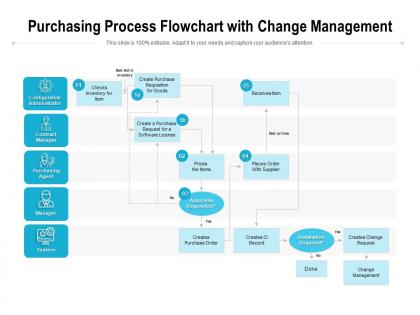
Purchasing process flowchart with change management




Try Before you Buy Download Free Sample Product
 Impress Your
 Audience
 100%
100% Editable
 Save Hours
 of Time


Identify innermost desires with our Purchasing Process Flowchart With Change Management. Find out their basic driving force.
People who downloaded this PowerPoint presentation also viewed the following :
Purchasing process flowchart with change management with all 2 slides:
Find out the basic driving force with our Purchasing Process Flowchart With Change Management. It helps identify their innermost desires.
FAQs for Purchasing process flowchart
Honestly, it's pretty simple once you break it down. You've got need identification, vendor selection, then creating the purchase order. After that comes order processing, receiving your stuff, and finally paying the invoice. The approval workflows are where things get tricky though - depending on how much you're spending, those can really bog everything down if people don't stay on top of it. Each step has checkpoints so you're getting the right products at the right price from approved vendors. The flowchart shows who's responsible for what and when. Definitely walk your team through it so nobody's confused about their part.
Honestly, flowcharts are a game-changer for purchasing stuff. Map out your whole process from request to payment and suddenly everyone knows who does what. No more confusion about approvals or next steps. You'll spot where things get stuck too - like when Bob from accounting takes forever to sign off (we all have a Bob). New people catch on way faster when they can see the visual instead of trying to remember your long explanation. Oh, and vendors get it immediately. Start with whatever messy process you have now, then clean it up once it's on paper.
Honestly, just go with draw.io first - it's free and way better than you'd expect. If you need something fancier later, Lucidchart has solid templates for business stuff and works great in the cloud. Visio's fine too if your company's already paying for Microsoft everything, but it feels pretty dated to me. I always start with the free option anyway to mess around with ideas before committing to anything paid. They all do real-time collaboration which is clutch. Draw.io will probably handle whatever you're doing just fine though.
Honestly, it depends so much on your industry. Healthcare has crazy compliance hoops - vendor certs, regulatory checks, the works. Manufacturing usually means tons of approval layers, especially for raw materials. Tech companies? They'll fast-track software but then scrutinize every hardware purchase like it's gonna bankrupt them. Government stuff is just painful - all those bidding processes and paperwork requirements. Service companies keep it simpler, mostly just cost approvals. I'd grab 2-3 flowcharts from similar companies and see what you're missing or what steps you could cut.
Look, stakeholder involvement is what makes or breaks your purchasing flowchart. Different people need to sign off at different stages - finance for budget approvals, IT when you're buying tech stuff, legal for contract reviews. The size of the purchase usually determines who gets involved too. Honestly, I've seen so many processes crash because nobody mapped out the approval chain ahead of time. You want to identify everyone upfront and build their checkpoints right into your flowchart. That way people know exactly when they're supposed to jump in and you won't get stuck waiting around for approvals.
Honestly, flowcharts are game-changers for this stuff. They make everyone follow the exact same steps, so tracking compliance becomes super straightforward. No more of that "wait, I thought you were doing it" back-and-forth nonsense. When auditors show up (ugh, inevitable), you've got a clear paper trail proving your process was followed. It's like having a built-in accountability system - skip a step or approval, and it jumps out immediately. My advice? Map what you're currently doing first, then spot where approvals and documentation need to happen. Trust me, future you will thank present you.
Honestly, the worst thing you can do is overcomplicate it - like cramming 50 decision boxes with microscopic text everywhere. People will take one look and nope out. Skip approval steps? Big mistake. Same with forgetting who's supposed to handle what task. I swear, half the flowcharts I see are gorgeous but completely useless because nobody knows their role. Talk to the actual purchasing team while you're building it. They'll tell you how things really work vs. how you think they work. Run through a couple test scenarios before you launch it - saves you from looking like an idiot later.
So basically, e-procurement platforms and ERP systems handle most of those manual handoffs automatically now. No more paper floating around between departments - everything routes digitally based on spending limits and categories. AI even catches problems early, which is honestly pretty slick. The real game-changer? Those bottlenecks where stuff sits in people's inboxes for days just disappear. Data entry mistakes drop way down too. I'd map out your current process first and see which steps drag the longest. Those are your best bets for automation.
So you can track a bunch of helpful stuff with purchasing flowcharts. Cycle time from request to delivery is big. Also vendor response rates and cost per purchase order. Approval steps are honestly where most processes die a slow death - that's usually your main bottleneck. Budget variance and purchase order accuracy matter too. If you've got compliance rules, track those rates as well. Oh, and don't skip supplier performance scores. The trick is figuring out which parts of your process consistently mess up or take forever, then tackle those problem areas first. Makes way more sense than trying to fix everything at once.
Add decision diamonds wherever you're evaluating stuff - like after picking vendors, throw in "Does this actually meet requirements?" If not, arrow back to revising specs. After contract review, if legal finds problems, loop back to negotiation instead of pushing forward. I always use different colored arrows for the feedback loops, makes them way easier to see. Honestly, just think about where things usually go sideways in your process and build those checkpoints in from the start. That's really the trick to making these flowcharts actually useful.
Stick with shapes people know - rectangles for processes, diamonds for decisions, circles for start/stop. Color code different departments so people can instantly spot their part. I swear, some flowcharts look like someone threw shapes at a wall! Keep text short and arrows thick enough to follow. White space matters too - cramped charts are the worst. Oh, and test it on someone fresh. If they squint and look confused, you probably need to simplify. Actually, that's saved me so many headaches.
Look, getting your team trained on those flowcharts will honestly be a game changer for purchasing. Nobody's gonna skip approval steps anymore or sit there confused about what comes next. Bottlenecks become way easier to spot and fix before they slow everything down. New people especially love having that visual guide - beats trying to remember a bunch of complicated instructions someone rattled off during orientation. I'd just walk everyone through it at your next team meeting, maybe run through some practice examples. Trust me, once they get the hang of it, your whole process runs so much smoother.
Honestly, customizing your purchasing flowchart is a game changer. Different departments need totally different approval levels and vendor requirements - like your IT team's security needs versus what marketing deals with when buying software. Tailored processes cut out the BS steps that slow everyone down but keep the controls that actually matter. People will actually follow them too since they make sense for their day-to-day work. I always tell people to map out each team's biggest headaches first, then build workflows around those specific problems. Way better than cramming everyone through some cookie-cutter process that nobody wants to use anyway.
Honestly, I'd check it every 6 months if things are moving fast at your company. Once a year minimum though. Big changes like new software, regulations, or staff turnover? Time for an update. Also when people start complaining the process sucks or when reality doesn't match your flowchart anymore - which happens more than you'd think! Set a calendar reminder or you'll totally forget about it. These documents have a way of becoming useless pretty quickly if you're not staying on top of them.
Yeah, totally! Show suppliers your flowchart upfront - it's honestly pretty smart. They'll see exactly how decisions happen at your company and can adjust their pitch accordingly. Makes you look way more professional too, like you actually know what you're doing instead of just figuring it out as you go. The flowchart also helps you spot where you can negotiate vs where company policy has you stuck. I'd walk them through the whole process before your next meeting. That way they get your constraints and won't waste time pushing for stuff that'll never happen.
No Reviews