


Purchase Requisition Flowchart In Procurement Process




Try Before you Buy Download Free Sample Product
 Impress Your
 Audience
 100%
100% Editable
 Save Hours
 of Time


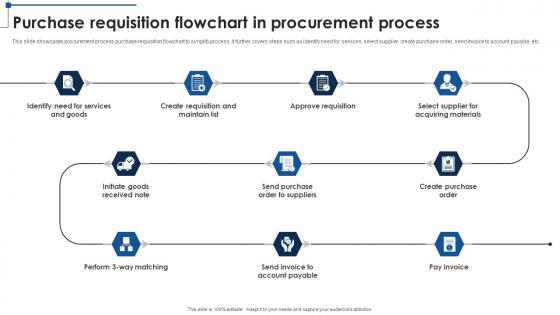
This slide showcases procurement process purchase requisition flowchart to simplify process. It further covers steps such as identify need for services, select supplier, create purchase order, send invoice to account payable, etc.
People who downloaded this PowerPoint presentation also viewed the following :
Purchase Requisition Flowchart In Procurement Process with all 9 slides:
Use our Purchase Requisition Flowchart In Procurement Process to effectively help you save your valuable time. They are readymade to fit into any presentation structure.








FAQs for Purchase Requisition Flowchart
So you're basically mapping out who handles what when someone needs to buy stuff. Main pieces are request initiation, approval workflow, budget checks, vendor selection, and final sign-off. Don't forget decision points for different dollar amounts - like, a $50 office supply request shouldn't need the CEO's blessing, you know? Include rejection paths too for when stuff gets shot down. Oh, and integration spots where it connects to your procurement and accounting systems. Honestly, the whole thing just makes sure requests don't get lost in limbo and everyone knows whose desk it lands on next.
Honestly, just map out your whole requisition process in a flowchart first. Shows you where things get stuck and who's doing what. Document everything from the initial request all the way to creating the purchase order. I bet you'll find duplicate steps or totally pointless ones - we always do. Once you see it laid out, redesign to cut the redundant stuff and set actual deadlines for each stage. Also nail down clear approval limits so people aren't guessing. Lucidchart works great for this kind of thing. Get your team's input too since they're living this mess daily.
Don't overthink the flowchart - too many decision points and you'll confuse everyone. I made this mistake once and had to redo the whole thing. Map out what actually happens now before you design anything new. Those "what if someone's on vacation" scenarios? Plan for them upfront because that's where everything gets stuck. Oh and definitely test it with real requisitions first - like 3 or 4 actual ones. People need to know timing too, so add how long each step should take. Trust me, clear approval levels save you so many headaches later.
Honestly, approval levels can totally kill your requisition process if you're not careful. Too many layers and everything just sits there forever - I've seen urgent stuff delayed for weeks because it's stuck in someone's inbox. You can't ditch approvals completely though, or your budget will be a disaster. What works best is setting up smart thresholds. Small purchases shouldn't need three signatures, you know? Save the multiple approvals for the expensive stuff. Oh, and definitely review those dollar amounts regularly - what made sense two years ago probably doesn't now.
Look, the biggest thing automation does is kill all those annoying manual handoffs that bog everything down. Your requests get routed automatically based on dollar amounts, budget codes get validated instantly, and approvers don't have to sit there manually checking stuff. We cut our processing from like 3 weeks to maybe 4-5 days - honestly couldn't believe the difference. Plus requesters stop bugging you with "where's my order" emails since the system sends updates automatically. I'd map out where you're currently getting stuck first, then figure out what parts you can automate from there.
Honestly, a flowchart just makes everything so much clearer for everyone involved. No more "wait, who was supposed to approve this?" confusion between departments. Finance knows when requests are coming their way, procurement stops chasing people down for signatures, and requesters actually understand what happens to their purchase order (shocking, I know). It maps out who signs off on what and when, so nobody's left guessing about timelines. The best part? Everyone's on the same page from day one. Just get all your stakeholders together first and map out what you're currently doing - even the messy parts.
Okay so for the flowchart - rectangles for processes, diamonds for decisions, arrows for direction. Basic stuff but it works. Don't cram a novel into each box, keep the text short. Color-coding is honestly a lifesaver - different colors for approval levels or departments. I learned that the hard way on my last project lol. Include all the key people and their decision points, but skip the tiny micro-steps that'll just clutter everything up. Here's the real test though: show it to someone fresh and see if they get confused. If they can follow it without asking questions, you're golden.
Honestly, you've gotta hardwire the compliance stuff directly into your flowchart. Set mandatory approval thresholds and force documentation at every step - people will absolutely try to skip things if you give them wiggle room (learned that the hard way). Automated reminders help too when requests sit around. Make role assignments crystal clear so nobody's confused about who approves what. I'd also run regular audits on finished requisitions to spot where things went sideways. The whole thing falls apart if compliance isn't actually built into the workflow steps.
Honestly, I'd go with Lucidchart or draw.io for purchase requisition flowcharts. Draw.io is totally free and works great with Google stuff. Lucidchart costs money but has way better templates - super helpful if you're making these charts regularly. Their procurement templates are actually pretty decent. Visio's okay if your company already pays for it, but it feels old and clunky to me. I've been using Lucidchart for like two years now and it's solid. Try their free trial first though - see if it clicks with how you work.
Your purchase requisition flowchart is basically the roadmap for your procurement strategy. It hits all the key checkpoints - approvals, budget limits, routing through the right channels based on spend amounts or vendor deals. Honestly, it's like having your strategic priorities baked right into the daily workflow. Cost control, compliance rules, preferred suppliers - all that stuff gets embedded so your team doesn't have to memorize every policy detail. Pretty smart actually. I'd map your current flowchart against your procurement goals to find any weird gaps or bottlenecks you might've missed.
Yeah, definitely! Your flowchart basically shows you where all the money decisions happen. Track who's picking vendors and you'll start seeing patterns - like if someone always goes with the expensive option or misses bulk deals. The approval timeline matters too since delays can kill early-bird pricing (learned that one the hard way). I'd add tracking points at each stage to capture actual costs vs what you budgeted, plus any quotes you got from other vendors. Really helps you see where money's being wasted or where the process gets stuck.
Track cycle time first - that's how long requests take from start to finish. Also watch your rejection rates and where approvals get stuck. Honestly, compliance rates tell you everything about whether people actually follow your process or just ignore it. Budget variance is huge too. I'd start with maybe 3 metrics max that match your worst headaches right now. Don't go crazy measuring everything at once - you'll just overwhelm yourself. Once you've got those baseline numbers, then you can add more tracking. The approval stage timing stuff is super useful but probably not day one priority.
So here's what I'd do - add review checkpoints right into your flowchart after big steps like budget approval or picking vendors. Simple feedback forms work great when they automatically pop up after someone finishes a task. We used basic rating systems and comment boxes at my last job, honestly worked better than expected. Schedule team check-ins too, maybe monthly? Focus on what's actually slowing people down. Don't try to get feedback on everything at once though - pick one or two critical spots first and build from there.
So basically goods need that whole receiving step - someone's gotta check quantities, make sure quality matches your PO, all that stuff. Services skip right past that since there's nothing physical to inspect. Way more streamlined. Approval chains are different too. Services usually need different people signing off, especially for consulting or IT work. Companies get weirdly specific about service categories sometimes - don't ask me why! Your best bet? Map out both workflows so people actually know what happens after they hit submit. Makes everyone's life easier.
Training your team on that purchase requisition flowchart will save you so much headache. No more "wait, what happens next?" confusion slowing everything down. Everyone knows their role, approvals move faster, and requests don't get stuck somewhere random. Finance will actually be happy with you for once – crazy, I know. Vendors get paid on time, budget tracking works like it should. Your procurement cycle becomes predictable instead of chaotic. Honestly, just do a 30-minute walkthrough with everyone next week. Even that small time investment makes a massive difference.
-
This PowerPoint layout is very helpful from a business point of view, and it's visually stunning too! I'm so happy with this product because it has helped me understand and deliver great presentations.
-
Like always a great experience with you guys. Always there on the drop of hat to help.