


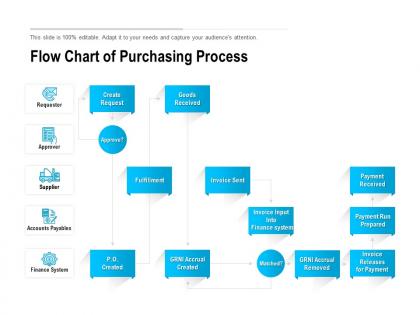
Flow chart of purchasing process




Try Before you Buy Download Free Sample Product
 Impress Your
 Audience
 100%
100% Editable
 Save Hours
 of Time


Our Flow Chart Of Purchasing Process are ideal for conveying information. It helps conduct the assembly.
People who downloaded this PowerPoint presentation also viewed the following :
Flow chart of purchasing process with all 2 slides:
Grab hold of the day with our Flow Chart Of Purchasing Process. Chart out important aims to achieve.
FAQs for Flow chart
Honestly, the whole process isn't too complicated once you get the hang of it. You start by figuring out what you need and filling out a purchase requisition. Then comes the approval nightmare - seriously, some companies take forever with this step. After that, you're hunting for vendors and collecting quotes. Once you pick someone, you send the purchase order and wait for delivery. The last bit is just invoice processing and cutting the payment. Oh, and definitely figure out your approval limits upfront - trust me, you'll thank yourself later when something urgent pops up.
Flowcharts are seriously underrated for this stuff. Everyone stops having their own random interpretation of processes when there's one clear diagram showing who does what. Finance can see exactly when they need to approve budgets, procurement knows their handoff points, and people requesting stuff finally get realistic timelines. No more "wait, I thought you were handling that" disasters. Plus your stakeholders can literally point at specific boxes during meetings instead of talking in circles - makes everything way more focused. Honestly wish more companies would just draw things out like this instead of keeping everything in people's heads.
Honestly, I'd go with Draw.io first since it's totally free and pretty easy to figure out. Lucidchart is solid too - both have decent templates for process stuff. If your company's already paying for Microsoft, Visio works but it's kind of a pain to use tbh. Miro's good when you're working with a team and need everyone brainstorming together. You could even just use PowerPoint if you're doing something super basic. I always forget Google Drawings exists but that's an option too. Start simple with Draw.io though - worst case you switch later.
Don't make compliance an add-on - build it right into each step from the start. Map out your regulatory requirements, internal policies, all that fun stuff first. Then create mandatory checkpoints at key moments like budget approvals and vendor verification. Honestly, I've watched way too many companies try to slap compliance on later and it's always a nightmare. Make it crystal clear who owns each check and what paperwork they need. The whole point is making it automatic so people can't accidentally skip the critical parts when they're following your process.
Honestly, start with cycle time - that's request to delivery timeframe. Cost per purchase order matters too. Track how long approvals take and supplier performance stuff like on-time delivery rates. Exception rates are huge though - when orders get bounced back or need rework, it kills your flow. Budget variance and order accuracy should definitely be on your list. Maybe throw in user satisfaction if you're dealing with internal people. But seriously, don't go crazy tracking everything. Pick like 4-6 metrics that actually move the needle for your team, then build from there once you've got the basics down.
Look at your flowchart and spot the stuff you do over and over - that's your automation goldmine. PO generation, vendor emails, approval routing, invoice processing... honestly, most of this grunt work can run itself. Mark those decision points super clearly so you know where automation jumps in. Build exception paths too because something will definitely break at 2am on a Friday (trust me on this one). I'd start small - maybe auto-create POs when inventory gets low. Once that's working smoothly, you can tackle the bigger processes. The key is mapping it out first so you're not guessing where the handoffs happen.
So vendor selection basically happens right after you figure out what you need and how much you can spend. You're comparing suppliers on price, quality, how fast they deliver - all that stuff. Honestly, it takes forever but you can't skip it. I learned that the hard way once. Document your criteria first though, so you're not just going with gut feeling. Makes it way easier to explain your choice later when someone inevitably questions it. Once you pick someone, then you can move on to contracts and actually placing orders.
Honestly, flowcharts are clutch for training new people. Way better than dumping some boring manual on them and hoping for the best. You can literally walk through scenarios together - "requisition got approved, so what happens next?" - and they actually get it. The visual thing really works too. People remember stuff better when they can see the whole process laid out. I'd make them laminated copies for their desks or just create a bookmark-able digital version. Oh, and it cuts down on all those "wait, what do I do now?" questions later. Makes onboarding so much less painful for everyone.
Don't go crazy with details - honestly, nobody wants to stare at some massive flowchart that looks like a subway map. Keep it simple and just hit the big decision points. But here's the thing - actually talk to your AP and procurement people before you make it! I've watched people create these "perfect" charts that fall apart because they never asked how stuff really works around there. Oh, and run through a couple real examples once you're done. You'll find weird situations you didn't think about. Trust me on that one.
Set up feedback loops with everyone using the flowchart - buyers, approvers, vendors, all of them. Quarterly reviews work well so people can call out bottlenecks or confusing parts they've hit. Make giving input dead simple, like a basic form or Slack channel (honestly, people won't bother if it's complicated). Track the biggest pain points first. Don't wait for some huge overhaul - just make small changes as you go. Test stuff with one department before rolling it out everywhere. Way less headache that way, trust me.
So with goods, you're dealing with receiving stuff, inspections, inventory updates - the usual physical workflow. Services are way messier since you can't exactly "receive" a consulting gig like you would a box of pens, right? You'll need different checkpoints. Goods get concrete steps like "inspect delivery" while services need more contract reviews, milestone tracking, performance monitoring stuff. Honestly, I'd just make separate templates since the approval processes are totally different anyway. Services require way more ongoing evaluation compared to the one-and-done nature of most goods purchases.
Honestly, flowcharts are a game-changer for supplier relationships. Your vendors will actually know what's happening instead of constantly asking "so... where are we with this?" Those conversations are the worst. Map out your approval times, payment schedules, all that stuff upfront. It makes you look way more professional and reliable. You can spot bottlenecks before they become problems too. I'd start with just your supplier onboarding process - that's usually where most of the confusion happens anyway. Once suppliers know what to expect, everything runs smoother.
Okay so for purchasing flowcharts - use decision diamonds, process boxes, and arrows obviously. But here's the thing: color-coding will save your life. Blue for approvals, red for rejections, green when stuff's done. Don't make the text tiny because nobody can read that in meetings (learned this the hard way). If you've got multiple departments involved, throw in some swimlanes. Icons help too - dollar signs, checkmarks, whatever makes sense. The whole point is making it super scannable so people can spot where things get stuck without squinting at your screen for ten minutes.
So basically add risk checkpoints right after you identify vendors but before final approval. Diamond shapes work great for these decision points - check their financial health, compliance record, delivery track record. Most people honestly just wing this part and get burned later. Set up separate tracks for different risks: financial stuff, operations, regulatory compliance. High-risk purchases should get kicked upstairs for extra approval or need mitigation plans. Oh and define your risk thresholds super clearly so whoever's using the flowchart doesn't have to guess when something needs escalating.
Check it quarterly or when your process changes big time. Get input from whoever actually uses the thing daily - they'll catch outdated stuff way before you do. Assign one person to own updates, because otherwise it just sits there collecting digital dust while everyone assumes someone else is handling it. Write down changes right when they happen (you'll definitely forget the details later). Also, track what questions people keep asking about the process. Those questions usually point to confusing parts that need fixing. Oh, and set a calendar reminder so you don't accidentally ignore it for six months.
No Reviews