

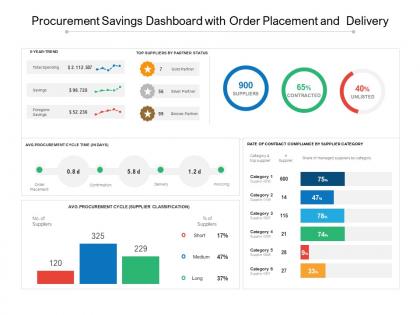
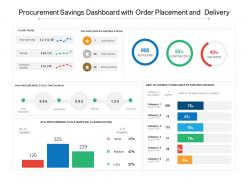
Procurement savings dashboard with order placement and delivery




Try Before you Buy Download Free Sample Product
 Impress Your
 Audience
 100%
100% Editable
 Save Hours
 of Time


Our Procurement Savings Dashboard With Order Placement And Delivery enable you to get ahead of the curve. Complete all assignments before due date.
People who downloaded this PowerPoint presentation also viewed the following :
Procurement savings dashboard with order placement and delivery with all 5 slides:
Our Procurement Savings Dashboard With Order Placement And Delivery are akin to an elixir. They will take you through the full distance.

FAQs for Procurement savings dashboard with order
Start with the basics - cost savings percentage, spend under management, and supplier performance scores. Contract compliance and PO cycle time matter too. Days payable outstanding will make your finance team happy, which honestly makes life easier for everyone. Procurement ROI is huge with executives. But here's the thing - dashboards become total chaos if you go overboard. Stick to 6-8 metrics tops. Pick ones that actually connect to what your team's trying to accomplish. And update them regularly or nobody's gonna bother looking at it.
Look, data viz basically saves you from drowning in spreadsheet hell. Charts and heat maps let you spot spending patterns instantly instead of squinting at endless rows of numbers. It's honestly night and day - like finally getting glasses after being half-blind. You'll catch budget issues, supplier problems, and cost-saving opportunities way faster. Plus your boss will actually pay attention when you show colorful charts instead of dumping raw data on them (learned that the hard way). Start simple with bar charts and progress bars. Trust me, even basic visuals make a huge difference.
Real-time data completely changes how you make procurement calls. Instead of finding out about supplier issues weeks later, you catch problems as they're happening. Budget overruns? You'll see them before they get ugly. Contract negotiations become way more effective when you're working with current info, not month-old reports. Honestly, I've watched teams blow massive savings opportunities just because their data was stale. Makes you want to shake someone, you know? Daily dashboards show you what's actually going on in your supply chain right now. Start by figuring out what needs daily tracking versus weekly - that's your first move.
Honestly, procurement dashboards are clutch for finding cost savings - they show all your spending in one view instead of making you hunt through a million spreadsheets. You'll spot duplicate vendors right away, catch price spikes before they get crazy, and see exactly where you're blowing past budget. Charts make the overspending super obvious. I'd start with your biggest spending categories though, since even saving like 5% there hits different than optimizing smaller stuff. You can also dig into supplier performance to negotiate better deals. Way more efficient than the old-school method of drowning in Excel hell.
Look for real-time data integration and customizable KPIs - that's what separates the good dashboards from the garbage ones. You want predictive analytics that actually help you make decisions, not just fancy charts that impress people in meetings. Automated alerts are huge for contract renewals and spend issues. Make sure it has drill-down features so you're not constantly jumping between systems (trust me, that gets old fast). Integration with your ERP is non-negotiable, plus automated reporting saves tons of time. If it's not catching problems early, you're wasting money.
Honestly, it's a game changer because everyone sees the same stuff in real time. No more endless "what's the status?" emails clogging your inbox. Finance, legal, ops - they can all check contract statuses and spending without bothering you constantly. The transparency thing actually works too - people spot problems faster when they're all looking at the same data. Figure out who needs access to what first, then set up their views accordingly. Way better than playing phone tag all day, which gets old super fast.
Put your biggest priorities right at the top - spend visibility, contract stuff, supplier performance. Those need to be impossible to miss. Color code everything the same way so it's not confusing. Group similar data together too. I swear, some dashboards look like someone threw charts at a wall and called it done. Don't cram everything on one page - use filters so people can dig deeper when they want to. Navigation should be obvious with clear labels. Test it with your procurement team first. They'll catch the annoying stuff you didn't think of.
So basically, procurement dashboards show you what's actually happening with your suppliers in real time - delivery times, quality scores, cost stuff. Way better than drowning in Excel sheets, trust me. You can quickly see patterns, like if one supplier keeps showing up late or their quality is sliding. The visual comparison thing is clutch when you're looking at multiple vendors. Most have alerts that ping you when performance tanks below whatever limits you set. Then you've got solid data to back you up when you need to have those awkward conversations with suppliers who aren't cutting it.
Honestly, Power BI and Tableau are your best bets if you've got the budget - they play nice with most ERP systems and handle procurement data really well. Google Data Studio's decent too and way cheaper, just not as robust. You'd be surprised how far Excel can take you though, especially with pivot tables. I mean, it's not sexy but it works. The real trick is finding something your team will actually open every day instead of letting it collect digital dust. Whatever connects easiest to your current procurement setup is probably where you should start.
So grab your historical data from the ERP, old contracts, supplier records - dump it all into your dashboard. Most platforms have automated feeds now which is honestly a lifesaver compared to updating spreadsheets manually every damn month. I'd focus on spend patterns, supplier performance, contract renewals, price changes over like 12-24 months. The trending visuals are clutch for catching seasonal stuff or gradual shifts you'd totally miss in regular reports. Start with your biggest spend categories though - that's where you'll actually see real impact from spotting trends.
Honestly, data quality will be your biggest headache. All that procurement info is scattered everywhere and cleaning it up takes forever - nobody ever budgets enough time for this part. Getting people to ditch Excel is another battle entirely. Plus some teams will freak out about their performance being visible to everyone suddenly. Oh, and don't make it too flashy right away. Pick one metric first, nail that completely, then build from there. Make sure it's actually helpful, not just another pretty chart nobody looks at.
Honestly, mobile accessibility makes or breaks procurement dashboards. Your team won't touch it if they can't check supplier performance or approve orders from their phones. Nobody wants to sprint back to their laptop just to approve a PO - that's ridiculous. Being able to handle urgent stuff while you're stuck in meetings or traveling? Total lifesaver. I've seen expensive dashboards collect dust because they were clunky on mobile. Short sentences work better for mobile anyway. If it doesn't work smoothly on phones, people will find workarounds or just ignore it completely.
Honestly, these dashboards are game-changers for catching problems early. You get real-time visibility into supplier performance, spending patterns, contract statuses - all the stuff that matters. Track financial health, delivery delays, quality issues in one spot. The predictive analytics part is clutch because you'll spot disruptions before they blow up your supply chain. Like when a supplier's about to ghost you or prices are gonna spike. Set automated alerts for your critical thresholds and boom - you're ahead of most headaches. Way better than scrambling after things go sideways.
Honestly, these dashboards are total game-changers for compliance stuff. Real-time tracking means you're not constantly hunting through endless spreadsheets for supplier certifications and contract details. The best part? They catch violations before you're scrambling to fix them. Set up alerts for expiring certifications and spending limits - trust me, you'll thank yourself later. During audit season (ugh), reports generate automatically instead of you pulling all-nighters. I'd start with your biggest 3 compliance headaches and build alerts around those first. Way less stressful than the old manual way.
Track these key ones: requisition-to-PO time, PO-to-delivery, and your full cycle time from requisition to receipt. Those three show you exactly where things get stuck. Also monitor approval cycles and how fast suppliers respond - honestly, slow suppliers will tank everything else no matter how efficient you are internally. You can build fancy vendor scorecards down the road, but these timing metrics are what actually matter right now. Set up alerts when they hit your limits so you don't end up scrambling later.
No Reviews