

Procurement Dashboard Report With Sourcing Details




Try Before you Buy Download Free Sample Product
 Impress Your
 Audience
 100%
100% Editable
 Save Hours
 of Time


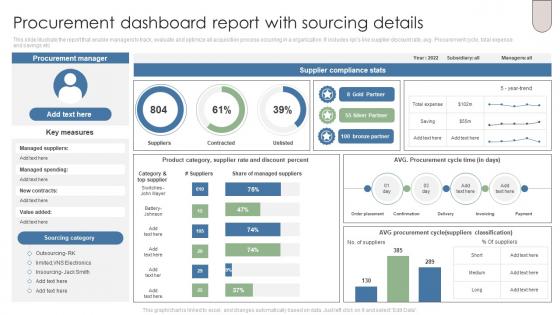
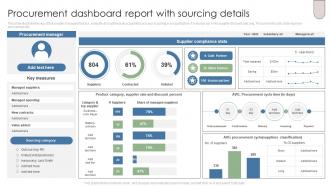
This slide illustrate the report that enable managers to track, evaluate and optimize all acquisition process occurring in a organization. It includes kpis like supplier discount rate, avg. Procurement cycle, total expense and savings etc.
People who downloaded this PowerPoint presentation also viewed the following :
Procurement Dashboard Report With Sourcing Details with all 7 slides:
Use our Procurement Dashboard Report With Sourcing Details to effectively help you save your valuable time. They are readymade to fit into any presentation structure.





FAQs for Procurement Dashboard Report
Track your spend analytics and supplier performance first - those are the big ones. Cost savings and budget variance are obvious, but cycle times from requisition to delivery will show you where things actually get stuck. Don't forget supplier risk scores and how well they stick to payment terms. Maverick spend percentage is huge too, honestly that one catches everyone off guard. Oh and throw in contract renewal dates so you're not scrambling later. If your company cares about supplier diversity, add that metric. Start there and build out based on what your boss actually wants to see.
Dude, real-time data integration is such a lifesaver for procurement. Instead of working off last week's stale reports, you're seeing price changes and supplier problems as they actually happen. Game changer, honestly. Your dashboard becomes like a live feed of everything - current spend, how suppliers are performing, market shifts, all right there. No more scrambling to catch up after the fact or making calls based on info that's already outdated. I'd say start with whatever data sources refresh most often and work from there. Way better than flying blind with old numbers.
Track what matters most - spend analysis, supplier performance, contract compliance, savings. Bar charts are perfect for spend by category. Trend lines show how things change over time. Clean visuals that tell the story instantly work best. I swear, half the dashboards I've seen look fancy but collect dust because they're impossible to navigate. Don't cram everything on one screen - drives people crazy. Keep colors consistent and make sure you can drill down when someone asks about that random spike in Q3. Oh, and test with real users first. Saves you headaches later.
First thing - connect directly to your ERP systems instead of manual uploads. Spreadsheets are honestly where everything falls apart. Set up automated validation rules and run reconciliation checks against source systems regularly. Daily or weekly audits help catch weird spikes before they become problems. Make sure someone actually owns each metric too, otherwise you'll just get finger-pointing when numbers don't add up. Oh and document where each dashboard field comes from - sounds boring but you'll spot gaps immediately. Build alerts for unusual changes in key numbers.
So AI handles all the boring data crunching and catches stuff you'd never notice. Your spending patterns, supplier red flags, contract recommendations - it processes everything instantly. What used to take weeks now happens in minutes, which honestly feels a bit crazy when you first see it. The predictive analytics are where it gets interesting though. Look for dashboards that can analyze your transaction history and suggest cost cuts or flag compliance problems. It's like having someone who never sleeps going through your vendor evaluations 24/7.
Honestly, procurement dashboards are pretty clutch for keeping tabs on your suppliers. You'll see delivery times, quality scores, cost stuff - all in real time. Makes it way easier to catch patterns, like that one vendor who's always running behind schedule. The side-by-side comparisons are what really sold me though - suddenly renewal decisions actually make sense instead of just going with your gut. Oh, and definitely set up alerts for when performance dips. Trust me, catching problems early beats scrambling later when your whole supply chain goes sideways.
Honestly, data quality will be your worst enemy - stuff's spread everywhere and integration is brutal. People hate changing from Excel too, which I get but it's still annoying. Focus on KPIs that actually mean something to the higher-ups, not just flashy dashboards that look cool but tell you nothing useful. Oh, and don't try to boil the ocean right away. Pick one department to start with. Get your data sorted first before anything else. Find those power users who love new tech - they'll sell it to everyone else for you.
Honestly, just think about what actually matters in your industry first. Manufacturing? You'll want supplier quality stuff and lead times. Healthcare needs all those compliance certifications tracked. Retail's more about seasonal forecasting and inventory turnover - that kind of thing. Most tools are pretty drag-and-drop these days, which is nice. You can set up custom alerts too. I'd start by writing down your top 5 headaches, then build around tracking those. Way easier than trying to use some generic template that doesn't fit your world at all.
Honestly, Power BI and Tableau are your best bets if you've got the budget - they play nice with ERPs and handle messy procurement data. Google Data Studio's decent for basic spend tracking if money's tight. Excel can work too but gets ugly real quick with big datasets (learned that the hard way). Coupa and Ariba have their own dashboards built in, which is pretty convenient. I'd say figure out what metrics actually matter to you first, then just pick whatever fits your budget and tech skills. Don't overthink it.
Oh man, procurement dashboards are game-changers. No more digging through random spreadsheets or those annoying "hey what's the status on..." emails every five minutes. Everyone just logs in and sees the same real-time data on spending, contracts, whatever. You can set up alerts for important stuff and actually catch problems early instead of scrambling later. The best part? People trust it more because there's no "well my version says this" drama. Just make sure you set permissions right so Karen from accounting isn't seeing executive-level budget stuff, you know?
Honestly, being able to handle procurement stuff on your phone is a lifesaver. I'm always bouncing between meetings, so I can quickly approve requests or check spending alerts without rushing back to my computer. Real-time notifications are clutch too - you won't miss those urgent approvals that could mess up project timelines. Super helpful if you travel a lot or work from different offices. Oh, and definitely set up alerts for purchases over your approval limit. That way big expenses don't slip through while you're distracted with other stuff.
Pull your historical spend data, contract dates, and demand patterns into the dashboard - it'll predict what you need down the road. Set it up to show projected spend by category and supplier risk timelines. Honestly, the budget variance alerts are a game changer. You'll get automated warnings before stockouts or overruns hit, so no more panic buying at terrible rates. Monthly forecast reviews keep everything on track (though let's be real, they're kind of boring). But it's worth it - you can actually negotiate from a position of strength instead of begging suppliers last minute.
Look, you'll want clean visuals and real-time data that actually updates when stuff changes. Interactive charts are non-negotiable - static reports are basically useless. Make sure it works on mobile too since you'll probably be checking supplier performance while waiting in line for lunch or whatever. Build in filtering and drill-down features so people can dig deeper without opening ten different screens. Automated alerts for budget overruns will save your sanity. Here's what I'd do though - ask your team what three questions they're constantly asking, then design the whole thing around answering those fast. Everything else is just noise.
Start with baseline measurements before you launch anything - trust me on this one. I made the mistake of skipping this step once and couldn't prove our impact later. Track stuff like how long purchase orders take to process, contract compliance rates, and supplier performance. Pick maybe 3-4 metrics your team actually cares about (don't go crazy with data). Cost savings are obvious, but also look at efficiency gains and time reductions. Calculate your dashboard costs against real benefits - less manual work, better spend visibility that leads to negotiated savings, faster decisions. Track consistently for 6-12 months and you'll have solid ROI data.
Dude, the predictive stuff is where it's at - these new dashboards actually warn you about supply chain issues before they blow up. Mobile design is huge now since everyone's running around with their phones. Real-time collaboration is pretty sweet too, your team can jump in and comment right from the dashboard. Honestly? The interfaces don't suck anymore, which is refreshing after dealing with those ancient systems for years. Oh, and sustainability tracking is everywhere now because of all the ESG requirements. Check out demos that focus on the predictive analytics - that's where you'll see actual ROI instead of just pretty charts.
-
You guys are life-saver when it comes to presentations. Honestly I cannot do much without your services. Thank you!!!
-
You can rely on SlideTeam whenever you run out of designs for your presentation. Thank you so much SlideTeam!