

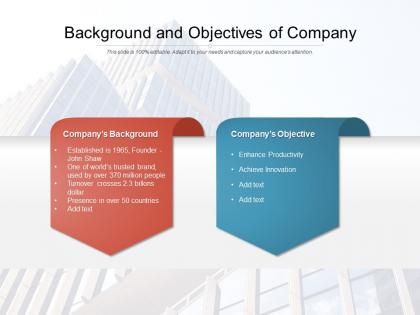
Background and objectives of company




Try Before you Buy Download Free Sample Product
 Impress Your
 Audience
 100%
100% Editable
 Save Hours
 of Time


Our Background And Objectives Of Company are explicit and effective. They combine clarity and concise expression.
People who downloaded this PowerPoint presentation also viewed the following :
Background and objectives of company with all 2 slides:
Give your audience a fulfilling experience. They will find our Background And Objectives Of Company elevating.
FAQs for Background and
Honestly, we got fed up watching brilliant people tank their presentations with awful slide designs. Like, you'd have these incredible insights but your deck looked straight out of 2003 - and suddenly nobody's listening anymore. That gap between amazing content and trash visuals was driving us crazy! Short version: we built templates so your ideas actually get the attention they deserve. Focus on what you want to say first. Then grab a decent template and let it do the design work while you handle the smart stuff.
Honestly, I spend way too much time lurking in industry forums, but that's how we figure out what people actually need. Before making any template, we dig into each industry's specific problems and test everything with real users from those fields. Sales templates are totally different from HR ones - like, a cold email that crushes it in B2B tech would be a disaster for healthcare recruiting. Performance data and user feedback help us keep updating stuff. Don't see templates for your industry? Just message us. We build new categories based on what people are asking for.
So you gotta submit a design request through the creative portal with all your brand stuff and requirements. Takes about 3-5 business days for the first mockup - the design team's always crazy busy but honestly they're worth the wait. When you get it back, go through everything carefully and give them super detailed feedback on colors, layout, fonts, whatever's bugging you. Usually takes 1-2 rounds of revisions, then boom - it goes into the template library. Oh, and definitely include real content examples in your original request instead of just lorem ipsum garbage. Makes a huge difference.
We basically redesign everything based on what people complain about. Mobile-responsive stuff gets priority when users keep asking for it. Same with cleaning up those messy e-commerce templates everyone hates. Download stats tell us a lot too - some of our "artistic" templates completely bomb, which is honestly hilarious. Dark mode and minimalist trends? We jump on those pretty fast. Oh, and definitely bookmark the "New & Updated" section since we're always tweaking things. It's way better than hoping we'll magically read your mind about what you need.
Honestly, these templates are pretty solid for a few reasons. You can customize them super easily without being a designer, which is clutch. Most competitors make you pay extra for automation features, but ours come standard. The drag-and-drop thing actually works without screwing up your layout - I know that sounds basic but you'd be surprised how many don't do this right. They're mobile-responsive too, so your team won't constantly bother design people for changes. Oh, and they look way less dated than most options out there. Try the demo first though.
Ugh, design trends change SO fast - seriously, what looked amazing last year feels ancient now. The tricky part is making templates flexible but not so complicated that people break them trying to customize stuff. Set up some kind of rating system so you can see which ones are flopping. Also, brace yourself for feedback that hurts but actually helps. There's always that one template everyone uses completely wrong no matter how clear you think the instructions are! Regular review cycles help, but honestly? Just stay plugged into what users are actually saying about your stuff.
Honestly, customization is everything with presentation templates. Don't use those generic ones that scream "I downloaded this 5 minutes ago." Your brand colors and fonts need to actually match - seems obvious but you'd be surprised how many people skip this. I always tell people to at least fix the logo placement and swap the color scheme. Takes like 10 minutes max but makes you look way more professional. The goal is making it feel like yours, not some random template. Trust me, clients notice when something looks thrown together vs. thoughtfully designed.
Look, start with intuitive navigation and clear visual hierarchy - users shouldn't have to guess where stuff is. Make it responsive across devices too. Loading speed is huge because people bounce immediately if it's slow (learned that the hard way). Don't forget accessibility features like proper contrast and keyboard navigation so everyone can actually use it. Oh, and test with real users constantly - they'll spot problems you'd never see. Sometimes I think we overthink design when really it's just about making things dead simple for people to accomplish what they came to do.
So we basically stalk all the design platforms weekly - Dribbble, Behance, Pinterest, you know the drill. Social media's honestly where we catch stuff first though, way before it hits the design blogs. Our team also pays attention to which templates people actually download versus just browse (there's usually a big difference). We hit up conferences when we can, but let's be real, most insights come from just watching what performs well. Every quarter we update the library instead of jumping on every tiny trend that pops up. Oh, and definitely check our "Recently Updated" section - we refresh the popular stuff with current styling pretty regularly.
Yeah, they work with all the usual suspects - PowerPoint, Google Slides, Keynote. The cool thing is they actually build them separately for each platform instead of just doing some lazy one-size-fits-all thing. So when you download the PowerPoint version, you get a proper .pptx file that actually behaves like it should. Same deal with Keynote (.key files) and Google Slides just imports smooth as butter. Honestly saved me so much time not having to wrestle with formatting disasters. Just grab whichever version matches what you're using and you're set.
I look at three things: downloads, feedback scores, and whether people actually use them in real presentations. Downloads show what's trendy, but feedback scores? That's where you find out if your stuff actually works or just looks nice. Also tracking if templates get used in actual pitches vs. just sitting in someone's folder collecting digital dust. You want high downloads AND good feedback AND real usage - that's the magic combo. Check monthly and fix the ones getting downloaded a lot but making people grumpy.
Oh nice! So there's actually a bunch of stuff to help you out. Step-by-step tutorials, video walkthroughs, detailed docs for each template type. The videos are honestly your best bet - way easier to follow along in real-time than reading through everything. They've got a whole resource library too with best practices and industry examples. There's monthly Q&A sessions (though I always forget about those) and a community forum where people share random tips. Start with the quick-start guide first, then check out the advanced customization stuff once you're not completely lost.
Okay so we build our templates around visual hierarchy and story flow. Your slides should logically build toward the main point - problem, solution, impact. The layouts literally guide where people look, like breadcrumbs for their eyes (sounds cheesy but it works). Our prompts help you think through the actual story arc instead of just word-vomiting everywhere. Colors and fonts? They're doing emotional heavy lifting too. Honestly, try the "Problem-Solution" template next time. It basically structures the whole narrative for you. Way easier than starting from scratch.
Honestly, it's all about collaboration here. We don't just hole up and make templates by ourselves - your feedback actually shapes what we build next. Our design team works super closely with developers too, making sure stuff actually works instead of just looking nice. Industry experts help us figure out the real pain points you're dealing with. The whole thing's pretty iterative though - we'll put something out there, see how it goes, then tweak based on what's actually working. Oh and if you spot gaps or have specific needs, definitely let us know! That kind of input literally drives our whole roadmap.
So we've got three big things happening over the next couple years. First up - better analytics features for our main product. Mobile app is finally coming too (I know, took forever right?). Should see the beta around Q2 next year, which'll help us reach younger users we've been struggling with. The real money maker though? Industry-specific stuff for healthcare and finance. Custom dashboards, compliance tools - could seriously double our market size. Oh, and I'll send you the full timeline once the budget stuff gets sorted out. Leadership's still hammering out details but the roadmap updates should give you a heads up.
No Reviews