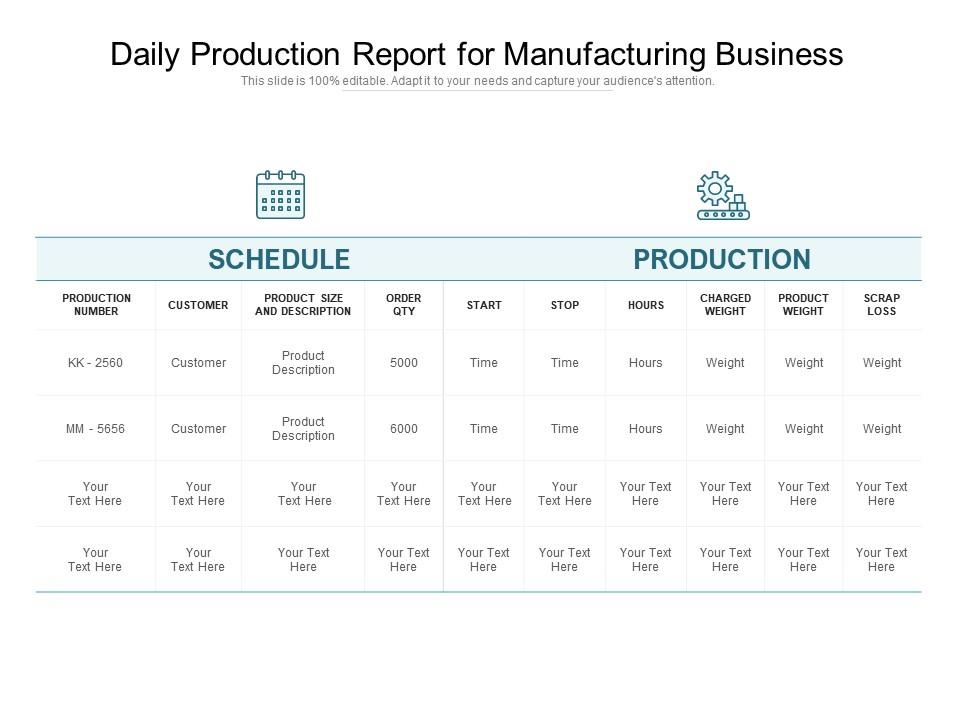
Daily production report for manufacturing business

Daily production report for manufacturing business
Slide 1 of 2
Favourites Favourites

Try Before you Buy Download Free Sample Product

Audience Impress Your
Audience
Editable 100%
Editable
Time Save Hours
of Time
The Biggest Sale is ending soon in
0
0
:
0
0
:
0
0
Presenting this set of slides with name Daily Production Report For Manufacturing Business. The topics discussed in these slides are Schedule, Production, Customer. This is a completely editable PowerPoint presentation and is available for immediate download. Download now and impress your audience.

FAQs for Daily production report

Track your actual output against what you planned, plus quality stuff like defect rates. OEE is huge too. Downtime's where you'll find the best improvement opportunities - seriously, that's gold. Labor efficiency and material usage are obvious ones. Safety incidents, obviously. Energy consumption if it's a big deal for your operation. Oh, and don't get caught up in metrics that just look good on paper. Focus on things you can actually fix tomorrow. Start simple with these basics, then add more once you've got the process down. Pretty straightforward really.

Look, automated tools grab data straight from your machines instead of having people type it in. No more worrying about typos or Mike messing up those spreadsheets again. Real-time info flows from sensors and production lines into clean, formatted reports without anyone touching it. You'll catch weird numbers right away with alerts too. Honestly, once you see how smooth it runs, you won't want to go back to manual entry. Start with whatever data you're currently inputting by hand - that's the low-hanging fruit for automation.

Line graphs are your best friend for daily tracking stuff. Bar charts work well when you're comparing shifts or different lines. Honestly, most production reports look like someone threw up rainbow colors everywhere - super distracting. Stick with 2-3 metrics max per chart. Always throw in your targets so people can see if you're hitting goals or not. Label your axes clearly (seems obvious but you'd be surprised). Red/green status indicators are clutch for quick updates. Bottom line: someone should get the whole picture in 30 seconds or less.

Daily production reports? Totally depends on what you do. Manufacturing's pretty cut and dry - units made, downtime, defects, labor hours. Agricultural stuff is way messier though. Weather screws everything up, plus you've got crop yields and livestock health to track. I honestly think ag reports are harder because you can't predict half the variables. Manufacturing reports follow patterns, but farming? Good luck with that. Bottom line - don't just copy someone's template. Pick metrics that actually matter for your business, whatever that looks like.

So here's the thing - real-time data basically turns your production reports into something you can actually use instead of just historical paperwork. You'll catch bottlenecks and equipment issues while they're happening, not the next day when it's too late. Think of it like having GPS navigation versus just looking at a map after you've already gotten lost, you know? Production rates, downtime, resource usage - you see it all live during the shift. Problems get fixed before they turn into disasters (which honestly saves so much headache). Figure out what metrics would actually help you make decisions, then build backwards from there.

Those daily production reports are seriously underrated for finding what's broken. Look for the weird patterns - like why does machine 3 always crap out on Wednesdays? Track your downtime and quality issues over a few weeks. Don't just file the reports away though, that's pointless. Get your team together weekly to actually dig through the trends. Compare month to month and see what keeps popping up. Honestly, most places skip this step and wonder why they're stuck with the same problems. Prioritize fixes based on what's costing you the most time or money.

Ugh, data inconsistencies will drive you crazy - production never matches inventory, and shift reports are always different from equipment logs. Getting departments to submit stuff on time? Good luck with that mess. Equipment downtime gets logged wrong (or not at all), which totally screws your efficiency numbers. Oh, and last-minute changes happen constantly, so your carefully planned reports become useless. Honestly, automate data collection wherever you can and set firm deadlines for manual stuff. It'll save you so much hassle down the road. Trust me on this one.

Quarterly reviews are perfect for catching problems early. If you're dealing with new systems or things change fast, monthly might work better. I made this mistake once - we went six months without updating ours and half the metrics became totally useless. Pretty embarrassing in hindsight. The whole point is making sure your reports still help with actual day-to-day decisions. Set a reminder for three months out and check if the data's still relevant and the format works for your team.

So those daily reports basically put everyone's work out in the open, which honestly makes people try harder. Nobody wants to be the one guy always missing their numbers, you know? You'll spot who's killing it and who needs help before things get awkward. When people see how their work fits into the big picture, they actually care more about results. Also - and this might sound obvious - but talk through the reports with your team instead of just emailing them. Makes a huge difference.

Honestly, most people start with Excel because it's simple and you probably already know it. Power BI and Tableau are way better for visualizations though - like, the difference is pretty obvious once you see real-time dashboards in action. There's also MES software like Wonderware or Ignition, but that's probably overkill unless you're running a huge operation or need direct equipment integration. My advice? Start with whatever your team actually uses day-to-day, then figure out if you need live data feeds or if daily reports work fine. No point overcomplicating things from the start.

Honestly, automated data feeds from your equipment will save you so much headache - way less manual entry mistakes. Get a few people double-checking your most important numbers before anything goes out. I'd focus on your top 3 metrics first instead of trying to fix everything at once. Standardized templates help too so everyone's tracking the same stuff. Oh, and don't put all the pressure on one person to catch errors - that never works out well. Multiple checkpoints throughout the process work way better than hoping someone spots issues at the end.

Go with a dashboard - charts and graphs beat boring text walls every time. You want stakeholders spotting trends fast, not wrestling with spreadsheets. Production volume, downtime, efficiency rates should pop right out. Honestly, most reports I see are total eye candy but useless for actual decisions. Color-code everything (red = bad, green = good) and throw in a quick paragraph explaining any big issues or wins. One page max if you can swing it. Oh, and always start with yesterday's most important number - that's what everyone's really looking for anyway.

So those daily production reports? They're way more useful when you actually talk to your floor teams about them instead of just filing them away. Your operators see stuff you miss - they know why that machine acted up at 2pm or what caused the slowdown yesterday. Honestly, most of them are dying to share what they know if you just ask. Pick one metric tomorrow and do a quick huddle about it. Get their take on the numbers, then use what they tell you to focus on the next day. It's like... suddenly your data makes actual sense.

First thing - figure out which regulatory bodies you're dealing with. FDA if you're in pharma, EPA for environmental stuff, OSHA for safety. Pretty straightforward. Your daily reports need to track what regulators actually want to see. Safety incidents, waste output, quality issues, production volumes if there are quotas. Trust me, building this into your daily routine beats panicking when audit season rolls around. Documentation is key - traceability info, data integrity, proper retention periods. I'd start by checking what your specific industry requires for production docs. That'll basically tell you everything you need in those reports.

Honestly, tracking your daily reports over a few months is where the magic happens. You'll start seeing which shifts actually crush their numbers and which equipment keeps breaking down - it's like having a weird production fortune teller thing going on. Seasonal patterns become super obvious, plus you can tell if that expensive new training was worth it or just another waste of money. I'd stick to maybe 3-4 key metrics so you're not drowning in data. Then use what you learn to tweak staffing levels and hopefully stop those annoying recurring problems. Makes setting next quarter's goals way less of a guessing game too.

Ratings and Reviews

0% of 100
Review Form
Write a review
Most Relevant Reviews

No Reviews