

 0 Comment
 Customer Reviews

Did you know most people waste one-third of their time due to poor planning? That is a very common struggle, and the truth is, we all get 24 hours. What makes the difference is how we use them and make the most of what we have. That is where a weekly hourly calendar comes into the picture.
A solid weekly timetable planner can change everything and can give you control over the daily tasks. If you follow a daily hourly plan or hour-by-hour schedule, you can understand how much time goes into each task. It can help you break your week into small time blocks so that you can achieve your desired goals. Also, adding a weekly time allocation chart to your routine can help you stay consistent.
If you are interested, check out our Top 7 Hourly Calendar Templates with Samples and Examples.
Now, to make your project planning easier and faster, our SlideTech team has prepared some PPT templates. Based on your preferences, you can pick the ideal weekly schedule template and fix your time management problem. We have considered important weekly agenda topics and their visuals to help you organize different tasks. These documents are available in different formats and can be easily customized to meet your different project requirements. At the end of every week, you can look back and see where your time went and accordingly make new plans.
.
Now, let us explore our Top 10 Weekly Hourly Schedule Templates with Samples and Examples.
Template 1: Weekly Shift Schedule To Evaluate Employee Working Hours
You must include this PPT template in your presentation deck and help managers clearly see who is working and when. It displays the weekly shift schedule and allows you to learn about punctual and productive employees. It shows important elements such as - employee name, working hours, day off, leave, total working days, etc. Now, click on the download link and get the template. This kind of working shift schedule can improve team planning for a particular project and reduce any confusion.

Template 2: Weekly Task Assignment List with Status and Hours Budgeted
A weekly task assignment list can guide you to see what’s done and what’s pending. You can implement the chart to plan ahead, stay organized, and avoid last-minute confusion. You can use the following template and highlight important elements of the task assignment list. It shows the days of the week, task name, status, due date, task type, assignee name, hours budgeted, and actual hours. So, download the template now and get a better idea of work progress without constantly asking for updates.

Template 3: Weekly Sales Activity Report Schedule with Working Hours
With this sales report, your sales manager can spot patterns, fix slow areas, and reward top performers. It can help team members understand where they are spending too much or too little time. Salespeople can review their week and plan better for the next week. So, include this appealing template and describe your weekly sales activity report schedule with working hours. It includes components such as day of the week, total hours, calling hours, office visit hours, etc. Get the template and prepare your schedule now!

Template 4: Man Hours Days Of Week Time in Out Breaks Overtime and Regular Hours
If you closely monitor the work shift of your employees, you can know exactly when people start and stop their work. Regular hours show a routine schedule, while overtime shows extra effort. This kind of schedule tracking can guide you prepare the payroll and project planning. So, add this simple yet effective template to your presentation bundle and track the working hours of your staff. It includes elements like days of the week, time in/out, breaks, overtime, and regular hours. Here, you can also show the sick hours, holiday hours, vacation hours, etc. Now, click on the link below to access the template for planning smart schedules.

Template 5: Employee Hourly Weekly Calendar PPT Template
An employee hourly weekly calendar helps managers track the working hours and pay of the employees. It gives a clear picture of who works when and for how long. You can employ the following PPT layout and break down the schedule of your employees. It shows types of work shifts, off days, total hours, and total pay. The template can help you calculate total weekly hours and expected pay so that you can maintain payroll smoothly. So, get the template from the link now! Your manager can use it to compare hours across staff to track overtime or under-scheduling.

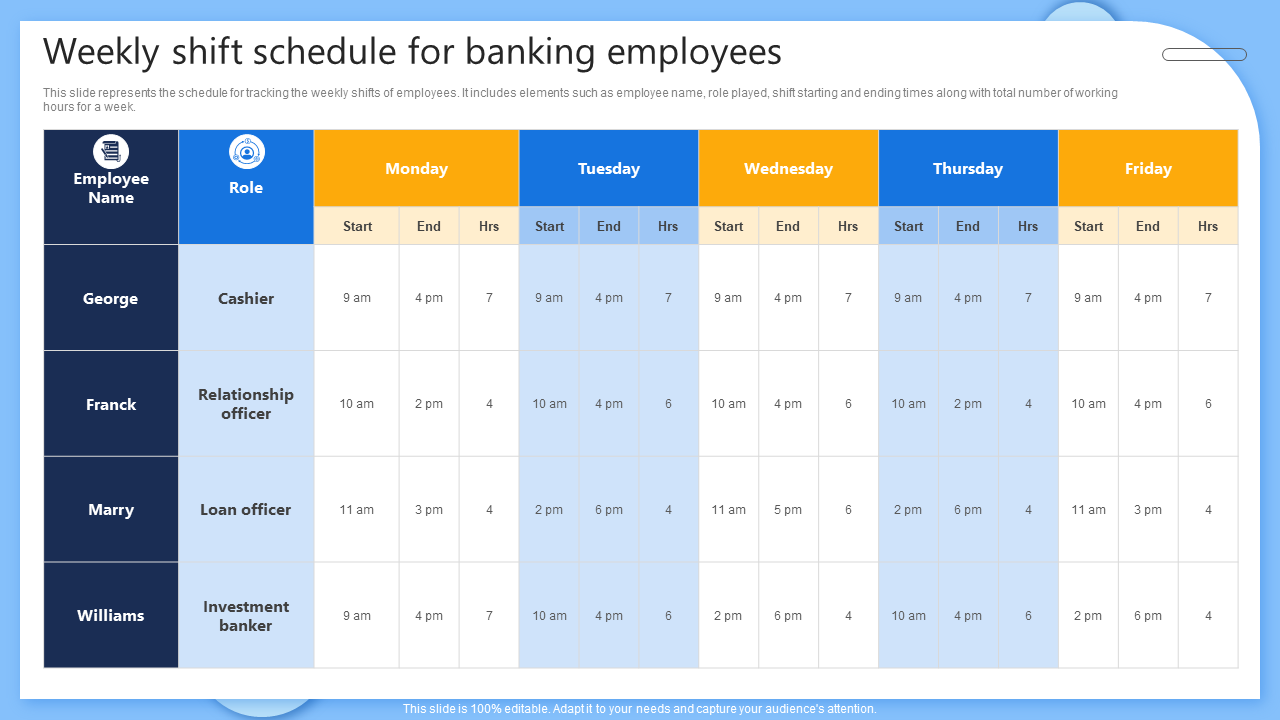
Template 6: Weekly Shift Schedule for Banking Employees
The following PPT template illustrates the schedule for tracking the weekly shifts of employees. It shows elements such as employee name, role played, shift times, and the total number of working hours for a week. With this tool, it becomes easier to spot problems like overwork or idle time. This is an instantly available PowerPoint presentation that you can customize as per your requirements. Download it now and try to make clear plans so that teams can meet goals faster and with less effort.
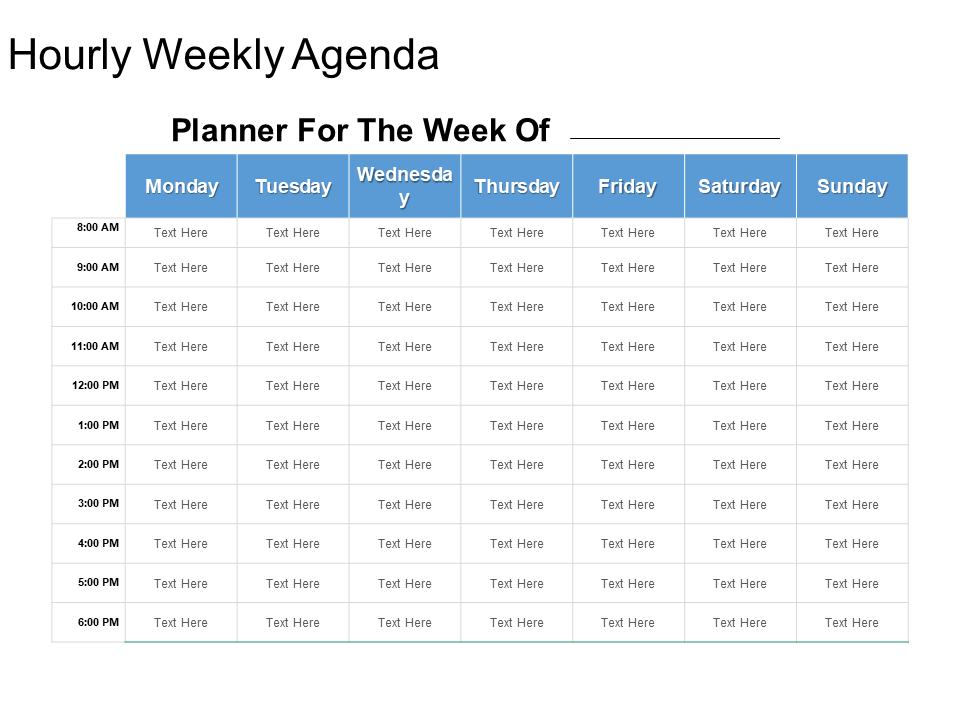
Template 7: Hourly Weekly Agenda Powerpoint Slide Deck
You must include this attractive template in your list to show the new work agendas. It can help you keep a tab on important tasks, projects, or orders of the day. The template shows plans for the entire week on an hourly basis. When people know their hours in advance, they feel more ready and less stressed. So, download the template today and highlight the tasks that need to be dealt with on that same day. Use it to display your business plans, explain tasks, projects, or discuss meeting key points with your team.
Template 8: Weekly Employee Task and Time Tracking Schedule
The following template shows the company employee schedule in a structured way. It is a perfect document if you are struggling with organizing the weekly tasks. Also, based on the performance, you can assign activities and tasks to each individual at a particular slot. Here, the PPT template includes weekly total working hours, weekly completed tasks, weekly total working days, employee name, etc. It is best suited to monitor the short-term tasks and you can ensure there is constant improvement throughout the week. So, get the template now to promote transparency and drive project success!

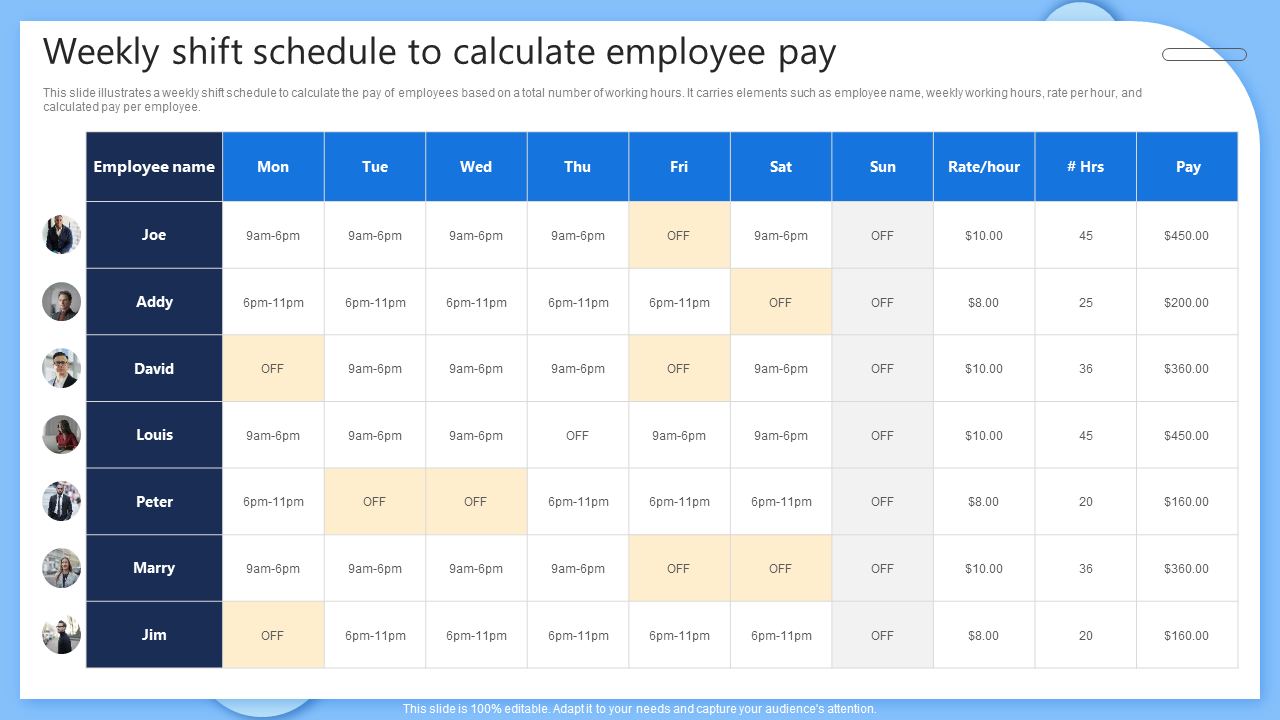
Template 9: Weekly Shift Schedule to Calculate Employee Pay
A weekly shift schedule can easily assist you track employee hours as it shows exactly when each person worked. Also, it becomes easier to add up the total working hours at the end of the week. You can spot missed shifts, overtime, or late arrivals quickly. So, add this smart template to your list and illustrate a weekly shift schedule. It can help you calculate the pay of employees based on the total number of working hours. It includes elements such as employee name, weekly working hours, rate per hour, and calculated pay per employee. Download the template right away!
Template 10: Employee Weekly Work Schedule for Effective Time Management
An employee's weekly work schedule can assist everyone know what to do and when to do it. It removes unnecessary confusion about shifts, meetings, and daily office tasks. This also improves teamwork and keeps everyone on the same page. You can use our attractive template and help your team lead and managers plan ahead and avoid last-minute changes. It describes the weekly work schedules of your company staff in a concise format. It shows information about employee names, tasks performed by each employee, total hours worked, per-hour rate, and total wages. Download the template now and build a stronger, more reliable work routine for everyone.

Conclusion
A weekly hourly schedule helps you stay on top of everything. It improves time use, reduces stress, and increases focus. With tools like a weekly time map, you always know what to do and when. Every day becomes clear when you know what is coming. You won’t forget important tasks, meetings, or personal goals. And a weekly routine keeps your life balanced and makes space for work, fun, and rest. So, feel free to use the above mentioned templates and see how your time is spent. They can support your personal project planning and save you time. Get the templates now and try to stay more organized!
FAQs
Now let us answer some common time planning FAQs in simple words:
1. How many hours should be allocated to each major activity?
Mostly, experts suggest this 8-8-8 rule: 8 hours for work, 8 for rest, and 8 for personal time. This includes breaks and exercises as well. You can adjust your time depending on your lifestyle and job requirements.
2. What are the most productive hours?
According to studies, most people are mainly focused between 9 a.m. and 12 p.m. But productivity peaks can vary, so track your energy levels and schedule your top tasks accordingly.
3. Are high-priority tasks receiving adequate time allocation?
You can prepare and check with your time allocation chart or weekly agenda. If you feel any urgent work is rushed or skipped, you can always reschedule your tasks.
To learn more about the topic, please take a look at our Schedule Templates.