

 0 Comment
 Customer Reviews

The deck's been shared. Three people have already replied asking what the timeline means.
Not because the roadmap is unclear—you've spent weeks on it. The sequence makes sense, the milestones are real, the dependencies are mapped. But somewhere between the planning tool and the slide, something got lost. The version in the deck doesn't say what you meant. It says something flatter. Harder to follow.
That gap is specific. It's not about strategy. It's about structure on a slide.
A future development roadmap isn't just a project plan dressed up. It's a promise—to stakeholders, to teams, to leadership—that there's a sequence, and the sequence is under control. The problem is that promising something in a presentation requires a very different skill than knowing it. Most people know the roadmap cold. Getting an audience to feel confident about it, in under 20 minutes, with no handout? That's where things go sideways.
And it always gets worse when the timeline is long. Three years. Five years. Cross-functional. Multiple workstreams. The instinct is to put everything in. Every milestone. Every dependency. Every exit criterion. The slide fills up, and now nobody can read it from the third row, and the executive in the front is already looking at her phone.
So the templates exist. Not because product managers can't build roadmaps—they can. But because structuring a multi-year plan into something a room full of people can absorb in one sitting is a genuinely hard formatting problem. Someone has to figure out what goes on which slide, what visual logic organizes the time horizon, how color signals status without a legend nobody reads.
SlideTeam's future development roadmap templates were built for exactly this—the moment after you've done the thinking, when the only job left is making it land. Pre-designed layouts that handle the structural heavy lifting, so you're not rebuilding the visual logic from scratch every time a stakeholder asks for an update.
Here's what's in the collection.
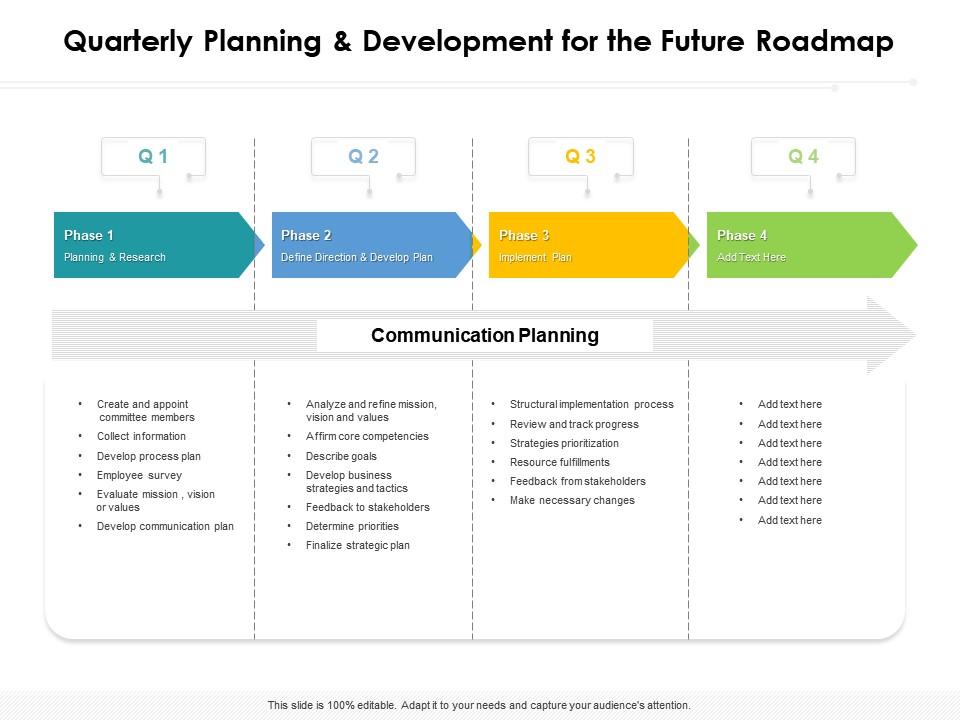
Template 1: Quarterly Planning and Development for Future Roadmap
Quarterly planning becomes visually compelling with this structured roadmap slide. It organizes development goals into clear, time-bound segments that keep teams aligned. Each quarter stands as a distinct planning unit, making progress readable. Stakeholders want to see priorities, timelines, and deliverables without decoding complex visuals. You can tailor each section to match your team's exact product roadmap planning cadence. The layout drives accountability by anchoring every initiative to a specific quarter. Transform your quarterly planning presentations with precision and confidence. Download this dynamic template now and unlock sharper, more persuasive development roadmap communication.
Download this PowerPoint Template
Template 2: Six-Month Planning and Development for Future Roadmap
Six months of development priorities, structured so nothing gets lost. This slide maps a half-year arc clearly, giving audiences an immediate sense of sequencing. Each phase connects logically to the next, reinforcing your long-term business planning narrative. The layout surfaces key milestones without burying them in dense text. You can highlight dependencies, deliverables, and team ownership at a glance. It's built for stakeholders who need the big picture fast. Transform your six-month planning presentations today. Download this dynamic template now and unlock a roadmap structure that keeps every timeline on track.

Download this PowerPoint Template
Template 3: Six-Month Project Proposal Development Roadmap
Project proposals gain traction when the timeline is visual and grounded. This PPT template is built for project leads presenting a six-month delivery plan to decision-makers. It covers scope, phases, and milestones in a structure that answers questions before they're asked. Whether you're pitching a software development roadmap or a cross-functional initiative, this slide makes the sequence credible. The template is 100% editable and customizable.

Download this PowerPoint Template
Template 4: Strategic Roadmap for Development of New Product
Three-year product launches need a single visual that holds the full picture. This PPT preset shows market share targets, revenue KPIs, and initiative timelines side by side. Product managers and strategy leads use it to align business change plans with execution phases. It's a strong fit for teams building a strategic development plan from the ground up. The template is 100% editable and customizable.
[product_image id=927621]
Template 5: Milestones Roadmap for Project Management in Future
Project milestone planning works best when the sequence is visible and unambiguous. This PowerPoint slide maps seven stages—from approvals to delivery—in a format project managers can walk through in minutes. Program leads use it to surface dependencies and signal what needs sign-off at each gate. It keeps cross-functional conversations grounded in actual progress rather than status reports. The template is 100% editable and customizable.

Download this PowerPoint Template
Template 6: Project Implementation Plan Development Roadmap
Implementation plans fail more often in the communication than in the execution. This PPT template covers planning, business analysis, data migration, and training in a single cohesive view. Operations and IT leads use it to present a project implementation roadmap to stakeholders who need the full scope quickly. It's particularly useful for ERP implementation roadmap conversations where sequencing directly affects go-live risk. The template is 100% editable and customizable.

Download this PowerPoint Template
Template 7: Strategic Roadmap for Future Development PPT Slides
Creative versatility meets structured planning in this roadmap deck. Every slide balances visual impact with clear information hierarchy, keeping audiences engaged throughout. The layout adapts to your brand identity, making each presentation feel intentional and authoritative. It's designed for digital transformation roadmap presentations that need to impress and inform simultaneously. Elevate your strategic future development presentations today. Download this dynamic deck now and unlock a visual framework that outshines the competition.
[product_image id=1606240]
Template 8: 5-Year Roadmap for New Product Development
Five years of product development, laid out so every stage earns its place. This slide tracks years, stages, milestones, and exit criteria in a single, scannable layout. It gives product teams a structured view across the entire development arc—short, mid, and long-term goals all visible at once. You can use it to drive product lifecycle management conversations with leadership or investors. The annual milestone structure creates accountability checkpoints without overwhelming the narrative. Transform your long-range product planning presentations today. Download this dynamic template now and unlock a five-year roadmap that commands attention.
[product_image id=1191487]
Template 9: Milestones Roadmap for Product Development in Future
Six distinct stages of product development, presented so audiences see the full arc instantly. This slide drives clarity at every phase—from concept through launch and beyond. The milestone-based structure gives product leads a confident visual anchor for stakeholder reviews. You can highlight blockers, completions, and upcoming deliverables without reworking the layout. It's purpose-built for product roadmap planning sessions where progress needs to be undeniable. Transform your product milestone presentations today. Download this dynamic template now and unlock a roadmap view that keeps every team moving forward.

Download this PowerPoint Template
Template 10: Infrastructure Roadmap Overview Presentation PPT Outline
IT infrastructure decisions are hard to explain without a clear visual structure. This PPT deck gives IT directors and CIOs a ready-made framework for presenting an IT infrastructure roadmap to boards and leadership teams. For context, it works equally well for strategic technology planning reviews and vendor alignment sessions. The layout makes complex dependencies readable at a glance. The template is 100% editable and customizable.
[product_image id=1532367]
Template 11: Quarterly Roadmap for Product Development Project Planning
Quarter-by-quarter product planning, structured so every phase has a clear owner and outcome. This slide organizes development priorities into a grid that makes resource allocation and sprint planning immediately visible. Teams can map feature development planning across four quarters without losing the strategic thread. The layout surfaces what's coming, what's active, and what's complete—all in one view. You can adapt it for product, engineering, or cross-functional roadmap sessions. Transform your quarterly product planning presentations today. Download this dynamic template now and unlock a roadmap structure built for execution.

Download this PowerPoint Template
Template 12: 5-Year Product Development Roadmap PPT Presentation
Five years is a long commitment, and stakeholders want to see the logic behind it. This PowerPoint slide maps organizational growth and business investment across five defined phases. Strategy leads and founders use it to present a SaaS product roadmap or startup growth strategy to investors and boards. The phased view makes ambitious timelines feel grounded and achievable. The template is 100% editable and customizable.

Download this PowerPoint Template
Template 13: Strategic Roadmap for Future Development PPT Guidelines
Visual appeal and strategic clarity aren't mutually exclusive—this deck proves it. Every slide in this future development roadmap set is crafted to hold attention while delivering structured information. The layouts make long-range planning sequences easy to follow without dense text blocks. You can align every element to your brand with minimal effort. It's designed for leaders who need to present an enterprise development plan with authority. Transform your strategic roadmap presentations today. Download this dynamic deck now and unlock slides that make every planning conversation count.
[product_image id=1731965]
Template 14: Future Roadmap Essentials for Product Development Teams PPT Sample
Product development teams need a roadmap deck that speaks to both builders and decision-makers. This complete slide set delivers exactly that—structured layouts that carry your team's planning logic clearly. Each slide captures the essentials: phases, milestones, priorities, and timelines, all without visual clutter. You can shift color themes and content blocks to match your audience and context quickly. It's built for agile roadmap framework presentations that need to stay credible through multiple planning cycles. Transform your product team roadmap communications today.
[product_image id=1701030]
Template 15: Six-Month Planning and Development for Roadmap
A six-month planning window is short enough to be tactical, long enough to need structure. This complete deck gives teams a full suite of slides to map development priorities across the half-year arc. Each layout surfaces milestones, ownership, and phase transitions without requiring audience members to work to understand them. You can adjust color themes to fit different stakeholder groups or business units with ease. It's purpose-built for planning sessions where clarity directly affects team alignment. Transform your six-month roadmap presentations today. Download this dynamic deck now and unlock a planning framework built for real execution momentum.
[product_image id=1471706]
Template 16: Development Roadmap for Support Teams PPT Information
Support teams have roadmaps too—and they deserve slides that reflect their planning rigor. This deck gives support operations leads a structured framework for presenting development priorities, capability gaps, and improvement timelines. Each layout is designed to show progress and plans in a format leadership can absorb. You can tailor content blocks to match specific team goals, tooling investments, or quarterly development goals. Transform your support team development presentations today. Download this dynamic deck now and unlock roadmap slides built for teams that keep the business running.
[product_image id=1544154]
Template 17: Five-Yearly Planning and Development for Future Roadmap
Five years of organizational planning, structured across annual milestones that tell a coherent story. This slide gives executives and planners a clean visual framework for long-term business planning. Each year becomes a distinct chapter, making the full five-year arc easy to present and easy to follow. You can anchor strategic initiatives, investment priorities, and capability targets to specific planning years. It drives alignment between leadership vision and operational execution. Transform your five-year roadmap presentations today. Download this dynamic template now and unlock a planning structure that turns ambition into a credible commitment.

Download this PowerPoint Template
Template 18: Innovation Roadmap Planning for Future Success PPT Structure
Innovation pipelines rarely fail because of a lack of ideas. They fail because no one can see the sequence clearly. This PPT preset helps innovation leads and R&D teams present their innovation pipeline planning in a format that earns confidence, not confusion. It pairs simplicity with structure—enough visual detail to show rigor, clean enough to avoid overload. The template is 100% editable and customizable.
[product_image id=1515159]
Template 19: Three-Month Planning and Development for Future Roadmap
Three months is the right window for teams that run on short planning cycles. This PowerPoint slide gives project and product leads a focused view of near-term development priorities. It's built for teams that need to communicate quarterly development goals quickly, without losing the structure that makes plans credible. Fast-moving environments benefit most from a roadmap that's specific and scannable. The template is 100% editable and customizable.

Download this PowerPoint Template
Template 20: Innovation Roadmap for Future Planning PPT Presentation
Future planning deserves a visual format that matches its ambition. This PPT deck gives planners and product leaders a polished framework for presenting innovation timelines to any audience—boardroom or team stand-up. It works well for AI development strategy presentations where the sequencing of capabilities matters as much as the vision itself. The structure keeps creative ideas grounded in a timeline that audiences can trust. The template is 100% editable and customizable.
[product_image id=1480881]
Deliver Your Future Development Roadmap with SlideTeam
SlideTeam's PowerPoint templates are the best in the industry for future development roadmap presentations. These content-ready slides give you professional structure, clear milestone layouts, and visual clarity that keeps every stakeholder aligned. Use these ready-made frameworks to present your strategic development plan with authority—whether it spans one quarter or five years. Grab these templates today and turn your roadmap into a presentation that drives real decisions.
FAQs on Future Development Roadmap
What visual elements should a presentation include to communicate a multi-year development roadmap to stakeholders?
A multi-year roadmap slide needs four things: a clear time axis, named milestones, ownership labels, and a status indicator. Keep the time horizon visible at all times—year or quarter markers work best. Group milestones by theme or workstream, not by date alone. Use a legend only if it's two or three items. Anything more than that, and the audience stops reading it.
How can a roadmap presentation template balance high-level strategic milestones with tactical details without overwhelming the audience?
Use two slide types: one for executives (three to five milestones, no sub-tasks), one for teams (phases, owners, dependencies). Never try to serve both audiences on a single slide. A summary slide leads; a detail slide follows for those who need it. The rule is simple—if a stakeholder has to ask what the slide means, it has too much on it.
What slide layouts best represent phased rollouts and iterative development cycles in a roadmap presentation?
Swim-lane layouts work best for phased rollouts—each lane maps to a team or workstream, each column to a time period. For iterative cycles, a repeating block structure (sprint or quarter blocks) signals cadence. Avoid linear arrows alone; they flatten the real complexity. Gantt-style bars inside swim lanes give you both sequence and duration at a glance.
How should a presentation template handle the visualization of interdependent features or workstreams across teams?
Use a dependency matrix slide or a connected swim-lane view with arrows between workstreams. Show the link, not just the proximity. Color-match related workstreams across teams so the connection is immediate. Keep dependency lines to the three or four most critical ones — too many lines make the slide unreadable and actually hide the risks you're trying to surface.
What color-coding strategies work best in roadmap slides to distinguish between completed, in-progress, and planned initiatives?
Three colors, used consistently, cover everything: green for completed, amber for in-progress, grey for planned. Red should be reserved for blocked or at-risk items only—overusing it removes its signal value. Apply colors to bars or icons, not to backgrounds. Put the legend in the footer, not as a separate slide. Consistency matters more than the specific colors you choose.
How can timeline-based slide templates be adapted to accommodate agile development methodologies that involve frequent reprioritization?
Use a rolling-window layout—show a fixed number of sprints or quarters rather than a fixed end date. This makes reprioritization a visual shift, not a rebuild. Mark confirmed items differently from tentative ones (solid versus outlined bars work well). Build the template so adding or removing a sprint block doesn't break the whole layout.
What design principles should guide the creation of executive-level roadmap slides versus team-level operational roadmap slides?
Executive slides: three to five items, large font, no jargon, outcomes only. Team slides: tasks, owners, timelines, dependencies—more density is acceptable. The executive version answers 'where are we going?' The team version answers 'what are we doing next week?' Never merge the two. Build both from the same data, but design them for entirely different questions.
How can a presentation template effectively communicate risk factors and contingency plans within a future development roadmap?
Add a dedicated risk row or column inside the roadmap layout—flag risks directly adjacent to the milestone they affect. Use a simple two-column structure: risk on the left, contingency response on the right. Avoid burying risks in footnotes. If a risk is real enough to plan for, it belongs on the slide where the affected milestone lives, not on a separate appendix slide no one reads.