





 0 Comment
 Customer Reviews

The deck's been built. Slides are numbered, colors are consistent, and someone's already printed the agenda.
But the question sitting quietly in the back of the room—the one nobody's asked yet—is whether any of this actually worked. Not "did we complete the program." Whether it worked. Whether the process held up. Whether the outcomes match what was promised six months ago in a conference room with a whiteboard.
That's the uncomfortable part. Completion is easy to document. Effectiveness isn't.
Process program evaluation is one of those things that organizations say they do and rarely do well. Not because the tools don't exist. Because the gap between running a program and honestly assessing it is wider than most teams want to admit. You'd have to look at what you planned versus what happened. And sometimes those two things don't match, and that's a hard conversation to have in a status meeting.
It gets worse when there's no structure. When evaluation is treated as an afterthought—something bolted on at the end, after the budget's spent and the team's already moved on. You end up with a summary that says "generally positive outcomes" and a follow-up meeting that nobody schedules.
And then there's the reporting problem. Even when someone does the evaluation properly—tracks KPIs, collects stakeholder feedback, runs a process efficiency analysis—the findings still have to go somewhere. Into a deck. A presentation. Something that a VP or a board or a funder will actually sit through and understand.
That's where structure matters. Not just in the evaluation itself, but in how you present it. Templates for process program evaluation exist because the work of explaining what happened, what worked, and what didn't is its own skill. Separate from the analysis. Separate from the data.
SlideTeam's pre-designed templates handle exactly that gap—ready-made frameworks for when you know what you found but don't know how to frame it for a room full of decision-makers. Content-ready slides that give the evaluation a shape before you fill in the details.
Here's what's available.
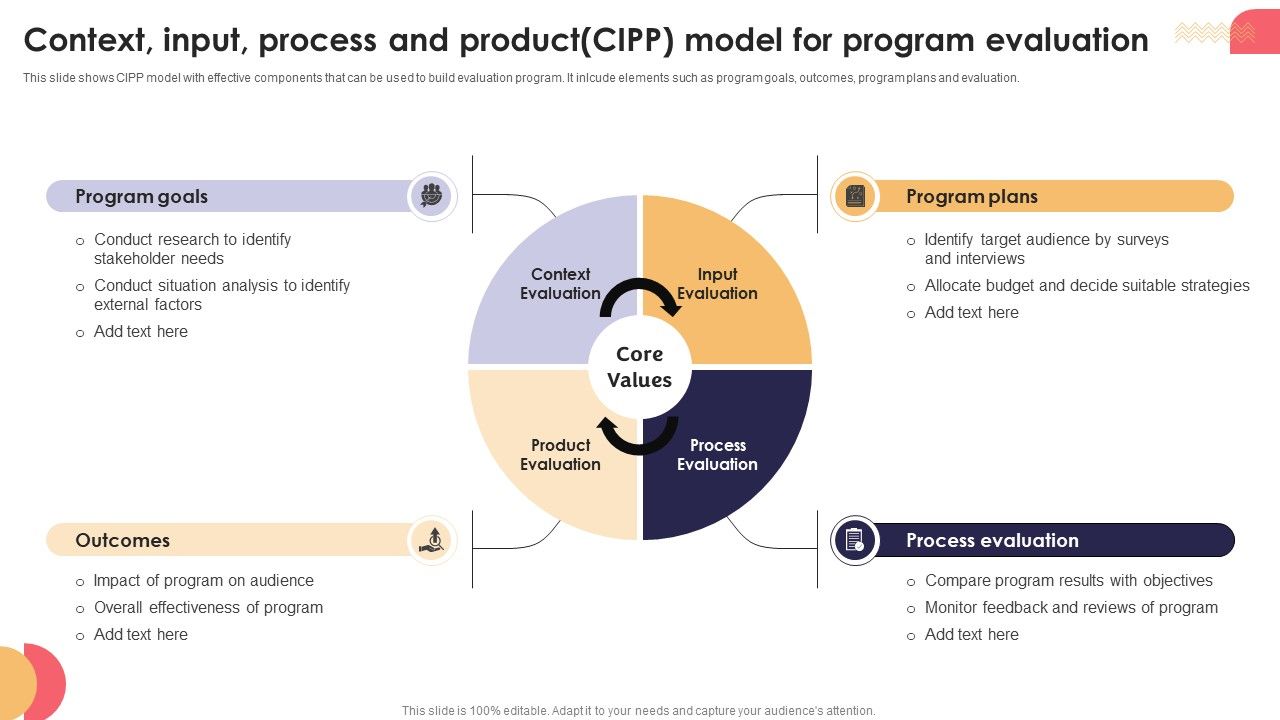
Template 1: Context Input Process and Product (CIPP) Model for Program Evaluation
The CIPP model drives sharper program evaluation by organizing your analysis into four focused stages. Context, Input, Process, and Product evaluations each address a distinct layer of program performance. This clear four-stage architecture lets you pinpoint gaps between program goals and actual outcomes. It also separates planning quality from implementation quality — two things that often get conflated. Stakeholders get a structured view that answers the right questions at every stage. Transform your evaluation presentations with this logically layered framework. Download this dynamic template now and unlock credibility in every program review.
Download this PowerPoint Template
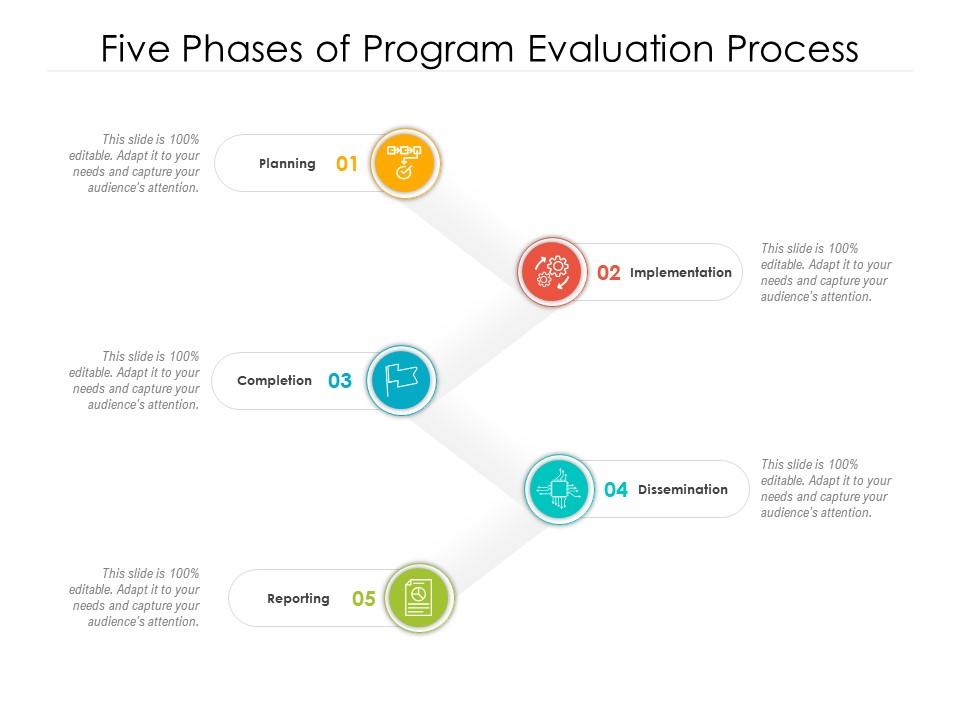
Template 2: Five Phases of Program Evaluation Process
Mapping a program evaluation across five clear phases gives your audience confidence in the process. Each phase—from Development through Implementation—builds logically on the last, showing rigor and intentionality. This sequential visual structure makes program performance metrics easier to communicate at any stage. It turns a complex evaluation process into a story that stakeholders can follow without effort. Use this for quarterly program reviews or end-of-cycle assessments that demand clarity. Transform your program evaluation presentations with this structured five-phase approach. Download this dynamic template now and unlock audience trust from the first slide.
Download this PowerPoint Template
Template 3: Training Program Evaluation Process Framework PPT
Training programs rarely fail in isolation—they fail within a system. This PPT template maps the evaluation framework across individual, organizational, health system, and environmental layers. It's built for program managers and L&D leads who need to show how situational factors shape outcomes. Whether you're presenting a process evaluation for a health system initiative or a cross-functional training rollout, this slide holds the full picture. The template is 100% editable and customizable.

Download this PowerPoint Template
Template 4: Context Input Process and Product for Program Evaluation PPT Designs
Delivering a CIPP evaluation that actually lands with your audience requires more than good data—it needs visual cohesion. This deck aligns Context, Input, Process, and Product components inside a presentation that's built to engage. Every slide is structured to guide decision-makers through program evaluation criteria without overwhelming them. The design keeps complexity readable, which matters when funders or executives are in the room. Creativity and clarity work together here in one professionally designed deck. Transform your program evaluation presentations with this visually compelling resource. Download this dynamic template now and unlock presentation impact that matches the quality of your findings.
[product_image id=1470053]
Template 5: Program Planning Monitoring and Evaluation Process
Effective resource allocation starts with a clear view of every step from program design to policy and advocacy. This PPT preset walks through five stages of program monitoring and evaluation in a logical, visual sequence. It's the kind of slide a program director reaches for when presenting to a steering committee or donor. Use it to show how implementation and monitoring feed directly into evaluation and learning. The template is 100% editable and customizable.

Download this PowerPoint Template
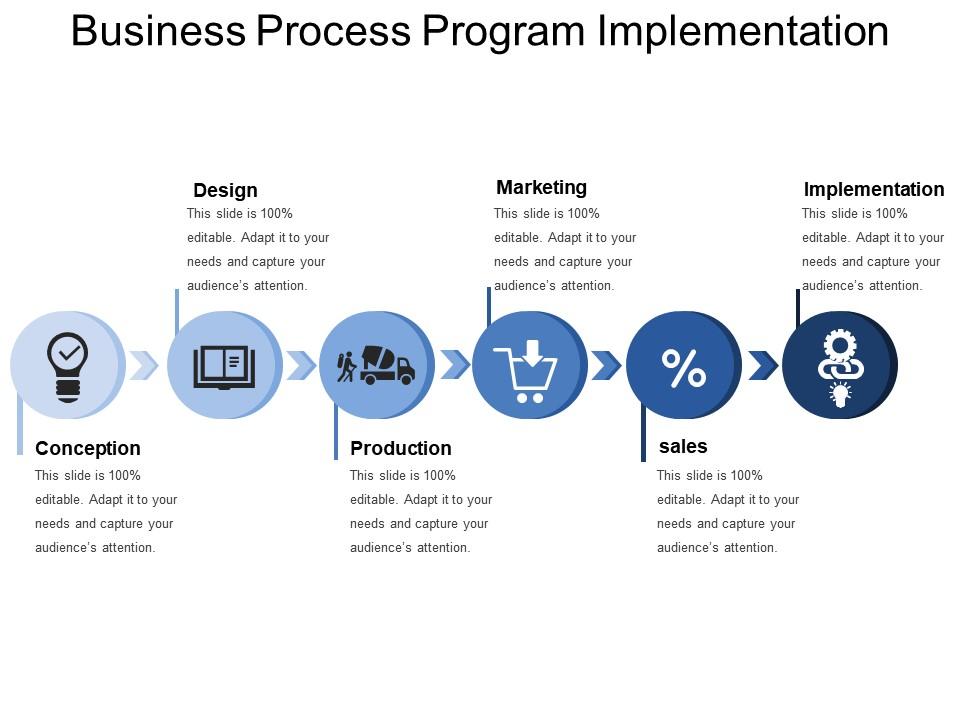
Template 6: Business Process Program Implementation
Presenting a business process program implementation across six structured stages gives leadership an immediate operational overview. Each stage—from Program Development through Execution—builds a clear picture of how plans become actions. This framework anchors process improvement assessment conversations with a repeatable, visual structure. It works equally well for internal audits, stakeholder briefings, and continuous improvement reviews. Use this to show not just what was done, but how it was sequenced. Transform your implementation presentations with this six-stage framework. Download this dynamic template now and unlock clarity in every program execution review.
Download this PowerPoint Template
Template 7: Five Phases of Program Evaluation Process PPT Summary
Communicating five evaluation phases to a mixed audience takes a deck that balances depth with accessibility. This PPT preset is purpose-built for teams presenting program outcome measurement across development and implementation phases. For a broader look at how evaluation phases are structured visually, this resource on process program evaluation PPT templates covers the core options well. The slide keeps the narrative moving without losing the evaluative rigor your audience expects. The template is 100% editable and customizable.
[product_image id=1861541]
Template 8: Integrating Monitoring and Evaluation into Program Management PPT Slides
Monitoring and evaluation rarely get the visual treatment they deserve inside a program management deck. This complete deck integrates M&E directly into the program management workflow, making oversight visible and credible. Each slide is crafted to show how ongoing data collection connects to program performance metrics and decisions. It's structured to support program managers presenting to boards, auditors, or grant committees. The layout eliminates the usual friction between evaluation rigor and presentation clarity. Transform your program management presentations with this integrated M&E framework. Download this dynamic template now and unlock a structured approach to continuous improvement evaluation.
[product_image id=1720280]
Template 9: How to Conduct a Comprehensive Program Evaluation Process PPT Example
Conducting a comprehensive program evaluation is one thing. Presenting it credibly is another challenge entirely. This PPT preset gives evaluators a structured deck to walk audiences through every stage of the evaluation process. It's built for practitioners who need to show methodology, findings, and recommendations in a single coherent flow. Whether you're presenting a process gap analysis or a full program impact assessment, this deck holds it together. The template is 100% editable and customizable.
[product_image id=1773461]
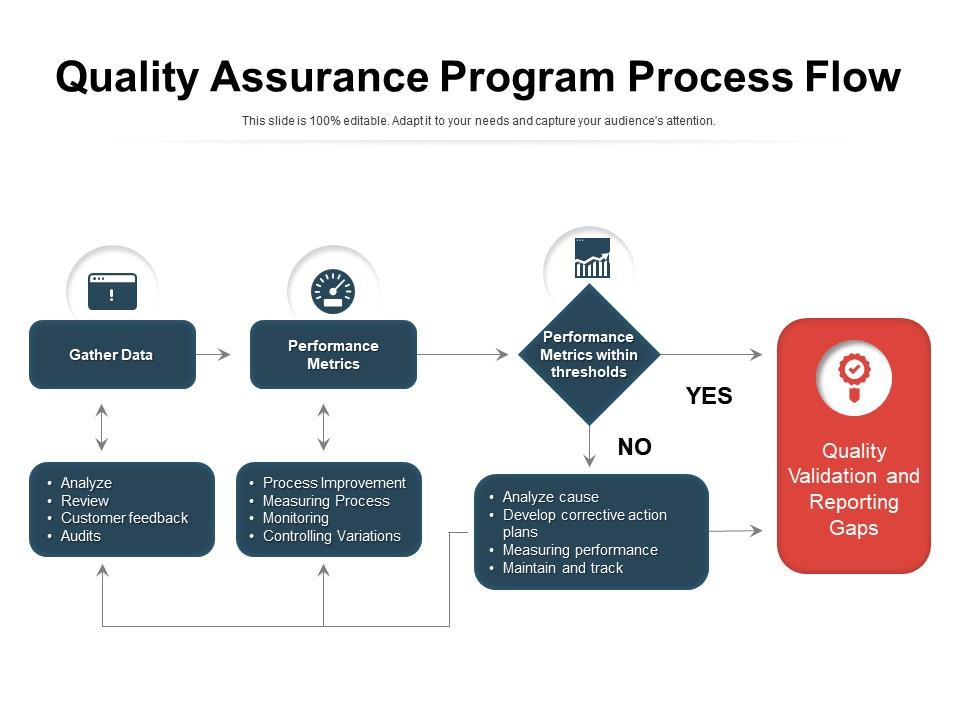
Template 10: Quality Assurance Program Process Flow
A QA program is only as useful as the reporting behind it. This template maps the full quality assurance process flow—from raw data through performance metrics, quality validation, and gap reporting. The structured visual layout makes it easier to show where performance stays within thresholds and where it doesn't. It supports data-driven evaluation conversations without requiring the audience to parse raw numbers. This is the slide QA leads reach for when presenting to operations or compliance committees. Transform your quality assurance presentations with this clear, metric-driven framework. Download this dynamic template now and unlock immediate visual clarity in every QA review.
Download this PowerPoint Template
Template 11: Tools and Techniques for Process Evaluation in Business PPT Presentation
Choosing the right process assessment tools matters more than most teams acknowledge at the start of an evaluation. This PPT preset lays out the key tools and techniques used in business process evaluation with clarity and structure. It's designed for analysts and consultants who need to justify their methodology before presenting findings. Use it to frame how process benchmarking techniques and qualitative methods work together in a single evaluation cycle. The template is 100% editable and customizable.
[product_image id=1442181]
Template 12: Business Process Evaluation PPT Sample
Business process evaluation findings need a home—a structured deck that gives the analysis shape without burying it in detail. This PPT preset is built for practitioners who need to present process performance analysis to leadership or clients. It's concise, professional, and designed to keep the audience focused on what the data actually shows. For context on how process evaluation templates support different evaluation types, this guide on program evaluation and review technique templates is worth a read. The template is 100% editable and customizable.
[product_image id=1428324]
Template 13: How to Create Effective Process Flow PPT Guidelines
Clear process flows are harder to build than most people expect—especially when the audience includes both technical and non-technical stakeholders. This PPT preset provides practical guidelines for creating effective process flow visuals that communicate without confusion. It's the kind of deck a business analyst or operations lead uses to align teams before an evaluation kicks off. Use it to build shared understanding of the process before assessing where it breaks down. The template is 100% editable and customizable.
[product_image id=1653038]
Template 14: Business Process Design Thinking Program PPT Graphics
Design thinking and business process work better together when the presentation actually shows the connection. This deck brings a design thinking lens to program development and process evaluation, giving teams a structured way to present creative problem-solving. Each slide combines visual clarity with functional depth, making it suitable for boardroom reviews and client-facing pitches alike. It supports presentations where process improvement assessment needs a human-centered framing. Transform your design thinking presentations with this visually powerful framework. Download this dynamic template now and unlock audience engagement from the opening slide.
[product_image id=1391215]
Template 15: Fundamentals of Program Evaluation for Managers PPT Presentation
Managers learning to run program evaluations need a resource that covers the fundamentals without overwhelming them. This deck introduces evaluation framework development concepts in a structured, visually engaging way. It's designed for training sessions, onboarding, and internal capability-building presentations where clarity matters more than complexity. Every slide is built to give managers the confidence to run and report evaluations without prior specialist knowledge. Transform your program evaluation training with this foundational presentation deck. Download this dynamic template now and unlock a faster path to evaluation competency across your management team.
[product_image id=1492244]
Template 16: Program Evaluation Report PPT Example
Program evaluation reports often cover a lot of ground—findings, methodology, recommendations, and next steps. This PPT preset gives evaluators a clean structure to present all of it without losing the thread. It's built for program managers and evaluators who need to deliver findings to funders, leadership, or oversight bodies. The design supports program effectiveness reviews where credibility and clarity carry equal weight. The template is 100% editable and customizable.
[product_image id=1401125]
Template 17: Program Evaluation and Tools Methodology PPT Information
Presenting evaluation tools alongside program findings helps audiences understand not just what was found, but how. This PPT preset covers both the evaluation methodology and the instruments used, giving the presentation a fuller picture. It's useful for teams who need to justify their evaluation best practices to external stakeholders or audit committees. Pair it with findings slides to show the complete evaluation lifecycle in one coherent deck. The template is 100% editable and customizable.
[product_image id=1492828]
Template 18: Designing Effective Program Evaluation Frameworks PPT Information
Evaluation framework development takes time—presenting it shouldn't. This PPT preset is built for teams who need to communicate how their evaluation framework was designed and why it works. It covers the structural logic behind effective program evaluation, making it useful for both internal alignment and external reporting. Program officers, M&E specialists, and consultants will find it particularly practical for stakeholder briefings. The template is 100% editable and customizable.
[product_image id=1492588]
Template 19: Performance Evaluation Process Post-Team Training Program
Post-training evaluation is the moment where learning intent meets measurable outcome. This template maps the full performance evaluation process—from satisfaction and participant reaction through knowledge acquisition and behavioral application. The four-stage structure gives L&D teams a clear way to show how training translates into on-the-job change. It supports ROI evaluation conversations by connecting each stage to a concrete, trackable result. Every layer of the evaluation is visible and distinct, making stakeholder reporting straightforward. Transform your post-training presentations with this outcome-focused evaluation framework. Download this dynamic template now and unlock a cleaner way to demonstrate training program impact.
[product_image id=1141173]
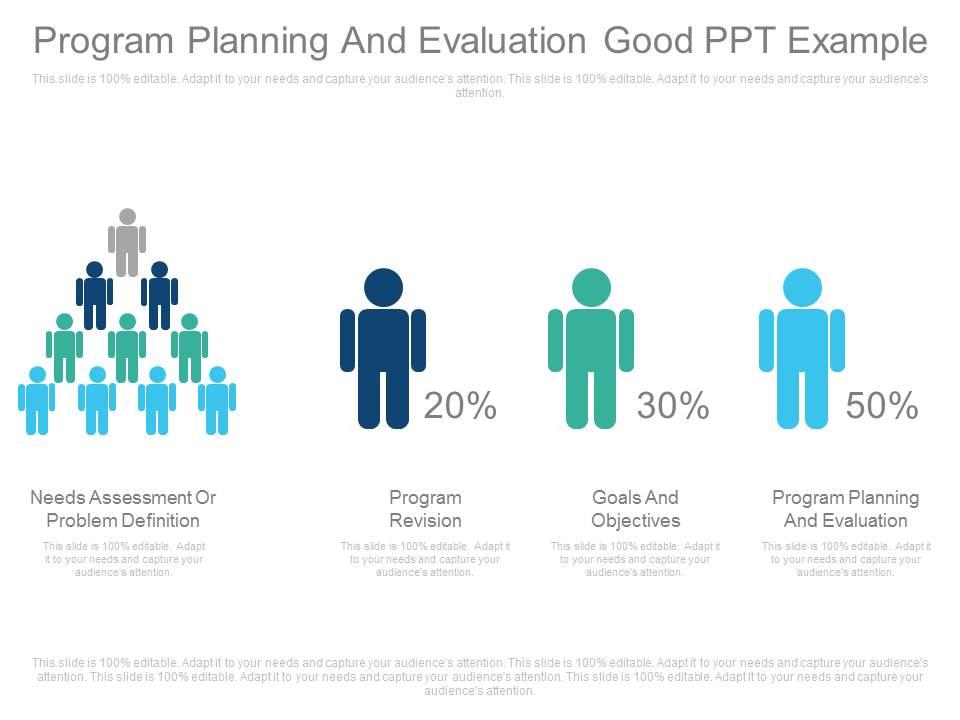
Template 20: Custom Program Planning and Evaluation PPT Example Template
Program planning and evaluation belong in the same conversation—this template keeps them together. The four-stage structure moves from needs assessment through goals, program planning, and evaluation in a logical sequence. It's particularly useful for presenting program revision decisions alongside the evaluation criteria that drove them. Use it to show how problem definition and program outcomes connect across the full planning cycle. This layout makes the evaluation process feel intentional, not retrospective. Transform your program planning presentations with this integrated four-stage framework. Download this dynamic template now and unlock a structured approach to communicating program design and assessment decisions.
Download this PowerPoint Template
Elevate Every Program Review with SlideTeam
SlideTeam's PowerPoint templates are the best in the industry for process program evaluation. These content-ready slides save hours of formatting work while delivering the professional structure that evaluation findings demand. Whether you're presenting a program impact assessment, a QA review, or a full evaluation framework, these ready-made PowerPoint slides give your findings the clarity and credibility they deserve. Deploy these templates today and ensure your program reviews drive decisions, not just discussions.
FAQs on Process Program Evaluation
What are the core components that distinguish a robust process program evaluation framework from a superficial one?
A solid framework includes four things: clear program goals, defined data collection methods, measurable KPIs, and a feedback loop for decisions. Superficial evaluations skip the feedback loop—findings get documented but don't change anything. The difference is whether evaluation outputs connect directly to program revision. If findings sit in a report nobody acts on, the framework isn't doing its job.
How can organizations determine the right frequency for conducting process program evaluations without disrupting operational continuity?
Tie evaluation frequency to program milestones, not the calendar. Evaluate at key decision points—after implementation phases, before budget renewals, or when performance metrics show variance. For stable programs, quarterly check-ins with an annual deep review work well. The goal is enough data to act on, not so much evaluation that it pulls teams away from delivery.
What metrics are most reliable for measuring the effectiveness of a process program evaluation in real time?
The most reliable real-time metrics are process completion rates, error or defect rates, and time-per-task against baseline. These are measurable, fast to collect, and tied directly to operational output. Avoid relying solely on satisfaction scores in real time—they lag behind actual performance. Pair quantitative metrics with short stakeholder feedback cycles for a more complete picture.
How does stakeholder alignment influence the accuracy and outcomes of a process program evaluation?
Misaligned stakeholders produce incomplete data. When evaluators, program staff, and decision-makers don't agree on what success looks like, each group reports against different criteria. Get stakeholders aligned on evaluation goals before data collection begins—not after. This single step improves both data quality and the likelihood that findings get acted upon.
What role does data triangulation play in eliminating bias during process program evaluations?
Data triangulation means checking findings against at least three independent sources—surveys, observation, and performance records, for example. If all three point to the same conclusion, the finding is reliable. Bias creeps in when evaluators rely on one method or one group's perspective. Triangulation doesn't eliminate bias, but it makes bias visible and correctable.
How can evaluators distinguish between process failure and program design flaws during an evaluation?
Ask whether the process was followed as designed. If it wasn't, you're likely looking at a process failure—execution, training, or resource issues. If the process was followed correctly and outcomes still fell short, the problem is in the program design itself. This distinction matters because the fix is completely different in each case. Document both before drawing conclusions.
What are the most common pitfalls organizations encounter when implementing their first formal process program evaluation?
The three most common pitfalls are starting evaluation too late, using the wrong metrics, and failing to separate monitoring from evaluation. Many first-time evaluations also lack a baseline—making it impossible to measure change. Build the evaluation plan before the program launches, not after it ends. And make sure someone owns the findings process, not just the data collection.
How should evaluation findings be prioritized when multiple process inefficiencies are identified simultaneously?
Prioritize by impact and fixability. Address inefficiencies that affect the most people or carry the highest risk first. Then separate quick fixes from structural issues—quick fixes build momentum, structural issues need a separate workstream. Don't try to address everything at once. A clear priority order makes findings actionable and prevents the common outcome of reporting everything and changing nothing.


