





 0 Comment
 Customer Reviews

The deck's already open. Slides are blank, the cursor's blinking, and someone from engineering just pinged asking when the sprint plan goes out.
Scrum sounds clean on paper. Backlog, sprint, review, repeat. But getting a room full of developers, a product owner with seventeen competing priorities, and a Scrum Master who's already in three other meetings to agree on anything — that's the part nobody warns you about. The process makes sense. The presentation of the process is where things fall apart.
There's this particular silence in sprint planning sessions. Someone shares their screen. The slide is a wall of text, or worse, a hand-drawn photo of a whiteboard. The team nods. Nobody's really aligned. And two weeks later, in the retrospective, everyone's surprised by how misaligned they were.
It's not that the Scrum framework is hard to understand. It's that communicating it—across roles, across sprints, across teams that each have their own vocabulary for the same thing—takes more than a Google Doc and good intentions. A developer's definition of "done" isn't always the same as a stakeholder's. The product backlog that looks prioritized in Jira doesn't always look prioritized to the person asking why their feature keeps slipping.
That's where the structure lives. Not in the ceremony itself, but in how you show it. How you map the sprint cycle so someone joining mid-project doesn't have to ask six questions. How you lay out retrospective findings so they don't just disappear after the meeting.
These templates exist because the problem is real and common. Teams figured out that a solid visual framework—one that shows the scrum model step by step, tracks sprint progress, captures retrospective cycles—makes the whole process easier to communicate and harder to misread.
SlideTeam's pre-designed scrum model templates handle exactly that. Ready-made frameworks for every ceremony, every role, every lifecycle stage. So you're not building from scratch every sprint.
Here's what's available.
Template 1: Scrum Model Step-by-Step PowerPoint Presentation Slides
Every scrum model conversation needs a visual backbone that holds the whole process together. This PPT covers thirty-three slides across the full scrum lifecycle. It gives practitioners a structured, step-by-step view of the framework—from backlog to increment. Teams use it to align developers, product owners, and stakeholders in one consistent visual language. It works well for onboarding new scrum team members or walking leadership through the agile scrum process. The template is 100% editable and customizable.
[product_image id=525869]
Template 2: Agile and Scrum Sprint Retrospective Model
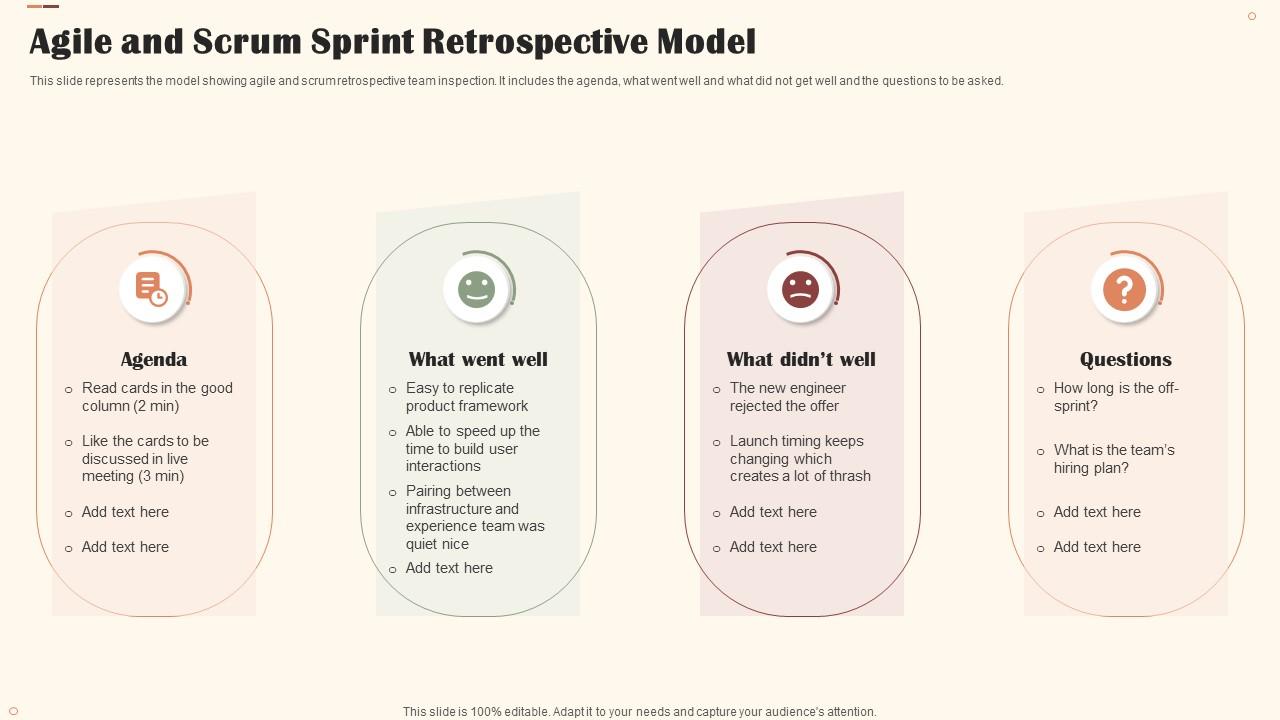
Structured retrospective reviews drive real team improvement across every sprint cycle. This slide maps the Agile and Scrum retrospective process across four clear stages. It captures agenda, what went well, what didn't, and the questions worth asking. Teams can use it to run focused Sprint Review and retrospective sessions. Scrum Masters and coaches will find it especially useful for structured team inspections. Transform your retrospective meetings into actionable improvement sessions today. Download this dynamic template now and unlock continuous team progress.
Download this PowerPoint Template
Template 3: Scrum Framework Steps Involved in Scrum Model Software Development Life Cycle
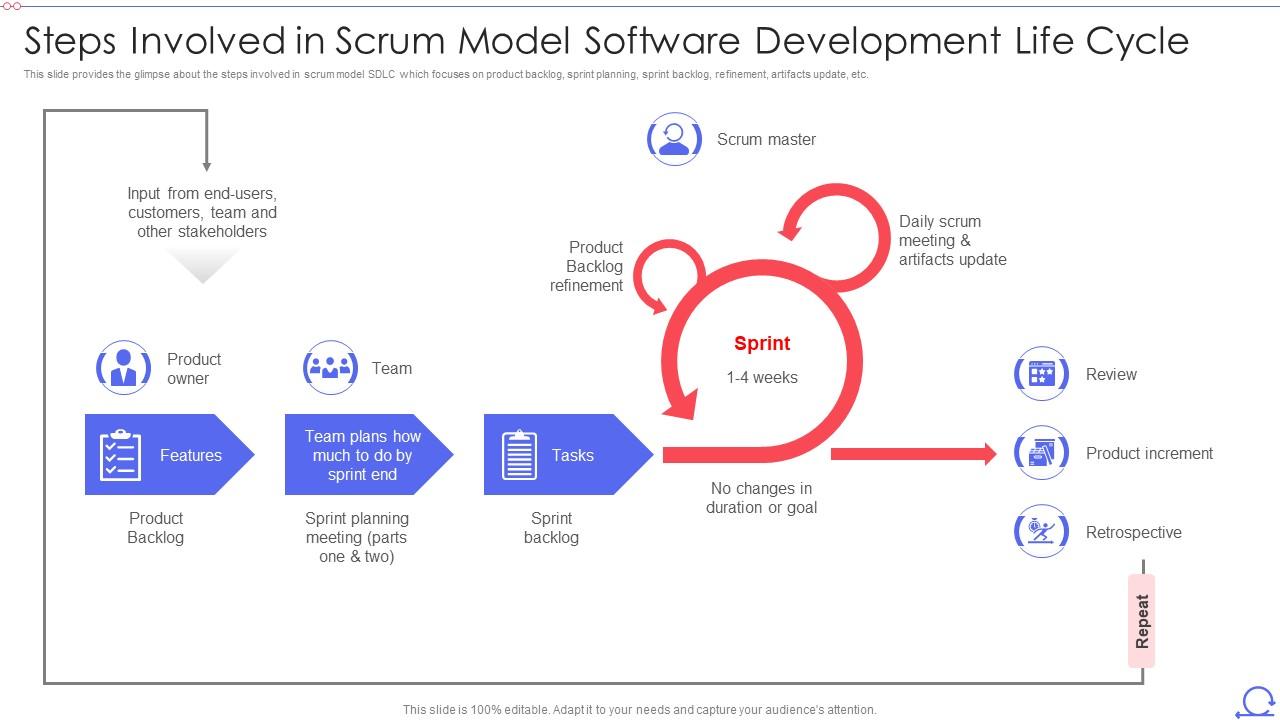
Clarity on scrum's software development lifecycle is what separates functional teams from struggling ones. This slide maps every step—product backlog, sprint planning, sprint backlog, refinement, and artifacts update. It gives teams a precise, visual reference for the full Agile Scrum process. Each stage is clearly anchored to features, team roles, and sprint planning meetings. Use it to align cross-functional teams on how iterative development actually moves. Transform your SDLC presentations with instant structural clarity. Explore more scrum model templates with samples and examples and download this slide now to drive shared understanding across your team.
Download this PowerPoint Template
Template 4: Agile Scrum Methodology Steps Involved Scrum Model Software Development Life Cycle
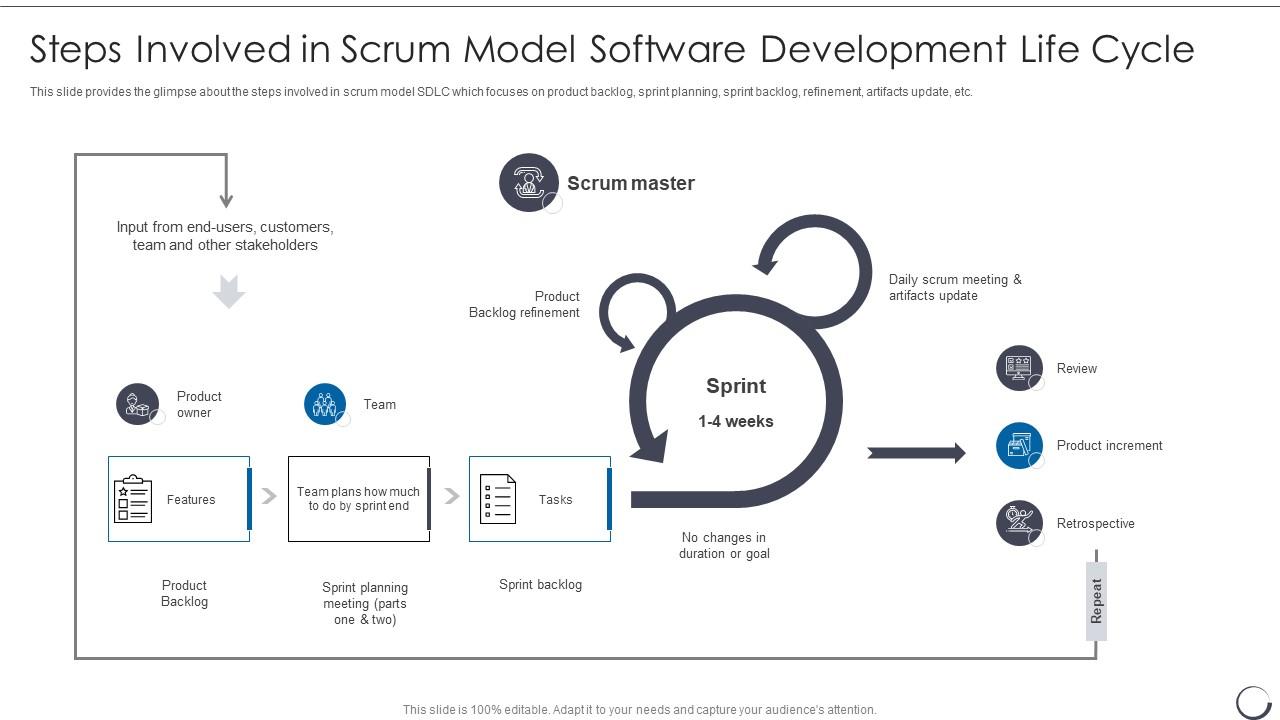
Communicating the full Agile Scrum methodology in one coherent slide is harder than it sounds. This template maps the scrum model SDLC—backlog, sprint planning, sprint backlog, refinement, and artifact updates—with precision. It gives software teams a single, authoritative visual for every development lifecycle discussion. Product owners, Scrum Masters, and developers can each find their stage quickly. Use it for onboarding, sprint kickoffs, or stakeholder alignment meetings. Elevate your Agile development presentations with a clear, step-by-step framework. Download this template now and ensure your entire team speaks the same scrum language.
Download this PowerPoint Template
Template 5: Agile Software Development Methodology Scrum SDLC Agile Model IT PowerPoint
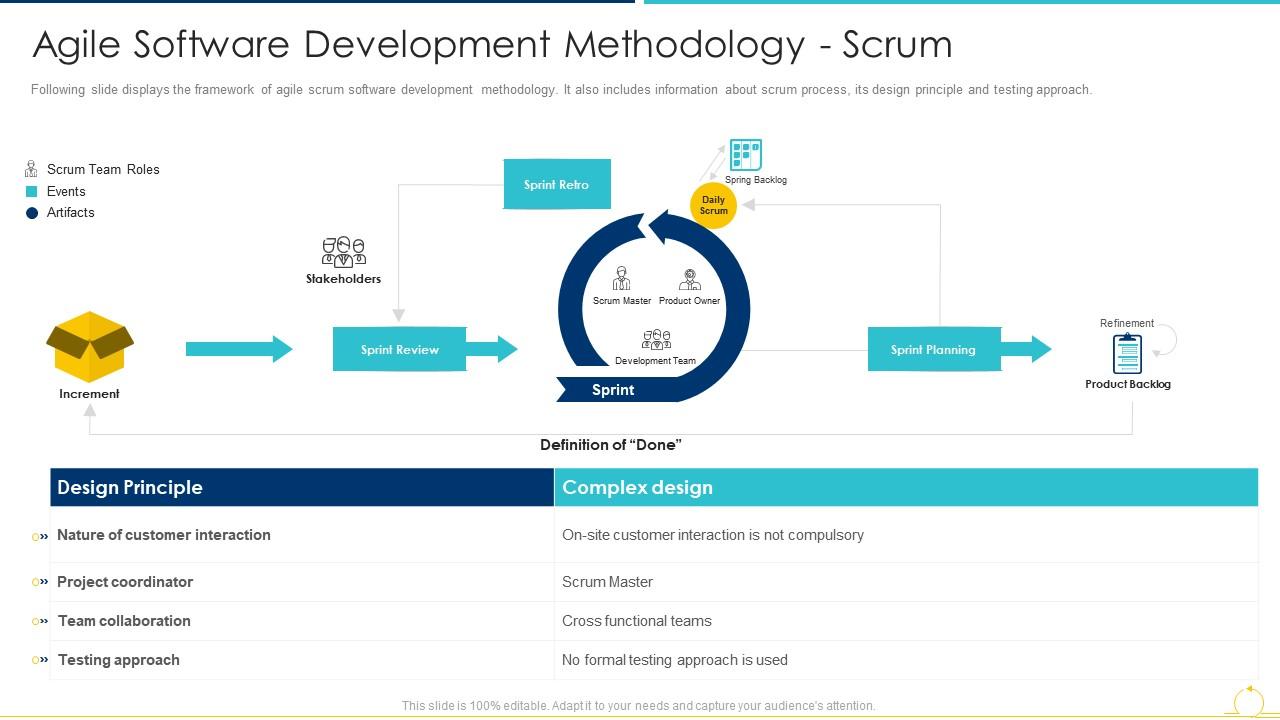
Agile software development methodology needs more than a process chart—it needs a framework that shows how everything connects. This slide integrates the scrum process, its design principles, and its testing approach in one cohesive view. Functional teams and project coordinators can use it to anchor every sprint planning discussion. Team collaboration touchpoints are mapped alongside the core scrum model. It's purpose-built for Agile Software Development conversations where detail matters. Transform your methodology presentations with a coherent, single-source framework. Download this template now and give your cross-functional teams a shared reference they'll actually use.
Download this PowerPoint Template
Template 6: Steps Involved in Scrum Model Software Development Life Cycle IT
Product backlog refinement and sprint planning are where scrum either works or stalls. This PPT template walks through each step of the scrum model SDLC—from product backlog to daily scrum meetings to artifact updates and product increment. It's built for development teams who need a precise, stage-by-stage visual for stakeholder and team alignment. Project leads presenting sprint progress will find the structure especially clear. For context, this slide also covers the definition of done at each delivery stage. The template is 100% editable and customizable.

Download this PowerPoint Template
Template 7: Steps Involved in Scrum Model Software Development Life Cycle PPT
Scrum inside a software development lifecycle needs a clear map, not just a list of ceremonies. This PPT preset covers the full step-by-step view of scrum in SDLC—product backlog, sprint planning, sprint backlog, refinement, and artifact updates in sequence. It's built for scrum teams who need to present the end-to-end process credibly. Product owners and Scrum Masters use it to walk stakeholders through how each phase connects. The template is 100% editable and customizable.

Download this PowerPoint Template
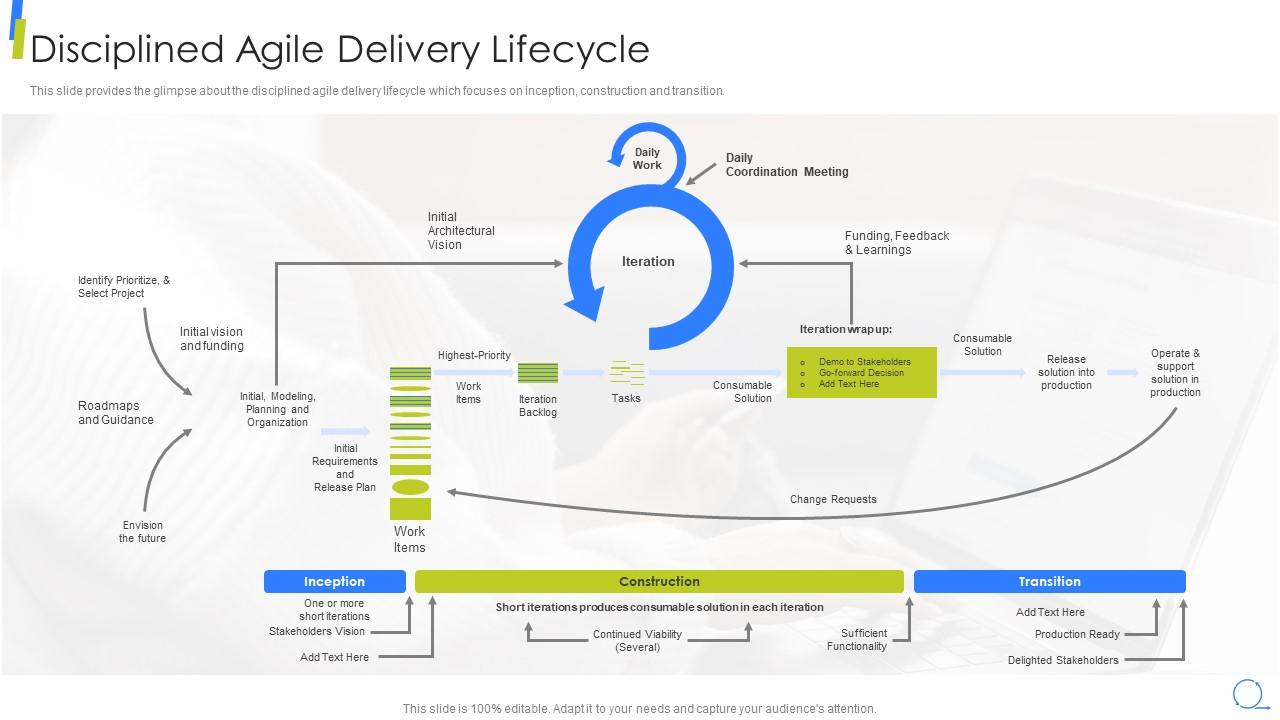
Template 8: Disciplined Agile Delivery Lifecycle Scrum Model Step-by-Step
Disciplined Agile Delivery structures the full product lifecycle across inception, construction, and transition phases. This slide gives teams a stage-by-stage visual of the DAD lifecycle—anchored to real delivery milestones. It works for Agile Methodology practitioners who need to communicate a structured, phased approach to leadership. Program managers and enterprise coaches use it to align multiple teams on delivery expectations. Structured phase sequencing makes each transition point visible and defensible. Transform your disciplined agile presentations with this clear, comprehensive lifecycle view. Download this template now and anchor every delivery conversation to a shared framework.
Download this PowerPoint Template
Template 9: Scrum Sprint Retrospective Meeting Cycle Model
Sprint retrospectives only work when the cycle is visible and repeatable across every team. This slide maps the retrospective meeting cycle—planning, implementation, review, and retrospect—in one clean model. Teams and Scrum Masters can use it to run structured, consistent retrospective sessions every sprint. It anchors sprint planning and deployment milestones to a shared project vision. The cyclical layout makes continuous improvement a process, not just a principle. Transform your retrospective meetings into a disciplined, repeatable team ritual. Download this template now and give your sprint cycles a structure that actually sticks.

Download this PowerPoint Template
Template 10: Understanding the Change Curve Model PPT Example
Organizational change rarely follows a straight line, and teams need a model that reflects that reality. This PPT template maps the change curve for practitioners navigating team or process transitions. Scrum Masters and change leads use it to show how resistance, adjustment, and adoption unfold over time. It fits into agile project management reviews where team sentiment and adaptability are on the agenda. Understanding agile modeling alongside change curve concepts helps teams manage transitions more credibly. The template is 100% editable and customizable.
[product_image id=1528640]
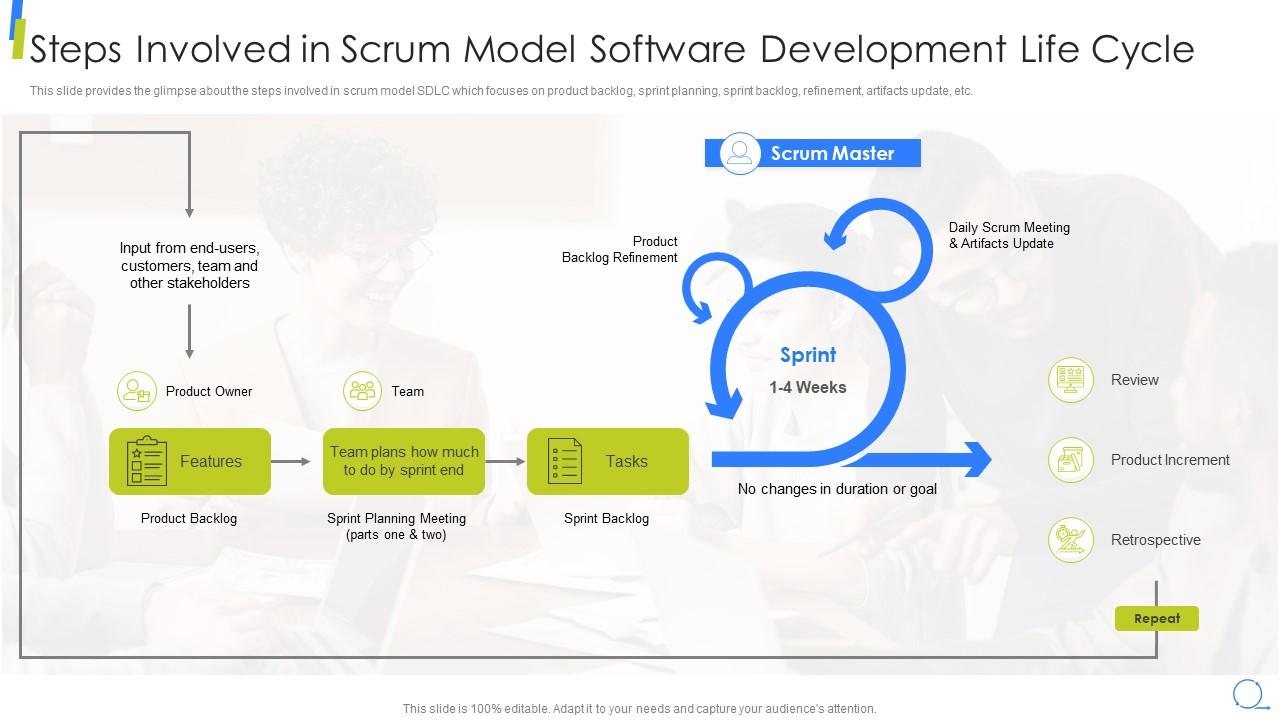
Template 11: Steps Involved in Scrum Model Software Development Life Cycle
Walking a team through the scrum model SDLC step by step requires a slide that matches the process's own precision. This PPT covers product backlog, sprint planning, sprint backlog, refinement, and artifact updates in a clear sequence. Development leads and scrum coaches use it to build shared understanding before each sprint begins. It's a reliable navigation tool for daily scrum discussions and sprint boundary reviews. The template is 100% editable and customizable.
Download this PowerPoint Template
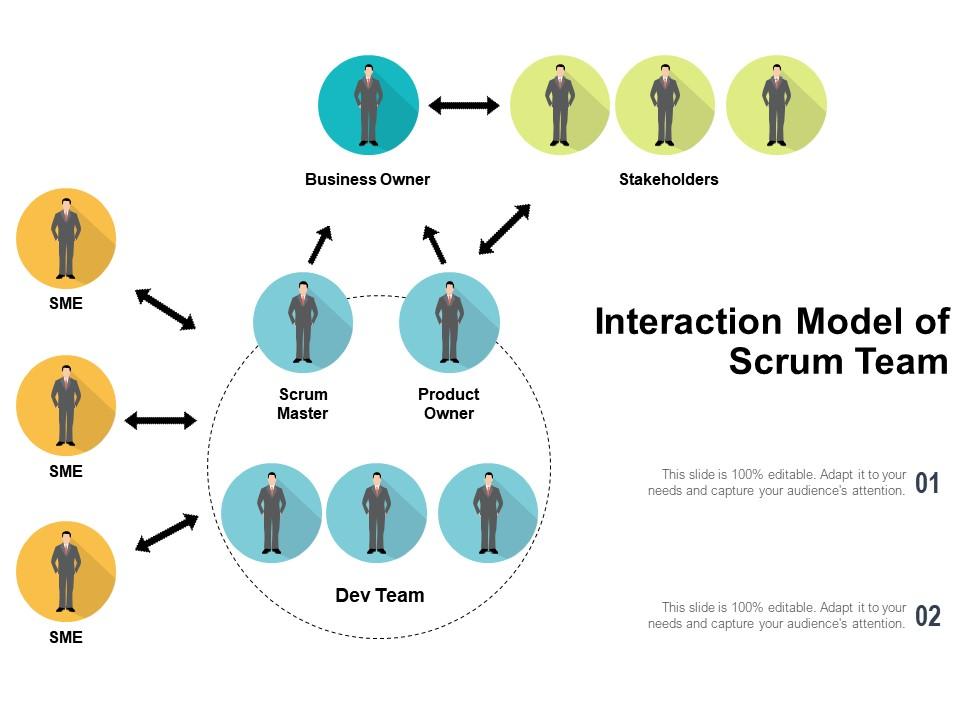
Template 12: Interaction Model of Scrum Team
Scrum teams work well when every member understands who talks to whom and when. This deck maps the interaction model of a scrum team — showing how developers, the product owner, and the Scrum Master connect across the sprint cycle. It's a practical tool for onboarding new team members or clarifying cross-functional team roles in a growing organization. Team leads use it to reduce role confusion during sprint planning and daily standups. The template is 100% editable and customizable.
Download this PowerPoint Template
Template 13: Scrum Product Backlog Creation Model Step-by-Step
Product backlog creation is where every successful sprint begins—and where most planning breakdowns start. This slide maps the full backlog creation process—daily scrum, sprint review, retrospective, planning, and backlog refinement—in one cohesive view. Product owners and Scrum Masters use it to show how backlog items flow from concept to sprint-ready. It gives stakeholders a clear picture of how user stories become deliverable increments. Use it to anchor product planning discussions with a structured, repeatable framework. Transform your backlog creation presentations into a credible, step-by-step delivery map. Download this template now and give your product planning the visual structure it deserves.

Download this PowerPoint Template
Template 14: Pros and Cons in Scrum Project Management Model Guide
Every organization considering scrum project management needs an honest view of what it delivers and where it falls short. This slide covers eight defined pros and cons — spanning creativity, cost, feedback cycles, project deadlines, and team environment. It gives project managers and program leaders a balanced, structured framework for evaluating the scrum model against hybrid alternatives. Stakeholders appreciate the directness; teams can use it to set accurate expectations before committing to a methodology shift. Use it to anchor honest, productive methodology conversations. Transform your project management evaluations with a clear, evidence-based pros-and-cons framework. Download this template now and equip your decision-makers with the balanced view they need.
[product_image id=960469]
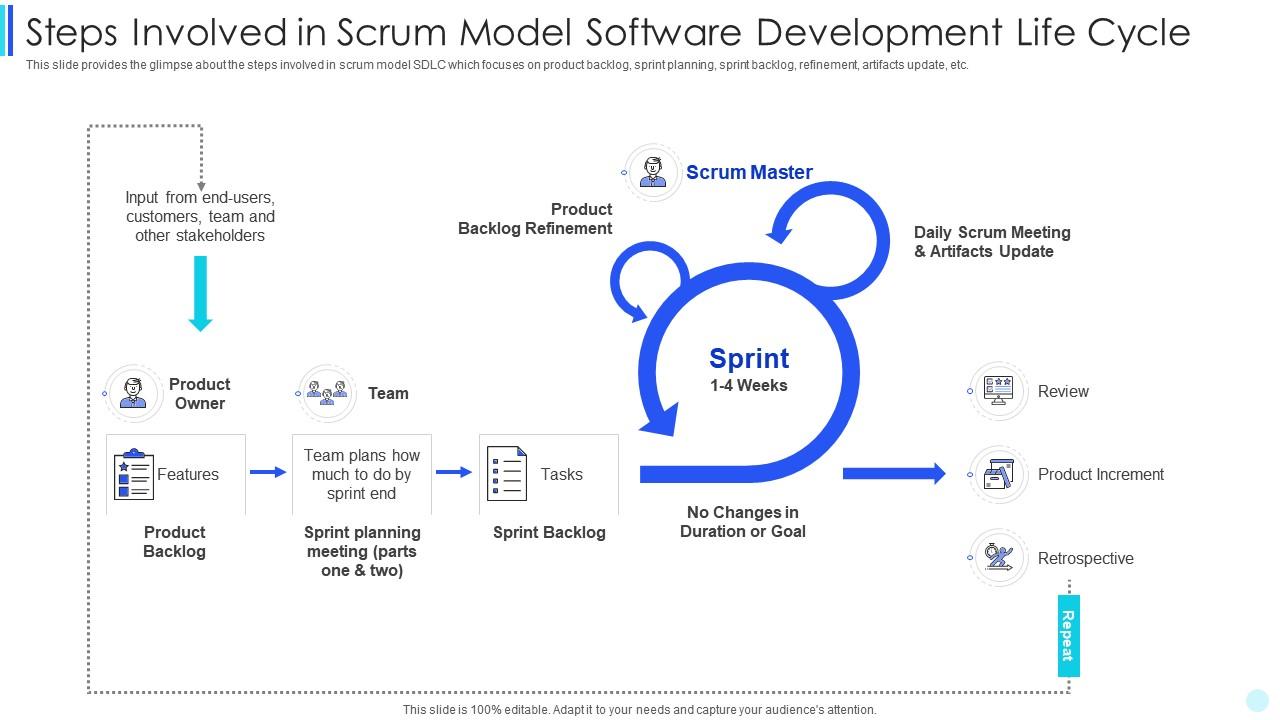
Template 15: Scrum Development Steps Involved in Scrum Model Software Development Life Cycle
Clear SDLC communication is the difference between a team that ships and one that debates. This PPT slide maps the scrum model's development steps—product backlog, sprint planning, sprint backlog, refinement, and artifact updates—in a single readable flow. Development leads and scrum coaches use it to guide teams through each lifecycle stage without ambiguity. It's a strong navigation tool for software refinement discussions and sprint boundary reviews. The template is 100% editable and customizable.
Download this PowerPoint Template
Template 16: Scrum Agile Software Development Process Model Sequentially
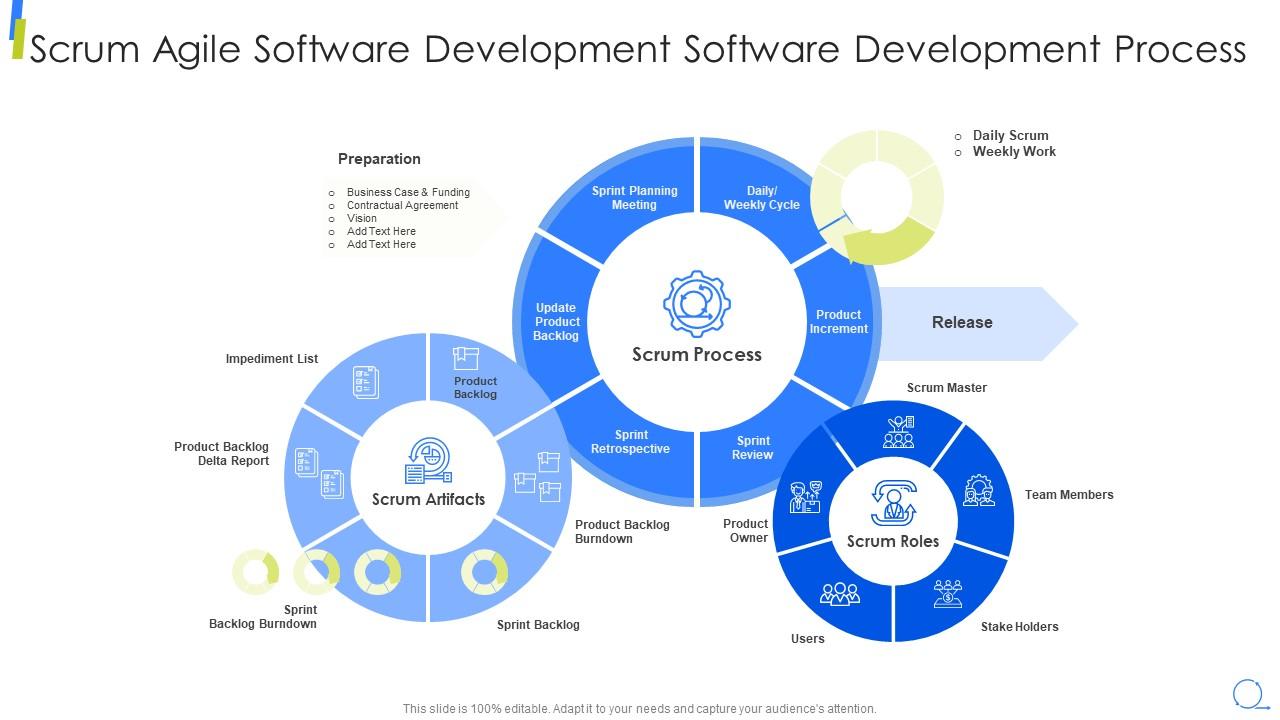
Scrum agile software development works best when the process, artifacts, and roles are visible to everyone involved. This PPT preset covers three core stages — scrum artifacts, scrum process, and the Scrum Master's role — alongside the impediment list and preparation steps. Development teams and Scrum Masters use it to communicate the full agile scrum workflow in a single, structured view. It supports sprint planning conversations and scrum ceremonies briefings equally well. The template is 100% editable and customizable.
Download this PowerPoint Template
Template 17: Agile System Development Lifecycle Scrum Model Step by Step
Agile system development needs a lifecycle model that shows every phase—not just the sprint loop. This slide maps the full agile system development lifecycle: iteration, inception, construction, transition, production, and retirement. It gives systems architects and program leads a structured view of how each phase feeds the next. Cross-functional teams use it to align on timelines and phase boundaries during project kickoffs. Each lifecycle phase is clearly separated for easy audience comprehension. Transform your agile system presentations with a complete, phase-by-phase lifecycle framework. Download this template now and give your team a shared development roadmap they can actually follow.

Download this PowerPoint Template
Template 18: Agile Software Development Lifecycle Scrum Model Step-by-Step Slide
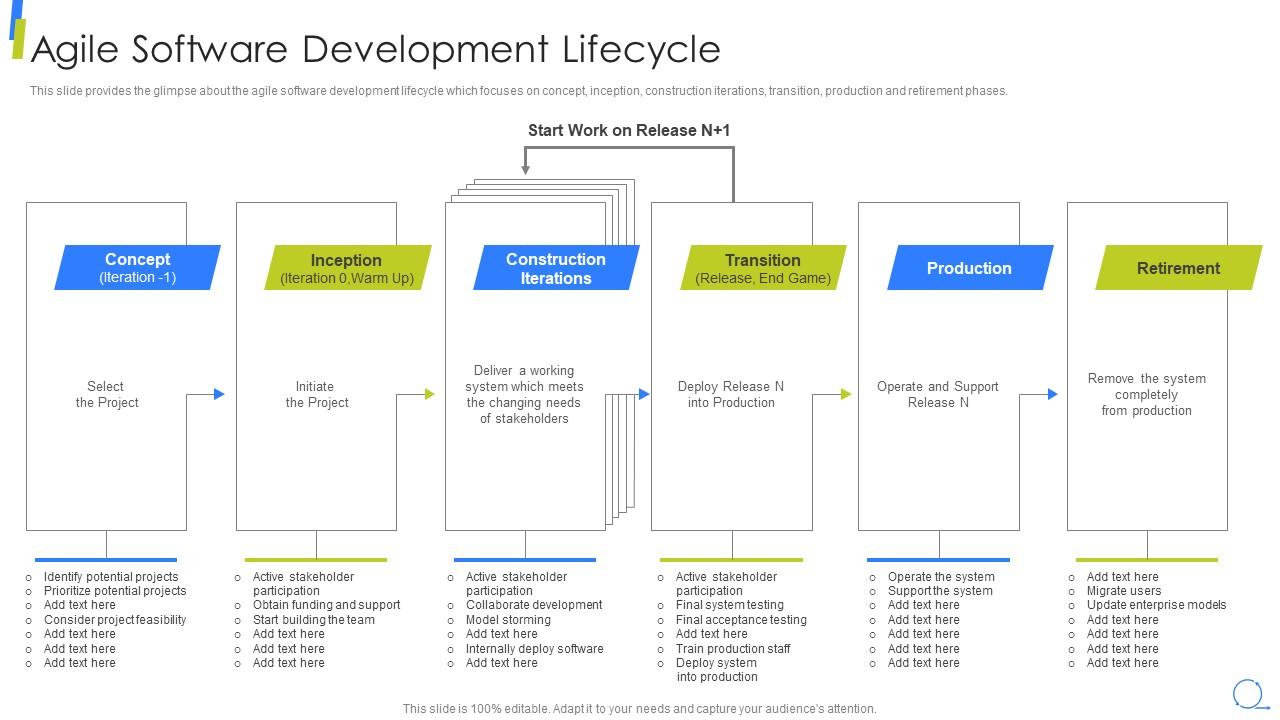
Agile software development lifecycle planning requires more than a sprint calendar—it needs a full-phase view. This PPT template covers six key stages: concept, inception, construction iterations, transition, production, and retirement. Development managers and agile coaches use it to walk leadership through how software evolves from idea to decommission. It supports iterative development planning conversations and long-horizon program reviews alike. The template is 100% editable and customizable.
Download this PowerPoint Template
Template 19: Determine Squad Health Check Model as Scrum Tool in Agile Project Management
Squad health is a real operational signal—and most teams don't have a structured way to surface it. This slide maps the squad health check model across six dimensions: teamwork, mission, health codebase, suitable process, speed, and support. Scrum Masters use it to assess and visualize team health across multiple squads in Agile Project Management reviews. It gives leadership a credible, structured view of where teams are thriving and where they need intervention. Use it to make health check conversations specific, not anecdotal. Transform your team performance reviews with a clear, diagnostic health check framework. Download this template now and give your Scrum Master the visibility tool every agile team needs.

Download this PowerPoint Template
Template 20: Seven-Stage Agile Sprint Management Roadmap
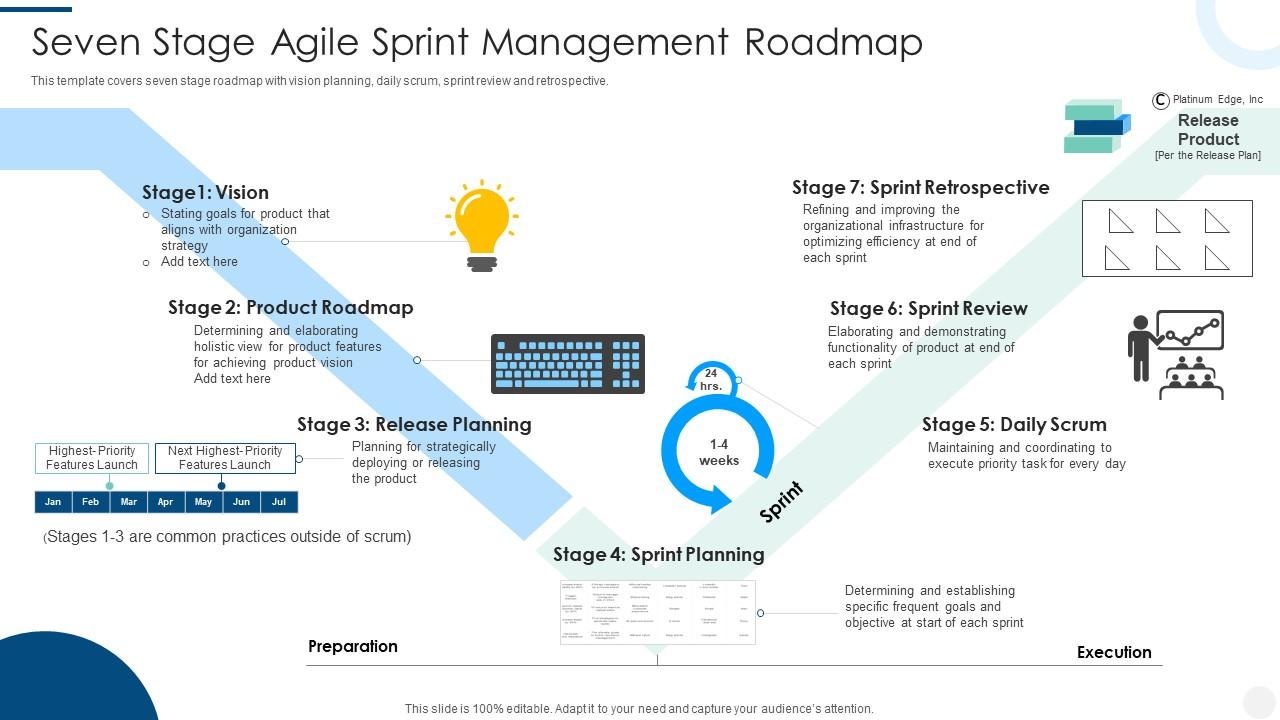
Sprint management across seven stages needs a roadmap that keeps vision and execution connected. This PPT covers vision planning, product roadmap, release planning, daily scrum, sprint review, and retrospective in a single sequential flow. Agile coaches and delivery leads use it to communicate the full sprint management lifecycle to stakeholders and team members. It's a strong tool for release planning sessions and sprint kickoff presentations. The template is 100% editable and customizable.
Download this PowerPoint Template
Master Every Sprint with SlideTeam
SlideTeam's PowerPoint templates are the best in the industry for communicating every stage of the scrum model—from sprint planning to retrospective cycles. These content-ready slides save teams hours of formatting work while delivering professional, structured visuals that stakeholders and developers both understand. Use these ready-made PowerPoint slides to align your scrum team roles, clarify your product backlog, and present agile development progress with confidence. Deploy these templates today and make every sprint meeting count.
FAQs on Scrum Model
How does the Scrum model differ from traditional waterfall project management in terms of flexibility and delivery cycles?
Waterfall locks scope, timeline, and deliverables upfront. Scrum works in short sprints — usually two weeks — allowing teams to reprioritize between cycles. Waterfall delivers once at the end; Scrum delivers working increments every sprint. This makes Scrum far more responsive to changing requirements. Teams catch problems early rather than discovering them at final delivery.
What are the core responsibilities of a Scrum Master that distinguish the role from a conventional project manager?
A Scrum Master removes blockers, not tasks. Unlike a project manager, they don't assign work or own the timeline. Their job is to protect the team's focus, facilitate scrum ceremonies, and coach on the agile process. They serve the team, not the organization's reporting structure. That distinction—servant-leader versus authority figure—is what separates the role.
How does sprint planning ensure alignment between the development team and business stakeholders?
Sprint planning forces a shared agreement on what gets built and why. The product owner presents backlog priorities; the team commits to what's achievable in the sprint. This creates a concrete, time-boxed contract between business needs and delivery capacity. Stakeholders get visibility on what's coming next. Misalignments surface before work starts, not after.
What metrics can teams use to measure the effectiveness of their daily standups in a Scrum framework?
Track three things: meeting duration, action items generated, and blockers resolved within 24 hours. If standups consistently run over 15 minutes, the format is broken. If blockers raised on Monday aren't cleared by Tuesday, escalation is failing. Teams that resolve blockers fast have effective standups. Counting unresolved impediments per sprint is a reliable signal.
How does the Definition of Done influence product quality and team accountability in Scrum?
The Definition of Done sets a shared, non-negotiable standard for what 'complete' means. Without it, one developer's done is another's draft. It forces teams to agree on quality criteria—testing, review, documentation—before sprint work begins. This reduces rework and makes product increments genuinely shippable. Teams with a clear Definition of Done ship more reliably.
What strategies help product owners prioritize a backlog when multiple high-value features compete for attention?
Use three filters: business value, effort estimate, and dependency order. If two features score equally on value, pick the one with fewer dependencies first. Involve stakeholders in scoring—hidden priorities surface quickly in that conversation. Time-box the prioritization discussion; endless debate is itself a risk. A ranked backlog beats a perfectly justified one every time.
How can organizations scale the Scrum model across multiple teams working on a single product?
Most organizations use Scrum of Scrums—a brief sync between team representatives from each squad. Frameworks like SAFe and LeSS provide more formal structures for large-scale coordination. The key is a shared product backlog owned by one accountable product owner hierarchy. Cross-team dependencies need explicit tracking. Scaling fails when teams optimize locally and ignore shared constraints.
What are the most common pitfalls teams encounter during sprint retrospectives and how can they be avoided?
The biggest pitfall is treating retrospectives as complaint sessions with no follow-through. Teams surface problems, agree on fixes, then repeat the same issues next sprint. Fix it by assigning one owner and one deadline to every action item. Keep retrospectives under 90 minutes. Review the previous sprint's action items first—before discussing anything new.


